iOS has been saving your SMS and iMessage attachments even after you've deleted them, according to several tips received from iClarified readers.
When receiving an attachment via the Messages app, iOS stores the attachment in /var/mobile/Library/SMS/Attachments directory. Once an attachment is deleted the related files should be removed from the directory. Unfortunately, it appears that this has not been the case for some versions of iOS.
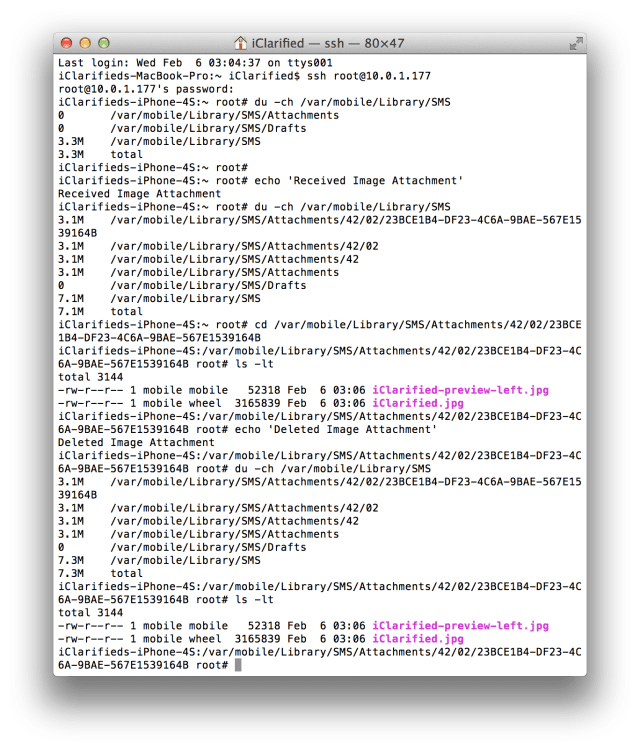
We used two devices, one on iOS 6.0 and another on iOS 6.1, to test the issue. After receiving an iMessage with a photo attachment on iOS 6.0, we examined the attachments directory to locate the file. We then deleted the attachment from the message history. Reexamining the directory showed the file was still there! Notably, the attachments directory is accessible without a jailbreak and is backed up to the computer each time you sync, or to iCloud if you use iCloud backups. This makes it quite easy to access. The files persisted even after a reboot.
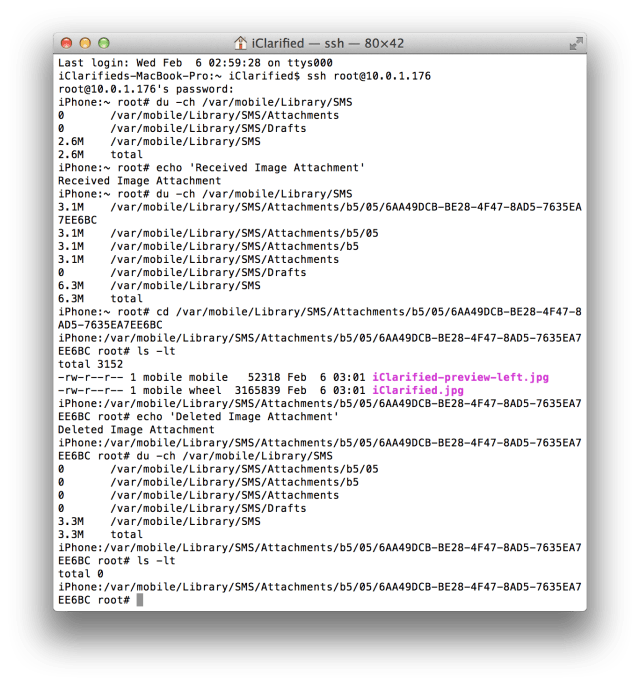
We then performed the same test using a device on iOS 6.1. Fortunately, after deleting the attachment, it was deleted from the device.
It appears that Apple may have stealthily corrected the issue with iOS 6.1; however, it is still a major security concern for users on earlier firmware versions and users with device backups on their computer or iCloud. In addition, it appears that this bug may explain why some users have been reporting missing free space on their device. For those users these attachments have been accumulating over time and could be causing GBs of wasted space on their device.
One source tells us that he found images on his device that were deleted over two years ago. Unfortunately, the images can't be easily deleted as you probably don't want to wipe all your attachments. However, if you are worried about security it might be a good idea.
Jailbroken users can delete everything in their attachments directory by executing "rm -R /var/mobile/Library/SMS/Attachments/*" in MobileTerminal or deleting the content of the directory using iFile; however, this reportedly can cause problems with third party tweaks such as BiteSMS.
Non-jailbroken users may be able to modify a backup of their device to remove the 'deleted' attachments and then restore that back to their device. The best solution is of course a clean restore to iOS 6.1.
Please let us know in the comments if you've been experiencing this issue and if iOS 6.1 has resolved it.
iOS 6.0 (FAILS TO DELETE ATTACHMENTS):
iOS 6.1 (SUCCESSFULLY DELETES ATTACHMENTS):
Get the iClarified Daily Newsletter
Apple news, rumors, tutorials, price drop alerts, in your inbox every evening, free.
Unsubscribe at any time.
Success!
You have been subscribed.
Add Comment
Would you like to be notified when someone replies or adds a new comment?
Yes (All Threads)
Yes (This Thread Only)
No
Notifications
Would you like to be notified when we post a new Apple news article or tutorial?
Yes
No
Comments (31)
Comments are closed for this article.
0
Rhonda - June 26, 2013 at 4:02pm
I have that exact issue; but I am unsure how to clear all deleted messages with attachments I have tried restoring my iphone to factory settings but all that did was delete my itunes!!??!! I am not a computer programmer over here but step by step how to do this will help me out alot!!
0
Derek Brown - March 24, 2013 at 10:52pm
I have some of these 'deleted' images on my phone. Is there a way to tell who I sent these to or who sent them to me? Or when they were sent/received?
0
John - May 17, 2013 at 2:16pm
Has anyone found a way to determine where these attachements originated? Like the original message information?
0
Derek Brown - May 17, 2013 at 6:43pm
I tried to figure it out, but I eventually gave up. I suspect the details are purged from the messages database, but the raw attachments are left intact, making it impossible to see who sent/received the attachments or any related test messages. However, if you have a jailbroken iPhone, you can look at the folders containing the attachments to see when they were created and at least get an idea of when the messages were sent/received.
0
Flubber - February 24, 2013 at 10:15am
Those attachments used 5Gb of my iphone...
I was looking everywhere for those others file (classic directory you found on forums or tutorials to get rid of other place, till i found this article.
5Gb of loose place filled with photos of my kid took long long time ago...
0
Breck - February 8, 2013 at 8:48am
You do realize your home wireless router is used as a location iDevice? Not for locating you for anyone that comes in range of your wireless router. These files are not stored on the iDevice that comes in range of the wireless router, but they are stored / sent somewhere. Isn't wonderful that be cared about so much.
0
Breck - February 8, 2013 at 8:34am
You are just now figuring this out? Well to be honest everything from text, emails, pictures, and your location even if you turned it off , basicly anything and everything you have done on your iPhone is still there from day one you turned it on.
0
Jepha - February 7, 2013 at 7:50am
That's a lot of pics I need deleted.
0
DavidG - February 7, 2013 at 5:58am
I'm still having this issue on iPad 2 running 6.1.
0
DavidG - February 7, 2013 at 5:58am
Running 6.1
0
Amen - February 6, 2013 at 11:01pm
delete delete delete lol
0
Ben - February 6, 2013 at 7:04pm
Just found a bunch of attachments on my iOS 6.1 iPhone 5 through ifile.... This is frustrating.
0
Sabar - February 24, 2013 at 12:10pm
Hi. I have no knowledge in any dlnoeepmevt and would like to take advantage of the appstore's money making features. I know it may take years to learn, does anyone have any suggestions for tutorials that won't bore a 12 year old out of his mind???Yes, I know it is far fetched and I would like to do other things than just making money. Is there a way to learn C without prior references to languages?
0
Karmen9 - February 6, 2013 at 4:51pm
This is stocking!!
0
sidewinder - February 6, 2013 at 5:01pm
stocking (def) noun 1. close-fitting covering for the foot and part of the leg, usually knitted, of wool, cotton, nylon, silk, or similar material.
0
Logic44 - February 6, 2013 at 6:27pm
I laughed out loud
0
Ron Dean - February 6, 2013 at 4:45pm
Just freed up 2gb of space......
0
Jdn1985 - February 6, 2013 at 7:32pm
This is crazy me too I free up 1.6gb that I could be using for apps, music or photos
0
Joebrizock - February 6, 2013 at 3:45pm
Is there a way to restore these files, so I can get the pics back?. I have a few pics that I deleted and would like to get them back
0
Mike - February 6, 2013 at 3:16pm
Just confirmed its also part of IOS 5.1.1, just checked ifile and found all deleted pics and videos still there, about 1/2GB big
0
co0ga - February 6, 2013 at 2:44pm
I've found this almost 2 month ago while I was rooting my Iphone and I called the german apple service "why are there still messages and numbers after deleting them" the one at the service-center could answer my question and I think he wasnt even allowed to answer them. Apple is working with CIA together.
0
odedoo1 - February 7, 2013 at 4:07pm
This is kind of old news, in my country it was all over the news like almost 2 years ago that Apple is saving your GPS routs and that they can turn on the microphone and camera from on commend, I don't know how they kept it off the news in the U.S but the GPS part was leaked and Cydia came out with an App that delete the file and stop Apple from spying on our location, then it made it to the courts and Apple layers said that they are studying our routs so they can give us better service ( that was like a year before Apple Maps ) any way the courts made Apple stop it but nothing about the microphone and cameras was mentioned. but in the news here they also showed how the FBI busted 5 mobsters by listening and watching them plan a murder and they showed the whole thing that the FBI saw and heard. there are all kind of talk about the goverment asking Apple to build a phone that you can't take the battery out for just that reason, also the Feds or CIA will pay up to $200,000 for a good jailbreak ( Cydia paid $30,000,000 for the guys that created the 5.1.1 jailbreak, I bet they paid much more for the long awaited 6.1 jailbreak ) So nothing would surprise me when Apple name comes up!!!
0
Jankhankhan - February 6, 2013 at 12:59pm
I agree with Tom !! Thats annoying how come your deleted contact still appear ??
0
ipadguy - February 6, 2013 at 12:26pm
This is bad for people that are cheating on their girlfriends or wives or simply doing some criminal activities... Otherwise a picture or video in a text message should definitely not f with your security or anything else... I mean like some information in a pictures or video put in an instant message, you shouldn't get in trouble for that... first of all your text messages are private property of yours police and other authorities should not have easy access or any access if you haven't done anything criminal!
0
Really!!! - February 6, 2013 at 7:14pm
It has nothing to do with any human behavior. Stop defending apple. It's something that should have been fixed ages ago. Which takes me back to the previous article about jailbreaking, I've had more problems with iOS itself then anything jailbreak has brought. Also on top of it jailbreakers can easily remove the dormant space wasting images that act deleted but are not, that normal users have to restore there phones from a full restore point because even there backup may still have those images. It's BS!
0
Aris - February 6, 2013 at 9:27pm
I don't trust using my iPhone anymore. I am really conserving switching to the new galaxy.
0
odedoo1 - February 7, 2013 at 4:10pm
I own all Apple devices and I totally agree with you and I won't defend Apple!
0
Tom - February 6, 2013 at 11:49am
There is another issue with messages, If you delete a contact with an iPhone that uses iMessage, if you type the name of the contact it'll still appear. It's really annoying.
0
G - February 6, 2013 at 9:45am
Not case on 5.1.1
0
Mike - February 6, 2013 at 3:20pm
I've confirmed that 5.1.1 does it as well, I found pictures and videos from over a year ago still there, checked with ifile
0
odedoo1 - February 7, 2013 at 4:13pm
there are Apps at Cydia just for those kind of things.






![Apple Previews August Apple TV Lineup With 'Ted Lasso,' 'Dark Matter,' and More [Video]](/images/news/101644/101644/101644-160.jpg "Apple Previews August Apple TV Lineup With 'Ted Lasso,' 'Dark Matter,' and More [Video]")



![Apple Reports Q3 FY26 Earnings: $109.4 Billion in Revenue, $29.8 Billion in Net Income [Chart]](/images/news/101635/101635/101635-160.jpg "Apple Reports Q3 FY26 Earnings: $109.4 Billion in Revenue, $29.8 Billion in Net Income [Chart]")