How to Fix Weather App and Long Reboot Issues After Evasi0n Jailbreak
LIKE
TWEET
SHARE
PIN
SHARE
POST
MAIL
MORE
Posted February 6, 2013 at 4:54pm by iClarified
These are instructions on how to fix issues with the Weather app and long reboots after jailbreaking using Evasi0n 1.0 for iPhone, iPad, or iPod touch.
Update: It appears that this fix may not work for those who have AppSync installed. Please remove it and reboot before attempting the fix. If you have already installed the updated packages please try to remove AppSync then reboot.
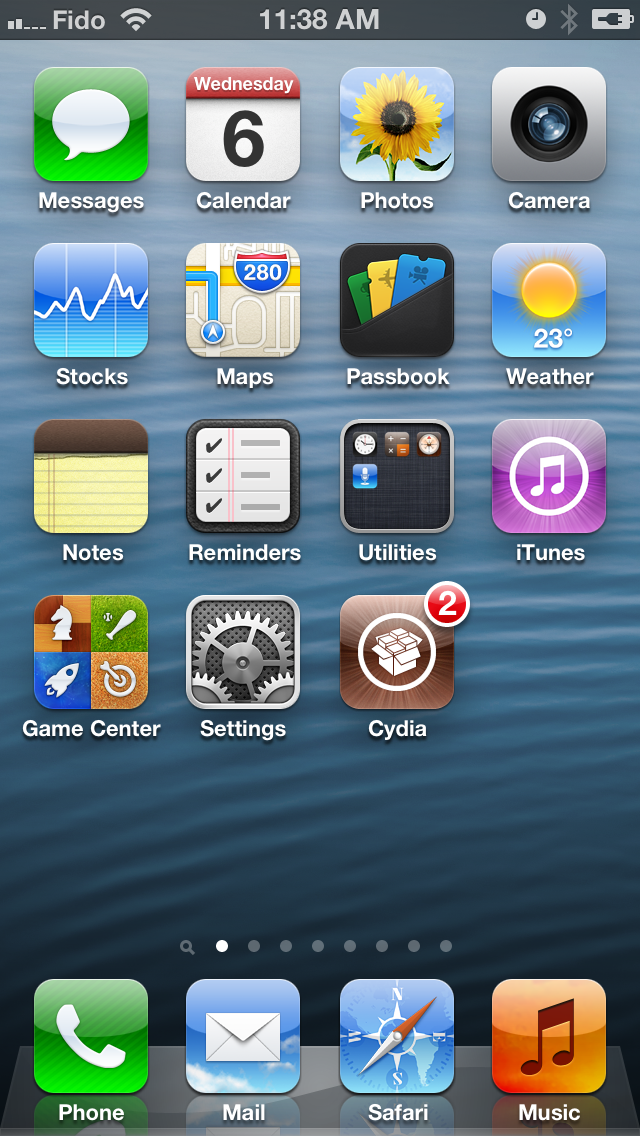
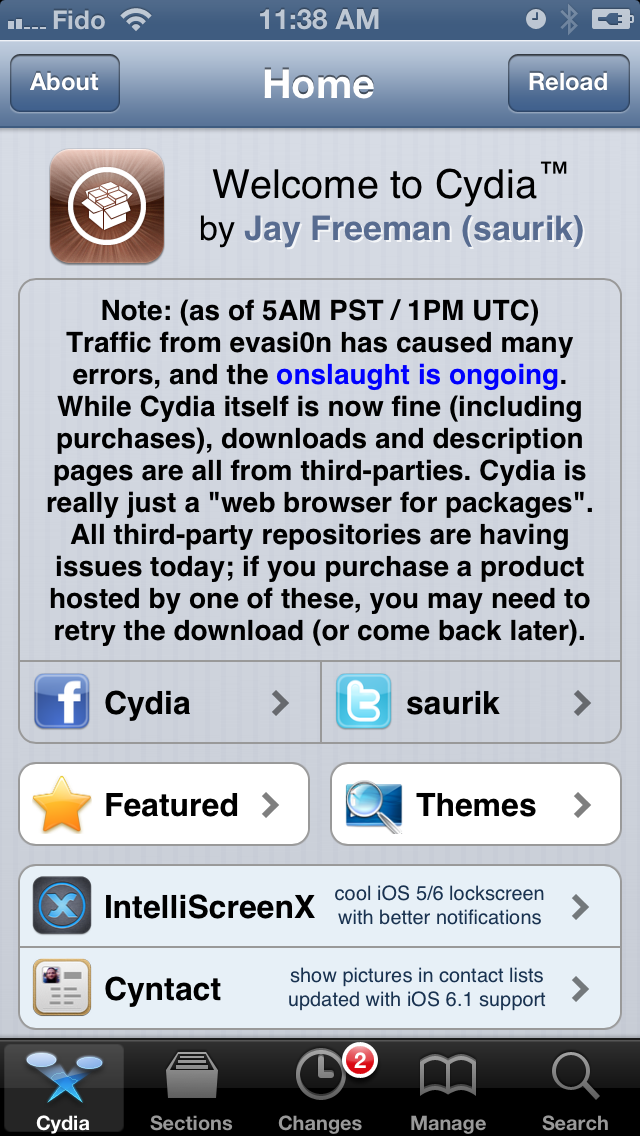
Step One Launch Cydia from your SpringBoard.
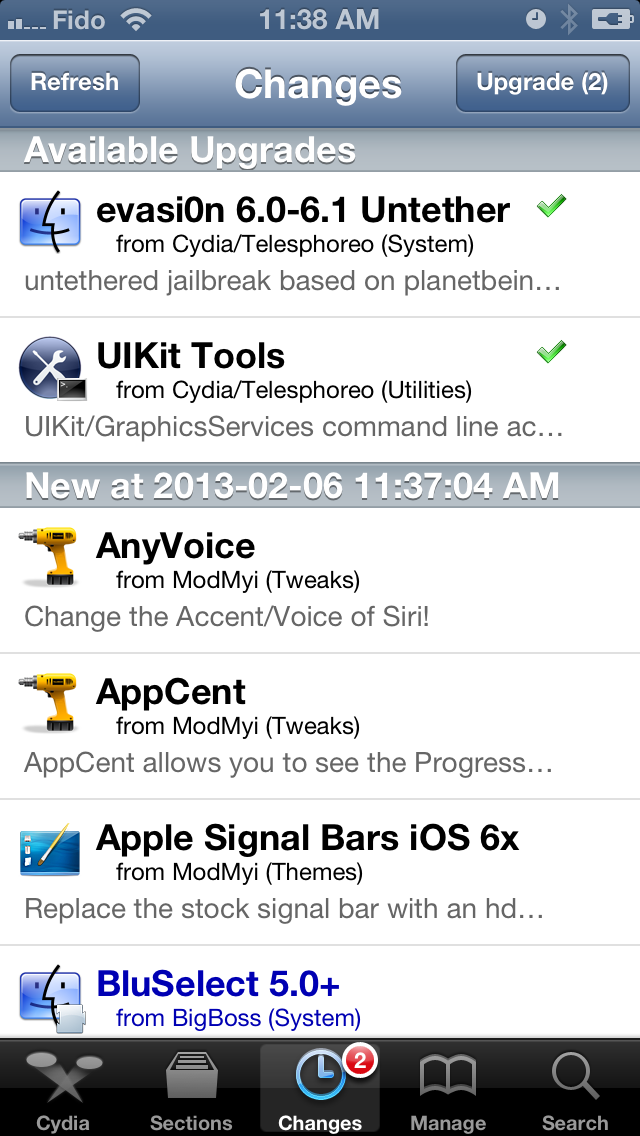
Step Two Press to select Changes from the list of tabs at the bottom of the screen.
Step Three Make sure evasi0n 6.0-6.1 Untether and UIKit Tools are selected then click the Upgrade button at the top right of the device.
Step Four Click the Confirm button to begin installation.
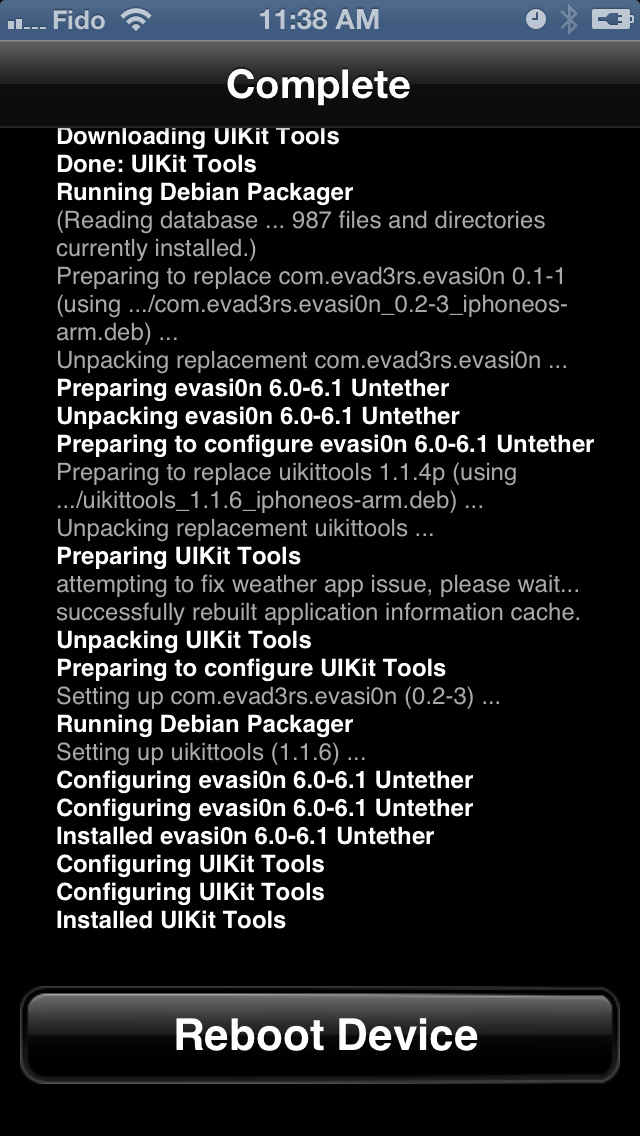
Step Five Once installation has completed make sure to click the large Reboot button and not the home button. Once your device has rebooted you should no longer have issues with the Weather app or long reboot.
*For those who are still experiencing this issue after following these steps, expect another similar update to appear in Cydia shortly.
Add Comment
Would you like to be notified when someone replies or adds a new comment?
Yes (All Threads)
Yes (This Thread Only)
No
Notifications
Would you like to be notified when we post a new Apple news article or tutorial?
Even after you have updated evasi0n and UIKIT Tools,
try iOS 6 Weather App Fix from Biteyourapple or Cracklords repo.
It fixed for me.
iOS 6.1 , 4S with Appsync 6.
iPad 2 with iOS 6.1 jail broken and i do not even have the weather app anywhere on the device let not working or crashing.. It's as if it was uninstalled... Anyone else have similar issues? I've already applied this update and still nothing...
I did that, and my weather app is working now, but i have no appsync. I was using appsync iOS5+. Should I get the 6.1 one? Will weather app work still?
Hol tengo una consulta al hacer jalekriacber lo hice sin ahcer esa configuracion previa de ponerle windows ni que tipo de ipod tengo, hay algun problema con eso???
FOR ANYOBE HAVING WEATHER BUG ISSUE!
Uninstall appsync 5.x and appcake then reinstall (while connected to iTunes) appcake from iphoneappcake repo (standalone not with appsync included) and reinstall appsync 5&6 from ihacksrepo and like I mentioned make sure ur phone is connected to iTunes and do a hard reboot ( by holding both home and power Til reboots) once ur phone loads back up and iTunes connects to it u will notice its downloading missing information or something like that I forget and once it's done you weather app will work fine again!!! Did for me anyways!!!
I THINK THE PROBLEM PEOPLE ARE HAVING IS WHEN installing appcake or other apps that have appsync included in the back which is causing it to conflict!!!! But if its done separately with iTunes connected it should fix it for anyone........
Maybe even try to do it with just iTunes connected without uninstalling anyone just a hard reboot, maybe that will fix it idk since I didn't do that and mine is fixed!!!!
GOOD LUCK PEOPLE HOPE THIS INFORMATION HELPS USERS THAT MIGHT NOT KNOW MUCH ABOUT iFile or don't wanna mess with more internal stuff!!
Hi Guys,
It was so easy to me fixing this issue.
I did nothing except removing my AppSync, after removing AppSync and rebooting my device the problem is completely solved.
Thanks for the advices
ill try not to spam a forum but i have notice a few problems so maybe someone have it also. after two days i have notice there are a message and receiving calls problems. i don't receive all sms or imessages, they are coming with a delay or dosn't come at all. and by receiving calls phone sometimes don't ring and the caller get a message that my phone is unreachable or turned off
roberto gandolfo hashioka - February 7, 2013 at 5:07am
I'm experiencing some times a black screen when I press the home button to close an application. It happened few times and with different apps such as whatsapp and apple store. I had to press the sleep button and unlock the phone in order to make it works. Does anybody having this problem?!
Try this. After uninstalling appsync goto var/mobile/Library/Caches find and delete with ifile com.apple.mobile.installation.plist and com.apple.LaunchServices-045.csstore.
Reboot and done
how long is this long reboot.
i have dun what you have writen on my 4s (removed files in ifile and rebooted) but the mobile is rebooting over the 10 minutes for now and still nothing only apple logo on the screen.
what to do? please help?
iPhone 4 IOS-6.1
1. Uninstalled appsync from sinful, master reboot
2. Installed the update fixes, forces a master reboot
3. Then reinstalled appsync from sinful
Like magic my weather app is working
I'm not sure if anyone can answer this question for me on here if not that's fine..., but u guys are talking about app sync 6.x and All I can find is app sync 5.x-6.x. Could someone lead me to the right repo thnx!!





![Apple Releases First Public Beta of iOS 26 and iPadOS 26 [Download]](/images/news/97994/97994/97994-160.jpg "Apple Releases First Public Beta of iOS 26 and iPadOS 26 [Download]")
![Apple Releases First Public Beta of macOS Tahoe 26 [Download]](/images/news/97992/97992/97992-160.jpg "Apple Releases First Public Beta of macOS Tahoe 26 [Download]")





![Renewed M2 Max Mac Studio On Sale for Just $899 [Deal]](/images/news/98000/98000/98000-160.jpg "Renewed M2 Max Mac Studio On Sale for Just $899 [Deal]")
![Sonos Ace Wireless Headphones On Sale for $150 Off! [Deal]](/images/news/97941/97941/97941-160.jpg "Sonos Ace Wireless Headphones On Sale for $150 Off! [Deal]")
![Twelve South ButterFly SE MagSafe Charger On Sale for 59% Off! [Deal]](/images/news/97931/97931/97931-160.jpg "Twelve South ButterFly SE MagSafe Charger On Sale for 59% Off! [Deal]")
![Apple 16-inch MacBook Pro (M4 Max, 48GB, 1TB) On Sale for $480 Off [Deal]](/images/news/97927/97927/97927-160.jpg "Apple 16-inch MacBook Pro (M4 Max, 48GB, 1TB) On Sale for $480 Off [Deal]")

