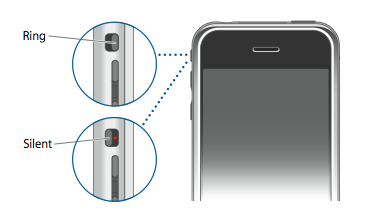
This is a solution for regaining your ringtones and system sounds for those with a broken iPhone silent switch.
First, to regain your system sounds install the "Silent Switch Bypass" from the iClarified repository. To find instructions on adding this source to your Installer app follow this tutorial.
The bypass was created by XianLi and modifies your SystemSoundBehaviours plist.
Next, to regain your Ringtones all you have to do is install VideosTone. You can find instructions on how to do this here
Finally, for more discussion on this issue, check the Hackint0sh thread.
Get the iClarified Daily Newsletter
Apple news, rumors, tutorials, price drop alerts, in your inbox every evening, free.
Unsubscribe at any time.
Success!
You have been subscribed.
Add Comment
Would you like to be notified when someone replies or adds a new comment?
Yes (All Threads)
Yes (This Thread Only)
No
Notifications
Would you like to be notified when we post a new Apple news article or tutorial?
Yes
No
Comments (40)
Comments are closed for this article.
0
Derrick Schmidt - November 14, 2017 at 11:03pm
thanks this worked great for me
0
JigsT - January 19, 2015 at 7:21am
My switch stays on silent and cannot be turned back to ring. This worked for me (iphone 6):
Turn on assertive touch (through settings), then go on device and "Unmute."
Turn off assertive touch (if you don't want it).
It works fine now.
0
Ahmad iiman - February 7, 2017 at 2:14pm
Thank you my friend
Thank u very very much.
0
orilowkey - November 17, 2013 at 10:56pm
you can go to settings>>accessibility>>assistive touch. Then you can mute and unmute the iPhone.
0
Bailey - July 24, 2016 at 5:43am
This was really useful, thank you :)
0
Michael - October 2, 2013 at 10:10pm
If you turn on assistive touch you can select mute/un mute under device
0
Ross - November 5, 2012 at 7:56am
My switch on my iPhone does work but goes down and goes up and silent and then off silent
0
ksl82 - May 19, 2012 at 11:59am
I couldn't find this app in iClarified's repository. I also tried to install the AutoSilent software, but it said my device wasn't proven compatible yet. So I used SBSettings with a special module.
0
proxide - November 4, 2009 at 5:01pm
Haven't tested auto silent yet, but thank you in the meanwhile =)
Been waiting for months for someone to post a follow-up!
0
Nalfein - January 25, 2010 at 11:05pm
I 've installed Auto Silent...but i cannot disable my Broken Silent Switch so i turns to Silent or Ringer Mode again again (vribrating all the time) and it's very frustrating and also consumes too much battery...Is there any settings that i must change or something??
Thanks in advance...
0
Amy - January 29, 2010 at 1:12pm
I searched under bothe Cydia and the App Store.. I can not find an application called Auto Silent.
0
J Dollaz - February 21, 2011 at 3:06pm
do these buttons have an affect on me getting my iphone jailbroken
0
Manish - March 10, 2011 at 2:07pm
I installed Auto Silent on my iPhone (4.2.1) and it just corrupted my iPhone. The silent switch is not working anymore, on or off, iPhone always remain on silent. Even though, I've un-installed the app, but still no joy. Can any one help.
0
Ben - July 30, 2009 at 2:11pm
Yea. Except it is impossible to take off such a tiny piece of plastic without having a specialized tool. Because needle nose pliers even the smallest ones are too big and it doesn't work to try and grab it
0
proxide - July 29, 2009 at 7:53am
Now there's 3.0.
I would love this app for 3.0 through Cydia!!
0
Bart - September 11, 2009 at 12:49pm
I also have 3.0.1 and looking forward to a mute switch bypass app. Want to have my sounds back! Can anyone help? Why isn't this app being updated to work with OS 3 too???
0
Rai - November 4, 2009 at 3:12pm
You can use "Auto Silent" for 3.0. It supports all iPhone generations (2g, 3g, 3gs) and os firmware 2.2, 3.0, 3.1
0
Notsocommon78 - May 16, 2009 at 8:55am
All you have to do is pry the plastic off. You don't need a drill or anything it's just plastic. Once off all I use is my earing to move the switch back one fourth. Didn't download a thing.
0
Luke - November 16, 2010 at 4:32pm
Thanks for that, worked like a charm. =)
0
Cesar uribe - January 27, 2012 at 5:20am
I have iphone 4 with same prob u think itl wrk, phone stuck on silent and volume buttons do nothin?:(
0
Ben - April 17, 2009 at 5:37pm
Ok... Obviously they are not going to come out with a new bypass for the 2.0+ versions any time Soon. So here's what I did. I took a drill and a very tiny drill bit, and slowly bored out the plastic piece. I pulled the rest of the black switch out with needle nose pliers.there should be a small slot right next to the silver metal piece on the inside. Get a saftey pin and push it up. Vioula! Your sound is back! Now since you have a hole in your phone, you can either do a quick fix and cover it with some scotch tape. Or you could put jb weld or an epoxy that hardens to rock to cover it. I used the epoxy. And haven't had a problem since:-). However. You shouldn't try this unless you have a steady hand and have used drills and other tools A LOT because you could easily bore a hole into your iPhone...
0
R - January 14, 2010 at 1:20pm
I removed the plastic, easy to do. The switch is easy to see, it is just above center toward the top of the phone. I believe the silver cylinder to be the vibrator. Unfortunately, moving the switch for me did not fix it. I did read somewhere that a person got inside and simply cut the wires for the switch, it said the default setting is for the ring is to be "on". Haven't opened the phone to try it yet. Haven't been able to verify the default setting theory.
0
yaboyfoy - January 14, 2009 at 9:35pm
I was reading a comment on another page, and if the app is not working, as a last resort, you can just use a small flat head screwdriver and just completely take out the switch, and under the switch you will see where you can just switch the silent switch yourself. I did it and it works. you can take it back and forth using a paperclip or pin. You will have a hole where the switch use to be you can come up with something to put in the place of it.
0
katherine - April 8, 2009 at 2:34pm
how do you take the silent button completely off? my silent button broke and now it slides back and forth, but its stuck on silent? and i cant figure out how to take the whole button off. PLEASE HELPP!
0
kn33 - December 9, 2008 at 9:20pm
is this available for 2.2? i really need it!!!! thanks. instructions would be helpful
0
Notsocommon78 - May 16, 2009 at 8:52am
All I did was took the black button off and used an earing to slide it back and forth. Works fine.
0
Rai - November 4, 2009 at 3:13pm
You can use "Auto silent" app. it supports all iPhone generations and 2.2, 3.0, 3.1
0
Dan Brandon - September 24, 2008 at 3:13pm
hey dave, its dan.
I dont quite understand what you want me to do
because i think i followed yet my iphone is still in silent mode, it vibrates and rings with headphones in but thats about it im afraid ;l
please help
by installing MiVTones, was i supposed to make texting and ringign come outloud?
0
Ben - September 13, 2008 at 11:01pm
I tired to install the bypass software on a 1.14 but it doesn't work. Waht is the reason for that?
0
David Mullaney - September 7, 2008 at 8:26am
Dan, I reckon that the fix that I posted in the comments section should be all you. If you have a jailbroken iPhone, applying the fix is a trivial file copy, but you must install MiVTones for it to work, and you must use a Movie ringtone that has audio.
0
dan brandon - September 3, 2008 at 4:43pm
If anyone can help me as I have 2.0.1 firmware and my silent mode button keeps falling onto silent and I haven't heard any noise from it yet unless I'm changing the ringtone. I've tried connecting to iClarified but it won't seem to work on the firmware. Email me some help please?! Much appreciated.
0
David Mullaney - August 18, 2008 at 8:07am
Hey Ricky
if you grab this file
SystemSoundBehaviour.plist
and drop it into your
/System/Library/PrivateFrameworks/Celestial.Framework/
directory, using Cyberduck or WinSCP. Then install MiVTones and enable it, then you should get the Video playing with audio as your ringtone.
Hope this helps
0
Ricky Starling - August 18, 2008 at 7:35am
Yep, same problem as mentioned above. I have a broken Silent Switch and my phone has 2.0; and help would be greatly appreciated!
0
Warren - November 12, 2009 at 4:15pm
if anyone knows how to put my iphone back to ring? as it's stuck on silent and dont know how i can get my sound back at all! any help pls?
0
David Mullaney - August 14, 2008 at 8:02pm
Looks like the issues was with MiVTones, and not the plist fix. Updated to the latest MiVTones this AM and its working like a dream.




![Apple Plans December Launch for Apple Intelligence in China [Report]](/images/news/102843/102843/102843-160.jpg "Apple Plans December Launch for Apple Intelligence in China [Report]")
![OpenAI Agrees Not to Use Allegedly Stolen Apple Trade Secrets [Report]](/images/news/102840/102840/102840-160.jpg "OpenAI Agrees Not to Use Allegedly Stolen Apple Trade Secrets [Report]")



![How To Forward Calls on iPhone [Video]](/images/tutorials/92926/92926/92926-160.jpg "How To Forward Calls on iPhone [Video]")
![How To Back Up Your iPhone to an External Drive on Mac [Video]](/images/tutorials/72786/72786/72786-160.jpg "How To Back Up Your iPhone to an External Drive on Mac [Video]")
![How To Install Homebrew on Mac [Video]](/images/tutorials/83695/83695/83695-160.jpg "How To Install Homebrew on Mac [Video]")


![14-Inch MacBook Pro With M5 Max Drops to $3,299 ($800 Off) [Deal]](/images/news/102828/102828/102828-160.jpg "14-Inch MacBook Pro With M5 Max Drops to $3,299 ($800 Off) [Deal]")