These are instructions on how to downgrade your iPhone's Baseband using KiPhone. This software is a patched version of ZiPhone released by kIREmk. It has not been found to cause the issues some have experienced with ZiPhone.
To follow this tutorial you must have 1.1.4 firmware installed on your iPhone. If you accidentally downgraded to 2.0 then use this tutorial to downgrade to 1.1.4.
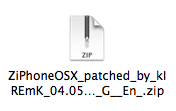
Step One Download KiPhone to your desktop: Mac (ZiPhoneOSX_patched_by_kIREmK_04.05.04_G__En_.zip download no longer available), Windows (_En__ZiPhone_patched_by_kIREmK_04.05.04_G.zip download no longer available)
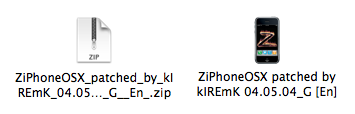
Step Two Double click the downloaded zip file to extract its contents.
Step Three Double click the extracted file (ZiPhoneOSX patched by kIREmK 04.05.04_G [En]) to launch the application.
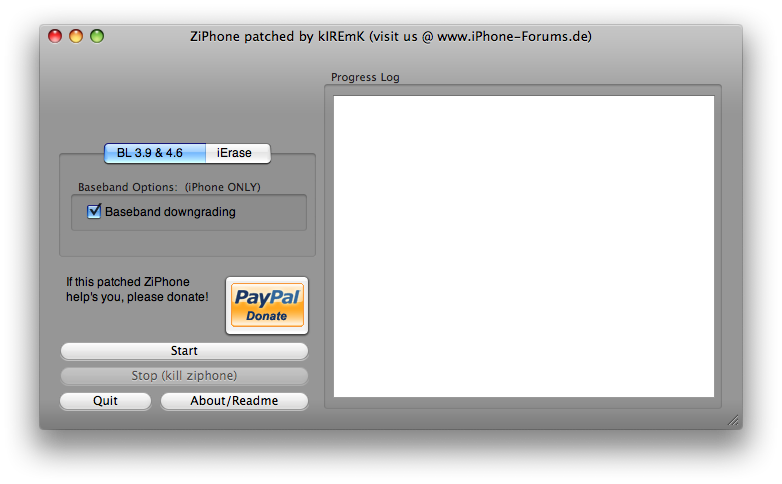
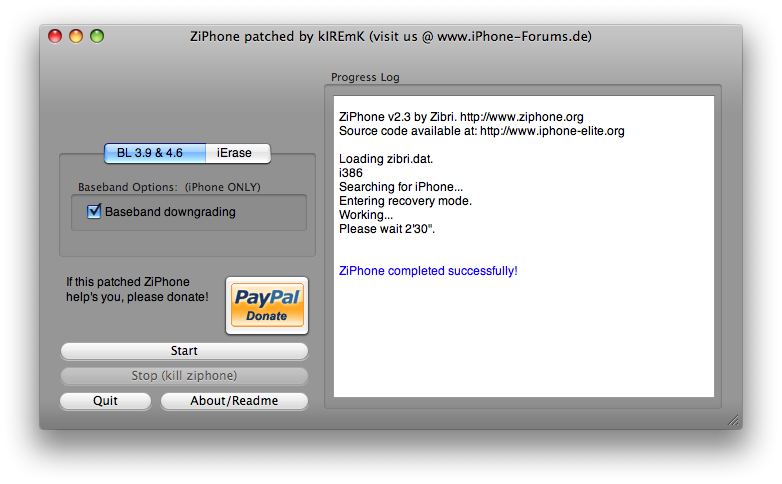
Step Four Once the application has launched make sure the BL 3.9 & 4.6 tab is selected. Also make sure the Baseband downgrading checkbox is selected.
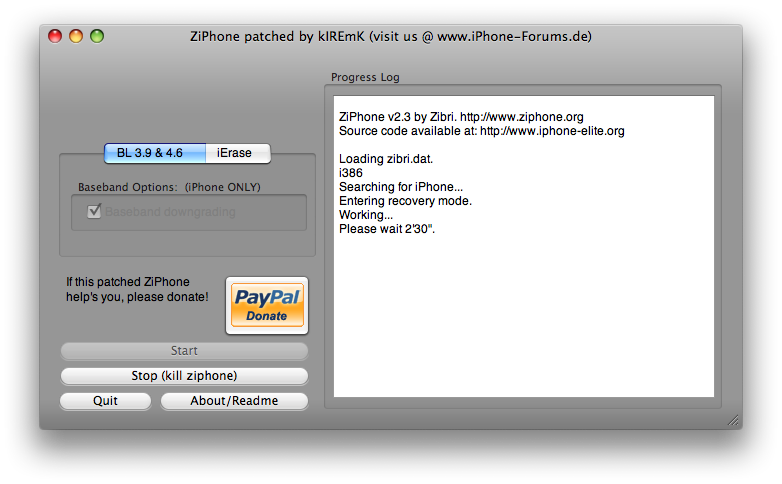
Connect your iPhone to the computer and click the Start button. ZiPhone will put your iPhone into recovery mode and you will be informed that the process will take 2 mins and 30 seconds.
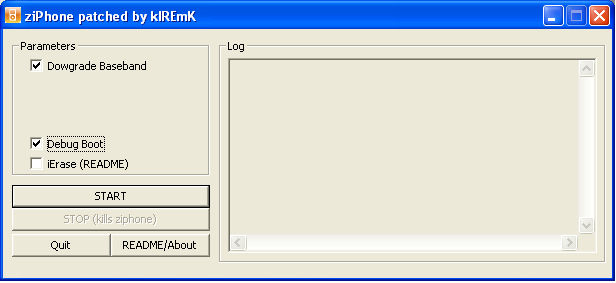
Windows: If you are a windows user then simply check off Downgrade Baseband and Debug Boot and click the Start button.
Step Five Once the process is complete you will be informed that it completed successfully. You now have downgraded your Baseband to 04.04.05_G!
Get the iClarified Daily Newsletter
Apple news, rumors, tutorials, price drop alerts, in your inbox every evening, free.
Unsubscribe at any time.
Success!
You have been subscribed.
Add Comment
Would you like to be notified when someone replies or adds a new comment?
Yes (All Threads)
Yes (This Thread Only)
No
Notifications
Would you like to be notified when we post a new Apple news article or tutorial?
Hi There !
I have update the version 3.0 Os ( newest iphone os ) but that bring me a problem with baseband , so i want to ask how can i downgrade 04.05.04_g to 02.30 ??
please answer me , Bye.
Hey guys, please clarify me this...this tool allows you to downgrade 2g firmwares or 3g also? Because y tried everything on my 3G iphone and it gets stuck in "Entering Recovery Mode"...i already tried and got bricked...only thing was to restore the custom ipsw but still with the 2.2.1 baseband...i got into the iphone.forums.de site but i can't read german :-(
if your iphone is tuned into an ipod touch, if u have no signals and itunes is rejecting your phone and if any of unlocking programmes like iliberty is not helping, u will ind your peace with this little zip file.
no matter how u did it, if ur baseband is changed to 04.05.04_g and u want to downgrade it, this works and this is the simplest way that works also. after u download the file, rght click on it and click on extract to****filename****. than click on the 'ziphone patched by kiremik' file with orange logo.
if u tray to run the ile in winzip without extracting, it will not work properly.
Well, same problem, I just followed this tutorial but when I'm trying to open the ZiPhoneOSX patched by kIREmK 04.05.04_G [En] it crashes and the system tells me the application quits. It's 2:44 in the morning and I'm tired of this problem. Is there any other place to download this patch or what can I do? I need my phone back! Please help!
ok ive done everything. no lie. i accidently upgraded my itunes to 8 and my iphone to 2.0 . ive restored with winpwn and pwnage. and then i used ibrikr and nothing worked so i downgraded to 1.1.4 and got iliberty and ziphone. all of them unlock and jailbreak my phone and add apps which is awesome. but i get no signal no lie. ive gone on google and youtube and it says to download kiphone. i have downloaded kiphone for both mac and windows. i have a windows. and nothing works! kiphone always gives me a damn error message. i cannt downgrade my baseband! i dunno wtf is wrong with this ive restored my phone like a thousand times and unlocked it. ive been here for days and days and no1 knows what to do. i had it working last night but i realized the wrong sim was in and when i pulled it out the phone stopped working. i dunno wtf is wrong with this kiphone but i am getting no signal and have no idea what to do anymore!!!
I just want to thank the people who posted this thread with the file. I am from Manila, Philippines and i'm just one of those silly guys excited to upgrade my 2G iphone to version 2.0 and wala.. i got BRICKED. I've tried everything.. unlocking jailbraking and activating my iphone with every software i know.. but yes.. the IPOD features works but it has NO SIGNAL, therefore no SMS or Calls were sent in and out of my phone. I'm desperate of finding solutions in the internet, almost gave up.. until i've found this! It's back to normal again! Thank you! Salamat po!
I'm running an iPhone 1.1.4 which was downgraded from a iPhone 2.0.
Since the baseband didn't get downgraded in the process, I used KIPhone to downgrade my baseband from 04.05.04_G to 04.04.05_G. It did downgrade, but downgraded all the way to 04.03.13_G??
Any idea why or how? From here what is the best way to upgrade to 04.04.05_G?
Thanks.
Hi,
i have seen it yet that iClarified release a "How to" of my little toy....
@ Zibri:
i don't want to make it my own tool, i wanted that the people can see that is YOUR tool that i have patched :D
Sry if i had insulted you ... that wasn't my idea to do this....
KiPhone (patched ZiPhone) isn't working perfect i know.... but for 80 % of the peope how downloaded it, it works good.
And by the way .... iDemocrazy3 is the same script how it ZiPhone 3.0 it is ....
sry for my bad english...
I'm using the windows version and get to the GUI. I check off downgrade baseband and debug boot. When I click START the GUI disappears and nothing happens. Is anyone else experiencing this ? I really need my baseband restored badly. Thanks
Thanks so much - after hours of trial and error: it works!
The funny thing is, that KiPhone crashed always - so i tried it on my desktop, iMac, and so it worked.
Alright, lets fix all of this..
a. Yes you cant be on 7.7, downgrade to 7.5 or 7.6
b. Richard Burns, if youre phone goes into recovery and nothing happens we suggest you do another restore to 1.1.4 and try again
c. The purpose of this tutorial is for those that accidentally upgraded to 2.0 but dont have an ATT sim to unlock or jailbreak
d. Genna, uninstall everything and delete it from trash. Make sure your itunes is 7.5 or 7.6
Also, if you have a MAC, pwnagetool 1.1 downgrades the baseband for you. You just need to re-pawn and re-create a new ipsw
N41









![Apple Watch Series 11 is Back on Sale for Just $299 [Deal]](/images/news/101081/101081/101081-160.jpg "Apple Watch Series 11 is Back on Sale for Just $299 [Deal]")
![AirPods Max 2 Drop to New All-Time Low of $499 [Deal]](/images/news/101063/101063/101063-160.jpg "AirPods Max 2 Drop to New All-Time Low of $499 [Deal]")
![AirPods Max 2 Hit All-Time Low Price of $509 ($40 Off) [Deal]](/images/news/101039/101039/101039-160.jpg "AirPods Max 2 Hit All-Time Low Price of $509 ($40 Off) [Deal]")
![New 13-Inch M5 MacBook Air Hits All-Time Low Price of $899.99 [Deal]](/images/news/100969/100969/100969-160.jpg "New 13-Inch M5 MacBook Air Hits All-Time Low Price of $899.99 [Deal]")
![AirPods Pro 3 Drop to $199 Ahead of Memorial Day [Deal]](/images/news/100935/100935/100935-160.jpg "AirPods Pro 3 Drop to $199 Ahead of Memorial Day [Deal]")
