To put the iPhone into recovery mode so you can do an iTunes firmware restore follow these steps.
UPDATE: Apple has introduced a new method to entering Recovery Mode. You can find instructions and a video demonstrating the new method here.
Step One Open iTunes and connect the iPhone to your Mac.
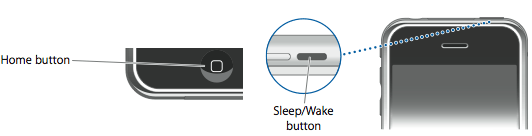
Step Two Press and hold the Home button and the Sleep/Wake button at the same time.
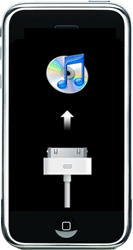
Step Three As soon as the screen goes black release the Sleep/Wake button. Continue holding the home button until you iTunes pops up a message telling you that it has detected an iPhone in recovery mode.
The iPhone will look like this:
Get the iClarified Daily Newsletter
Apple news, rumors, tutorials, price drop alerts, in your inbox every evening, free.
Unsubscribe at any time.
Success!
You have been subscribed.
Add Comment
Would you like to be notified when someone replies or adds a new comment?
Yes (All Threads)
Yes (This Thread Only)
No
Notifications
Would you like to be notified when we post a new Apple news article or tutorial?
1.Turn your iPhone off by holding down the sleep/wake button (on the right side on iPhone 6 and up, on the top corner on all other iPhones). Hold until the slider appears at the top and then swipe the slider. If your phone doesn't respond, hold the sleep/wake button and the Home button together until the screen goes dark (on an iPhone 7 series, hold volume down instead of Home)
2. Connect your iPhone to your computer. If you don't have a computer, you'll need to go to the Apple Store or borrow one
3. Perform a hard reset on the phone. Do this by holding down the sleep/wake button and the Home button at the same time (again, on iPhone 7 use volume down). Continue holding for at least 10 seconds. If the Apple logo appears on the screen, keep holding
4. Let go of the buttons when the Connect to iTunes screen appears (it's the image of the cable and iTunes icon shown at the top of this article). The phone is now in recovery mode
5. A window pops up in iTunes offering to let you Update or Restore the phone. Click Update. This tries to resolve the problem without erasing your data
6. If Update fails, you may need to attempt a Restore.
Once iPhone stuck in Recovery mode, you invariably have to Restore.
Regarding your iPhone Data Recovery
Google: "How to extract data from iPhone in recovery mode". May land up on some utility. Free or paid
Good Luck
PS: Genius bar will not help you in personal data recovery in any manner.
Moral: Always backup your data periodically.
You require iTunes if you want to recover your iPhone/iPod/iPad. This thread only tells you how to get the phone set so it can be recovered due to problems such as: Malfunction, Forgotten Passcodes, locked for about 1M minutes (Happened to me that's why i'm here), etc. Do remember that this WILL delete ANY and ALL data on the device that requires restoration.
after this one?? because my iphone same as what
is in the last stage so i connect it to the itunes but at last their something error i can't restore my files..
When your phone wont turn on your basically getting the black screen of death. hold down lock button and home button down until you see the apple. phone/ipod will now turn on.















![Apple Watch Series 11 is Back on Sale for Just $299 [Deal]](/images/news/101081/101081/101081-160.jpg "Apple Watch Series 11 is Back on Sale for Just $299 [Deal]")
![AirPods Max 2 Drop to New All-Time Low of $499 [Deal]](/images/news/101063/101063/101063-160.jpg "AirPods Max 2 Drop to New All-Time Low of $499 [Deal]")
![AirPods Max 2 Hit All-Time Low Price of $509 ($40 Off) [Deal]](/images/news/101039/101039/101039-160.jpg "AirPods Max 2 Hit All-Time Low Price of $509 ($40 Off) [Deal]")
![New 13-Inch M5 MacBook Air Hits All-Time Low Price of $899.99 [Deal]](/images/news/100969/100969/100969-160.jpg "New 13-Inch M5 MacBook Air Hits All-Time Low Price of $899.99 [Deal]")
![AirPods Pro 3 Drop to $199 Ahead of Memorial Day [Deal]](/images/news/100935/100935/100935-160.jpg "AirPods Pro 3 Drop to $199 Ahead of Memorial Day [Deal]")
