DFU means Device Firmware Update. If a restore using Recovery Mode doesn't work you will want to use DFU Mode as a last resort. When placing your iPhone into DFU Mode it does not load the OS before attempting the restore.
Watch the Video! For your convenience this tutorial is available in video format also. Watch it below...
To put the iPhone into DFU mode so you can do an iTunes firmware restore follow these steps:
Step One Open iTunes and connect the iPhone to your Mac.
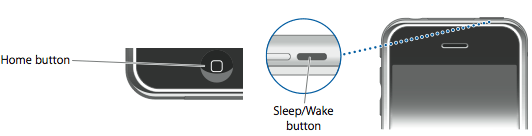
Step Two Press and hold the Home button and the Sleep/Wake button at the same time.
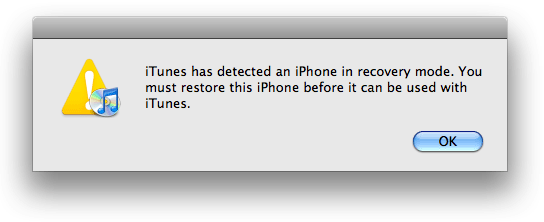
Step Three After exactly 10 seconds release the Sleep/Wake button. Continue holding the home button until you iTunes pops up a message telling you that it has detected an iPhone in recovery mode.
The iPhone screen will remain black like this:
NOTE***: It may take a few attempts to get your iPhone into DFU mode. Generally, I hold down both buttons then release the Home button just before I think the Apple logo would appear. If you are still holding both buttons down and you see the Apple logo you are holding them down for too long!
Get the iClarified Daily Newsletter
Apple news, rumors, tutorials, price drop alerts, in your inbox every evening, free.
Unsubscribe at any time.
Success!
You have been subscribed.
Add Comment
Would you like to be notified when someone replies or adds a new comment?
Yes (All Threads)
Yes (This Thread Only)
No
Notifications
Would you like to be notified when we post a new Apple news article or tutorial?
hey I just got an iPod touch 5th generation and it was my but he's ex-girlfriends when they broke up she gave it back to him but never told her iTunes password how do I get around that and restored to factory settings any idea?
Very narrow minded to think that the phone is stolen. I am a company admin and deal with all the time when ex employees put their personal icloud account on my corporate phones.
This is also not uncommon for people buying/selling used phones. If the seller does not go through the setup and deactiavte the account, the buyer will have issues.
how can u do it if screen has passcode and is cracked/unresponsive and have no idea what the itunes account info is cause person it was bought from is looney tunes?!
This solved my "ipod touch upgrade ios 2.2.1 to 4.2 error -1" problem I have had for more than a year.
Thank You.
Remember to backup your latest state of the IPOD.
pls help me ,, my iphone need to connect in itunes and upgrade or restore it but when the restoring has 75% it stuck and there is an error(1) what shuold i do?
thank you for saving me from driving into town to the apple store with 2 little kids! I solved the problem within 10mn following the easy instructions. thank you!!
christine
For the record, my ipod touch is 5th gen, and my laptop 10.6 . And when I followed through with the instructions it worked until I got an error message of 4005, and basically my laptop's version of itunes was not up to date, although it said it was. Currently the latest version is 12.0.1. And my laptop was reading "This version of itunes (11.4) is the current version", which is incorrect and misleading. So I switched to my later model - and it works. Ensure that your stuff is up-to-date or it won;t work.
still now working on my ipod 3. I'm getting pretty frustrated. I've been trying to do this for 84398457938457 hours and its not budging. I tried all of those and it won't work. I forgot the password and my cpu doesn't recognize it because it isn't synced.




![iPhone Duo's Initial 8 Million-Unit Order Extends Into 2027 [Gurman]](/images/news/102975/102975/102975-160.jpg "iPhone Duo's Initial 8 Million-Unit Order Extends Into 2027 [Gurman]")
![CT Scan Reveals How iPhone Duo's Hinge Works [Video]](/images/news/102981/102981/102981-160.jpg "CT Scan Reveals How iPhone Duo's Hinge Works [Video]")
![Apple Tests Face ID and Action Button for iPhone Duo, Considers Larger Display [Gurman]](/images/news/102972/102972/102972-160.jpg "Apple Tests Face ID and Action Button for iPhone Duo, Considers Larger Display [Gurman]")



![How To Back Up Your iPhone to an External Drive on Mac [Video]](/images/tutorials/72786/72786/72786-160.jpg "How To Back Up Your iPhone to an External Drive on Mac [Video]")

![How To Find Your IP Address on iPhone [Video]](/images/tutorials/496/496/496-160.jpg "How To Find Your IP Address on iPhone [Video]")

![New Fire TV Stick 4K Drops to $29.99 (50% Off) [Deal]](/images/news/102984/102984/102984-160.jpg "New Fire TV Stick 4K Drops to $29.99 (50% Off) [Deal]")
![Apple's iPhone 18 Pro and Pro Max Cases Are Up to 37% Off [Deal]](/images/news/102978/102978/102978-160.jpg "Apple's iPhone 18 Pro and Pro Max Cases Are Up to 37% Off [Deal]")
![16-Inch MacBook Pro With M5 Pro Drops to $2,429 ($570 Off), Lowest Price We've Seen [Deal]](/images/news/102957/102957/102957-160.jpg "16-Inch MacBook Pro With M5 Pro Drops to $2,429 ($570 Off), Lowest Price We've Seen [Deal]")

![16-Inch MacBook Pro With M5 Max Drops to $3,499 ($900 Off), Lowest Price We've Seen [Deal]](/images/news/102900/102900/102900-160.jpg "16-Inch MacBook Pro With M5 Max Drops to $3,499 ($900 Off), Lowest Price We've Seen [Deal]")
