These are instructions on how to replace the signal strength bars on your iPhone with a numerical representation of reception strength. (ie. numbers instead of bars).
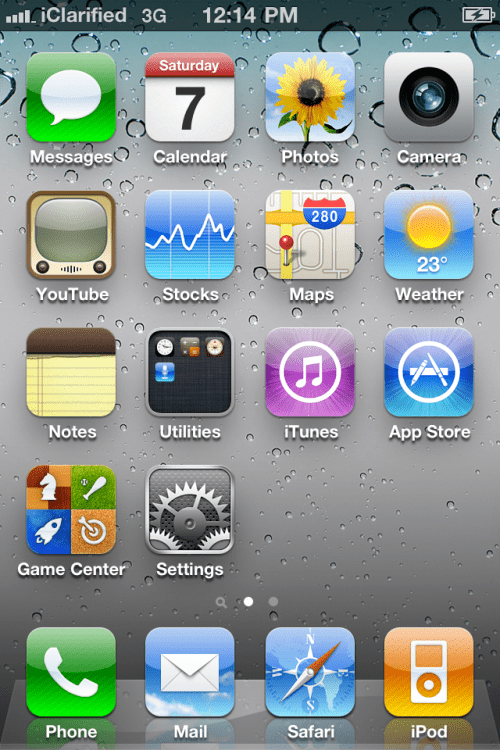
Step One Press to launch MobilePhone from your Springboard.
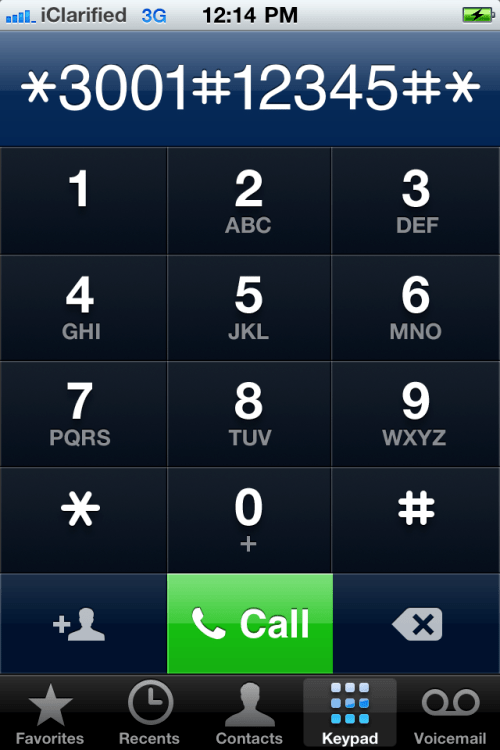
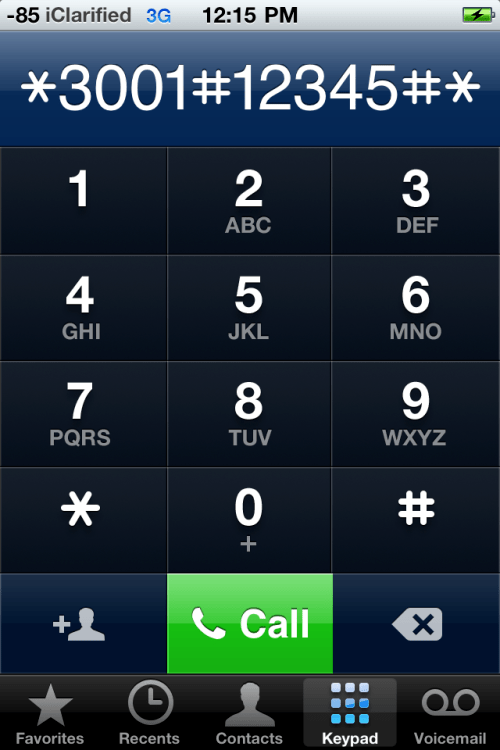
Step Two Tap the keyboard tab then dial *3001#12345#*.
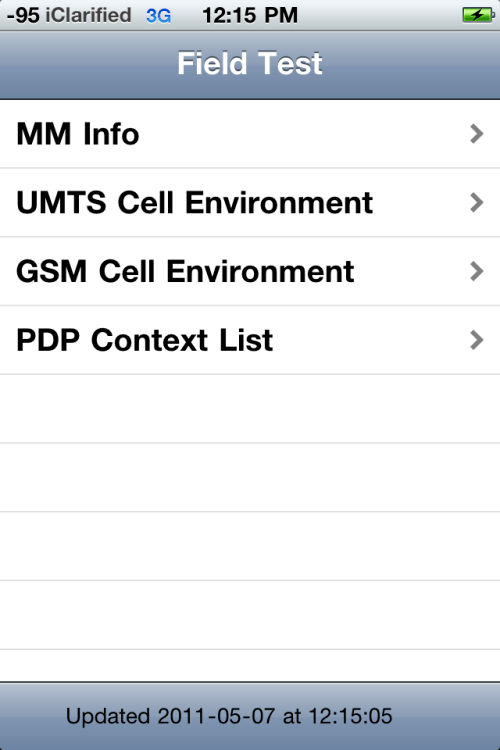
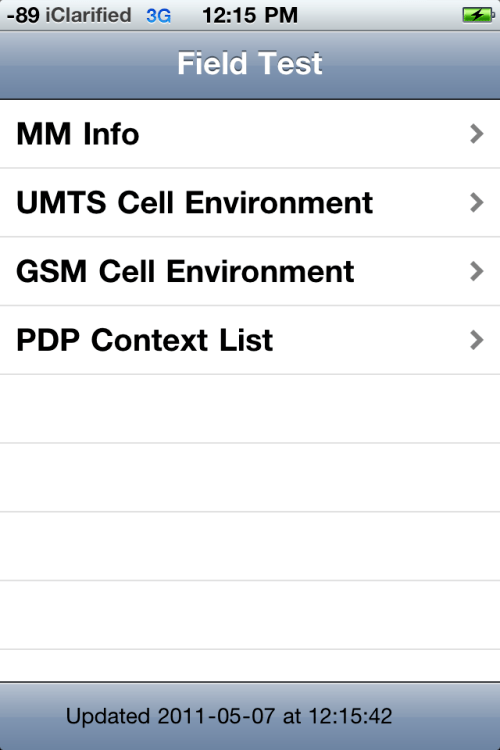
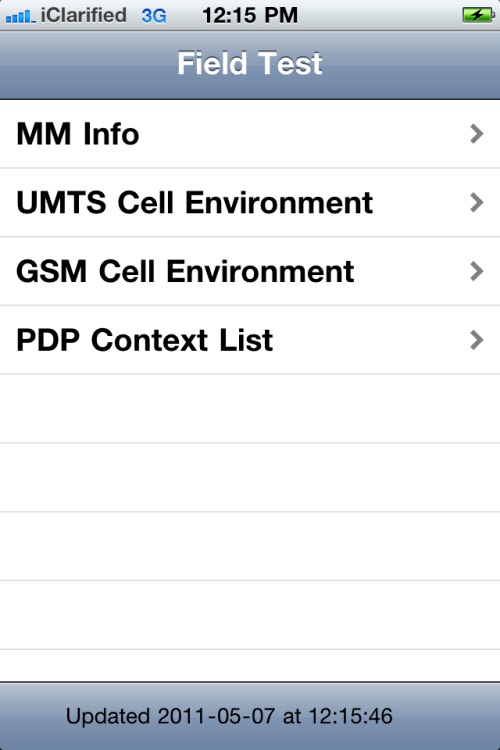
Step Three Your iPhone will now launch Field Test. Notice your strength bars have been replaced with a number. This number is your reception strength measured in decibels. The closer to 0dB the stronger your signal.
Step Four Press and hold the Power button until the power slider appears.
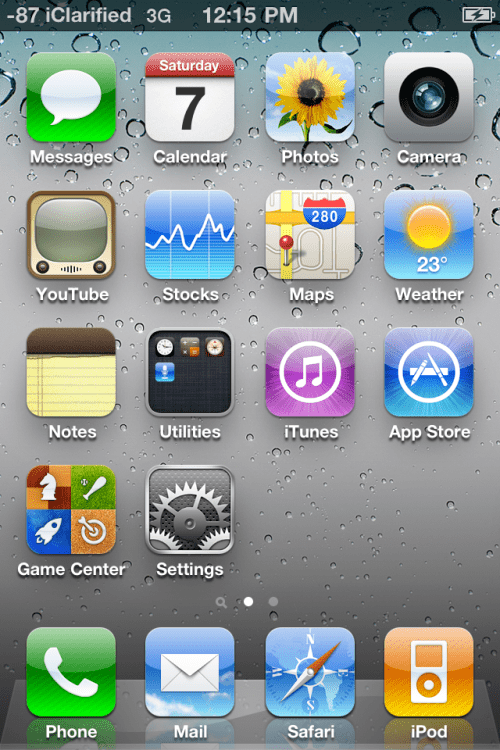
Step Five Press and hold the Home button until the Field Test program is terminated. Notice the signal strength numbers still remain.
To Switch Back to Bars Dial *3001#12345#* again to enter Field Test mode.
Press the signal strength at the top left of screen to toggle between numbers and bars. Then press the Home button to exit Field Test mode.
Get the iClarified Daily Newsletter
Apple news, rumors, tutorials, price drop alerts, in your inbox every evening, free.
Unsubscribe at any time.
Success!
You have been subscribed.
Add Comment
Would you like to be notified when someone replies or adds a new comment?
Yes (All Threads)
Yes (This Thread Only)
No
Notifications
Would you like to be notified when we post a new Apple news article or tutorial?
I literally 30 secs. Just had this same problem!! Literally, but only thing you do is repeat the steps but instead of holding the lock button (If your iPhone is updated) you will click where it says "Back to Phone" in the very upper top left of the phone and when it goes back to the dial pad, click the signal strength numbers and it should return back to normal.
To get this to work for me I entered field test mode, then double tapped the home button to switch back to the dial app. I entered the code again which brought me back to the field test app. I then held the power sleep button until the slider appeared. Then held the home button to return to the normal app desktop. The -xxx dB stayed.
Never mind. It was Siri. Apparently the Siri screen was interfering with the Field Test app closure. Turned Siri off briefly, and it worked perfectly. I can now use either the numeric meter or the dots, and can toggle between them.
Thanks!!
iPhone 5s with iOS 7.1.1 not jailbroken (Verizon)
Field Test runs fine. However, I can't get it to make the numeric change lasting. Tried the power button, then the home button, and also tried the power button AND home button (forcing a reboot). When the phone reverts to the home screen, the numeric value displays for the briefest instant, then reverts to the dots (and doesn't toggle). Dunno' if the fact that the home button brings up Siri has anything to do with this or not..... Any ideas? I'd like to use the numeric value rather than the dots.
Worked Great on iOS 7.1 on my UnJailBroken iPhone 4S! Make sure to hit send after *3001#12345#* .... Then Go to power down screen and finish by holding Home until Field Test disappears. And the magic of it is if you tap the signal indicator, it toggles between dots and numbers !
If you are having trouble getting it working on iOS 7.1 b5, enter the field test mode and hold down the power and home buttons together until the phone restarts.
It works fine in iOS 7. What the article doesn't make clear is that you have to hit Send to launch field test mode. if you enter the numbers but don't hit Send, you can still change for numbers to bars and back, but your selection won't persist unless you hit Send and see the field test menu. Then change to bars(dots) or numbers, hold power till the slider pops up, then Home to exit.
If anyone of you having trouble changing the bars to numbers try opening field test and hold the home button and sleep button at the same time and keep holding until the Apple logo appears then unlock your iPhone and BOOM!!! It shows numbers and the best thing is that when you tap on the numbers, it turns back to bars, do it again, and it turnns back to numbers
Just go to settings and Erase all settings, worked for me and I had the problem some of you did not being able to JUST have bars back. I had to toggle them back in each app or screen, but even after trying Mike's advice it didnt work.
Setting reset was what did it for me! Now I just have to go back a repersonalize some things which isnt too big of a deal
You can revert the numbers back to bars by tapping on the top left corner of your screen, when you are on your homescreen (not in field test mode!). From that moment forward, you can toggle between bars and numbers straight from your iPhone's homescreen.






![Apple Says iPhone Duo's Folding Display Has a Replaceable Cover Layer [Video]](/images/news/102525/102525/102525-160.jpg "Apple Says iPhone Duo's Folding Display Has a Replaceable Cover Layer [Video]")
![Touchscreen OLED MacBook Pro Could Debut as Early as October [Gurman]](/images/news/102519/102519/102519-160.jpg "Touchscreen OLED MacBook Pro Could Debut as Early as October [Gurman]")
![iPhone 18 Pro Sales Rise 12% in China as Apple Leads Weekly Smartphone Market [Report]](/images/news/102522/102522/102522-160.jpg "iPhone 18 Pro Sales Rise 12% in China as Apple Leads Weekly Smartphone Market [Report]")
![Apple TV Shares Trailer for 'Awkwafina: The Unlikely Cook' [Video]](/images/news/102513/102513/102513-160.jpg "Apple TV Shares Trailer for 'Awkwafina: The Unlikely Cook' [Video]")

![How To Find Your iPhone IMEI Number [Video]](/images/tutorials/83557/83557/83557-160.jpg "How To Find Your iPhone IMEI Number [Video]")
![How To Change Wallpaper on Mac [Video]](/images/tutorials/90512/90512/90512-160.jpg "How To Change Wallpaper on Mac [Video]")




![16-Inch M5 Max MacBook Pro Drops $900 to New Low of $3,499 [Deal]](/images/news/102438/102438/102438-160.jpg "16-Inch M5 Max MacBook Pro Drops $900 to New Low of $3,499 [Deal]")
![Magic Keyboard for iPad Air Drops to $200 on Amazon [Deal]](/images/news/102402/102402/102402-160.jpg "Magic Keyboard for iPad Air Drops to $200 on Amazon [Deal]")
![13-Inch M5 MacBook Air With 1TB Drops to $1,449 on Amazon [Deal]](/images/news/102345/102345/102345-160.jpg "13-Inch M5 MacBook Air With 1TB Drops to $1,449 on Amazon [Deal]")
