

These are instructions on how to take screenshots using the built in iPhone 2.0 screenshot feature.
You must have iPhone 2.0 firmware installed to follow this tutorial.
Step One
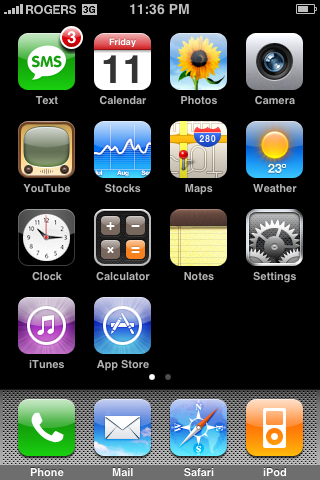
To take a screenshot simply hold down the Home button and press the Sleep/Wake button. You will notice the screen flash white.
Step Two
To view the screenshot you just took, press the Photos icon on your SpringBoard.
Step Three
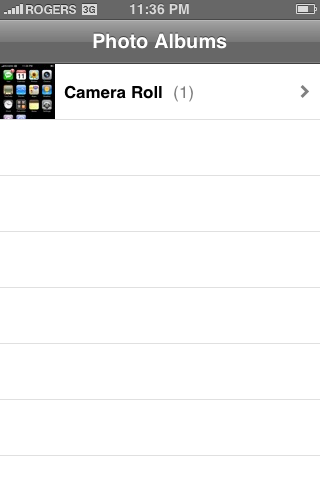
Press to select Camera Roll from the list of Photo Albums.
Step Four
Press to select the small thumbnail of your screenshot.

Step Five
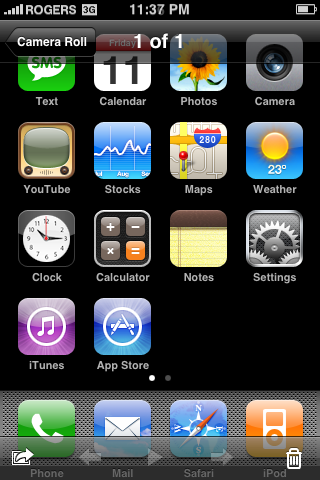
Now you can see your high quality iPhone screenshot. You can easily sync this to your computer just as you would with any other photo!
You must have iPhone 2.0 firmware installed to follow this tutorial.
Step One
To take a screenshot simply hold down the Home button and press the Sleep/Wake button. You will notice the screen flash white.
Step Two
To view the screenshot you just took, press the Photos icon on your SpringBoard.
Step Three
Press to select Camera Roll from the list of Photo Albums.
Step Four
Press to select the small thumbnail of your screenshot.
Step Five
Now you can see your high quality iPhone screenshot. You can easily sync this to your computer just as you would with any other photo!


![Apple Releases First Betas of iOS 27, iPadOS 27, macOS 27 to Developers [Download]](/images/news/101120/101120/101120-160.jpg "Apple Releases First Betas of iOS 27, iPadOS 27, macOS 27 to Developers [Download]")







![Apple Watch Series 11 is Back on Sale for Just $299 [Deal]](/images/news/101081/101081/101081-160.jpg "Apple Watch Series 11 is Back on Sale for Just $299 [Deal]")
![AirPods Max 2 Drop to New All-Time Low of $499 [Deal]](/images/news/101063/101063/101063-160.jpg "AirPods Max 2 Drop to New All-Time Low of $499 [Deal]")
![AirPods Max 2 Hit All-Time Low Price of $509 ($40 Off) [Deal]](/images/news/101039/101039/101039-160.jpg "AirPods Max 2 Hit All-Time Low Price of $509 ($40 Off) [Deal]")
![New 13-Inch M5 MacBook Air Hits All-Time Low Price of $899.99 [Deal]](/images/news/100969/100969/100969-160.jpg "New 13-Inch M5 MacBook Air Hits All-Time Low Price of $899.99 [Deal]")
![AirPods Pro 3 Drop to $199 Ahead of Memorial Day [Deal]](/images/news/100935/100935/100935-160.jpg "AirPods Pro 3 Drop to $199 Ahead of Memorial Day [Deal]")
