These are instructions on how to create an SSH install patchstick using ATV USB Creator and use it to jailbreak your Apple TV.
Before getting started you need a USB Stick that has been formatted to a single Mac OS Extended (Journaled) partition that uses a GUID Partition Table. You can find instructions on doing this here.
Step One Download ATV USB Creator from https://atvusb-creator.googlecode.com/files/atvusb-creator-1.0.b10.zip and place it on your desktop.
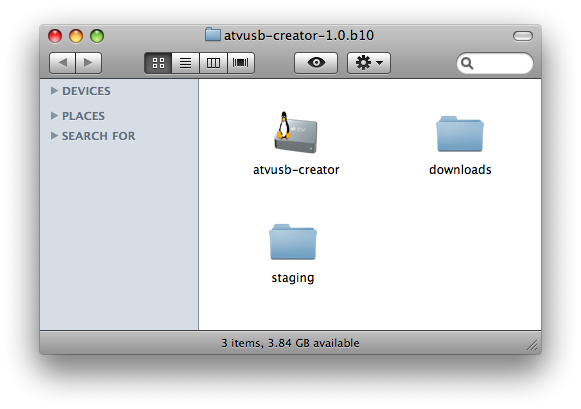
Step Two Double click to extract the atvusb-creator-1.0.b10.zip archive on your Desktop. A folder called atvusb-creator1.0.b10 will created.
NOTE***: Make sure there are no spaces in the folder name!
Step Three Connect a USB Stick to your computer.
Step Four From the atvusb-creator 1.0.b10 folder, double click the atvusb-creator icon
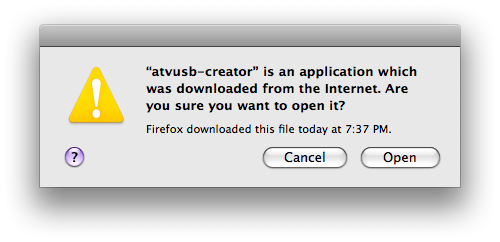
Step Five You will be informed that the application was downloaded from the Internet. Click the Open button.
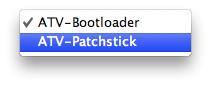
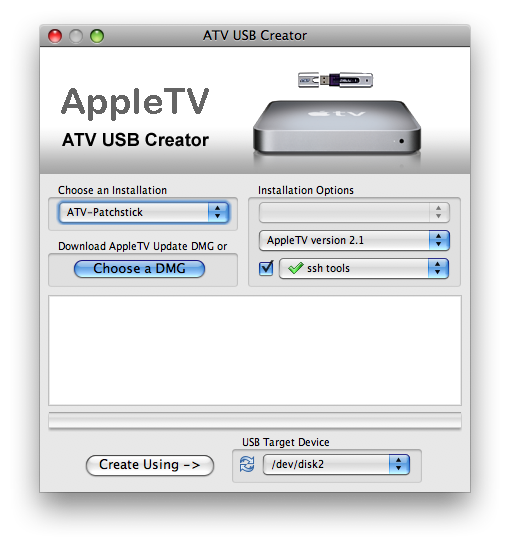
Step Six From the Choose an Installation dropdown select ATV-Patchstick.
Step Seven From the Installation Options dropdown select ssh tools
Step Eight Make sure the correct USB stick is selected for use.
Step Nine Press the Create Using --> button.
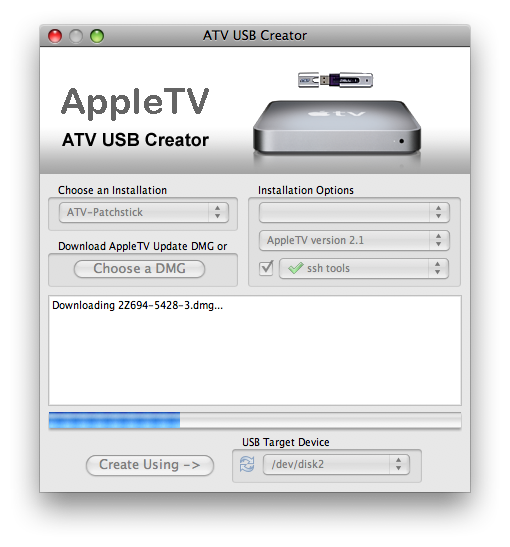
Step Ten ATV USB Creator will now download the AppleTV Update DMG. If you prefer to select this file yourself you could click the Choose a DMG button.
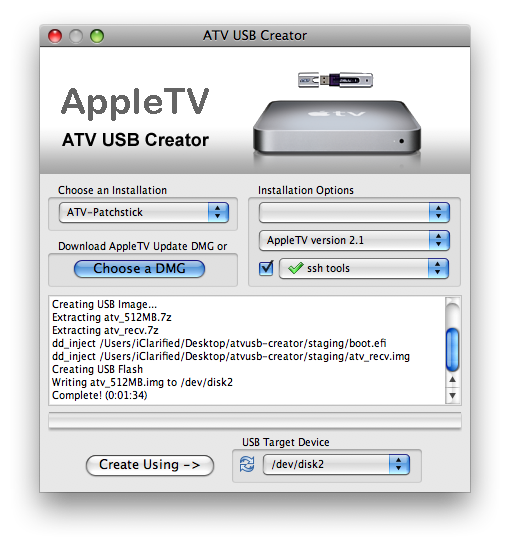
Step Eleven The program will inform you when your patchstick has been completed successfully.
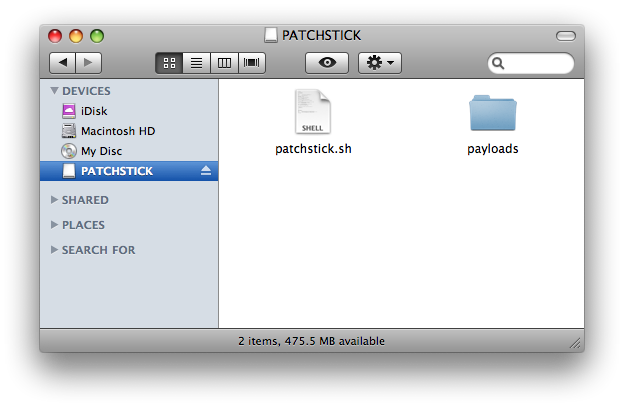
Step Twelve Notice that your USB Stick has been renamed and now contains files...
Step Thirteen Eject the USB Stick and connect it to your AppleTV.
Step Fourteen Hold down the Menu and - buttons on the AppleTV remote until it reboots.
Step Fifteen Notice the Patchstick will now do its job and install SSH on the AppleTV.
Step Sixteen When complete, remove the USB Stick from the AppleTV and unplug the device. Plug it back in to reboot.
Step Eighteen You can now access your AppleTV via SSH to perform a host of functions and hacks. You can find many interesting tutorials for your AppleTV here
THANKS***: A big thanks to sdavilla for creating this great app!
NOTES***: Some users have reported issues with certain USB Sticks. If you have any problems try a different one... We will post more info as we get it!
Get the iClarified Daily Newsletter
Apple news, rumors, tutorials, price drop alerts, in your inbox every evening, free.
Unsubscribe at any time.
Success!
You have been subscribed.
Add Comment
Would you like to be notified when someone replies or adds a new comment?
Yes (All Threads)
Yes (This Thread Only)
No
Notifications
Would you like to be notified when we post a new Apple news article or tutorial?
Hi...I'm getting the following error:
Creating USB Flash Disk...
umount_disk settling delay (10 seconds)
partition the target disk
umount_disk settling delay (10 seconds)
install recovery onto target disk
Unable to mount recovery: GetMasterBlock: Error 13 opening /dev/rdisk2s2
GetMasterBlock: Error 13 opening /dev/rdisk2s2
mount_hfs: Permission denied
install_recovery failed
Failed! (0:01:25)
And I've tried this on four different sticks...thoughts?
Great stuff. Thanks.
Worked fined as a charm.
Such a shame Boxee is not supported anymore.
But as a workaround I DL the XeeBo skin for the XBMC and it is as good as the original.
Thank you again!
ATV USB Creator failed for me on the "Create Using" step -
Downloading 2Z694-5573-24.dmg...
Download failed: HTTP Error 404: Not Found
I have a brand new Apple TV (probably v3.0.1) coming today - I suspect this patchstick may not work with it anyway... :-/
I have just updated to V3.0. ATV USB Creator seems to patch the system fine, but you don't get an XBMC link or anything and none of the software installed during patching seems to either appear in the menus or work when you select it. I would think that Apple have closed off some of the loopholes that allows the software to be patched.
I keep on getting the same error code - and I have tried 4 different USB flashdrives. Anyone know what the problem is? Here is what appears in the ATV USB Creator window:
2Z694-5660-029.dmg selected
Creating USB Flash Disk...
umount_disk settling delay (10 seconds)
partition the target disk
umount_disk settling delay (10 seconds)
install recovery onto target disk
Unable to mount image: hdiutil: attach failed - Resource busy
install_recovery failed
Failed! (0:00:49)
Im trying to do it but when I click create using, it give me back this message
Downloading 2Z694-5573-24.dmg...
Download failed: HTTP Error 404: Not Found
You can try again to resume your download
Please help me
Hi, I've tried the full process without any success. I have an ATV with version 2.3.1 and using Leopard 10.5.6.
My usb disk has been formated (renamed patchstick) and configured usb creator v.10
When I reboot my atv (menu + '-'), i have the screen where I need to choose the language and then screen resolution and finally atv asking for restart.
Any idea how i can fix this ??
I finally did it and everything works fine (playback from USB stick, Boxee etc.). The only problem I have now: Video playback in YouTube and Podcasts does not work any more! I only get the sound of the video, but no image ..! What can I do? Is there a problem with the codecs maybe? Thanks for your help!
I have downloaded the atvusb-creator to my desktop on my ibook, but when I double click on the icon to open the file it just flashes quickly, but does not open. I have downloaded this program several times thinking that it might not have downloaded and unzipped right, but each time it does the same thing...any ideas?
How do you tell if the "jailbreak" was successful? A follow up. If successful, the stream of text will end with a line that indicates success. I was NOT successful until I checked the ATV USB Creator Website and downloaded a newer version. The newer version worked. I can now SSH into my AppleTV. Unfortuantely, I can't use the features installed in FrontRow. Why? I am the victim of Hughesnet broad band service. I live in a rural area where satellite DSL is the only option. Satellites have "latency", the time it takes the signal to go into space and back. That messes up most downloads and touching applications. So the ATV can't download the software that I need. I'll have to do it manually which will be a challenge for an SSH novice...
How do you tell if the "jailbreak" was successful? This would be a nice addition to the tutorial.
I followed the steps using 2.1. I rebooted with the patchstick and the appleTV displayed a lot of code, then stalled. After about 10 minutes the screen went black. It has been about an hour... was I successful or did something go wrong? I hate to take out the stick and reboot without knowing whether it just needs more time...
At first I had trouble with my 2GB SanDisk Cruzer, then I reformatted in "Mac OS X Extended (journaled)" format and it worked fine. I'm on 10.5.5 with an atv on 2.2.
The problem I am now stuck with is this: I started with a factory restore, then I found that the patchstick/Boxee process put me at 2.0.2. Everything worked fine. I installed Couch Surfer 0.4, and it worked fine. I then went to upgrade through the normal aTV process and that brought me to 2.2, but all of the added features (Boxee, sshd, and Couch Surfer) were gone. Back to where I started.
Is there a way to have everything? Boxee, sshd, and 2.2?






![Apple Releases Xcode 27.1 Beta With iPhone Duo SDKs and Simulator [Download]](/images/news/102276/102276/102276-160.jpg "Apple Releases Xcode 27.1 Beta With iPhone Duo SDKs and Simulator [Download]")
![Apple Shares 'new trick' Shot on iPhone 18 Pro Ad Featuring ROSÉ [Video]](/images/news/102273/102273/102273-160.jpg "Apple Shares 'new trick' Shot on iPhone 18 Pro Ad Featuring ROSÉ [Video]")
![iPhone 18 Pro Teardown Shows Under-Display Face ID Camera and Larger Vapor Chamber [Video]](/images/news/102270/102270/102270-160.jpg "iPhone 18 Pro Teardown Shows Under-Display Face ID Camera and Larger Vapor Chamber [Video]")











![Apple Studio Display XDR Hits All-Time Low of $2,969.99 ($329 Off) [Deal]](/images/news/101976/101976/101976-160.jpg "Apple Studio Display XDR Hits All-Time Low of $2,969.99 ($329 Off) [Deal]")
