These are instructions on how to downgrade your baseband to 2.28 for iPhone 3Gs with the 5.8 bootloader using Fuzzyband. This will allow you to unlock your iPhone 3G using YellowSn0w.
Fuzzyband is the preferred application for downgrading your baseband since it does version checking, downgrades all versions of baseband from 2.30.03 to 4.26.08 (3.0 beta5), and it reports the current bootloader version on screen.
Step One Press to launch Cydia from your SpringBoard.
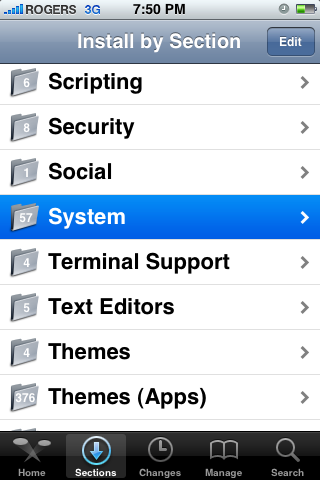
Step Two Press to select the Sections tab at the bottom of the screen.
Step Three Press to select System from the list of sections
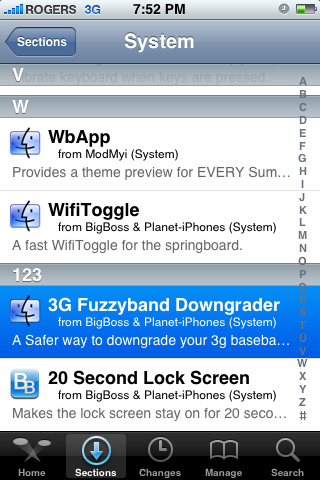
Step Four Press to select 3G Fuzzyband Downgrader from the list of packages
Step Five Press the Install button at the top right of the screen.
Step Six Press the Confirm button at the top right of the screen to begin installation.
Step Seven Once installation has completed successfully press the large Return to Cydia button.
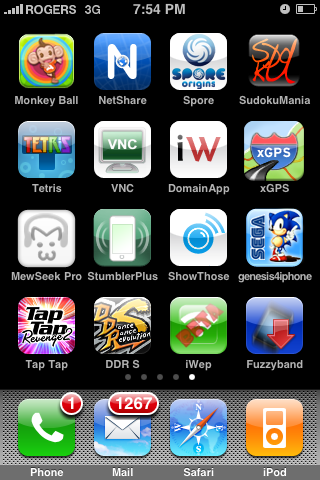
Step Eight Press the Home button to return to your SpringBoard. Notice there is a new application icon titled Fuzzyband. Press to launch the application.
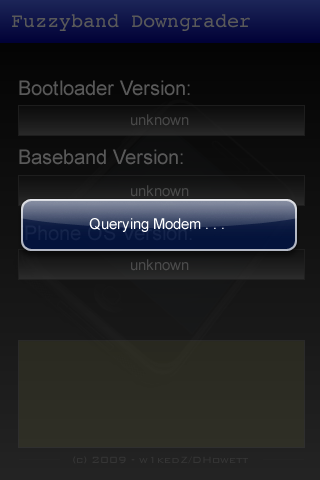
Step Nine Immediately upon launching the application you will be shown a message stating that Fuzzyband is querying your modem.
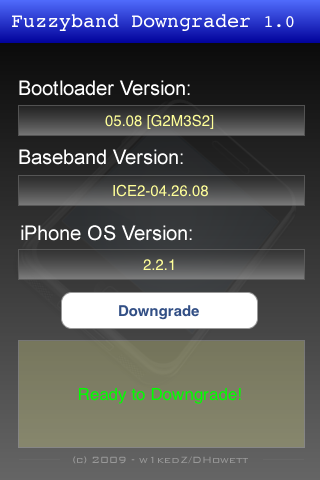
Once it completes you will be displayed your Bootloader Version, your Baseband Version and your iPhone OS version.
If you have a bootloader version higher then 5.08 you will not be able to downgrade your baseband and a Not Supported message will be displayed.
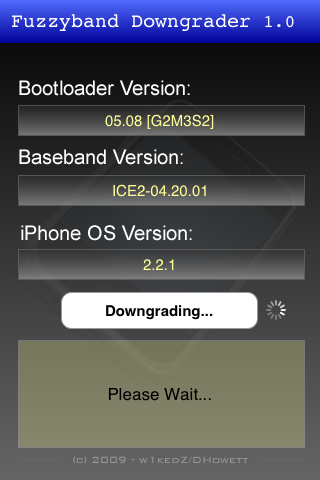
If you have the 5.08 bootloader you will be able to downgrade from baseband 2.30 or higher. Press the Downgrade button to begin downgrading your baseband.
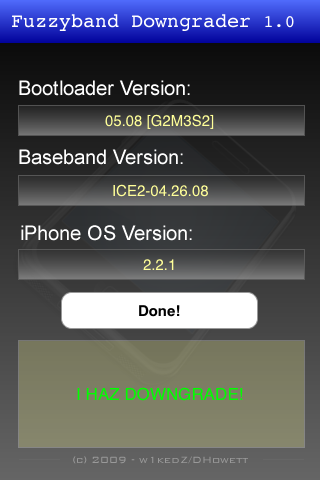
Step Ten Once the downgrade has completed successfully you will be displayed a Done! message saying, "I Haz Downgrade!" and you will be on the 2.28 baseband.
***THANKS: to w1kedZ/DHowett for creating this utility
Get the iClarified Daily Newsletter
Apple news, rumors, tutorials, price drop alerts, in your inbox every evening, free.
Unsubscribe at any time.
Success!
You have been subscribed.
Add Comment
Would you like to be notified when someone replies or adds a new comment?
Yes (All Threads)
Yes (This Thread Only)
No
Notifications
Would you like to be notified when we post a new Apple news article or tutorial?
Please let me know if we can degrade the baseband version with bootloader version 05.09 or how do we degrade the bootloader version to 05.08. Please help me !!!!!!!
Hi there. my Bootloader Version is 05.08 [G2M3S2] according to the Fuzzyband Downgrader but it says it's not supported because of my Baseband Version. Is there any solution ? Here's the info on the screen:
BootLoader Version: 05.08 G2M3S2]
Basebadn Version: ICE2-02.28.00
iPhone OS Version: 2.2.1
Thank you for your help.
Hey there, my iphoned is jailbroken, I have Cydia that's how I used the Fuzzyband Downgrader. But it just says it's not possible. I guess it's the Baseband and not the BootLoader. Here is the info again:
BootLoader Version: 05.08 G2M3S2] Baseband Version: ICE2-02.28.00 iPhone OS Version: 2.2.1 Thank you for your help.
Osayi (2009-06-14 18:27:01) Use a SIM adapter. @Danny: Dev-Team is at blog.dev-team.org. @margarita: No you can't. What's the SIM adapter and how to get it done, plz help !!!
To iClarified Dev, thank you for the help. It is not yet solved. I downloaded the Fuzzyband file and ran the program. Unfortunately, because the bootloader is version 5.9, the SIM lock cannot be canceled. Once again, I request your help.
It says clearly in the post that "If you have a bootloader version higher then 5.08 you will not be able to downgrade your baseband and a Not Supported message will be displayed." What do you think?
So I did it on my iPhone and it worked. I got my iPhone back from 2.30.03 to 2.38.00, but my question is when the new 3.0 final release comes out and if I upgrade will this utility work as well as long as I have the 5.8 bootloader? Well as long as my phone is jailbroken.
Hey ricardo, just wanted to know when you upgraded your phone to baseband 2.30 did your wifi stop working or was it ok. because i when i upgraded my wifi stoped working so i wanted to know if yours start working again after you downgraded
Thank you for the help.!
However, yet, the problem could not be solved.
Again, we request your help.
At present, it is " modem version 02.30.03 ", "OS 5G77".
Tell the way of changing into modem version 02.28.0.
It tried a down grade in the envoy modem version in the Fuzzyband software.
However, because the bootloader version was to do 5.9 being, it isn't possible to do a change.
Tell the way of changing a bootloader version into 5.8.
Or, tell the way of modem version's being able to be changed in the other way.
I request your help.
Thanks guys, great job i manage to jail break my iphone 3g 2.2.1 but unfortunately my bootloader is 5.9.
I am convince there will be a solution for this, please help.
Thanks again.
what i dont understand is that if this app is available thru CYDIA then the iPhone 3g must already be jailbroken to download it. so why wud someone need to downgrade an already jailbroken phone.
Does it make any sense?
Hi
I've tried to downgrade my phone with Fussyband it turns out I've got 5.9.
My question is if I was to down grade the firmware to 2.2 would that give me a down graded baseband?
Regards
If you have an iPhone 3G (firmware 2.2.1, baseband 2.30.03, bootloader 5.08) and it's locked, but you want it unlocked, you'll need to install Fuzzyband.
Sir, we have os 2.2.1and 2.30 bootloder 05.09 please help all iphone user
We wait 3month allready see your update 2.2.1&02.30and bootloder 05.09 we miss all and can't dial any where please help







![Boot Speed Test: iPhone Duo vs iPhone 18 Pro Max [Video]](/images/news/103104/103104/103104-160.jpg "Boot Speed Test: iPhone Duo vs iPhone 18 Pro Max [Video]")



![How To Turn Off iPhone [Video]](/images/tutorials/94999/94999/94999-160.jpg "How To Turn Off iPhone [Video]")
![How To Back Up Your iPhone to an External Drive on Mac [Video]](/images/tutorials/72786/72786/72786-160.jpg "How To Back Up Your iPhone to an External Drive on Mac [Video]")

![How To Find Your IP Address on iPhone [Video]](/images/tutorials/496/496/496-160.jpg "How To Find Your IP Address on iPhone [Video]")


![Beats Headphones, Earbuds, and Pill Speaker Are Up to 41% Off [Deal]](/images/news/103026/103026/103026-160.jpg "Beats Headphones, Earbuds, and Pill Speaker Are Up to 41% Off [Deal]")

![New Fire TV Stick 4K Drops to $29.99 (50% Off) [Deal]](/images/news/102984/102984/102984-160.jpg "New Fire TV Stick 4K Drops to $29.99 (50% Off) [Deal]")
![Apple's iPhone 18 Pro and Pro Max Cases Are Up to 37% Off [Deal]](/images/news/102978/102978/102978-160.jpg "Apple's iPhone 18 Pro and Pro Max Cases Are Up to 37% Off [Deal]")
