These are instructions on how to fix push notifications on your jailbroken 3.0 iPhone 2G. Please note that this is a preliminary fix by the iPhone Dev-Team and thus may need some improvements before it is finalized.
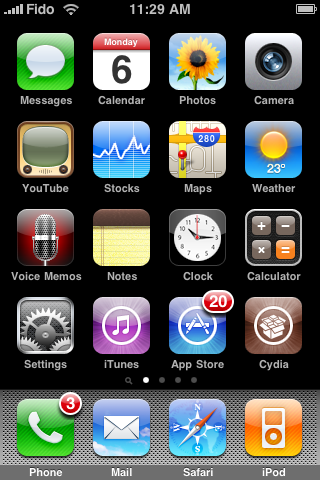
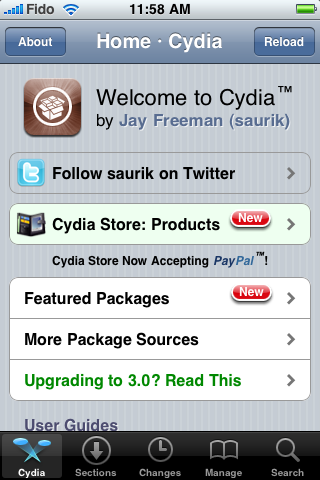
Step One Press to launch Cydia from your SpringBoard.
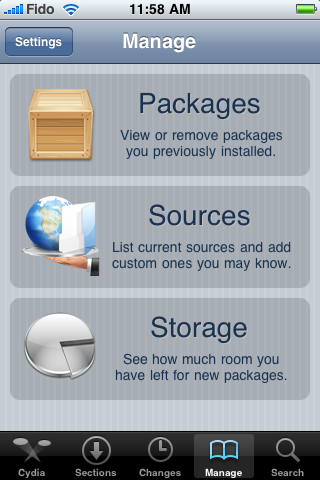
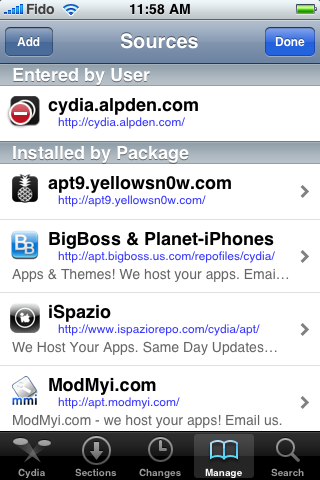
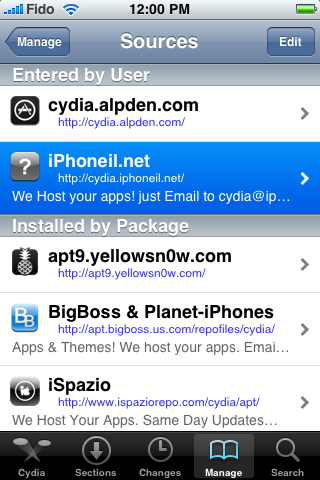
Step Two Press to select the Manage tab at the bottom of the screen.
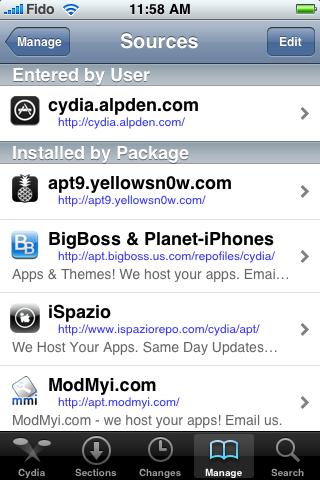
Step Three Press the large Sources button.
Step Four Press the Edit button at the top right of the screen.
Step Five Press the Add button at the top left of the screen.
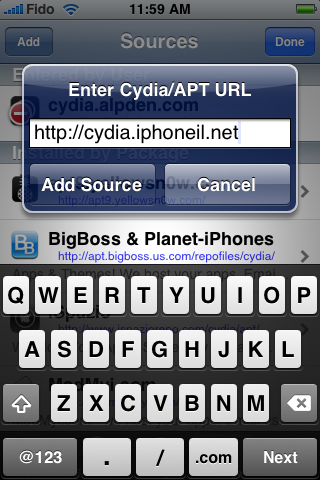
Step Six Enter http://cydia.iphoneil.net as the new source address and tap the Add Source button.
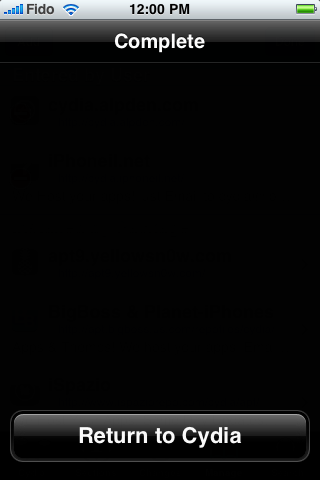
Step Seven Once the source has been successfully added press the large Return to Cydia button.
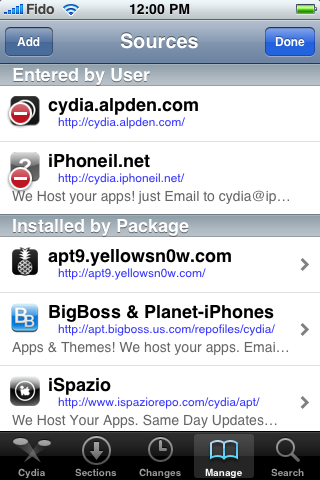
Step Eight Press the Done button to exit Edit mode.
Step Nine Press to select the newly added cydia.iphoneil.net repository.
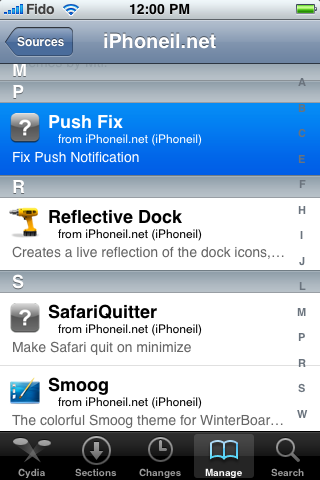
Step Ten Press to choose Push Fix from the list of Packages
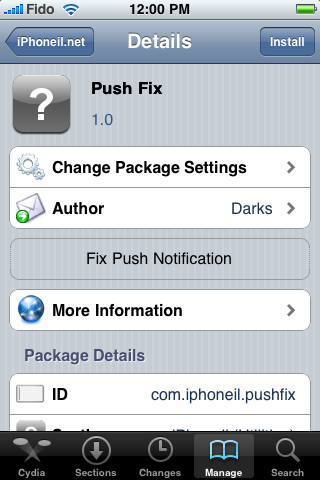
Step Eleven Press the Install button at the top right of the screen.
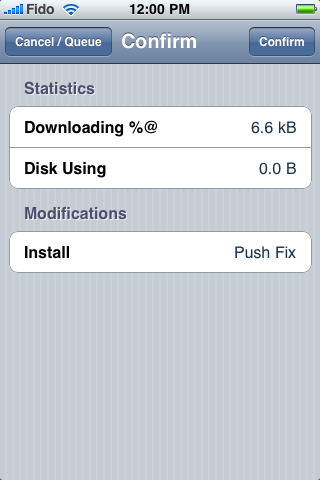
Step Twelve Then press the Confirm button to beginning installation
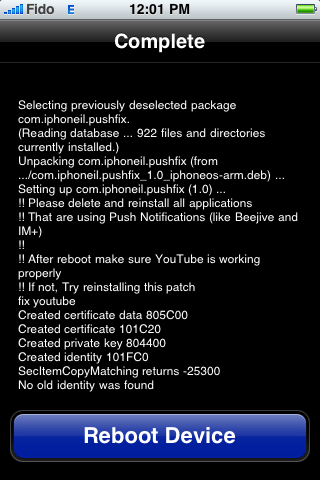
Step Thirteen Once installation has completed successfully press the large Reboot Device button to reboot your iPhone.
Once rebooted verify that YouTube works. If not try reinstalling the patch.
You will also need to remove then reinstall all your applications which use Push Notifications before they will work.
THANKS***: A big thanks to the iPhone Dev-Team for providing this fix. Also thanks to iPhoneIL for packaging it up nicely. Thanks to iSpazio for bringing this package to our attention.
Get the iClarified Daily Newsletter
Apple news, rumors, tutorials, price drop alerts, in your inbox every evening, free.
Unsubscribe at any time.
Success!
You have been subscribed.
Add Comment
Would you like to be notified when someone replies or adds a new comment?
Yes (All Threads)
Yes (This Thread Only)
No
Notifications
Would you like to be notified when we post a new Apple news article or tutorial?
1. Borrow any iPhone official carrier in your country (i use O2 in UK)
2. Restrore your iPhone with simcard O2 inserted
3. When iTunes asks about account setting, create a new account. Don't use backup'ed account
4. Let Apple activates your iPhone and this will register a new certificate into your iPhone
5. Install IM app (if you use app like Ping! or BuzzMe, you need to DELETE your ID and create a new one (because the Ping!/BuzzMe servers have registered your old certificate, not the new one)
6. Return the simcard to your friend and use your unallowed simcard and unlock like normal
7. Done! happy pushing!
I agree with Ben. This hack doesn't work. After a full day's fiddling about, using a legit SIM card (O2 here in the UK) the only way I've found to get Push working on my 3.0 iPhone 2G is to restore it properly using Apple's .ipsw file, then jailbreak using blackra1n. I haven't managed to get Push working reliably on the phone if I jailbreaked it using Pwnage Tool.
I installed this as my GPS was playing up and lost YouTube function & kept saying to connect to iTunes to allow push notifications. I've just deleted it and YouTube works again and the pop up has gone.
This really needs to be reviewed. This fix is nothing more than one iPhone's certs/keys being shared by thousands of people. This is why it works randomly and you can get weird messages from other people. Sharing this with thousands of people is pointless. Every iPhone and iPod needs its own cert to have your push notifications to go to you and no one else. These push certs are generated by iTunes when you activate your iPhone through iTunes legitimately. When you hacktivate, you are not contacting the APNs (Apple Push Notification Service) servers to generate these unique keys. So if you want push to work on your jailbroken iPhone you will have to: 1. Steal/copy these certs from an iPod that was activated in iTunes the normal way. 2. Activate your iPhone with a legit SIM card to go through activation (and NOT hacktivation) to have the Apple push servers generate your unique keys/certs. I found a way to use unique certificates and push works flawlessly for me. Works like a charm with all my push apps and I love push!
downloaded this on my 3gs i had to reboot got stuck on the apple logo screen so had to restore and jailbreak and unlock my phoen again ever since my batt is dying with half a day even if i am not touching my phone da batt drains out so decided to uninstall this app but cud not find it in cydia .. wht shud i do pls hel me my 3gs is just 2 days old and da batt life sucks... i can live without push notification but need a good batt life..
pls pls pls help... thank you !
I had the same problem when I upgrade from 2.2.1 rom to 3.0. The 2G phone get very hot and drain the battery very fast, making the phone unsusable.
To solve this I download from https://www.iclarified.com/entry/index.php?enid=750 both the iPhone1,1_3.0_7A341_Restore.ipsw rom an the iPhone1,1_3.0.1_7A400_Restore.ipsw rom.
Then install the 3.0.1 using the iTunes (shift+Restore), according to tnstructions on https://www.iclarified.com/entry/index.php?enid=4302.
When run the program RedSn0w, point to the iPhone1,1_3.0_7A341_Restore.ipsw, and follow the instructions.
** - RedSn0w not accept the iPhone1,1_3.0.1_7A400_Restore.ipsw file but with iPhone1,1_3.0_7A341_Restore.ipsw it unlock and jailbreak the installed iPhone1,1_3.0.1_7A400_Restore.ipsw rom.
After that, The 2G iPhone gets normal as it is with the 2.2.1 rom.
nice try but it does not work. you get other ppls im's and your pw get erased and do not stay stored.
useless, it can also get you phone to stay stuck on the apple logo, happend to me several times.. not worth your time or hassle.
it suxs that they got so close to making this work but never released an update with the fixes for it.
This really isn't a fix. This uses certificates from another phone, and because thousands of people are sharing the same "identity", YOU WILL GET OTHER PEOPLE'S MESSAGES, AND THEY WILL GET YOURS! It will be very unreliable for you, too, not working after your phone has been asleep for a bit.
It's possible to get Push working, but you'll need access to a phone you can activate properly, to get a legitimate, unique set of certificates. The dev-team released tools which would enable you to extract these and use them on a jailbroken phone.
In summary, USING THIS HACK IS NOT A GOOD IDEA.
This was a smooth ride , just make rue to install cleanly , i.e reboot (hard preferably) uninstall any push based app before you install the fix and then try . thanks@devTeam
when you say uninstall any push based apps, the onesI have are mail, calander and contacts and there isn't a little "x" to unistall it on my phone when press on the app and hold it (ie when they start to wiggle and apps that you can uninstall get a little "x" in the upper left corner). Do you suggest that we uninstall these primary based programs and reinstall?
I had the same problem when I upgrade to 3.0. The 2G phone get very hot and drain the battery very fast making the phone unsusable. To solve this I download from https://www.iclarified.com/entry/index.php?enid=750 both the iPhone1,1_3.0_7A341_Restore.ipsw rom an the iPhone1,1_3.0.1_7A400_Restore.ipsw rom. Then I installed the 3.0.1 using the iTunes (shift+Restore), according to tnstructions on https://www.iclarified.com/entry/index.php?enid=4302. When I run the program RedSn0w, I pointed to the iPhone1,1_3.0.1_7A400_Restore.ipsw, and follow the instructions. After that, The 2G iPhone gets normal as it is with the 2.2.1 rom. :-)
Please make the following:
When I run the program RedSn0w, I pointed to the iPhone1,1_3.0_7A341_Restore.ipsw, and follow the instructions. RedSn0w not accept the iPhone1,1_3.0.1_7A400_Restore.ipsw file but with iPhone1,1_3.0_7A341_Restore.ipsw it unlock and jailbreak the installed iPhone1,1_3.0.1_7A400_Restore.ipsw rom.
After that, The 2G iPhone gets normal as it is with the 2.2.1 rom.
push notifications works after doing this, but it drains your battery abnormally FAST. this is because the commCenter is constantly trying to connect to EDGE to access the push servers. and there is no way to disable this in 3.0 for the iphone 2G.
if you leave the APN field blank and have push notifications on, your battery will drain completely in about 2 hours. if you enter a valid APN like epc.tmobile.com, but don't actually subscribe to EDGE service, it will still drain faster than when push notification is off, but not as fast as when APN is blank or invalid.
so if you want to use push notifications, be sure to enter a valid APN and subscribe to EDGE service, meaning you pay for it. otherwise the commcenter process will use high cpu constantly trying to connect to EDGE (this is why people report that their iphone is getting hot) and your battery will drain super fast.
I followed instructions as posted in original post. No big problems. After reboot I had to re-enter my wifi and gmail password. Push still not working. I rebooted. Still not working. Then I went into settings, made sure push was enabled. I had to re-enter my password in my push settings. After that, push worked! I only did this 30 minutes ago, so I'll update in a couple days. But everything seems working now. FYI I don't use push for IM or 3rd party apps, I just need it for ical and contacts sync. And it worked for that!
the reason why you have to re-enter your wifi password as well as any other passwords such as mail, is because this process creates a new keychain based off a certificate from an activated iphone that has push working on it.
Yes! I had them today. I think they're being introduced at the push stage, because AIM.app doesn't have any record of them... Whether it's deliberate or a server has been hacked, who knows? I'm going to uninstall though.
I had the messages in Russian, not Hebrew. Some were In English.
From what I read about this, it's apple's fault. They scramble the push service for hacktivated iPhones.
This doesn't happen in all apps. Mostly in IM+. The rest of the apps I use push with work fine.
Maybe the dev team or some1 else will find a cure *fingers crossed*
omg, it always made me sad that i was looking forward to push so much and it wasnt working... but yay!!!! this worked!!!!! i have push!!!!! it works!!!!!!!
My WiFi also stopped working after installing this. WiFi started to wokk after uninstalling. Push notifications delivery was quite unreliable (IM+). Have you found a solution Anton?
Yes, I found the solution to the WiFi problem. It seems the 3.0 OS has a problem with the WiFi upon upgrade. It has nothing to do with the Push Fix.
What Apple recommends to do (What worked for me) is you have to reset the "Network Settings" This is done by going to Setting>General>Reset>Reset Network Settings. It will restart your device. After it loads up, it will ask you for the WiFi password and after you enter it, everything should work great.
Hope this helps.
Anton
actually it is because of the push fix. it creates a new keychain based on a working certificate taken from another iphone. this may also be why some people are getting random messages from unidentified senders.
I installed this package, after rebooting the apple logo shows, then the screen goes black (like it normally does for a short while since the 1st 3.0 beta), but stays there! iTunes doesnt recognise the phone, but iphoto pops and fetches the photos off my iphone! I guess I'll have to recover :( this happened to someone else?
Installed on my 2g iphone running the latest 3.0 software. Once installed could not connect to my router. Also seemed to reset email password. When I uninstalled the patch the phone would not restart. Stuck on the apple logo at bootup. Had to restore and re jailbreak. Thanks
As expected I had to reinstall everything, this time I didn't restore from my backup but configured it as a new iphone.
I tried using my O2 SIM BEFORE applying redsn0w, but itunes said, as expected, "iphone already activated"... I tried installing a couple of apps with push, these didn't "complain" anymore ("connect to itunes to activate push"), but the push messages didn't get... I then applied redsn0w, installed cydia with my usual apps... no push :(
An unexpected surprise came hours later; after about 8 hours of standby (I went to sleep!) the iphone still showed 100% battery!
I'm not sure if the batt meter is OK, I tried putting the iphone to some stress, played NFS for a few minutes, then I finally saw some batt drop, I left it again in standby, hours later it still shows a great battery life!
I'll update in a couple of days to see if this is real, if it is I'm really happy as the charge hardly got through a single day after beta 3.0 (and all the later versions).



![OLED iPad mini Expected in Late October or November [Report]](/images/news/102552/102552/102552-160.jpg "OLED iPad mini Expected in Late October or November [Report]")
![Redesigned MacBook Pro Said to Be 'Significantly Lighter' [Gurman]](/images/news/102549/102549/102549-160.jpg "Redesigned MacBook Pro Said to Be 'Significantly Lighter' [Gurman]")
![John Ternus Emerges as Apple's De Facto Design Chief [Gurman]](/images/news/102555/102555/102555-160.jpg "John Ternus Emerges as Apple's De Facto Design Chief [Gurman]")


![How To Change Wallpaper on Mac [Video]](/images/tutorials/90512/90512/90512-160.jpg "How To Change Wallpaper on Mac [Video]")
![How To Back Up Your iPhone to an External Drive on Mac [Video]](/images/tutorials/72786/72786/72786-160.jpg "How To Back Up Your iPhone to an External Drive on Mac [Video]")


![AirPods Pro 3 Drop to $179, Lowest Price Since June [Deal]](/images/news/102558/102558/102558-160.jpg "AirPods Pro 3 Drop to $179, Lowest Price Since June [Deal]")



![16-Inch M5 Max MacBook Pro Drops $900 to New Low of $3,499 [Deal]](/images/news/102438/102438/102438-160.jpg "16-Inch M5 Max MacBook Pro Drops $900 to New Low of $3,499 [Deal]")
