I would like to note that Nate True has released this jailbreak by going rogue from the Dev Team. He is no longer a part of that team. This release is not supported by the Dev Team either. It might be a good idea to wait for the official release; however, for those who can't wait I have posted this tutorial. It clearly did work for me, though success seems to be varied. Its too bad that it happened this way.
What you need: - Download iBrickr Special 1.1.3 Jailbreak Edition from: download link unavailable
Step One You must have a 1.1.1 or 1.1.2 jailbroken phone with Installer.app installed. If you need to know how to do this you can follow one of these tutorials:
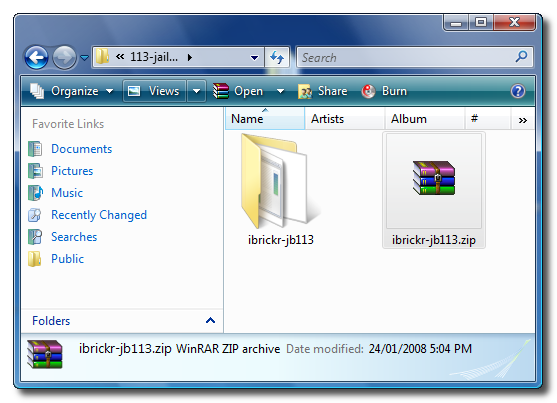
Step Three Extract iBrickr 1.1.3 from the file(ibrickr-jb113.zip) we downloaded earlier.
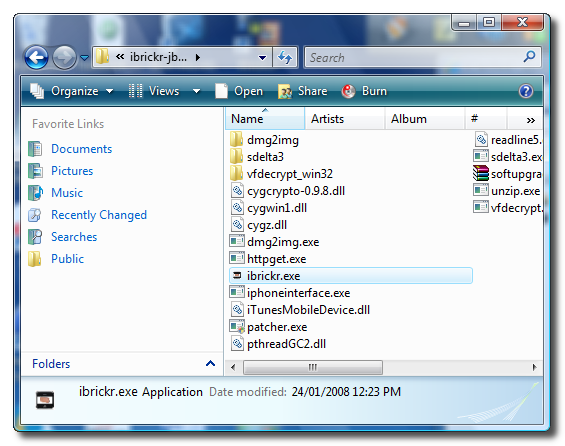
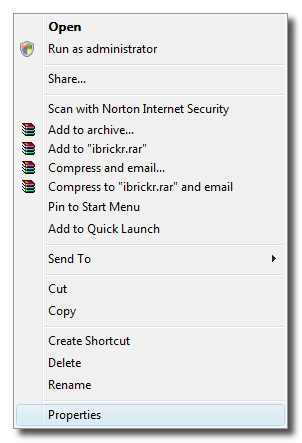
Step Four A folder will be extracted called ibrickr-jb113. If you have Vista/2000 from this folder right click ibrickr.exe then select properties from the popup menu. Otherwise if you have XP procede to Step 6.
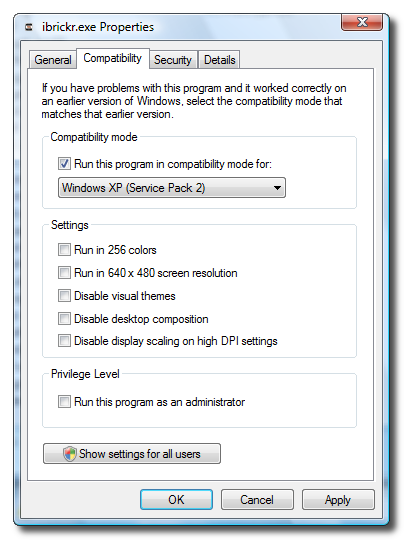
Step Five Click the Compatibility tab and check Run this program in compatibility mode for:. Then select Windows XP (Service Pack 2 from the drop down. Finally click the Apply button.
Step Six Now double click ibrickr.exe to launch the application.
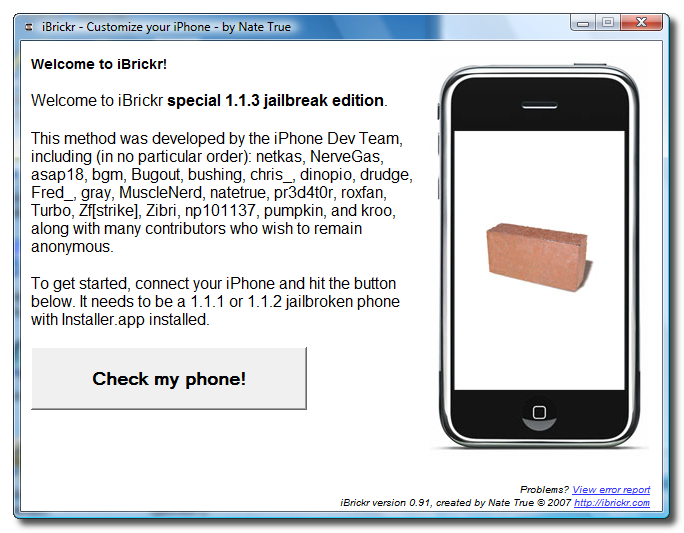
Step Seven When iBrickr launches click the Check my phone! button.
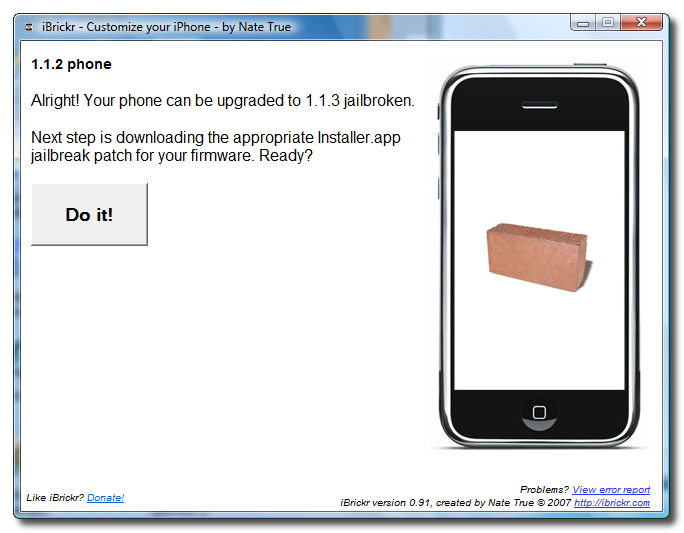
Step Eight You will get a message telling you which firmware version you are currently on. It will also let you know if your phone can be upgraded to 1.1.3 jailbroken. If it can, click the Do it button.
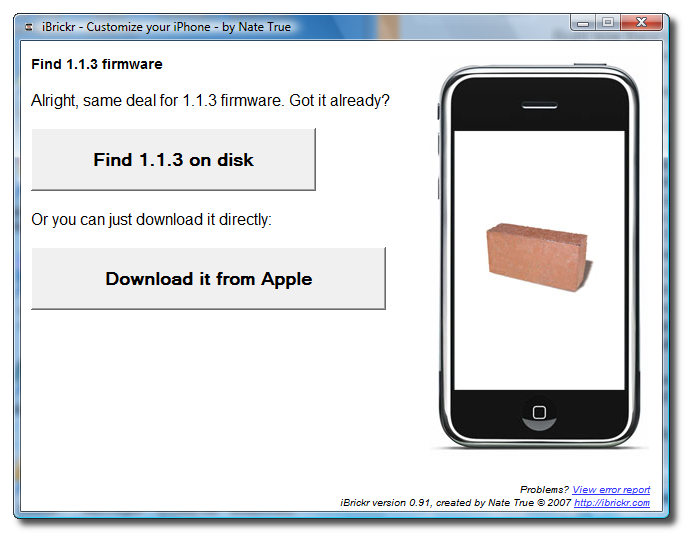
Step Nine iBrickr will download the necessary files. You will then be presented with the option to find the 1.1.3 firmware on your disk or to download it from Apple. Click the Download it from Apple button.
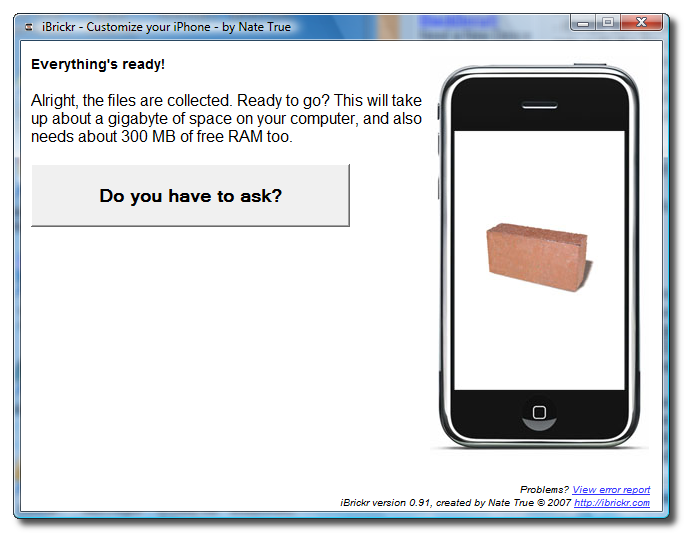
Step Ten Once the firmware has been downloaded you will be prompted to confirm the beginning of installation. Click the Do you have to ask? button to continue.
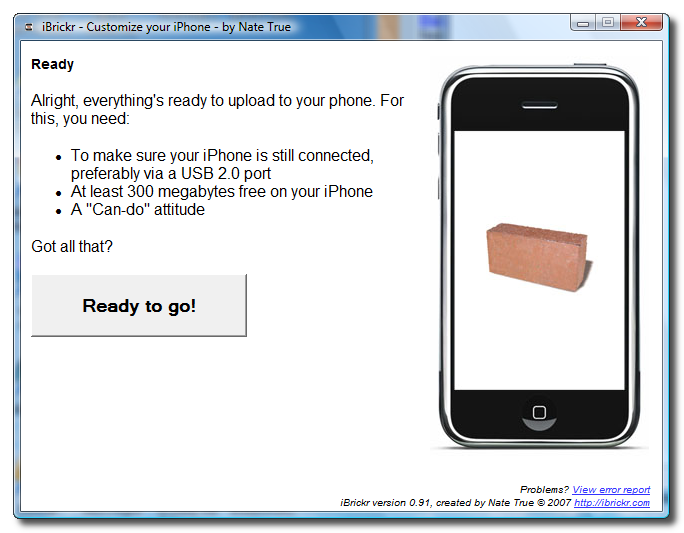
Step Eleven Again once everything is ready you will be asked to confirm installation. Click the Ready to go! button to begin.
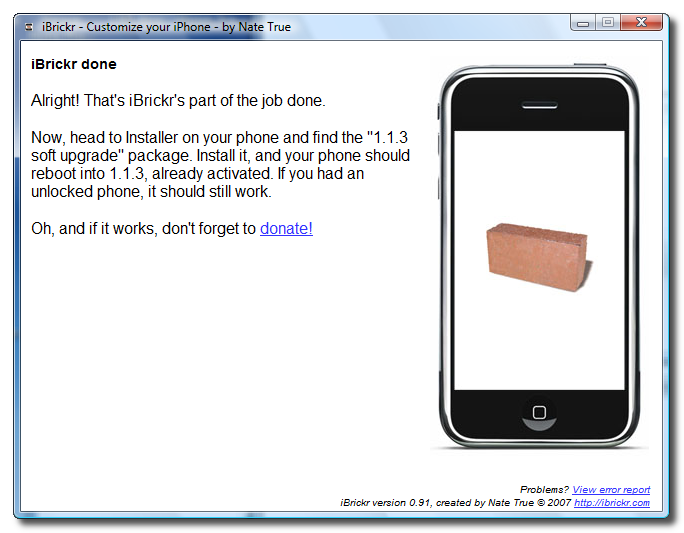
Step Twelve iBrickr has now completed its part of the job.
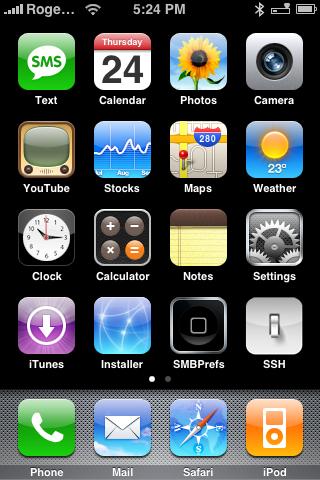
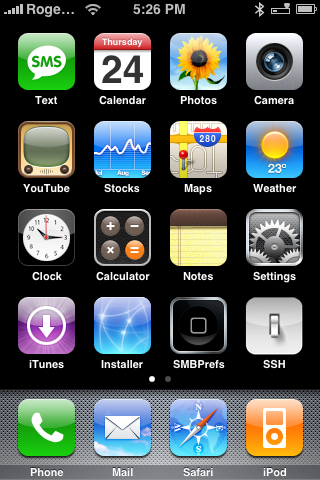
Step Thirteen Press to launch Installer from the Springboard.
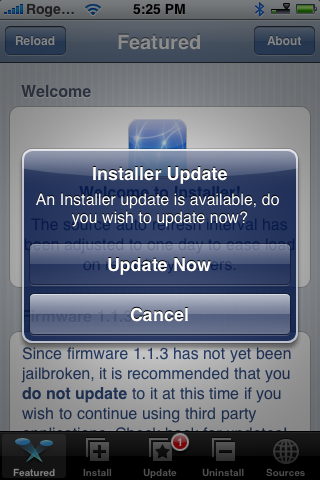
Step Fourteen If you get prompted for an Installer Update click the Update Now button.
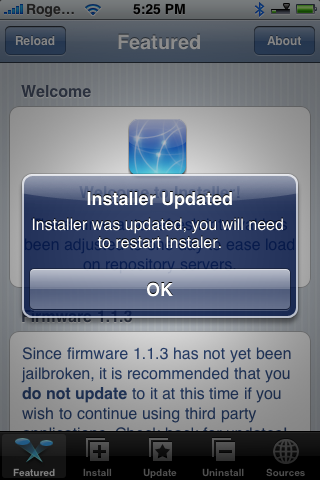
Step Fifteen If Installer was updated click the Ok button.
Step Sixteen Press to launch Installer from your Springboard again. (If you had to update).
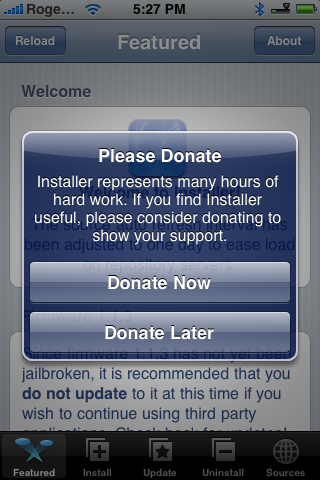
Step Seventeen If asked to Donate click the Donate Later button for now.
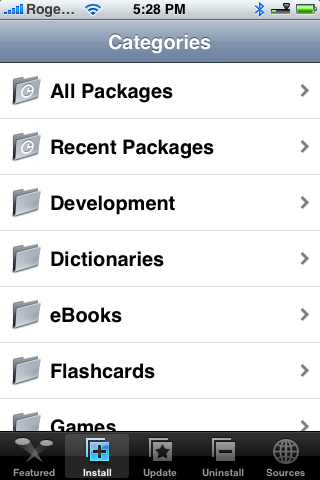
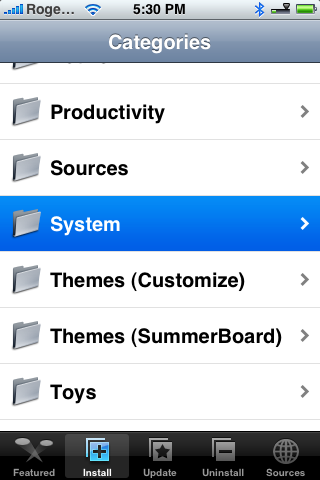
Step Eighteen Press to select the Install tab at the bottom of the screen.
Step Nineteen Press to select System from the list of Categories.
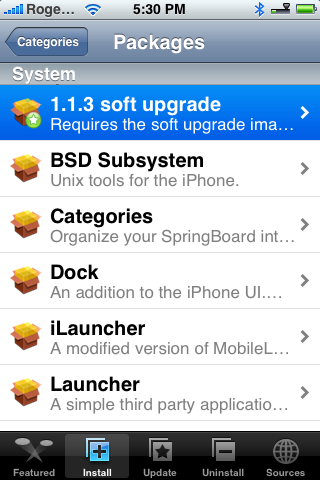
Step Twenty Press to select 1.1.3 soft upgrade from the list of Packages.
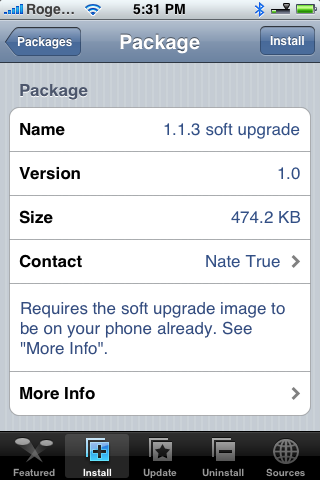
Step Twenty One Press the Install button at the top right of the screen.
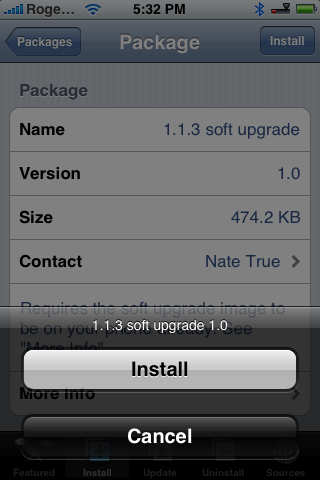
Step Twenty Two Press the large Install button that appears.
Your iPhone will install the Soft Update package then reboot. This takes a few minutes.
At reboot I got a "This accessory is not mean to work with the iPhone message." After this disappeared I got a "Edit Home Screen" message. Click the Dismiss button and you will have SUCCESS!!!!
CLEANUP: You should delete the file that iBrickr copies over to your iPhone its 300+ Mb. I'll add instructions as soon as things get less hectic. For now the file is at: ./var/root/media/softupdate
NOTES*: I noticed that SSH is not working... To fix it I had to reinstall BSD Subsystem from Installer. Then I installed OpenSSH from Installer.
THANKS: Since I don't know everyone on the Dev Teams I am gonna borrow netkas' thank you. Props to everyone on the Dev Team, including (in no particular order): netkas, NerveGas, asap18, bgm, Bugout, bushing, chris_, dinopio, drudge, Fred_, gray, MuscleNerd, natetrue, pr3d4t0r, roxfan, Turbo, Zfstrike, np101137, pumpkin, dubeditions(PhilMugPH) and kroo, along with many contributors who wish to remain anonymous. And props to planetbeing, who was the first person with a 1.1.3 jailbroken iphone, and Zibri, by whom this method was largely developed. Additionally to Shaun Erickson, who packaged the Installer half of the upgrade, and runs most of the application packaging for the iPhone.
Get the iClarified Daily Newsletter
Apple news, rumors, tutorials, price drop alerts, in your inbox every evening, free.
Unsubscribe at any time.
Success!
You have been subscribed.
Add Comment
Would you like to be notified when someone replies or adds a new comment?
Yes (All Threads)
Yes (This Thread Only)
No
Notifications
Would you like to be notified when we post a new Apple news article or tutorial?
Hey, for those of you who cant find the soft update to 1.1.3 then go to sources and add the iClarified source (http://installer.iClarified.com) then refresh the sources and go to the package iClarified and install the soft upgrade and jailbreak for 1.1.3. This worked fine for me took about 20mins but eventually upgraded. I havn't found any problems with it so far but if you get a syncing problem there is a package to fix this in the iClarified package list.
||||||||||||Do this after the process above (do the steps with iBrickr and then install this if you cannot find 1.1.3 soft update in system)|||||||||||||||||||||||||||\
Hope this works did for me. Good Luck :)
Same problem here. Everything went fine up to the ibrickr part. I cannot find 1.1.3 software upgrade in the installation list, even though I refreshed 1000 times.
i have the same problem =(
quote : everything went great UNTIL i went to the system section of installer and "1.1.3 soft upgrade" was not on the list. CAN YOU PLEASE HELP!!!!
I noticed the same problem, I only see the Official 113 Upgrade in the Installer, not the 113 Soft upgrade, or ... should I really use the Official one, since i was patched by iBrickr?
Do you have problem with upgrading your OTB iPhone 1.1.3 after you downgrade it to 1.1.1? Here is my personal solution:
1- Downgrade the firmware:
2- Install the packages:
Install the BSD Subsystem from system folder
OktoPrep
3- Upgrading to 1.1.2:
From iTunes press update with shift/option to select the firmware1.1.2
When its done will gives an error, and the iPhone in recovery mode.
Go to iBrickr (old version) press Boot the phone
The phone will start with 1.1.2 version screen
Go to jailbreak, check the SSH and press jailbreak!
When its done will show again the phone in recovery mode
Go back to iBrickr again then Boot the phone and then it will restart to a 1.1.2 jail broken phone.
4- Upgrading to 1.1.3
Get the instruction from here: https://www.iclarified.com/611/how-to-officially-update-and-jailbreak-to-113-iphone-firmware-installer
I wish it worked for you and solved the problem.
Thanks
HELP!!! I have a 1.1.2 Iphone downgraded to 1.1.1 unblocked, I followed all the steps and no problem, then I erased the IBrickr archives using the Installer application to erase it and no problem, then I installed some apps and no problem, finally I installed BSD Subsystem from Installer and when the iphone Rebooted the problems begin. The Iphone don't stop to rebooting itself. What can I do?. Thanks Rodrigo
@Pessi you should buy a **sim or try H/W BL downgrade but it is risky process.
when you will get your sim you should downgrade your 1.1.2 to 1.1.1 jailbeak, oktoprep and update to 1.1.2. jailbreak and then use this tutorial to make your phone work on 1.1.3 ;)
@Irina you can use this tutorial. your phone will work after a update.
Hey!
I have 1.1.2 OTB, JBen and with Next Sim III inside.
Is it possible for me to upgrade to 1.1.3? ...I don't know if the Next SIM III solution will keep on working for me if I upgrade.
Thanks in advance!












![Apple Studio Display XDR Hits All-Time Low of $2,969.99 ($329 Off) [Deal]](/images/news/101976/101976/101976-160.jpg "Apple Studio Display XDR Hits All-Time Low of $2,969.99 ($329 Off) [Deal]")
![Apple AirPods Pro 3 Drop to $199 ($50 Off) [Deal]](/images/news/101966/101966/101966-160.jpg "Apple AirPods Pro 3 Drop to $199 ($50 Off) [Deal]")
