These are instructions on how to patch AppSupport for 1.1.4 iPhones. This fixes Dialer Crashing and Caller ID problems. If when you try to make a call the keyboard crashes and returns you to the home screen then this is the tutorial you should follow.
This solution was created by timschuerewegen. We have only packaged it for your convenience. He deserves all the credit for it!
Currently this solution has support for the following countries: Anguilla, Antigua and Barbuda, Argentina, Australia, Austria, Bahamas, Bahrain, Bangladesh, Barbados, Belgium, Belize, Bermuda, Bosnia and Herzegovina, Brazil, Canada, Cayman Islands, Chile, China, Costa Rica, Croatia, Cyprus, Dominica, Dominican Republic, Falkland Islands (Malvinas), France, French Guiana, French Guiana (workaround for MCC 340 problem), Georgia, Germany, Greece, Grenada, Guadeloupe, Haiti, Honduras, Hong Kong, Iceland, India, Indonesia, Iran, Islamic Republic of, Ireland, Israel, Italy, Jamaica, Japan, Jordan, Kuwait, Lebanon, Macedonia, Madagascar, The Former Yugoslav Republic of, Malaysia, Malta, Martinique, Martinique, Mexico, Moldova, Republic of, Montenegro, Montserrat, Morocco, New Zealand, Norway, Panama, Peru, Philippines, Poland, Portugal, Qatar, Romania, Russian Federation, Saint Kitts and Nevis, Saint Lucia, Saint Vincent and The Grenadines, Saudi Arabia, Serbia and Montenegro, Singapore, South Africa, Spain, Sri Lanka, Sweden, Switzerland, Thailand, Trinidad and Tobago, Turkey, Turks and Caicos Islands, Ukraine, United Arab Emirates, United Kingdom, United States, Uruguay, Venezuela, Viet Nam, Virgin Islands, British
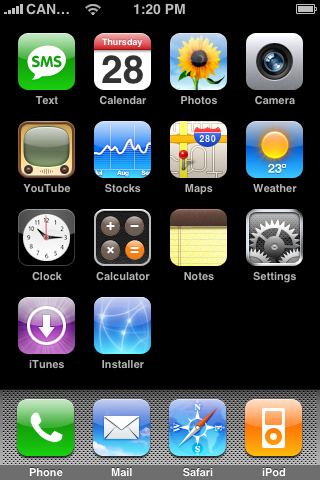
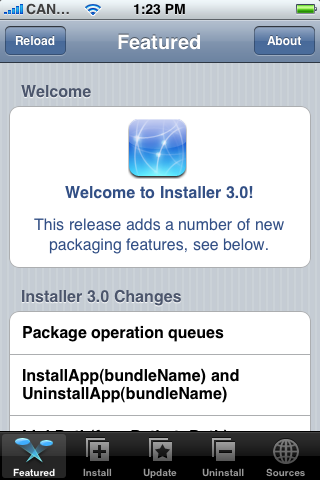
Step One Launch Installer by pressing its icon on your SpringBoard.
Step Two Press to select the Install tab at the bottom of the screen.
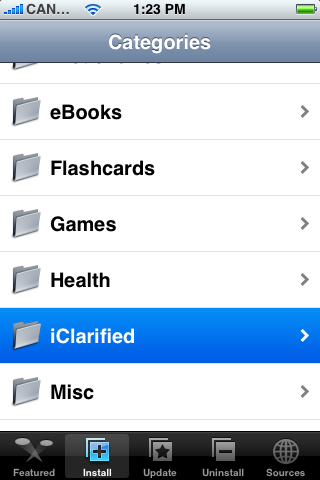
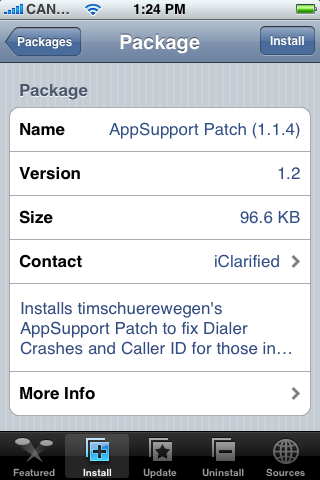
Step Three Press to select iClarified from the list of Categories.
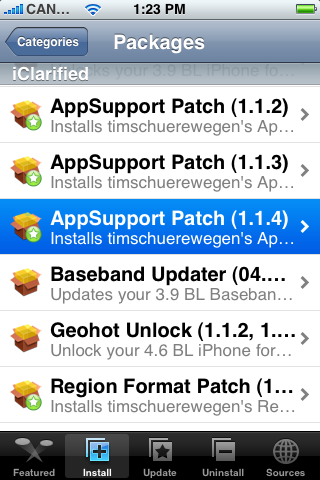
Step Four Press to select AppSupport Patch (1.1.4) from the list of Packages.
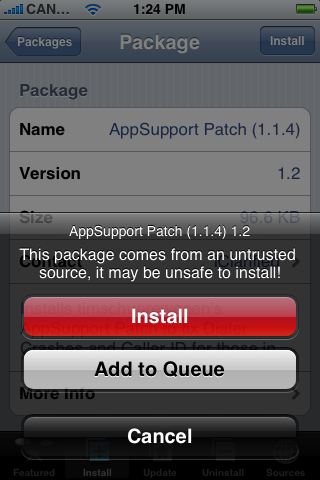
Step Five Press to select the Install button at the top right of the screen.
Step Six Press the large red Install button to begin the installation.
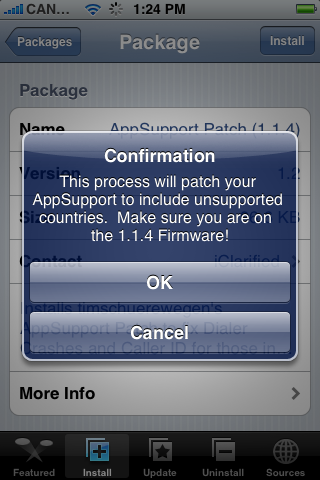
Step Seven A Confirm notice will appear telling you that this process will patch AppSupport and to make sure you are on the 1.1.4 firmware. Press the large OK button.
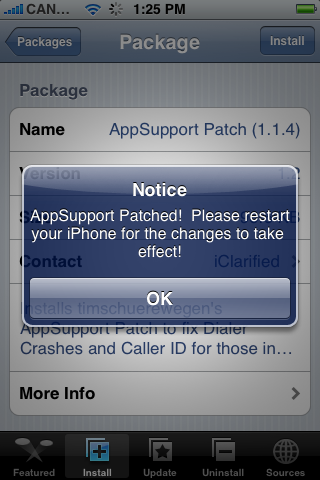
Step Eight Once the install has completed a Notice will appear telling you that AppSupport is patched. Also you will have to restart your iPhone for the changes to take effect. Click the large OK button.
Step Nine You will be returned to the Categories menu. Press the Home button to return to your springboard. Now hold down the Sleep/Wake button for 3 seconds to power off your iPhone. Drag the power slider that appears to the right.
After the iPhone turns off you may restart it and finally have use of your phone!
This solution was entirely developed by timschuerewegen. It can be customized to your country if it isn't included already. I will do a tutorial on that later. If you want to donate or to see the latest updates to his patch you can go: repository link no longer available
Get the iClarified Daily Newsletter
Apple news, rumors, tutorials, price drop alerts, in your inbox every evening, free.
Unsubscribe at any time.
Success!
You have been subscribed.
Add Comment
Would you like to be notified when someone replies or adds a new comment?
Yes (All Threads)
Yes (This Thread Only)
No
Notifications
Would you like to be notified when we post a new Apple news article or tutorial?
Kuwait recently switched from 7 digit numbers to 8 digits (excluding the country code 965), but since this chnage my phone does not recognize the contacts either when they are calling (shows name when no country code in contact) or SMS (shows name when country code included in contact).
Hi,
Recently Kuwait have added a leading digit to all the tele numbers. Old Format was +965 XXXXXXX. Not it is +965 XXXXXXXX. Hence we cannot see name 1.1.4
Yo soy de Costa Rica y arregle el nuevo sistema de 8 digitos, (8+ y el 2+), asi es como lo cambie:
Con el patch de iClarified instalado, hay que cambiar un archivo del iPhone. Yo uso Cyberduck (mac) busquen guias para meterse en los archivos del iPhone por SFTP (SHH).
En los sistemas del iPhone buscan /System/Library/Frameworks/AppSupport.framework/Support/PhoneNumberTemplates.txt
Pasenlo a su computadora y lo editan como texto .txt
Donde dice Costa Rica, borrenlo y peguen este texto
// Costa Rica [cr]
cr 506 00 - - ########
Y LO GUARDAN Y LO PASAN AL IPHONE SOBRE EL ARCHIVO ANTERIOR, listo... debe funcionar si no lo apagan y lo encienden y debe de servir.
Hi
Can you please add an additional digit for Costa Rica? We now have 8-digits in our phone numbers. This is our new phone number format: +506-8888-1234. Thanks a lot!
Guyz!!! I have been working for almost 12 hours infront of the computer to fix the inernational caller ID thing. And unluckily OpenSSH was not working in my phone. I have found the easiest way to overcome this problem using timschuerewegen's appsupport files. I just wanted to share this with u guyz.
This is all i did ( im not femilier with computers stuff but i made it, means any one can do this)
1. download the latest Build of PhoneNumber Dynamic Library.
2. Unzip it and extract it in ur desktop
3. download iPhonebrowser (coolest iPhone file explorer for windows)
4. install iPhonebrowser to ur computer
5. Add i.unlock.no to ur installer, and refresh
6. install Ziphone iBrickr fix from Unlocking tools folder (restart the iphone)
7. power on the iphone and put it in the cradle(connect the USB cable)
8. From ur computer open iPhoneBrowser
9. Follow the intructions from the phonenumber_dylib_readme.htm and do exactly as timschuerewegen says.
10. now restart ur phone sorry iphone again.
11. its all done. Enjoy
i hope this is helping u guyz!!!
Hi everyone. If you need help regarding your country refer to the hackint0sh forum and see if your country is listed there. Otherwise, contact tim in that same thread.
Hi, I tried your patch for the iphone but Tunisia wasn't created ...
as our numbers are from this form +21612345678 from outside or 12345678 from inside the country, I added the line:
// Tunisia [tn]
tn 216 00 - - ########
it works like that, but I didn't know what is the correct syntax and I only copied from spain which is almost the same syntax (except that they have 9 numbers)
please correct me if needed and add it to your package.
thanks
TigerSharkBarn
2008-02-29 23:48:29
Quote: Hi I used Ziphone to jailbreak to 1.1.4 successfully but I cant install the Patch AppSupport for 1.1.4 nor to remove any of the previous installed Apps. The error is Main Script execution failed. I am on Installer 3.0 and BSD Subsystem v2.1. Appreciate any help. Thanks.
I had the same problem, the ZiPhone jailbreak doesn't go far enough. You'll need to use iNdependence, this one activates, unlocks, jailbreaks and installs css and stuff, and so with this one you'll have no further problems.
The article mentions a tutorial for adding support for countries not in the officially supported country list. Has such a tutorial been created? If so, where can it be found. If not, is there a plan anytime in the near future. It would greatly help.
Thanks.
This page helped me improve the number formatting, and the entries for different countries can be adjusted and/or corrected as desired. Using a consistent number format helps with caller id. It is long winded but amounts to replacing a single file and is valid for all 1.1.x phones. I hope it gets included in the next version of this patch. It would be pretty easy to add this.
I have been trying to get this to work with my country Belize but i cant for some reason. With the 1.1.1 firmware, i used the Phone to # fix and set the number to 7 so that it only reads 7 digits and that worked perfectly since our cell phone format appears as +5016104455 and home and business numbers appears as +05018228888. So reading just the (6104455) and the (8228888) made the caller id work perfectly, however, i cant seem to get the settings for this patch to get the iphone to work like that, can anyone give me the settings that would have it just read the first 7 digits
Thanks in advance
This doesn't work! v113 didn't work on my 113 firmware, and not at 114 it still doesn't work! I think this is a hoax. I am in Ireland and the software changes nothing! Notice how nothing says precisely what it is supposed to do! 'Fixes problems' ha!
Thank you iClarified can u please add my country Syria to your AppSupport patch?
I'm adding it manually since 1.1.2
// Syrian Arab Republic [sy]
sy 963 00 0 ## #######




![Apple Home Hub With Siri AI in Employee Testing, Could Debut in October [Gurman]](/images/news/102309/102309/102309-160.jpg "Apple Home Hub With Siri AI in Employee Testing, Could Debut in October [Gurman]")

![Apple Cuts Fitness+ Jobs as It Rethinks the Service [Report]](/images/news/102306/102306/102306-160.jpg "Apple Cuts Fitness+ Jobs as It Rethinks the Service [Report]")










![Apple Studio Display XDR Hits All-Time Low of $2,969.99 ($329 Off) [Deal]](/images/news/101976/101976/101976-160.jpg "Apple Studio Display XDR Hits All-Time Low of $2,969.99 ($329 Off) [Deal]")
