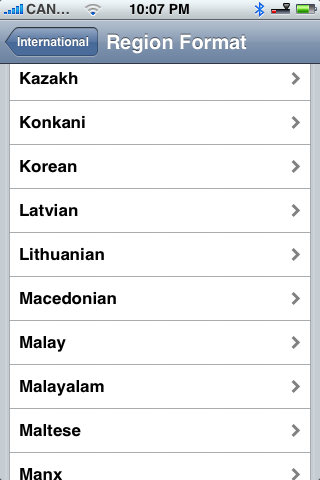
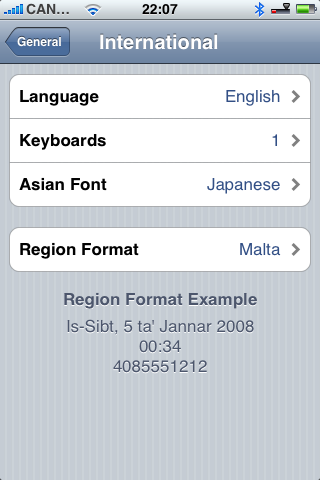
These are instructions on how to patch the 1.1.4 iPhone Region Format Settings to unlock all locales! Notice when you normally go to Settings:General:International:Region Format only a few countries are available. This patch will open the list to all countries!
This solution was created by timschuerewegen. We have only packaged it for your convenience. He deserves all the credit for it!
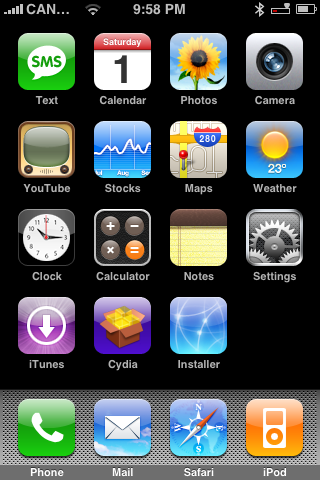
Step One Launch Installer by pressing its icon on your SpringBoard.
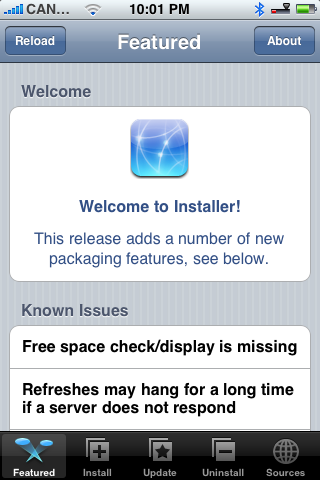
Step Two Press to select the Install tab at the bottom of the screen.
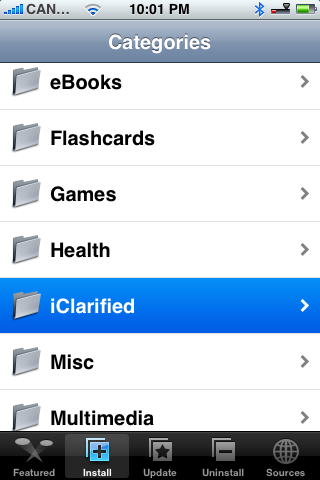
Step Three Press to select iClarified from the list of Categories.
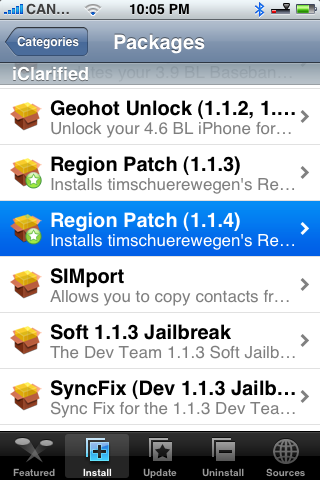
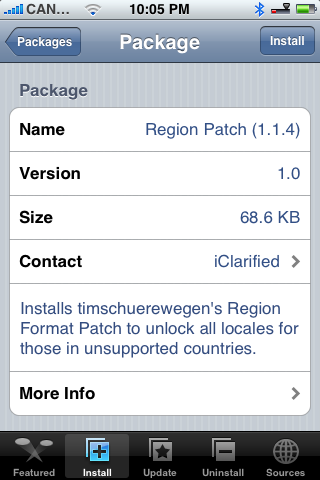
Step Four Press to select Region Patch (1.1.4) from the list of Packages.
Step Five Press to select the Install button at the top right of the screen.
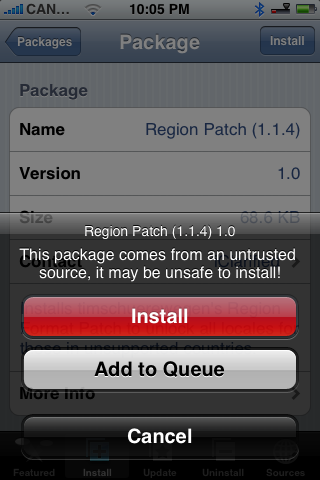
Step Six Press the large red Install button to begin the installation.
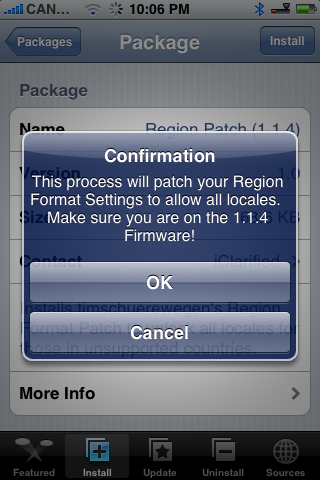
Step Seven A Confirm Notice will appear telling you that this process will patch your Region Format Settings and to make sure you are on the 1.1.4 firmware. Press the large OK button.
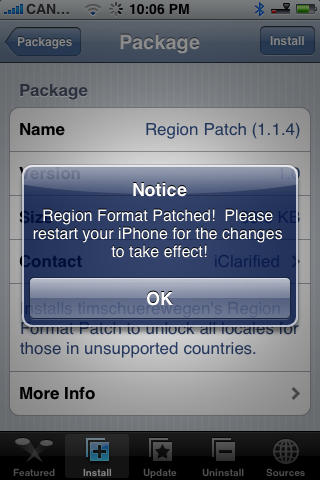
Step Eight Once the install has completed a Notice will appear telling you that Region Format is patched. Also you will have to restart your iPhone for the changes to take effect. Click the large OK button.
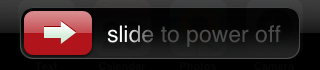
Step Nine You will be returned to the Categories menu. Press the Home button to return to your springboard. Now hold down the Sleep/Wake button for 3 seconds to power off your iPhone. Drag the power slider that appears to the right.
After the iPhone turns off you may restart it and finally set your Region Format!
THANKS***: This solution was entirely developed by timschuerewegen. Please give him your thanks!
Get the iClarified Daily Newsletter
Apple news, rumors, tutorials, price drop alerts, in your inbox every evening, free.
Unsubscribe at any time.
Success!
You have been subscribed.
Add Comment
Would you like to be notified when someone replies or adds a new comment?
Yes (All Threads)
Yes (This Thread Only)
No
Notifications
Would you like to be notified when we post a new Apple news article or tutorial?
Do it the easiest, safest and yet simplest way. Just visit the hackint0sh forums to find the post. I hope that iclarified will look into my methodology and come up with more easier way as this issue has been a big problem and i personally know how frustrating and boring it is to have an iPhone without this fix!!! thanks Nabeel
Can any one add Maldives to the list!!! Im new to these stuff and i have intalled iCleried regionf format patch but theres no support for Maldives. number format is +960####### please do sumthing. im goin crazzy here tryin to fix this.
Okay! So should i install a app called SwePhone (that includes translates and wordlist) and a program for the swedish letters (åäö) instead? or should i combine them all?
@Emad:
Yes, it works on 1.1.4
You will have Swedish keyboard, but not the complete translation.
You will only get date, days, months and similar items translated to Swedish.
@ Archer: That's what I want. By default you only have: English, English(UK), French, German, Italian. I'm Portuguese so, I would like to have that keyboard too. I'm not very comfortable with ssh. My only experience with it was when I unlocked my 1.1.2 otb with gunlock and had to copy some files, set permissions and run comands trought terminal on the iPhone. I will wait a day or two to see if a patch trough Installer arrives if not, I will give it a try.
@José: I've checked this. Now I have these keyboards on 1.1.4 iPhone: English, English (UK), French, French (Canada), German, Japanese, Spanish, Italian, Dutch, Swedish, Danish, Norwegian Bokmal, Finnish, Polish, Portugese. So
@ Archer: This is the reference to unlock the hidden keyboards on the iPhone from the hackint0sh forums. I stated the iPod Touch for comparison because by default the iPod Touch already have those keyboards but Apple hidden most of them in the iPhone.
Hi! What I meant was that the iPhone only shows 5 keyboards but it has more built in (like fw 1.1.4 in iPod iTouch). There is a way to make them visible already but I'm not very confortble in copying files through ssh. If you guys could do a patch similair to this one it was fantastic! :)




![Apple Releases macOS 27.2 Golden Gate Beta to Developers [Download]](/images/news/102249/102249/102249-160.jpg "Apple Releases macOS 27.2 Golden Gate Beta to Developers [Download]")
![Apple Seeds First Betas of watchOS 27.2, tvOS 27.2, and visionOS 27.2 to Developers [Download]](/images/news/102252/102252/102252-160.jpg "Apple Seeds First Betas of watchOS 27.2, tvOS 27.2, and visionOS 27.2 to Developers [Download]")
![Apple Releases iOS 27.2 Beta and iPadOS 27.2 Beta to Developers [Download]](/images/news/102248/102248/102248-160.jpg "Apple Releases iOS 27.2 Beta and iPadOS 27.2 Beta to Developers [Download]")










![Apple Studio Display XDR Hits All-Time Low of $2,969.99 ($329 Off) [Deal]](/images/news/101976/101976/101976-160.jpg "Apple Studio Display XDR Hits All-Time Low of $2,969.99 ($329 Off) [Deal]")
