Apple has released a Verizon Carrier Update for the iPhone to fix an issue which could cause your device to use cellular data while on Wi-Fi.
This carrier settings update resolves an issue in which, under certain circumstances, iPhone 5 may use Verizon cellular data while the phone is connected to a Wi-Fi network.
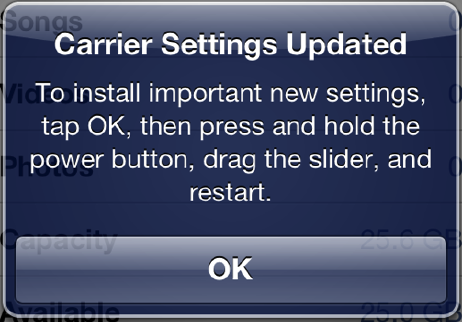
Follow these instructions to install the update. ● Tap Settings > General > About. ● Wait for the following alert to appear: ● Tap OK to install the update. ● Hold the Sleep/Wake button down until you see "slide to power off". ● Slide to power off. ● After the device powers off, hold the Sleep/Wake button to turn your phone back on.
Note: To finish the installation of the update, your iPhone 5 must be turned off and then on again.
After your iPhone restarts, tap Settings > General > About, then scroll down to Carrier and verify that "Verizon 13.1" is displayed.
Would you like to be notified when someone replies or adds a new comment?
Yes (All Threads)
Yes (This Thread Only)
No
Notifications
Would you like to be notified when we post a new Apple news article or tutorial?
Yes
No
Comments (9)
Comments are closed for this article.
0
Apple freak - October 1, 2012 at 9:29am
How about a lawsuit for you all who complained about it?? We dont care of overcharging you all and yes you guys found out about the fix before we do. So what???! Good for you!
0
NoGoodNick - May 31, 2013 at 7:10pm
OK, it's bad enough when the 'Samsung shills' steal my id, but when the apple fans do it too I figure it's about time to quite using my own ID. Can't anyone claim credit for their own comments anymore?
0
robindurden - October 1, 2012 at 6:36am
made a genius appt about this. the particular genius had no idea what I was talking about. always fun to find out issues before even apple employees do.
0
Big B - October 1, 2012 at 5:51am
For some reason, I simply cannot get this to work for me. The alert never comes up. I've tried with only cellular data on, only wi-fi, both⦠I've killed the settings app, restarted; nothing. In fact, my version is still showing at 12.0. I've only seen this alert before 1 time and I'd say it was a year ago at least. This isn't the same as the *code roaming capability update either, is it? In my mind they're separate. Anyone else have this problem and fix it? Suggestions? I am jailbroken, at 5.1.1 FW, CDMA.
0
Bob Dobbs - October 1, 2012 at 6:29am
This is fix is only for the iPhone 5.
0
iDood - October 1, 2012 at 3:53am
I'm glad I have AT
0
txboy5 - October 1, 2012 at 2:50am
I knew I wasn't eating up that much data that fast!!! Fuckers!




![Anthropic Mocks ChatGPT Ads in Super Bowl Spot, Altman Fires Back [Video]](/images/news/99846/99846/99846-160.jpg "Anthropic Mocks ChatGPT Ads in Super Bowl Spot, Altman Fires Back [Video]")
![Apple Releases macOS Tahoe 26.3 RC to Developers [Download]](/images/news/99842/99842/99842-160.jpg "Apple Releases macOS Tahoe 26.3 RC to Developers [Download]")
![Apple Seeds watchOS 26.3 RC, tvOS 26.3 RC, and visionOS 26.3 RC to Developers [Download]](/images/news/99840/99840/99840-160.jpg "Apple Seeds watchOS 26.3 RC, tvOS 26.3 RC, and visionOS 26.3 RC to Developers [Download]")
![Apple Releases iOS 26.3 RC and iPadOS 26.3 RC to Developers [Download]](/images/news/99839/99839/99839-160.jpg "Apple Releases iOS 26.3 RC and iPadOS 26.3 RC to Developers [Download]")





![iPad Air (M3) Drops to Lowest Price of the Year at $489.99 [Deal]](/images/news/99843/99843/99843-160.jpg "iPad Air (M3) Drops to Lowest Price of the Year at $489.99 [Deal]")
![Beats Powerbeats Pro 2 Drop to $199.95 [Deal]](/images/news/99815/99815/99815-160.jpg "Beats Powerbeats Pro 2 Drop to $199.95 [Deal]")
![Apple Watch Series 11 Drops Back to All-Time Low of $299 [Deal]](/images/news/99283/99283/99283-160.jpg "Apple Watch Series 11 Drops Back to All-Time Low of $299 [Deal]")
![Apple AirPods 4 With Active Noise Cancellation Drop to $119 [Deal]](/images/news/99794/99794/99794-160.jpg "Apple AirPods 4 With Active Noise Cancellation Drop to $119 [Deal]")
![AirPods Pro 3 Return to All-Time Low Price of $199 [Deal]](/images/news/99752/99752/99752-160.jpg "AirPods Pro 3 Return to All-Time Low Price of $199 [Deal]")
