iClarified has discovered that it is currently possible update to iOS 9 without having your iPhone's UDID registered in the Apple Developer Center.
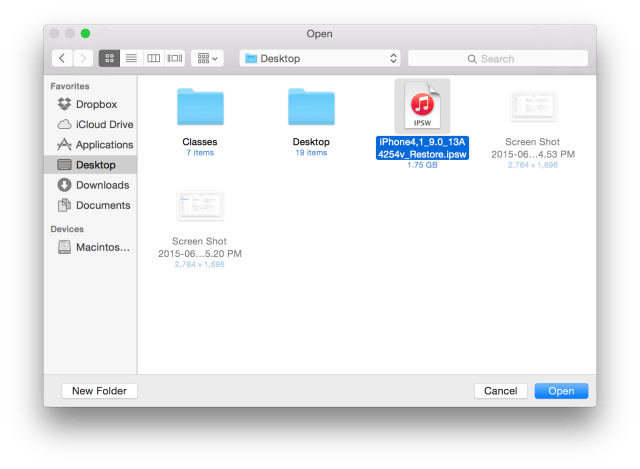
To begin, you'll need to get your hands a valid iOS 9 firmware (IPSW) file. This can be downloaded from the Apple Developer Center if you're a registered developer.
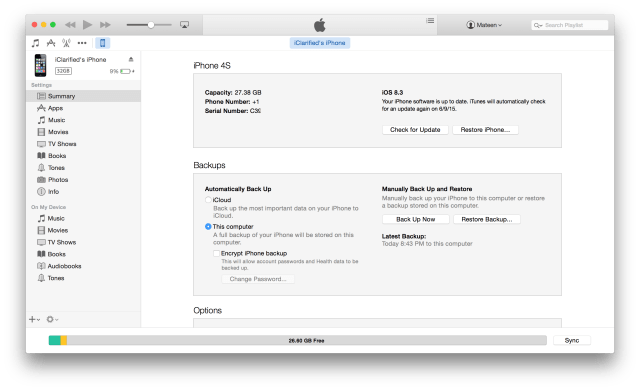
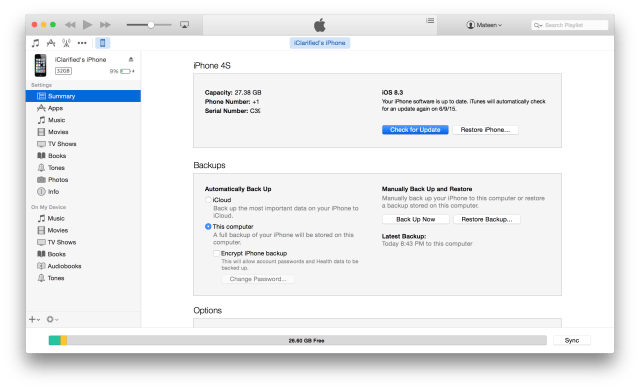
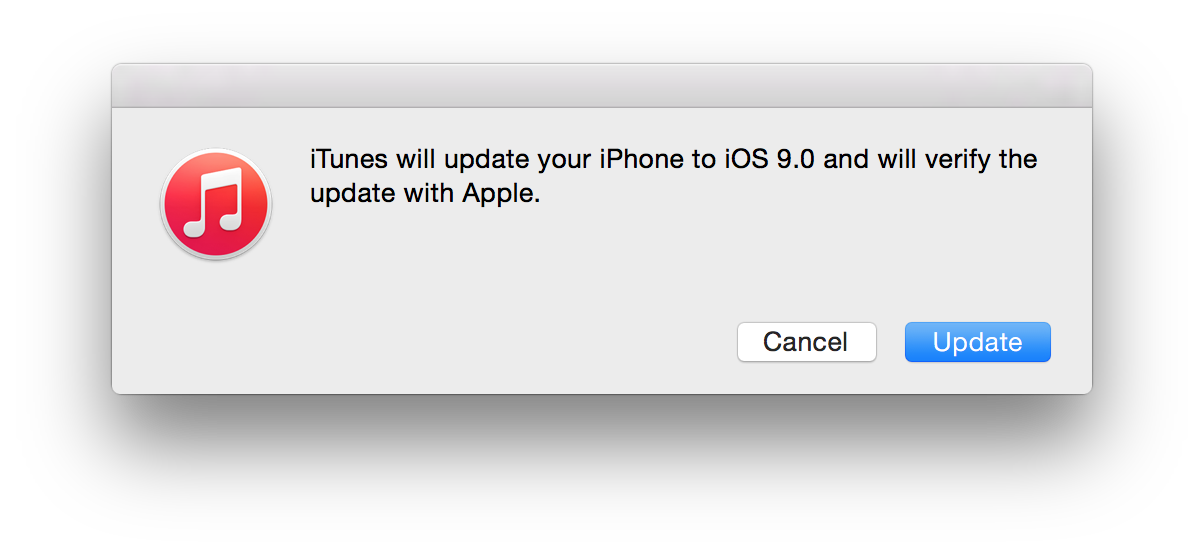
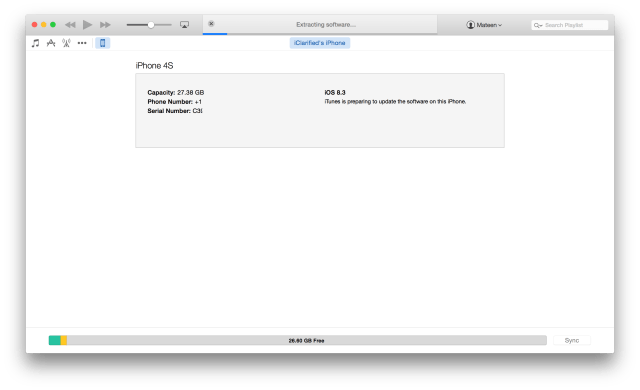
To upgrade to iOS 9 without a UDID registered in the Apple Developer Center, press and hold the Option key (Shift for Windows) and click 'Update' or 'Check For Update' in iTunes. Select the iOS 9 IPSW file you downloaded earlier from the popup window to install iOS 9.
Enjoy!
Warning: - Do not do this if you want to retain your jailbreak. You will not be able to downgrade to a jailbreak-able firmware. - Do not do this if you need to hacktivate. You must be able to activate your iPhone using a valid SIM card for this trick to work. - iOS 9 is for developers, so if you're not a developer, we recommend holding off. - Apple could block this loophole at any moment, so use at your own risk.
Notes: - You MUST use the update button NOT the restore button. - Make sure your device is activated before clicking update. We recommend turning off Find My iPhone as well. - If you would like to downgrade back to iOS 8, we've provided instructions on how to do that here.
Please follow iClarified on X, Facebook, or RSS for updates.
Get the iClarified Daily Newsletter
Apple news, rumors, tutorials, price drop alerts, in your inbox every evening, free.
Unsubscribe at any time.
Success!
You have been subscribed.
Add Comment
Would you like to be notified when someone replies or adds a new comment?
Yes (All Threads)
Yes (This Thread Only)
No
Notifications
Would you like to be notified when we post a new Apple news article or tutorial?
Yes
No
Comments (19)
Comments are closed for this article.
0
TheSupremePatriot - September 17, 2015 at 3:19pm
Battery life is fine for me :)
Im pretty sure your phones battery will drain if you jailbreak..
Thats why I don't jailbreak ;)
0
Guest - June 16, 2015 at 2:38pm
Want to know why battery life sucks? Location services run non-stop and data leakage is enormous!!! I used 3GB of data in two days without ever touching a browser or YouTube....only used Pandora for about an hour. WOW!!!
0
Asher - June 10, 2015 at 5:22pm
Omg the battery life is terrible!!
0
Anonymus - June 11, 2015 at 2:58pm
Yeap don't update it's full of bugs. The battery is literally being drained.
0
Kiddelton - June 12, 2015 at 1:14am
Yes it drains fast but i turn on low power mood and get one full day using the phone constant this will be a big option for the 9 for me
0
mackan1 - June 13, 2015 at 5:36pm
Yup same issue here battery drains fast but might be Apple are testing out high cpu usage on this build. Next couple of update will fix this issue
0
Guest - June 10, 2015 at 8:40am
Oh yeah, and "search" inside of settings was a GREAT idea!!!!
0
Guest - June 10, 2015 at 8:16am
iPhone 5(s) 16gb/Verizon. For a beta, this is amzingly smooth!! My only issue is battery life...not that good...even with Low Power Mode enabled.
0
stevenlacross - June 10, 2015 at 12:13pm
That's going to happen with all software updates, the more "features" they add, the more battery life it sucks up, also batteries just get worse over time, so you'll never get the same battery life as when you got it new. Unless you never updated it and you went to install a new battery two years later
0
Rick - June 9, 2015 at 9:48pm
I have it on my iPhone 6 and is kinda buggy. the apple store app does not display anything. most apps crash about 75% of the time. I will be dowgrading to 8.4 soon
0
iphone6 - June 9, 2015 at 8:38pm
Works fine but I think it uses more battery somehow
0
andres8a - June 9, 2015 at 7:30pm
iPhone 5 works fine
0
Vee - June 9, 2015 at 6:10am
I've installed it on my 6plus and everything works fine.
0
stevenlacross - June 9, 2015 at 3:15am
This method has been known for the past like 3 years, nothing new, Apple isn't going to close this loophole.
0
Ali - June 9, 2015 at 3:02am
Just wanted to point out that you can get the beta on your apple watch without a developers account as well
0
Toshibo - June 9, 2015 at 3:09am
How I can download iOS and watchOS?
0
Toshibo - June 9, 2015 at 3:30am
Help a lot! Thanks!
0
blackra1n - June 9, 2015 at 4:10am
Thank youuuuu!
0
Stevo - June 9, 2015 at 7:17am
Not working, straight to red iTunes logo, regarding the iOS 9 beta.






![Apple Says iPhone Duo's Folding Display Has a Replaceable Cover Layer [Video]](/images/news/102525/102525/102525-160.jpg "Apple Says iPhone Duo's Folding Display Has a Replaceable Cover Layer [Video]")
![Touchscreen OLED MacBook Pro Could Debut as Early as October [Gurman]](/images/news/102519/102519/102519-160.jpg "Touchscreen OLED MacBook Pro Could Debut as Early as October [Gurman]")
![iPhone 18 Pro Sales Rise 12% in China as Apple Leads Weekly Smartphone Market [Report]](/images/news/102522/102522/102522-160.jpg "iPhone 18 Pro Sales Rise 12% in China as Apple Leads Weekly Smartphone Market [Report]")
![Apple TV Shares Trailer for 'Awkwafina: The Unlikely Cook' [Video]](/images/news/102513/102513/102513-160.jpg "Apple TV Shares Trailer for 'Awkwafina: The Unlikely Cook' [Video]")

![How To Find Your iPhone IMEI Number [Video]](/images/tutorials/83557/83557/83557-160.jpg "How To Find Your iPhone IMEI Number [Video]")
![How To Change Wallpaper on Mac [Video]](/images/tutorials/90512/90512/90512-160.jpg "How To Change Wallpaper on Mac [Video]")




![16-Inch M5 Max MacBook Pro Drops $900 to New Low of $3,499 [Deal]](/images/news/102438/102438/102438-160.jpg "16-Inch M5 Max MacBook Pro Drops $900 to New Low of $3,499 [Deal]")
![Magic Keyboard for iPad Air Drops to $200 on Amazon [Deal]](/images/news/102402/102402/102402-160.jpg "Magic Keyboard for iPad Air Drops to $200 on Amazon [Deal]")
![13-Inch M5 MacBook Air With 1TB Drops to $1,449 on Amazon [Deal]](/images/news/102345/102345/102345-160.jpg "13-Inch M5 MacBook Air With 1TB Drops to $1,449 on Amazon [Deal]")
