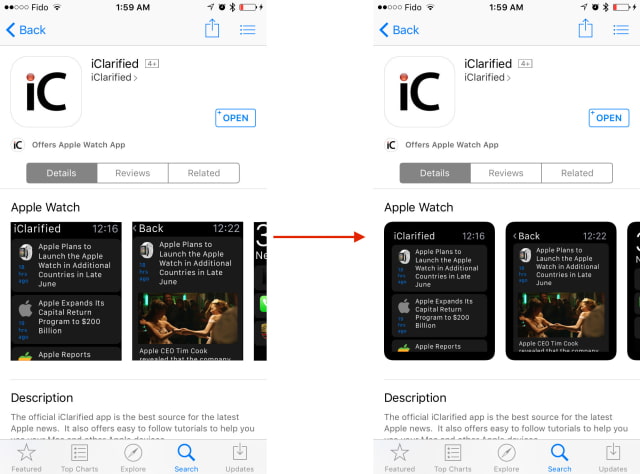
Apple has tweaked the look of Apple Watch screenshots on the App Store in iOS.
Previously, the App Store displayed screenshots with sharp corners and without a border. Now the screenshots are displayed with rounded corners and a black border that makes them appear more like they would on the Apple Watch itself.
Take a look at the before and after below! Don't forget you can get our iPhone, iPad, and Apple Watch app from here.
Add Comment
Would you like to be notified when someone replies or adds a new comment?
Yes (All Threads)
Yes (This Thread Only)
No
Notifications
Would you like to be notified when we post a new Apple news article or tutorial?
Yes
No
Comments (2)
Comments are closed for this article.
0
The iDevice Pro - June 19, 2015 at 11:24pm
To add...I personally tested this on an iPod Touch 5G on iOS 8.3 and it worked!
0
JollySonX - June 19, 2015 at 11:20pm
Oooooh curved corners on the images, looks a lot better now (:






![Apple Prepares Major 2026 Hardware Push With iPhone 17e, New iPads, and M5 Macs [Gurman]](/images/news/99870/99870/99870-160.jpg "Apple Prepares Major 2026 Hardware Push With iPhone 17e, New iPads, and M5 Macs [Gurman]")
![Apple Testing Variable Aperture and Large-Aperture Telephoto Cameras for iPhone 18 Pro [Rumor]](/images/news/99869/99869/99869-160.jpg "Apple Testing Variable Aperture and Large-Aperture Telephoto Cameras for iPhone 18 Pro [Rumor]")

![Apple Preparing to Allow Third-Party AI Voice Apps in CarPlay [Report]](/images/news/99865/99865/99865-160.jpg "Apple Preparing to Allow Third-Party AI Voice Apps in CarPlay [Report]")





![Original AirTag Drops to All-Time Low Price of $17 [Deal]](/images/news/99856/99856/99856-160.jpg "Original AirTag Drops to All-Time Low Price of $17 [Deal]")
![iPad Air (M3) Drops to Lowest Price of the Year at $489.99 [Deal]](/images/news/99843/99843/99843-160.jpg "iPad Air (M3) Drops to Lowest Price of the Year at $489.99 [Deal]")
![Beats Powerbeats Pro 2 Drop to $199.95 [Deal]](/images/news/99815/99815/99815-160.jpg "Beats Powerbeats Pro 2 Drop to $199.95 [Deal]")
![Apple Watch Series 11 Drops Back to All-Time Low of $299 [Deal]](/images/news/99283/99283/99283-160.jpg "Apple Watch Series 11 Drops Back to All-Time Low of $299 [Deal]")
![Apple AirPods 4 With Active Noise Cancellation Drop to $119 [Deal]](/images/news/99794/99794/99794-160.jpg "Apple AirPods 4 With Active Noise Cancellation Drop to $119 [Deal]")
