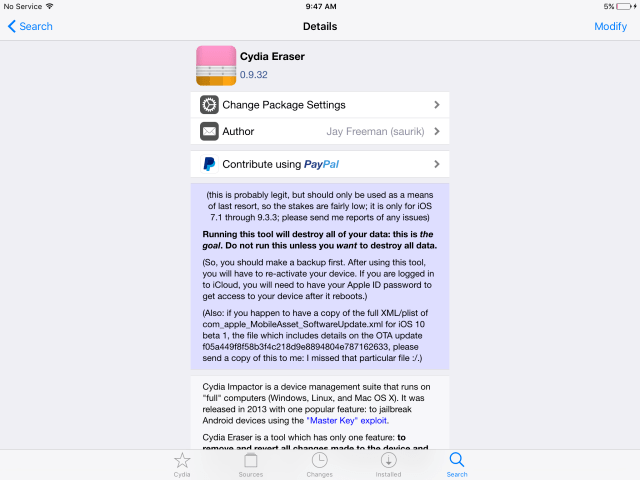
Saurik has released an update to Cydia Eraser bringing support for iOS 7.1 through iOS 9.3.3. Cydia Eraser lets you remove and revert all changes made to your jailbroken device and return it to "stock" Apple iOS software without updating to a new version of iOS.
Running this tool with destory all of your data: this is the goal. Do not run this unless you want to destroy all data.
Before using Cydia Eraser we recommend making a backup of your data. After using the tool you will need to re-activate your device. If you are logged into iCloud you will need to have your Apple ID password to get access to your device after it reboots.
Get the iClarified Daily Newsletter
Apple news, rumors, tutorials, price drop alerts, in your inbox every evening, free.
Unsubscribe at any time.
Success!
You have been subscribed.
Add Comment
Would you like to be notified when someone replies or adds a new comment?
Yes (All Threads)
Yes (This Thread Only)
No
Notifications
Would you like to be notified when we post a new Apple news article or tutorial?
Yes
No
Comments (15)
Comments are closed for this article.
0
Guest - August 15, 2016 at 6:17am
Put the icon in folder then you will notice it alot less.
0
Guest - August 15, 2016 at 6:14am
I suggest you manually delete many apps before you use the eraser. When you manually delete the apps from settings options, the process of restoring back to 9.3.3 will be substantially faster.
0
RTS48UK - August 13, 2016 at 2:24pm
I have a very strange phenomena related to Cydia. I originally Jailbroke my 4S and when I upgraded to a 5S (unjailbroken) I transferred my data via a restore from BU. An icon linking to 'Repo Cydia' appeared so I deleted it. Every time I rebooted the phone the icon reappeared. I have since upgraded to a 8 and the same phenomena of the icon appeared again. I asked Apple about it and they said that it is embedded in the boot system and can't be removed. Has anyone any ideas how I can be rid of this?
0
Kevon - August 15, 2016 at 1:55am
If apple said its embedded then thats just it that backup is dead for you. Your going to have to just restore fresh and dont restore from that backup thats corrupted.
0
RTS48UK - August 15, 2016 at 2:05am
Thanks Kevon but that is not an option for me as my phone lives with me in Bolivia but was bought and activated in the UK. Even then activation took 3 days so I hate to think what would happen here.
0
Kevon - August 15, 2016 at 2:16am
Sorry to hear that bud but give it a try, if your phone was already activated once after a restore it shouldnt need another activation.
0
JuergenWest - August 15, 2016 at 4:22pm
Have you tried restoring from an iCloud back up instead? And or used iCleaner?
0
Kaizo - August 15, 2016 at 9:01pm
So it completely destroys the data on the iPhone?
0
Chip - August 13, 2016 at 11:24am
This guy needs to put other payment option not only PayPal.
0
Hazrdus - August 13, 2016 at 3:04pm
Safest N most direct way! Especially when dealing with hackers on a daily basis!
0
Afridi - August 12, 2016 at 5:38pm
Very good app for erase cydia now should unthetread jailbreak , then naver update my phone ,erase and jailbreak for all time.
0
nono09 - August 12, 2016 at 5:08pm
Good but what's the point in 9.3.3 if all you have to do is reboot and it's not jailbroken?
0
Star - August 12, 2016 at 7:06pm
This will remove the files. Rebooting only makes it not active, jb is still there.





![Low-Cost MacBook Colors Were Originally Planned for M2 MacBook Air [Rumor]](/images/news/99984/99984/99984-160.jpg "Low-Cost MacBook Colors Were Originally Planned for M2 MacBook Air [Rumor]")
![Apple Seeds Xcode 26.3 RC 2 With Claude 4.6 Support [Download]](/images/news/99980/99980/99980-160.jpg "Apple Seeds Xcode 26.3 RC 2 With Claude 4.6 Support [Download]")







![Expired: Save $900 on Apple's 11-Inch M4 iPad Pro 2TB With Nano-Texture Glass [Deal]](/images/news/99982/99982/99982-160.jpg "Expired: Save $900 on Apple's 11-Inch M4 iPad Pro 2TB With Nano-Texture Glass [Deal]")
![11-Inch M5 iPad Pro Hits New All-Time Low at $799.91 [Deal]](/images/news/99962/99962/99962-160.jpg "11-Inch M5 iPad Pro Hits New All-Time Low at $799.91 [Deal]")
![11-inch M5 iPad Pro (1TB) Drops to All-Time Low of $1,449 [Deal]](/images/news/99924/99924/99924-160.jpg "11-inch M5 iPad Pro (1TB) Drops to All-Time Low of $1,449 [Deal]")
![Original AirTag Drops to All-Time Low Price of $17 [Deal]](/images/news/99856/99856/99856-160.jpg "Original AirTag Drops to All-Time Low Price of $17 [Deal]")
![iPad Air (M3) Drops to Lowest Price of the Year at $489.99 [Deal]](/images/news/99843/99843/99843-160.jpg "iPad Air (M3) Drops to Lowest Price of the Year at $489.99 [Deal]")
