How to Unlock Your iPhone with ZiPhone 2.4 (Windows)
LIKE
TWEET
SHARE
PIN
SHARE
POST
MAIL
MORE
Posted February 11, 2008 at 10:20am by iClarified
These are step by step instructions how to jailbreak and unlock almost any iPhone instantly! No downgrading then upgrading! You can do the unlock from 1.1.2 or 1.1.3. It will also jailbreak and activate as well as install Installer.app for you!
- Imei changer will work ONLY on 4.6 BL (112 and 113 ootb). - Unlock will work on 3.9BL and 4.6BL - Jailbreak will work on any OS version. - Activation will work on any OS version, except for youtube on 1.0.X.
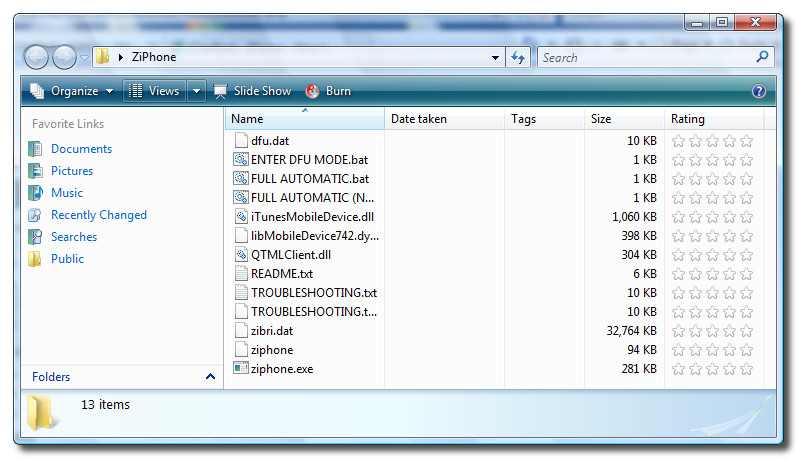
Step Two Double click ZiPhone.zip on your desktop to extract the folder ZiPhone..
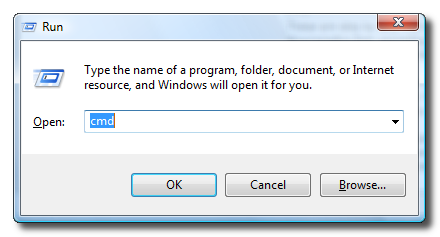
Step Three Press the Windows key and R at the same time to bring up the Run window. Type in cmd and press the Ok button to launch the Command Prompt.
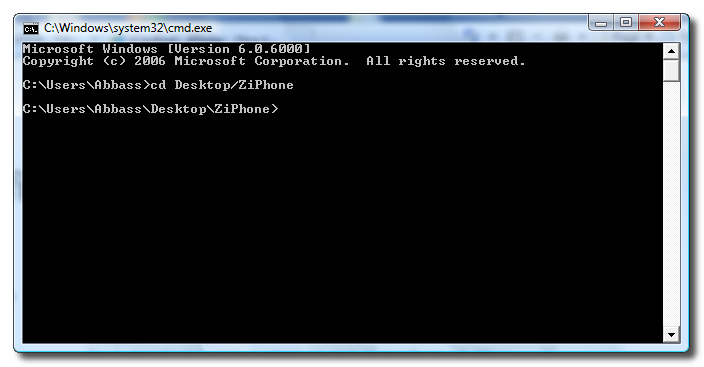
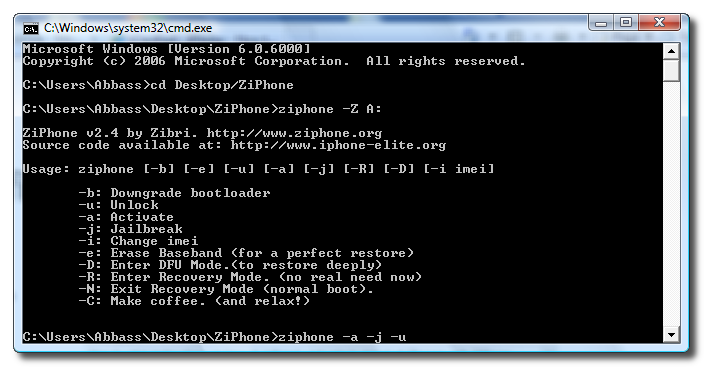
Step Four Type the following command into the Command Prompt to navigate to the ZiPhone directory: cd Desktop/ZiPhone.
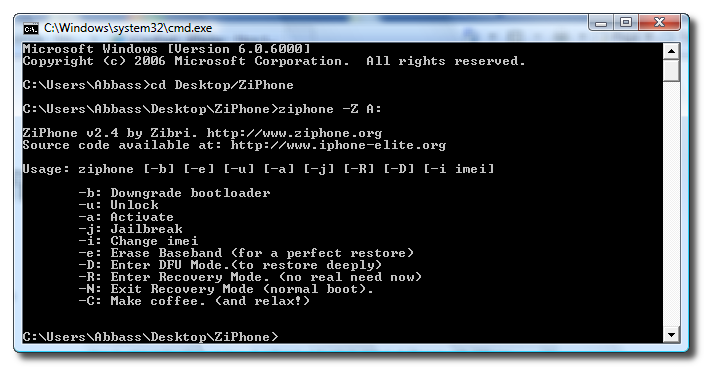
Step Four Execute the command ziphone -Z A: to see all its possible uses.
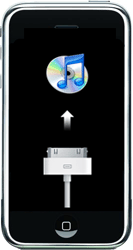
Step Five The program will prompt you to put your iPhone into recovery mode. To do this please hold down both the Sleep/Wake and Power buttons until you see the Apple logo. Once the Apple logo appears release only the Sleep/Wake button until you see the iTunes logo and cable on the screen.
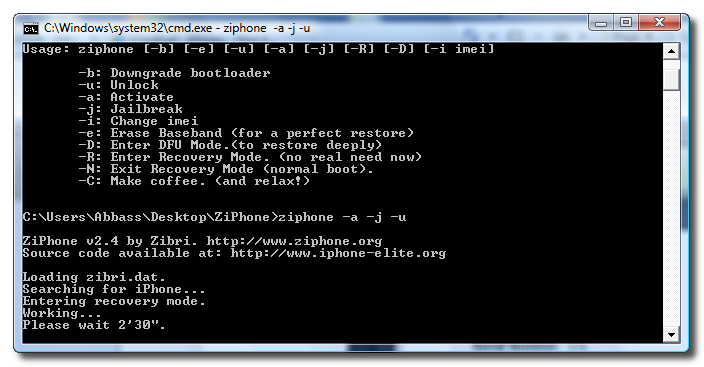
Step Six If you have a 4.6 BL iPhone you can now activate, jailbreak, and unlock! Just simply type in this command: ziphone -a -j -u
Step Seven The program will now search for zibri.dat. Then it will search for the iPhone. Once found it will tell you to wait for 2 minutes and 30 seconds.
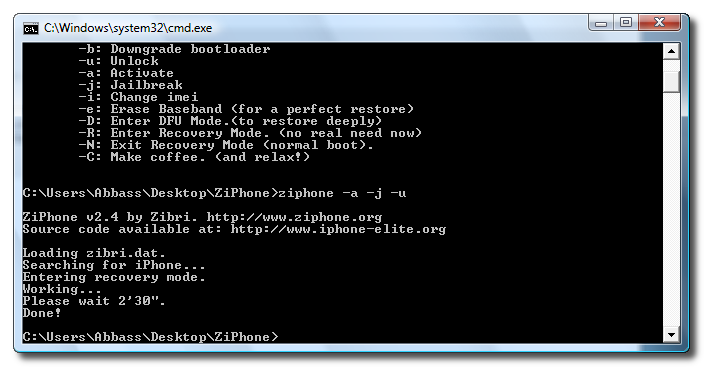
Step Eight After this time your iPhone will reboot and it will be activated, jailbroken, and unlocked!!!!
NOTE*: After completion its probably a good idea to install BSD Subsystem first then OpenSSH from Installer.app https://www.iclarified.com/687/how-to-install-bsd-subsystem-on-your-iphone
hallo,
Haben Sie ein iPhone 5 und meine IMEI-Nummer wie ändern möchten. Ich habe gelesen, es wäre mit der ziphone arbeiten,
Allerdings bin ich ein absoluter nopp in etwas, und ich nicht wirklich klüger.
Kann jemand bitte helfen Sie mir hier?
IPHONE 5
Version: 7.0.4 (11B55a)
Modell: MD297DN / A
vielen Dank.
mfg
i've already tried doing the command you said "ziphone -d". but still it doesn't work.. "no error" is still appearing in my screen.. what should i do??
iClarified,
if u cud spare a minute of ur time, i wud b really grateful.
I hv posted my problem in zibri's blog as well as urs but i hvn't got a reply yet :(
My problem : I had a 1.1.1 on which i ran ziphoneGUI2.4, then shift+restored to 113 & ran ziphone again.
Result : unlocked 1.1.3/4.03.13 & running well...EXCEPT...when i sync wit itunes to put in my songs,etc ..it says "sync in progress" but a second later it returns to springboard (home screen). so im not able to use the iphone as an ipod too.
Pls advice. Please! :(
I did the same on another phone, n its giving me the exact same problem.
Will be waiting for your reply.
regards & thanks
jaison
jaison.c@gmail.com
PS: any1 who'z had d same probelm & solved it,.. please reply
After entering command ziphone -u -a -j (or with any other ziphone options) I receive the following status
Searching for iPhone...
USBMuxListenerCreate: No error
and it lasts forever. iPhone looks to be in recovery mode. Please help.
hey mille, i think you got to read the instruction when you are following the step that iclarified had instructed cos' if you don't then you will have a bricked phone, so PPL please read the instruction all the way......................this is the best site you will ever fine in the net.
@jonny and everyone on this tutorial:
READING helps, sorry to be this direct. At the beginning of the tutorla iClarified writes:
"Easier GUI Version of this tutorial can be found here:
https://www.iclarified.com/entry/index.php?enid=666".
In this tut. he clearly describes the steps how and when to connect the iphone to your computer. Come on guys and girls, just read the details please. iClarified supplies every possible tutorial, don't blame him if you a) use the wrong one or )b don't read the details.
WARNING: THE ZIPHONE MAY RUINEN YOUR IPHONE
I had a jailbrocken Iphone OTB 1.1.2 (used as an ipod touch)
I tried the following:
1.) Upgraded to 1.1.3 via iTunes
2.) Put the iphone in recover mode and started:
ziphone -a -j -u
This was hanging in "Please wait 2'30" for more then a hour (the apple logo was blinking, could indicate the iphone was rebooting)
I interupted the ziphone,
Now I have 100 % usless iphone, showning the apple logo, it does not even response on the power off button, any ideas on how to make it response again, in order restore it from iTunes?
@ keets28
thanks. It worked!!! BTW it is very important that you connect the USB of recovery mode iphone to the computer after you run the GUI program izphone 2.0 and display shows "searching for iphone...". Iclarified please note this and add it in the proper step.
How do you replace v1.0 files with v2.0 files seeing as though i just saved everything to my desktop, i just dropped it in the recycle Bin but v1.0 is still coming up everytime i download v2.0
yeah you will but you will unlock it with ziphone again. it's locked now right? when you put it in recovery mode itunes will detect it and ask you to restore it and click yes. then run ziphone 2.0 again.




![Apple Releases First Public Beta of iOS 26 and iPadOS 26 [Download]](/images/news/97994/97994/97994-160.jpg "Apple Releases First Public Beta of iOS 26 and iPadOS 26 [Download]")
![Apple Releases First Public Beta of macOS Tahoe 26 [Download]](/images/news/97992/97992/97992-160.jpg "Apple Releases First Public Beta of macOS Tahoe 26 [Download]")





![Renewed M2 Max Mac Studio On Sale for Just $899 [Deal]](/images/news/98000/98000/98000-160.jpg "Renewed M2 Max Mac Studio On Sale for Just $899 [Deal]")
![Sonos Ace Wireless Headphones On Sale for $150 Off! [Deal]](/images/news/97941/97941/97941-160.jpg "Sonos Ace Wireless Headphones On Sale for $150 Off! [Deal]")
![Twelve South ButterFly SE MagSafe Charger On Sale for 59% Off! [Deal]](/images/news/97931/97931/97931-160.jpg "Twelve South ButterFly SE MagSafe Charger On Sale for 59% Off! [Deal]")
![Apple 16-inch MacBook Pro (M4 Max, 48GB, 1TB) On Sale for $480 Off [Deal]](/images/news/97927/97927/97927-160.jpg "Apple 16-inch MacBook Pro (M4 Max, 48GB, 1TB) On Sale for $480 Off [Deal]")

