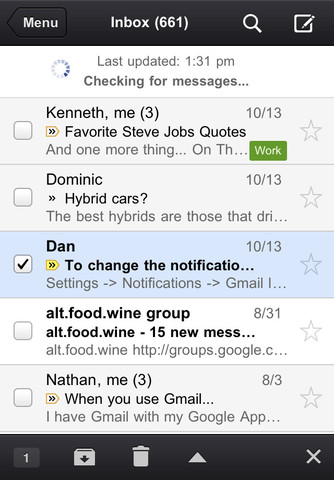
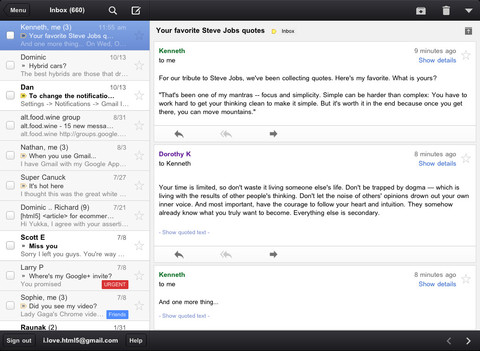
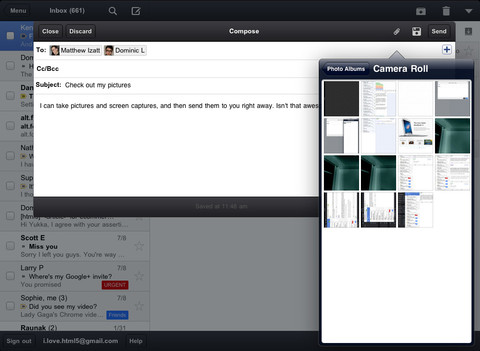
Google has released an official Gmail app for the iPhone, iPad, and iPod touch.
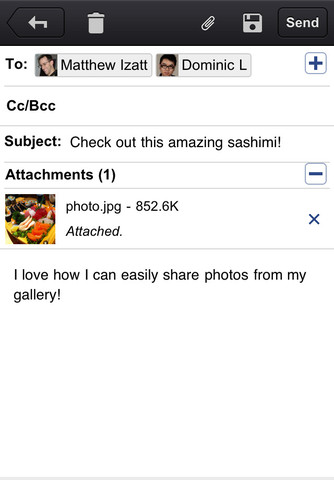
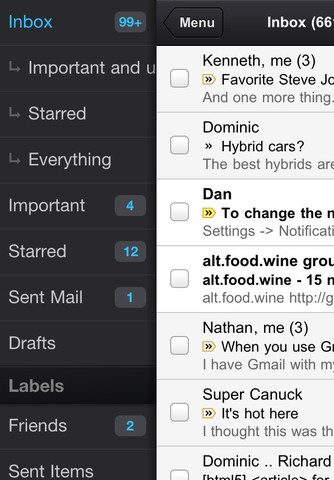
With the Gmail app, you can: ● Receive notification badges for new messages ● Read your mail with threaded conversations ● Organize your mail by archiving, labeling, starring, deleting, and reporting spam ● Keep track of important messages with priority inbox ● Auto-complete contact names as you type ● Send and receive attachments ● Search through all your mail
You can download Gmail from the App Store for free.
Apple news, rumors, tutorials, price drop alerts, in your inbox every evening, free.
Unsubscribe at any time.
Success!
You have been subscribed.
Add Comment
Would you like to be notified when someone replies or adds a new comment?
Yes (All Threads)
Yes (This Thread Only)
No
Notifications
Would you like to be notified when we post a new Apple news article or tutorial?
Yes
No
Comments (13)
Comments are closed for this article.
0
j Smiley b - November 3, 2011 at 8:29pm
It's been pulled by Google - no reason why just yet.
0
koko - November 2, 2011 at 6:53pm
doenst seem available in the US market store
0
Saki - November 2, 2011 at 6:29pm
This app is a waste. I can do all of this on my regular mail app. I cannot star my emails but anyone can live without that. Just put it in the important folder.
0
BTheG - November 3, 2011 at 4:07pm
Actually u can't upload pictures while in an email allready on the regular mail . That's a big feature too bad it's a poor design.
0
Ady Romantika - November 2, 2011 at 6:05pm
I received the notification error too.
0
FizzGiGG - November 2, 2011 at 5:57pm
Not showing up in App Store yet, but if I use a link grabbed from iTunes I can install it on my 4S. I get an error when launching the app though...
Notification Error
no valid 'aps-environment'
entitlement string found for application
0
Nobo1 - November 2, 2011 at 5:15pm
does this fix gmail/apple push issues ...??
0
gmac - November 2, 2011 at 5:20pm
you can set up gmail as exchange from iphone's mail.
so gmail get push email to you anytime.
0
nickle - November 2, 2011 at 6:21pm
Pull from app store
0
Jrich - November 2, 2011 at 9:17pm
Gmail push doesn't work for me on iPhone 4 on 4.3.3 or iPad 1 5.0. Never has. I just set up a new acct and it still doesn't work. Settings all say fetch mail push. I was hopping this apps notifications might solve the problem (and maybe save battery) but i was too late for version 1. Hope they fix it soon. I have traditionally alwayse preferred the web app to mail app until I started with ny new acct and iPad but push never worked. So pretty much same as before. Only get mail when I check it manually.
0
nickle1 - November 2, 2011 at 9:50pm
you have to activate it under preferences from gmail in order to get push email
0
Locutus - November 3, 2011 at 12:20pm
Actually, you have to set up gmail through Exchange in order to get push notifications.
0
Nobo1 - November 3, 2011 at 9:30pm
gmac I have this set up already however After years of using mail app I still get push issues with gmail... the certificate keeps getting rejected by the servers...




![Apple TV Shares Official Trailer for 'Trying' Season 5 [Video]](/images/news/101148/101148/101148-160.jpg "Apple TV Shares Official Trailer for 'Trying' Season 5 [Video]")





![Apple Watch Series 11 is Back on Sale for Just $299 [Deal]](/images/news/101081/101081/101081-160.jpg "Apple Watch Series 11 is Back on Sale for Just $299 [Deal]")
![AirPods Max 2 Drop to New All-Time Low of $499 [Deal]](/images/news/101063/101063/101063-160.jpg "AirPods Max 2 Drop to New All-Time Low of $499 [Deal]")
![AirPods Max 2 Hit All-Time Low Price of $509 ($40 Off) [Deal]](/images/news/101039/101039/101039-160.jpg "AirPods Max 2 Hit All-Time Low Price of $509 ($40 Off) [Deal]")
![New 13-Inch M5 MacBook Air Hits All-Time Low Price of $899.99 [Deal]](/images/news/100969/100969/100969-160.jpg "New 13-Inch M5 MacBook Air Hits All-Time Low Price of $899.99 [Deal]")
![AirPods Pro 3 Drop to $199 Ahead of Memorial Day [Deal]](/images/news/100935/100935/100935-160.jpg "AirPods Pro 3 Drop to $199 Ahead of Memorial Day [Deal]")
