These are step by step instructions how to jailbreak any iPhone instantly! No downgrading then upgrading! You can do the jailbreak from any firmware. It will also jailbreak and activate as well as install Installer.app for you!
ZiPhone performs all these functions: - Unlock and will work on 4.6 BL or 3.9 BL. - Jailbreak will work on any OS version. - Activation will work on any OS version, except for youtube on 1.0.X. - iErase BL 3.9 Baseband
UPDATE*: It seems that the 2.0 Apple logo problem can be solved by running ZiPhone in verbose mode. I have updated the tutorial!
Step One Download ZiPhone from: download link unavailable
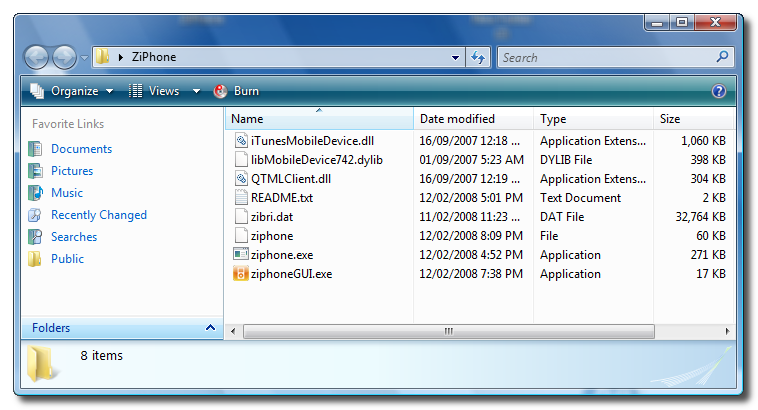
Step Two Double click ZiPhone.zip on your desktop to extract the folder ZiPhone..
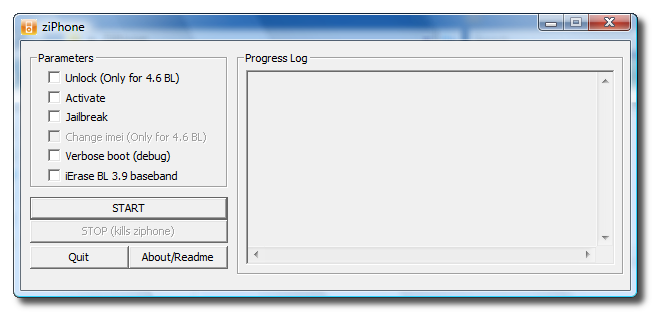
Step Three From the extracted ZiPhone folder double click ziphoneGUI.exe to launch the application.
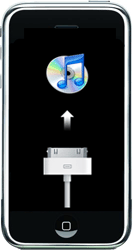
Step Four You must put your iPhone into recovery mode. To do this please hold down both the Sleep/Wake for 3 seconds. A power slider will appear. Slide it to the right to power down the iPhone. Then keeping ONLY the Home button pressed, connect the iPhone to the dock. Keep the home button pressed until you see the iTunes logo and cable on the screen.
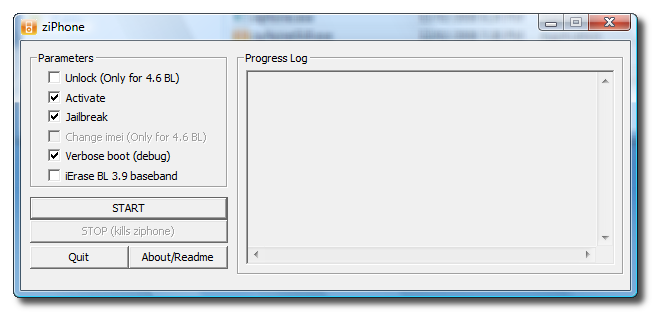
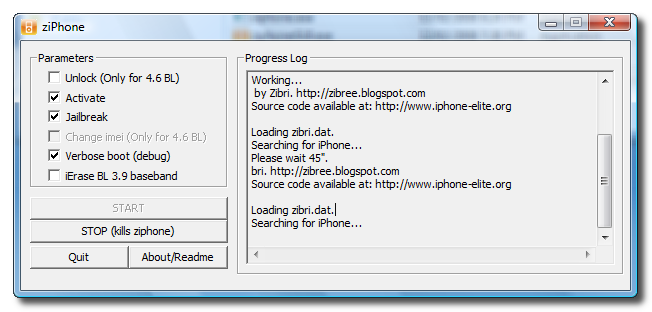
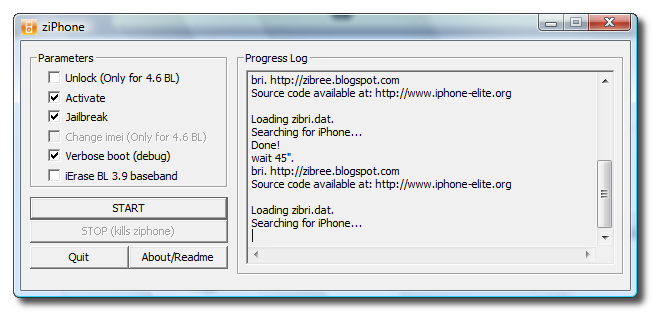
Step Five You can now activate and jailbreak! Just simply check the Activate, Jailbreak, and Verbose checkboxes. Then click the Start button.
Step Six The program will now load zibri.dat. Then it will search for the iPhone. Once found it will tell you to wait for 45 seconds.
Step Eight After this time your iPhone will reboot and it will be activated and jailbroken!!!!
NOTE*: After completion its probably a good idea to install BSD Subsystem first then OpenSSH from Installer.app
My Iphone is Vers. 1.1.4 YOU MAY NOT WANT TO CHECK "ACTIVATE" when you jailbreak. By doing this through ZiPhone it disconnects your YouTube connection for some reason. I learned this the hard way and so have many others. Feel free to do an internet search for "JAILBROKEN IPHONE CANNOT CONNECT TO YOUTUBE."
According to different posts, if you don't check activate, you can activate your phone through itunes after your jailbreak and your YouTube should work as it did pre-jailbreak.
To all those that are currently YouTube-less post jailbreak. There is a fix, it involves using Open SSH and WinSCP. I had no idea wth that was until I jailbroke my iphone and read a few posts. But there are step by step instructions for this whole process online at sites like iPhoneHacks. If you are a legit AT&T customer, as I am, I lost service after this youtube fix. All I did afterwards, which isn't stated in the fix above, is open up iTunes and plug in my iPhone. After about 40 seconds, service was restored to my phone. I'm assuming the fix de-activated my phone and connecting it back to iTunes re-activated it.
I hope this helps.
Btw, I ran this fix after installing several other apps post Jailbreak. So you shouldn't need to restore your phone for this fix.
@luisyo: There is a Tutorial here "How to Unlock Your iPhone with ZiPhone GUI (Windows)" or "(Mac)". Your decision. Regarding signal. Maybe you're just msising the icons for the signal, have you tried to make a call/send an sms?. If that didn't work, reboot. Reboot again....No? Reboot again. Else check Installer for a Signal Patch. I haven't needed it, but there is a patch there... i.e. add the appropriate third party source. Patch Bricktool/SignalFix might work...If not, no harm done.
Finally i do it.. now i have a 1.1.4 iphone avtivated and jailbreaked.. but i no have signal? why is taht? i have a stealthsim and i dont wana unlocked beacuase that change my basehand...
thanks wombat
OMG that is soooo cool thank you so much. You are right, that WAS ridiculously easy. I am using 1.1.4 and iTunes 7.6 and it all worked seamlessly. Thank you!
@armando Some of the apps dont work because they are not compatible with certain firmwares. Also most of the fixes for apps and youtube etc etc can be found in the installer. You might have to add a couple sources, but most fixes are in there.
i jailbroke my phone but youtube doesn't work is there away you fix this problem o and also once i go to intaller some of the apps dont work any reason way they dont work .



![Apple Home Hub With Siri AI in Employee Testing, Could Debut in October [Gurman]](/images/news/102309/102309/102309-160.jpg "Apple Home Hub With Siri AI in Employee Testing, Could Debut in October [Gurman]")
![Apple Cuts Fitness+ Jobs as It Rethinks the Service [Report]](/images/news/102306/102306/102306-160.jpg "Apple Cuts Fitness+ Jobs as It Rethinks the Service [Report]")

![Pro Photographer Austin Mann Tests iPhone 18 Pro Camera [Video]](/images/news/102297/102297/102297-160.jpg "Pro Photographer Austin Mann Tests iPhone 18 Pro Camera [Video]")









![Apple Studio Display XDR Hits All-Time Low of $2,969.99 ($329 Off) [Deal]](/images/news/101976/101976/101976-160.jpg "Apple Studio Display XDR Hits All-Time Low of $2,969.99 ($329 Off) [Deal]")
