WARNING: THIS TUTORIAL HAS A HIGH LIKELIHOOD OF BRICKING YOUR IPHONE. ANY TINY MISTAKE OR PROBLEM CAN MEAN A BRICK FOR GOOD!
Why would you still want to do this? The 04.03.13 baseband can be unlocked on 3.9 BL. This means you can have Google Locater working. Also, all old secpacks will not validate on 4.6. The 4.6 Bootloader requires a secpack of a newer version to let you do things with the baseband; whereas, the 3.9 BL requires the same version OR newer.
Perform these steps with your iPhone on and connected to your computer.
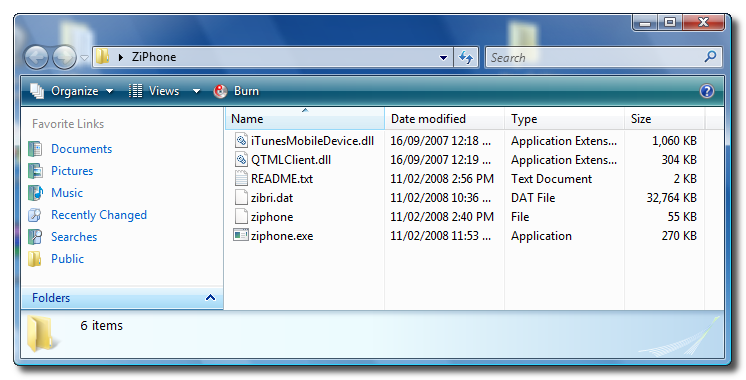
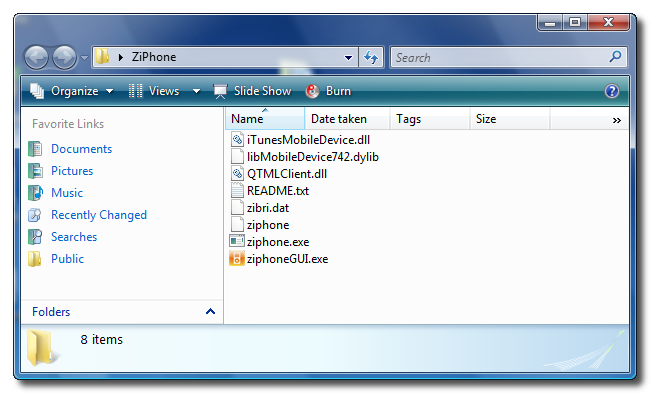
Step Two Double click ZiPhone.zip on your desktop to extract the folder ZiPhone..
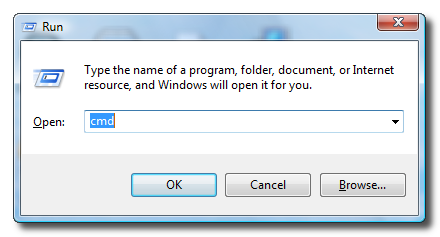
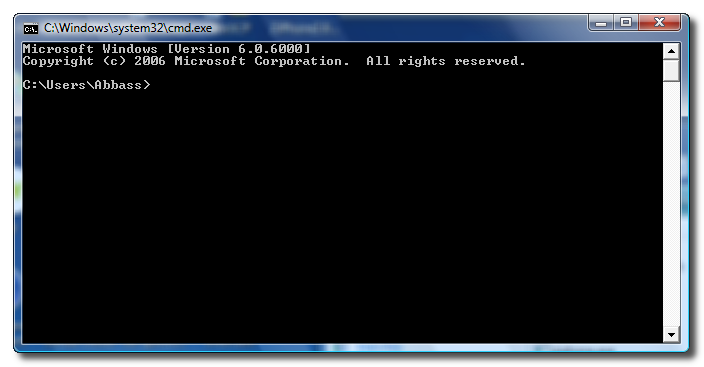
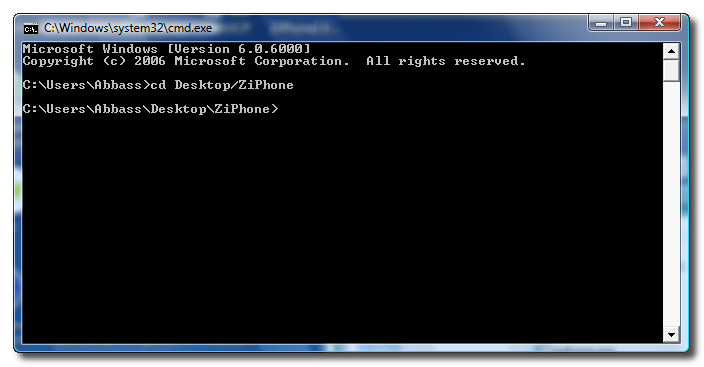
Step Three Press the Windows key and R at the same time to bring up the Run window. Type in cmd and press the Ok button to launch the Command Prompt.
Step Four Type the following command into the Command Prompt to navigate to the ZiPhone directory: cd Desktop/ZiPhone.
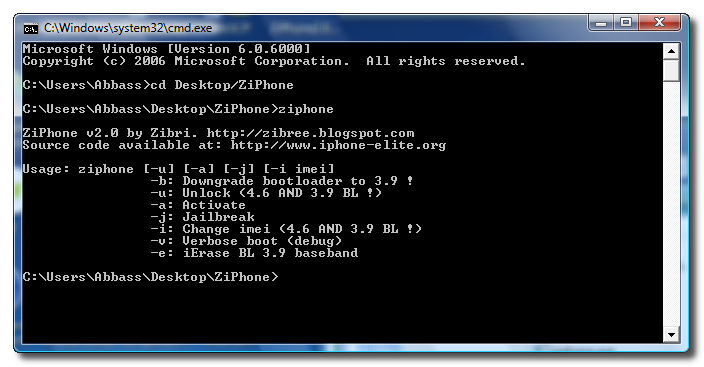
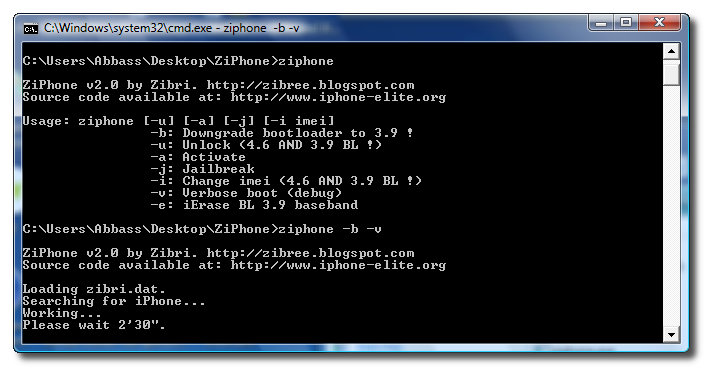
Step Four Execute the command ziphone to see all its possible uses.
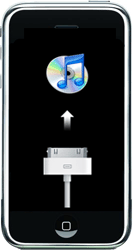
Step Five The program will prompt you to put your iPhone into recovery mode. To do this please hold down both the Sleep/Wake and Power buttons until you see the Apple logo. Once the Apple logo appears release only the Sleep/Wake button until you see the iTunes logo and cable on the screen.
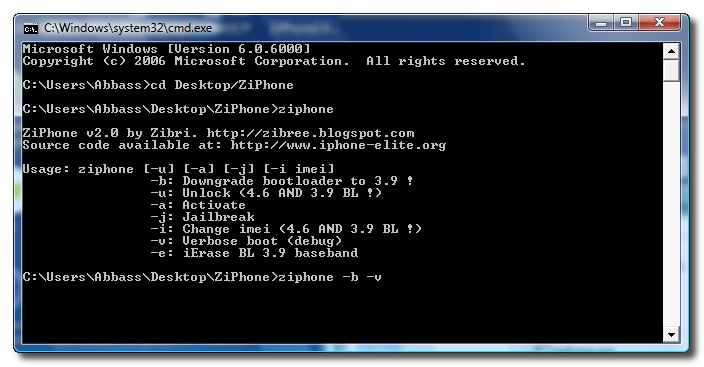
Step Six If you have a 4.6 BL iPhone you can now downgrade your bootloader! Just simply type in this command: ziphone -b -v
Step Seven The program will now search for zibri.dat. Then it will search for the iPhone. Once found it will tell you to wait for 2 minutes and 30 seconds.
Step Eight After this time your iPhone will reboot and it will be bootloader downgraded to 3.9 with the 04.03.13_G baseband!
NOTE*: After completion its probably a good idea to install BSD Subsystem first then OpenSSH from Installer.app
...using ZiPhone 2.4 it worked just fine. Now I have Bootloader 3.9_M3S2 and Modem Firmware 04.03.13_G. The APP Baseband Info says that I have Mode iPhone 1.1 although I'm actually on 1.1.3. Guess it's the same. Everything works fine so far.......
----------------------------now waiting to upgrade to 1.1.4------------------
@iClarified: Meanwhile we are at ZiPhone GUI V 2.4....................I used the method in the previous tutorial, which did not have the option to downgrade the bootloader from 4.6 to 3.9. Now 1.1.4 is on the market.........My Q.: should those who did not use the option (as not yet available) to downgrade the bootloader in order to get to Firmware 04.03.13_G????? With 1.1.4 out it seems to make more sense now to downgrade to 3.9.....................
Thx Russell :)
I did Restore in iTunes (to newest version which is atm 1.1.3)
Then did run ZiPhone 2.1: "ClickHereX4.6.bat will call Ziphone -b -j -a (Downgrades bootloader be warned, use for iphone > 1.1.2)"
But somehow iPhone screen was "Slide to emergency" aftewards. Only Bootloader downgrade was successful.
So again i run ZiPhone 2.1, now GUI, checked Activation, Jailbreak and Unlock.
In 2'30" i had fully working unlocked 1.1.3 phone :)
Sending sms to multiple users works, Google Maps located me on the map with right position, thanks to cellullar towers. So i suppose everything works fine. At last. :)
Hey guys! Has anyone tryed the -b option yet for 4.6BL?
Does it work right? No bricked phones? I was thinking of doing it, but i'll wait a little longer for news and updates.
Sorted Edge out it does not work on O2 pay as u go so I set up GPRS works fine. Summerboard authors need to update there theme then that be done cheers for all the hard work.
re: Summerboard problem - it depends which themes you install - some work, some don't. Those that don't won't appear in the themes list and require an update from the author so that they work with 1.1.3.
What are advantages/disadvantages of each BL? Right now I'm only aware of 3.9BL is able to run 04.03.13_G BB. What else we can gain/lose by moving to 3.9BL?
Hi " G "
I also had the same problem.. Same thing, i could not use installer cuz i installed to many apps and it got pushed off the screen... But, I did a Itunes restore and went to 1.1.3 (Iphone)
then when it was finished restoreing, ran ZiPhone2.0 with the -v -b command ,, and it worked perfect.. springboard now scrolls to other screens... google maps locate thing works perfect.. all installed apps work perfect....... also another older iphone my firend had that hes been trying to get working for months,, after doing all the same steps it worked perfect..... if you getting stuck at the apple logo, dont forget to put the -v -b command......... .To Zebri -- Nice work, and thank you. :)
Tried and it work but........... Still no Edge works with correct settings, I am on O2 pay as you go worked before I used this also wi fi password is never remembered any ideas google map work first time.
Tested Ziphone 1.0 and the so called 1.2 or 2.0 on a older Iphone but results are questionable, people should read up on it a little more, wait about 2 weeks....cheers !







![Apple's 16-Inch M5 Pro MacBook Pro Drops to a New Record Low of $2,449.99 [Deal]](/images/news/100873/100873/100873-160.jpg "Apple's 16-Inch M5 Pro MacBook Pro Drops to a New Record Low of $2,449.99 [Deal]")
![Apple 14-inch M5 Pro MacBook Pro Hits New All-Time Low at $1,983.94 [Deal]](/images/news/100736/100736/100736-160.jpg "Apple 14-inch M5 Pro MacBook Pro Hits New All-Time Low at $1,983.94 [Deal]")
![13-Inch M5 MacBook Air Drops to $949.99 on Amazon [Deal]](/images/news/100667/100667/100667-160.jpg "13-Inch M5 MacBook Air Drops to $949.99 on Amazon [Deal]")

![AirPods Pro 3 Drop Back to $199.99 on Amazon ($50 Off) [Deal]](/images/news/100545/100545/100545-160.jpg "AirPods Pro 3 Drop Back to $199.99 on Amazon ($50 Off) [Deal]")
