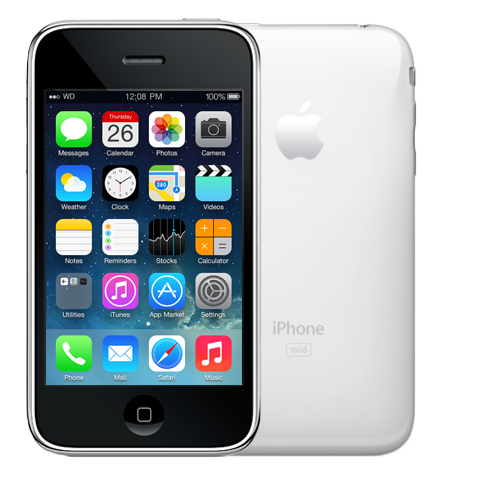
Whited00r 7 is a re-engineered firmware bundle that brings the look and feel of iOS 7 to older devices not capable of running the new operating system.
The firmware has been created with speed as the first priority and its creators say that none of the modifications Whited00r makes to your device will slow it down.
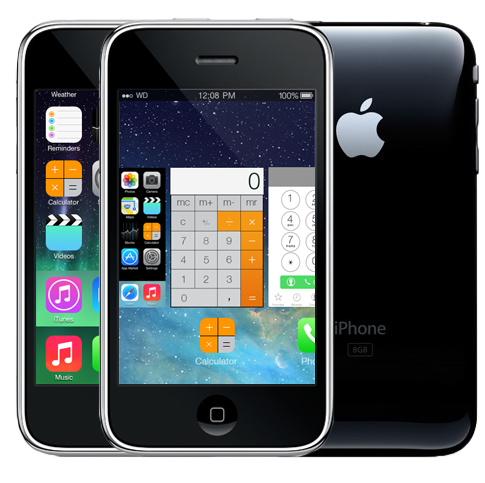
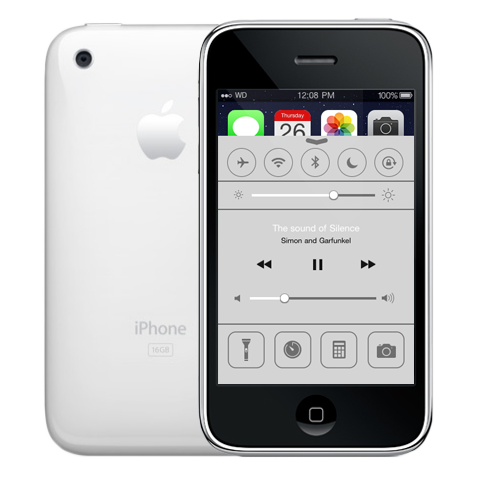
Notable additions include iOS 7 style push notifications, a new camera app, multitasking, control center, and more.
Here's some of the highlights:
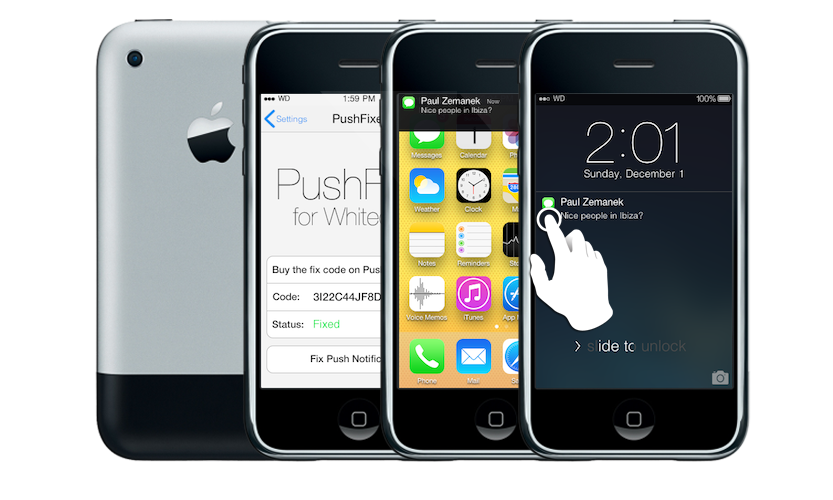
Push Notifications. Whited00r includes Amazing iOS7-like Push Notifications on the Lockscreen with blur-effect and banner alerts. Touch on the Notification to open the corresponding application. Whited00r also allows you to enable Push Notifications on an unlocked iPhone with a simple Graphic User Interface in Settings that will automate the whole process
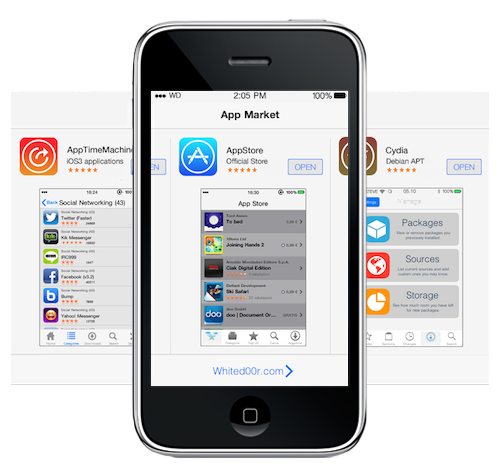
Multiple Stores for Applications. Whited00r provides access to both the official AppStore and Cydia. Whited00r also offers a unique service called AppTimeMachine. This exclusive service contains many applications that dropped support for older devices.
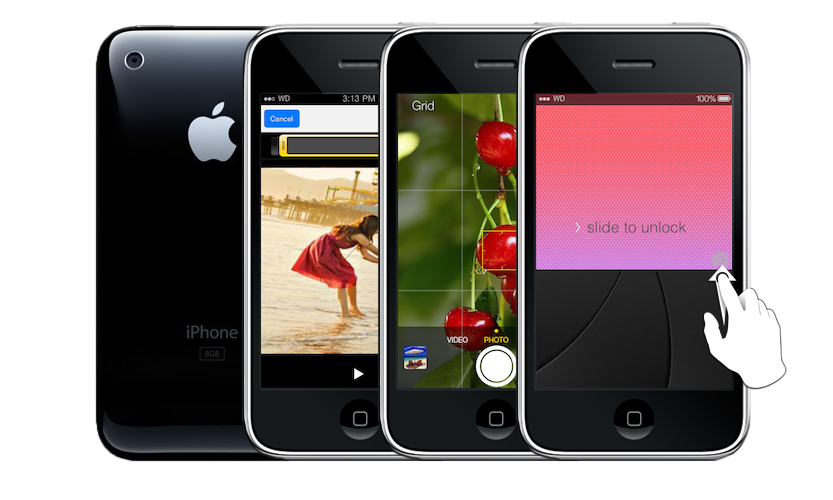
New and Improved Camera App. Whited00r includes the new iOS7 style camera app. You can now view your shot in full screen and capture it with the volume buttons. Whited00r supports high quality video capture courtesy of Cycorder's low level access sensor. Videos may also be exported to the camera roll or even shared via MMS, email, or YouTube.
Multitasking. Multitasking is made possible by simply double tapping the home button to reveal a thumbnail preview of your most recently use applications. For advanced users, the legacy multitasking bar is also included. It keep applications running in the background using system memory. The classic multitasking bar also comes with the iPod Controls and Rotation Lock toggle.
Control Center. Control Center gives you quick access to commonly used settings and apps. To access Control Center, swipe up from the bottom of the screen.
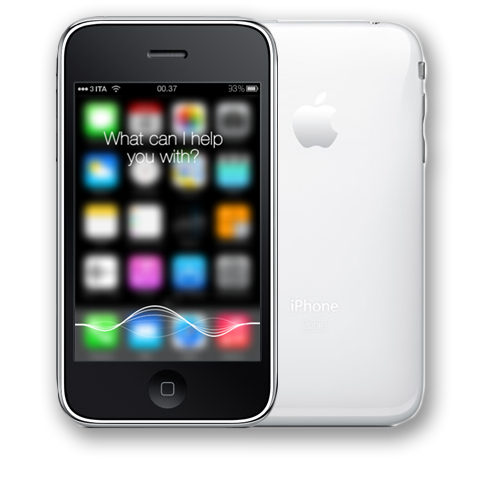
Voice Control. An alternative to one of the coolest features available to newer devices is now available to for the iPhone and iPod Touch.
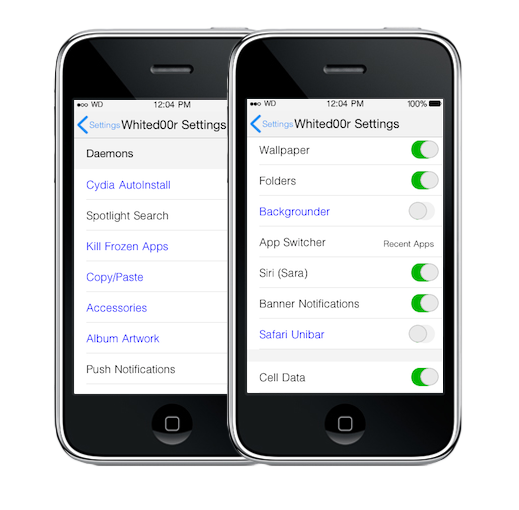
Customize features on the fly. With Whited00r, customization is only a few taps away! You can disable unused features like Siri Voice Control or folders to speed up your device. You have full control of System Deamons and you can even unlock advanced features to finely tune your Whited00r installation.
You can find links to download the Whited00r 7 firmware at the link below. Please follow iClarified on X, Facebook, or RSS for more news and tutorials.
Download
Get the iClarified Daily Newsletter
Apple news, rumors, tutorials, price drop alerts, in your inbox every evening, free.
Unsubscribe at any time.
Success!
You have been subscribed.
Add Comment
Would you like to be notified when someone replies or adds a new comment?
Yes (All Threads)
Yes (This Thread Only)
No
Notifications
Would you like to be notified when we post a new Apple news article or tutorial?
Yes
No
Comments (24)
Comments are closed for this article.
0
dlimi ismail - June 13, 2014 at 11:22am
how i can find apptimemachine .?
0
hasnain - January 21, 2014 at 5:33pm
my control center is not been seen in whited00r 7 do any one know its solution
0
LcsZhDrw - March 19, 2014 at 11:01pm
You have to enable it in the Whited00r settings.
0
Naransin - January 2, 2014 at 8:24pm
is there new apps in whited00r 7 regarding the ones available in whited00r 6? i mean in time machine?
which IOS is supposed to simulate the white7? IOS 3 or IOS 4?
0
Thomas - December 30, 2013 at 2:05pm
What about the 3GS - is this not an old device with no iOS7 support?! Only for original iPhone and 3G ...
0
mindingulove - December 31, 2013 at 4:42pm
they only give support to devices considered obsolete by apple. so are the devices that support only up to firmware 3. but ure going to say that iphone 3 supports 4, its true but ios 4 gets unstable on iphone 3, so the best firmware to it is ios 3. Iphone 3gs can run up to ios 6 one of the latest, and it wont be considered obsolete by apple right now, so no support from whitedoor
0
Pr0toc0L - December 30, 2013 at 1:40pm
What kills me is that this should be available for all devices and for new firmware. I'm pretty sure you can change the look of iOS 7 to other personalized themes with this new OS.
0
James Cameron - December 30, 2013 at 1:37pm
Why doesn't someone make iOS 7 look like iOS 6, that would be an upgrade.
0
gamerscul9870 - December 30, 2013 at 2:12pm
Maybe apple is improving first but I was planning to make a rumor to move every iOS 6 stuff to iOS 7 so people have it the way they wanted it, I wanted to make a rumor for months but no one replied to me on how to do it. Millions will be satisfied if I start this rumor and get everyone else to do it.
0
ratGT - December 30, 2013 at 9:58pm
I think that previous version, Whited00r 6, does exactly that - iOS 6 look and feel on iPhone 2G/ 3G
0
s_ajjad_4g - December 30, 2013 at 11:40am
does it work on ipod4?
0
Mavrick - December 30, 2013 at 3:43am
it works on 3g good....
0
Diego - December 29, 2013 at 3:00pm
Of course, you're entitled to your opinion. So are others. Guess what, not everyone think like you. Isn't that beautiful? ;)
0
gamerscul9870 - December 29, 2013 at 3:11pm
It's not ugly if it didn't come with the high neon color texture, but did you know you have to also change the web, Siri, and new designs of the apps to iOS 6 because it to is iOS 7.
0
Christopher - December 29, 2013 at 12:19pm
And, and, and, what about an iPod Touch 2nd gen? No really.
0
JamesRHoyland24 - December 29, 2013 at 10:01am
is the whitedoor iOS 7 compatable for an iPod touch 4th gen.
0
YBY - December 29, 2013 at 8:24am
How about iPad 1?
0
sundarkc - December 29, 2013 at 7:02am
no update for iphone 3gs & ipod touch 4?
0
putra-san - December 29, 2013 at 10:58am
I was looking support for 3gs too..
0
Jack - December 29, 2013 at 6:15am
Or buy an iPhone 4 ......
0
Guest - December 29, 2013 at 5:57am
Cool! How about the reverse..... Make ios7 look like iOS 6 again??
0
gamerscul9870 - December 29, 2013 at 6:03am
Or combine them so people have it their way, old or new on the SAME iOS as I always thought for an update.





![Apple Releases Xcode 27.1 Beta With iPhone Duo SDKs and Simulator [Download]](/images/news/102276/102276/102276-160.jpg "Apple Releases Xcode 27.1 Beta With iPhone Duo SDKs and Simulator [Download]")
![Apple Shares 'new trick' Shot on iPhone 18 Pro Ad Featuring ROSÉ [Video]](/images/news/102273/102273/102273-160.jpg "Apple Shares 'new trick' Shot on iPhone 18 Pro Ad Featuring ROSÉ [Video]")
![iPhone 18 Pro Teardown Shows Under-Display Face ID Camera and Larger Vapor Chamber [Video]](/images/news/102270/102270/102270-160.jpg "iPhone 18 Pro Teardown Shows Under-Display Face ID Camera and Larger Vapor Chamber [Video]")











![Apple Studio Display XDR Hits All-Time Low of $2,969.99 ($329 Off) [Deal]](/images/news/101976/101976/101976-160.jpg "Apple Studio Display XDR Hits All-Time Low of $2,969.99 ($329 Off) [Deal]")
