Apple has posted a workaround for customers experiencing a bug in Mail that results in no new email being received until the app is quit and reopened.
OS X: New email messages not received until Mail is quit and reopened
Symptoms For some email providers, new email messages in Mail may only appear to arrive when Mail is first opened. No new email arrives until Mail is quit and reopened.
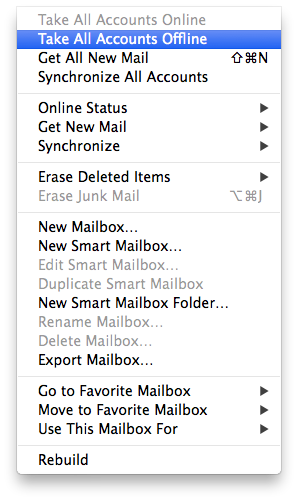
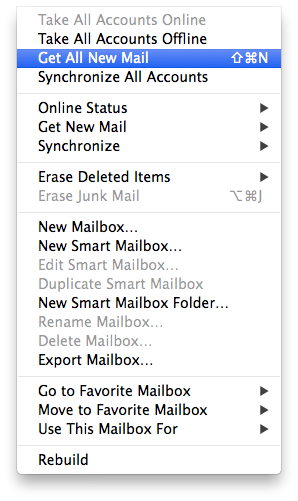
Resolution Quitting and reopening Mail forces t to re-establish a connection to the email server. You can use these steps to receive new mail messages without quitting Mail:
1. Choose Mailbox > Take All Accounts Offline. 2. Choose Mailbox > Get All New Mail.
As a shortcut, you can also add the Take All Accounts Offline and Get Mail buttons to your Mail toolbar.
1. Choose View > Customize Toolbar. 2. Drag the Take All Accounts Offline button to the Toolbar if it is not there already. 3. Drag the Get Mail button to the Toolbar if it is not there already. 4. Click Done
To receive new mail messages, click the Take Offline button, then click the Check Mail button.
[via Jay]
Get the iClarified Daily Newsletter
Apple news, rumors, tutorials, price drop alerts, in your inbox every evening, free.
Unsubscribe at any time.
Success!
You have been subscribed.
Add Comment
Would you like to be notified when someone replies or adds a new comment?
Yes (All Threads)
Yes (This Thread Only)
No
Notifications
Would you like to be notified when we post a new Apple news article or tutorial?
Yes
No
Comments (4)
Comments are closed for this article.
0
Lake - February 3, 2014 at 11:02pm
I see it is happening on the Mac, I'm just saying it is also happening on my 5s 7.0.4 as well and would like a fix for that as well
0
Ifan - February 3, 2014 at 10:01pm
I think they're talking about mail client on the Mac osx. Not mail client on the phone. No problem with my iPhone 5.
0
Fiya_lance - February 3, 2014 at 9:22pm
I have the same problem on my iPhone 5 on ios 7.0.4







![watchOS 27.0.1 Fixes Unexpected Restarts on Series 12 and Ultra 4 [Download]](/images/news/102378/102378/102378-160.jpg "watchOS 27.0.1 Fixes Unexpected Restarts on Series 12 and Ultra 4 [Download]")
![Near-Borderless Anniversary iPhone Pro Still on Track Despite Display Tech Delays [Report]](/images/news/102375/102375/102375-160.jpg "Near-Borderless Anniversary iPhone Pro Still on Track Despite Display Tech Delays [Report]")





![13-Inch M5 MacBook Air With 1TB Drops to $1,449 on Amazon [Deal]](/images/news/102345/102345/102345-160.jpg "13-Inch M5 MacBook Air With 1TB Drops to $1,449 on Amazon [Deal]")