Apple has updated Pages, Numbers, and Keynote for iOS and Mac with a library of over 500 professionally drawn shapes and other improvements.
Here's a look at what's new in each application...
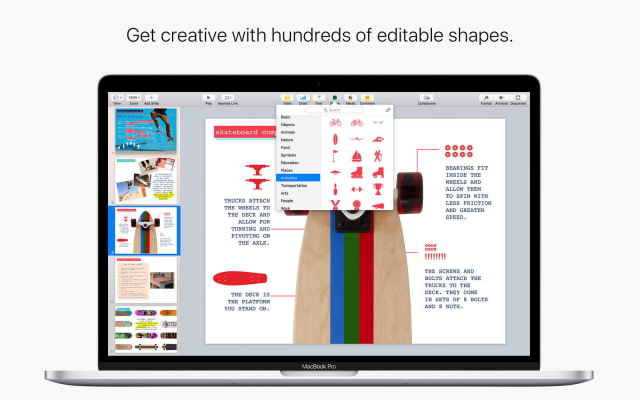
Pages for iOS and Mac • Enhance your documents using a library of over 500 professionally drawn shapes • Reply to comments and join threaded conversations • Add linked text boxes so text easily flows from one place to another • New auto-correction and text replacement options save time while typing • New page thumbnail view allows you to easily navigate your document • Export documents as fixed layout ePub books • Change margins, headers, footers and paper size while collaborating • [Mac] Improved support for Hebrew and Arabic languages • [Mac] The Stock and Currency functions now return data from the previous market day’s close
Numbers for iOS and Mac • Enhance your spreadsheets using a library of over 500 professionally drawn shapes • Reply to comments and join threaded conversations • Support for print preview in collaborative spreadsheets • New auto-correction and text replacement options save time while typing • The Insert Stock Quote feature and the Stock and Currency functions now return data from the previous market day’s close.
Keynote for Mac • Enhance your presentations using a library of over 500 professionally drawn shapes • Reply to comments and join threaded conversations • New auto-correction and text replacement options save time while typing • Scroll anywhere with new pan and zoom options • Edit presenter notes while displaying slides in Light Table view • Improved support for Hebrew and Arabic languages • The Stock and Currency functions now return data from the previous market day’s close.
Get the iClarified Daily Newsletter
Apple news, rumors, tutorials, price drop alerts, in your inbox every evening, free.
Unsubscribe at any time.
Success!
You have been subscribed.
Add Comment
Would you like to be notified when someone replies or adds a new comment?
Yes (All Threads)
Yes (This Thread Only)
No
Notifications
Would you like to be notified when we post a new Apple news article or tutorial?





![Apple Says iPhone Duo's Folding Display Has a Replaceable Cover Layer [Video]](/images/news/102525/102525/102525-160.jpg "Apple Says iPhone Duo's Folding Display Has a Replaceable Cover Layer [Video]")
![Touchscreen OLED MacBook Pro Could Debut as Early as October [Gurman]](/images/news/102519/102519/102519-160.jpg "Touchscreen OLED MacBook Pro Could Debut as Early as October [Gurman]")
![iPhone 18 Pro Sales Rise 12% in China as Apple Leads Weekly Smartphone Market [Report]](/images/news/102522/102522/102522-160.jpg "iPhone 18 Pro Sales Rise 12% in China as Apple Leads Weekly Smartphone Market [Report]")
![Apple TV Shares Trailer for 'Awkwafina: The Unlikely Cook' [Video]](/images/news/102513/102513/102513-160.jpg "Apple TV Shares Trailer for 'Awkwafina: The Unlikely Cook' [Video]")

![How To Find Your iPhone IMEI Number [Video]](/images/tutorials/83557/83557/83557-160.jpg "How To Find Your iPhone IMEI Number [Video]")
![How To Change Wallpaper on Mac [Video]](/images/tutorials/90512/90512/90512-160.jpg "How To Change Wallpaper on Mac [Video]")




![16-Inch M5 Max MacBook Pro Drops $900 to New Low of $3,499 [Deal]](/images/news/102438/102438/102438-160.jpg "16-Inch M5 Max MacBook Pro Drops $900 to New Low of $3,499 [Deal]")
![Magic Keyboard for iPad Air Drops to $200 on Amazon [Deal]](/images/news/102402/102402/102402-160.jpg "Magic Keyboard for iPad Air Drops to $200 on Amazon [Deal]")
![13-Inch M5 MacBook Air With 1TB Drops to $1,449 on Amazon [Deal]](/images/news/102345/102345/102345-160.jpg "13-Inch M5 MacBook Air With 1TB Drops to $1,449 on Amazon [Deal]")
