Apple has introduced the ability to manually connect to Wi-Fi networks in watchOS 5 beta.
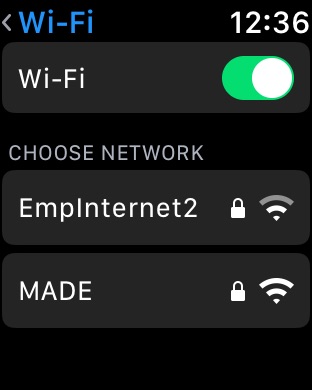
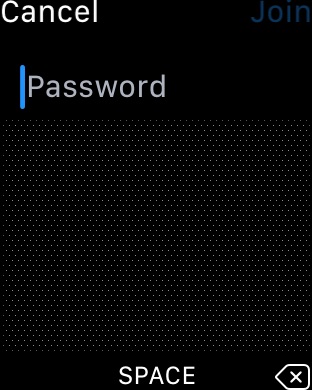
Navigating to Settings > Wi-Fi brings up a list of nearby Wi-Fi networks and a toggle to turn ON and OFF Wi-Fi. Choosing a network will now let you enter in a password using Scribble.
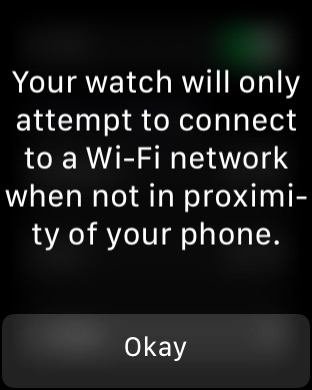
A notice informs users that "Your watch will only attempt to connect to a Wi-Fi network when not in proximity of your phone."
Check out the screenshots below and please follow iClarified on Twitter, Facebook, or RSS for more updates.
Get the iClarified Daily Newsletter
Apple news, rumors, tutorials, price drop alerts, in your inbox every evening, free.
Unsubscribe at any time.
Success!
You have been subscribed.
Add Comment
Would you like to be notified when someone replies or adds a new comment?
Yes (All Threads)
Yes (This Thread Only)
No
Notifications
Would you like to be notified when we post a new Apple news article or tutorial?






![Lamine Yamal Teases Unreleased Beats Over-Ear Headphones [Images]](/images/news/101007/101007/101007-160.jpg "Lamine Yamal Teases Unreleased Beats Over-Ear Headphones [Images]")
![Accessory Maker Prematurely Lists Foldable iPhone Cases [Images]](/images/news/101005/101005/101005-160.jpg "Accessory Maker Prematurely Lists Foldable iPhone Cases [Images]")
![Apple Shares Trailer for 'Sugar' Season 2 Ahead of June Premiere [Video]](/images/news/101003/101003/101003-160.jpg "Apple Shares Trailer for 'Sugar' Season 2 Ahead of June Premiere [Video]")
![iPhone 18 Pro Dummy Leak Reveals Alleged Color Lineup, Including 'Dark Cherry' [Images]](/images/news/101001/101001/101001-160.jpg "iPhone 18 Pro Dummy Leak Reveals Alleged Color Lineup, Including 'Dark Cherry' [Images]")





![New 13-Inch M5 MacBook Air Hits All-Time Low Price of $899.99 [Deal]](/images/news/100969/100969/100969-160.jpg "New 13-Inch M5 MacBook Air Hits All-Time Low Price of $899.99 [Deal]")
![AirPods Pro 3 Drop to $199 Ahead of Memorial Day [Deal]](/images/news/100935/100935/100935-160.jpg "AirPods Pro 3 Drop to $199 Ahead of Memorial Day [Deal]")
![15-Inch M5 MacBook Air Drops to New All-Time Low at $1,099.99 [Deal]](/images/news/100930/100930/100930-160.jpg "15-Inch M5 MacBook Air Drops to New All-Time Low at $1,099.99 [Deal]")
![Apple's 16-Inch M5 Pro MacBook Pro Drops to a New Record Low of $2,449.99 [Deal]](/images/news/100873/100873/100873-160.jpg "Apple's 16-Inch M5 Pro MacBook Pro Drops to a New Record Low of $2,449.99 [Deal]")
![Apple 14-inch M5 Pro MacBook Pro Hits New All-Time Low at $1,983.94 [Deal]](/images/news/100736/100736/100736-160.jpg "Apple 14-inch M5 Pro MacBook Pro Hits New All-Time Low at $1,983.94 [Deal]")
