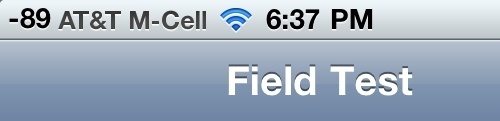
Users are reporting that iOS 4.1 once again allows you to enter Field Test mode on your iPhone and get a numeric representation of signal strength.
To try this you must first update your iPhone to iOS 4.1 then dial *3001#12345#*.
You'll notice that your signal bars are replaced with numbers. The closer the number to 0 then higher your signal strength. For example -10 is much stronger then -100.
Apple news, rumors, tutorials, price drop alerts, in your inbox every evening, free.
Unsubscribe at any time.
Success!
You have been subscribed.
Add Comment
Would you like to be notified when someone replies or adds a new comment?
Yes (All Threads)
Yes (This Thread Only)
No
Notifications
Would you like to be notified when we post a new Apple news article or tutorial?
Yes
No
Comments (7)
Comments are closed for this article.
0
Matt - September 9, 2010 at 7:41pm
Sorry, they're human. They make mistakes too.
0
Guest - September 9, 2010 at 1:20pm
Works on 3.1.2 JB
0
Blacksmp - September 9, 2010 at 12:09am
Signal strength is measured in dbm. Every 3 step is doubled strength. -87 is twice The power compared to -90. And you Will NEVER see -10...
I've gotten -40 as best sitting 10 or so meters directly below The base station antenna
0
Neilh - September 9, 2010 at 6:46am
Got -65 sitting next to my macrocell. Usually shows five bars.
0
Mathieu Galarneau - September 9, 2010 at 12:06am
U can also do it on iOS 4 if JB with SBS toggle under : more-> system option -> numeric gsm











![How To Find Your iPhone IMEI Number [Video]](/images/tutorials/83557/83557/83557-160.jpg "How To Find Your iPhone IMEI Number [Video]")


![Magic Keyboard for iPad Air Drops to $200 on Amazon [Deal]](/images/news/102402/102402/102402-160.jpg "Magic Keyboard for iPad Air Drops to $200 on Amazon [Deal]")
![13-Inch M5 MacBook Air With 1TB Drops to $1,449 on Amazon [Deal]](/images/news/102345/102345/102345-160.jpg "13-Inch M5 MacBook Air With 1TB Drops to $1,449 on Amazon [Deal]")



