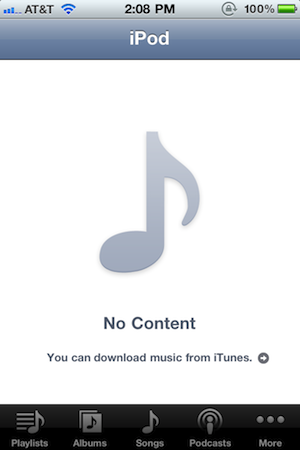
If your music has disappeared after updating to iOS 4.2.1, there is an easy fix.
Users in the Apple Discussion forums have found that if you plug your iPhone into the computer, open iTunes and play a song from on your device, then sync, the music will magically reappear.
Apple news, rumors, tutorials, price drop alerts, in your inbox every evening, free.
Unsubscribe at any time.
Success!
You have been subscribed.
Add Comment
Would you like to be notified when someone replies or adds a new comment?
Yes (All Threads)
Yes (This Thread Only)
No
Notifications
Would you like to be notified when we post a new Apple news article or tutorial?
Yes
No
Comments (5)
Comments are closed for this article.
0
Dynomity - November 23, 2010 at 5:18pm
Similar problem with phone app Favorites... I would hit a favorite and the screen would go black and not dial out. I re-added a few favorites and even moved the order around and things started working again. No more black screen and it actually dials the right contact now.
0
SaaM - November 23, 2010 at 4:01pm
i have 2000 songs, how do i know which one disappeared?
0
Leonick - November 23, 2010 at 3:46pm
Seriously, this isn't a new problem.
I've had this happen lots of times, just delete a song and sync it back in and it's update the library file
0
Stalin Annamalai - November 23, 2010 at 11:58am
Restarting the iPhone works...
0
DigiHead - November 23, 2010 at 12:09pm
no it's not! on three iphones i have it didn't. just connect to itunes, press sync, and it's ok!






![Calif Demonstrates iPhone Duo Jailbreak on Launch Day [Video]](/images/news/103008/103008/103008-160.jpg "Calif Demonstrates iPhone Duo Jailbreak on Launch Day [Video]")

![iPhone Duo Launches in Stores Worldwide [Photos]](/images/news/102993/102993/102993-160.jpg "iPhone Duo Launches in Stores Worldwide [Photos]")

![How To Back Up Your iPhone to an External Drive on Mac [Video]](/images/tutorials/72786/72786/72786-160.jpg "How To Back Up Your iPhone to an External Drive on Mac [Video]")

![How To Find Your IP Address on iPhone [Video]](/images/tutorials/496/496/496-160.jpg "How To Find Your IP Address on iPhone [Video]")

![New Fire TV Stick 4K Drops to $29.99 (50% Off) [Deal]](/images/news/102984/102984/102984-160.jpg "New Fire TV Stick 4K Drops to $29.99 (50% Off) [Deal]")
![Apple's iPhone 18 Pro and Pro Max Cases Are Up to 37% Off [Deal]](/images/news/102978/102978/102978-160.jpg "Apple's iPhone 18 Pro and Pro Max Cases Are Up to 37% Off [Deal]")
![16-Inch MacBook Pro With M5 Pro Drops to $2,429 ($570 Off), Lowest Price We've Seen [Deal]](/images/news/102957/102957/102957-160.jpg "16-Inch MacBook Pro With M5 Pro Drops to $2,429 ($570 Off), Lowest Price We've Seen [Deal]")

![16-Inch MacBook Pro With M5 Max Drops to $3,499 ($900 Off), Lowest Price We've Seen [Deal]](/images/news/102900/102900/102900-160.jpg "16-Inch MacBook Pro With M5 Max Drops to $3,499 ($900 Off), Lowest Price We've Seen [Deal]")
