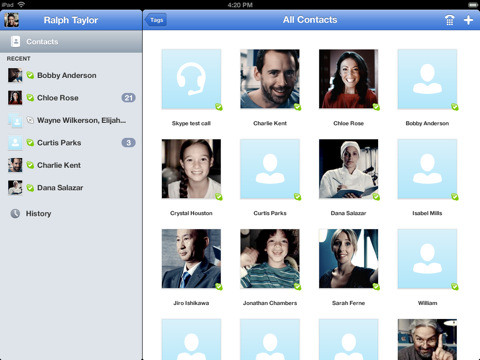
Skype has finally released a video chat application for the iPad.
Bring your Skype contacts closer with full screen video at your fingertips. Beautiful and simple, this is Skype built especially for the iPad. Call, video call, or instant message anyone on Skype. Plus, if you add a little Skype Credit, call landlines and mobiles at really low rates.
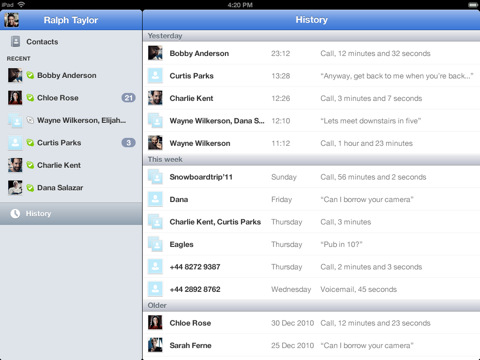
Simple to use: • Join Skype on your iPad in a few moments or just sign straight in to your account. • If you already have a Skype account, your Skype contacts will automatically be there on your iPad. • We've made adding new Skype contacts really easy. • Once they're in your Contact list, call, video or instant message them in one touch. • Flick through recent calls and instant messages in your Skype for iPad history. • Skype for iPad works over Wi-Fi or 3G (operator data charges may apply). Call Skype contacts on their iPhone, iPod touch, iPad, PC, Mac and even Skype enabled TVs.
Access free Skype features: • Talk face-to-face or show what you're seeing with front and back-facing cameras. • Use Skype for iPad to call anyone else on Skype – and enjoy near CD quality (SILK) sound. • Instant message and add emoticons to personalize your messages.
Then unlock even more features when you pay a little: • Make cheap calls to landlines or mobiles from your iPad. • Get an Online Number from Skype so people can call you on your iPad.
If you want to unlock these extra features, you can pay in a way that suits you. • Pay As You Go with Skype Credit - great for when you're using Skype every now and again. • Pay monthly with a subscription – best if you use Skype a lot.
System requirements: • Skype video calling requires iOS 4.0 or above. • Send and receive video using front or back camera on iPhone 4, iPad 2nd Generation, and iPod touch 4th Generation. • Send and receive video using rear camera on iPhone 3GS. • Receive video only on iPad 1st Generation and iPod touch 3rd Generation. • Works with any H264 compatible devices, including TVs.
The Skype iPad app is currently propagating through the App Store. It is already available on the New Zealand app store and should be available on the U.S. App Store soon. You can see a video of the app here.
Update: It's in the U.S. App Store. Get it here!
Get the iClarified Daily Newsletter
Apple news, rumors, tutorials, price drop alerts, in your inbox every evening, free.
Unsubscribe at any time.
Success!
You have been subscribed.
Add Comment
Would you like to be notified when someone replies or adds a new comment?
Yes (All Threads)
Yes (This Thread Only)
No
Notifications
Would you like to be notified when we post a new Apple news article or tutorial?
Yes
No
Comments (12)
Comments are closed for this article.
0
Rob - August 3, 2011 at 10:23am
Late to the party and half dressed, but at least it's a start. Contact photos are not showing, iPad Contacts are buried behind a useless "tags" button instead of being in the sidebar or directly on the dial pad where they are in every other version of skype. And how about a list style option for contact instead of the huge (generic) icon where a photo should be?
B-
0
Mike Djojo - August 2, 2011 at 3:46pm
Finally formally released for Indonesia Appstore...butbit pops up only working on unmodified devices? Meaning no jailbroken devices? But it works just fine on my Jailbroken iOS 4.3.3
0
Mimshack tee - August 2, 2011 at 6:41pm
It works just fine on mine too. Hours after I downloaded it disappeared from the app store. I wonder why???
0
BSoares - August 2, 2011 at 2:22pm
It just got released again :)
0
Shameer - August 2, 2011 at 10:05am
I got it last night and have it right now
0
HarryKojak - August 2, 2011 at 9:16am
I'm willing to bet there is STILL no support for Bluetooth
0
yousef - August 2, 2011 at 7:39am
I confirm that it was released and pulled back.
0
nat750 - August 2, 2011 at 7:21am
Not for the uk }:-(
0
jenn - August 2, 2011 at 7:01am
Skype pulled the app, stating it was released "prematurely". clarified did not falsely post this information
0
anelli - August 2, 2011 at 6:23am
I could not find it.
0
Mimshack tee - August 2, 2011 at 4:03am
Maybe, just maybe, iclarified for iPad?
0
Jumper - August 2, 2011 at 8:28pm
It was released, but was pulled shortly after. It's been re-released, but doesn't support jailbroken devices. At least not on my jailbroken iPad 2 running 4.3.3.






![Apple Developing iPhone Game Controllers Likely to Launch Under Beats [Report]](/images/news/102201/102201/102201-160.jpg "Apple Developing iPhone Game Controllers Likely to Launch Under Beats [Report]")
![Apple to Remove Video Walls and Bring Back Dedicated Genius Bars [Gurman]](/images/news/102198/102198/102198-160.jpg "Apple to Remove Video Walls and Bring Back Dedicated Genius Bars [Gurman]")
![John Ternus and Joz Discuss iPhone Duo Design, Price, and iPhone 18 Pro Camera [Video]](/images/news/102197/102197/102197-160.jpg "John Ternus and Joz Discuss iPhone Duo Design, Price, and iPhone 18 Pro Camera [Video]")







![Apple Studio Display XDR Hits All-Time Low of $2,969.99 ($329 Off) [Deal]](/images/news/101976/101976/101976-160.jpg "Apple Studio Display XDR Hits All-Time Low of $2,969.99 ($329 Off) [Deal]")
![Apple AirPods Pro 3 Drop to $199 ($50 Off) [Deal]](/images/news/101966/101966/101966-160.jpg "Apple AirPods Pro 3 Drop to $199 ($50 Off) [Deal]")
