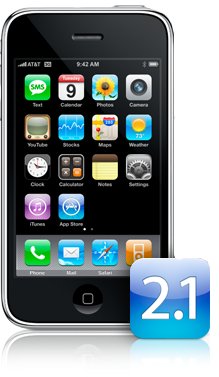
Apple has released the iPhone 2.1 firmware which contains many bug fixes and improvements.
Update includes: * Decrease in call set-up failures and dropped calls * Significantly better battery life for most users * Dramatically reduced time to backup to iTunes * Improved email reliability, notably fetching email from POP and Exchange accounts * Faster installation of 3rd party applications * Fixed bugs causing hangs and crashes for users with lots of third party applications * Improved performance in text messaging * Faster loading and searching of contacts * Improved accuracy of the 3G signal strength display * Repeat alert up to two additional times for incoming text messages * Option to wipe data after ten failed passcode attempts * Genius playlist creation
Again, we recommend not updating your iPhone to the 2.1 firmware until the iPhone Dev-Team releases an update to PwnageTool. This may be important for those hoping for an unlock in the future.
Apple news, rumors, tutorials, price drop alerts, in your inbox every evening, free.
Unsubscribe at any time.
Success!
You have been subscribed.
Add Comment
Would you like to be notified when someone replies or adds a new comment?
Yes (All Threads)
Yes (This Thread Only)
No
Notifications
Would you like to be notified when we post a new Apple news article or tutorial?
Yes
No
Comments (27)
Comments are closed for this article.
0
Lyrrad - September 13, 2008 at 11:50pm
Rest worked. But the lower volume on video remained.
0
lyrrad - September 13, 2008 at 6:35pm
glad I could help Kyle.
Has anyone noticed a lag while filling out web forms on the device? It feels like the spell check is slowing input. Same lag when deleting text. This is making it hard to type fast.
I also noticed volume is lower in video playback. I will reset the device to see if this changes.
Oh, one more odd thing. Old text messages that I had deleted are back. Anyone else have this happen?
0
nino - September 13, 2008 at 8:27am
w00p running 2.1 jailbroken with cydia and installer
followed the QuickPwn jailbreak guide.
0
Kyle Flanagan - September 13, 2008 at 8:02am
Lyrrad: Just updated my iPhone 2.0.2 to 2.1 through iTunes. Like you said, no issues with the unlock, and I didn't even use WinPwn 2.0.0.4. There's no Cydia or Installer but what the hell, I never used them much, so it makes no difference to me. App Store can remain on my desktop for as long as it wants, as I don't use that as well. Now waiting to see what's difference 2.1 makes over 2.0.2. Thanks for your tip earlier.
0
rockerzzz - September 13, 2008 at 1:38am
The itunes backup still soooooo sloooooooow not much different from 2.02
0
nino - September 12, 2008 at 7:12pm
Ni dice on the jailbreak Rambo.
I get to the bit where i hit GO in quickpwn and the cmd window opens but then it closes and nothing happens :(
0
Rambo - September 12, 2008 at 6:22pm
opp's here is the tutorial link I used for the 2.1 jailbreak.
0
Rambo - September 12, 2008 at 6:20pm
Check this out, worked for me............oh yeh!!!!!
0
Steve Anderson - September 12, 2008 at 5:27pm
rename it to what and were is it
0
alfons - September 12, 2008 at 4:38pm
>>says a file was created using a newer version of itunes and itunes will not open at all<< If you refer to the iTunes library file, just rename it and iTunes 7.7 creates a new one upon launch...
0
Steve Anderson - September 12, 2008 at 2:16pm
you cant even use winpwn no more on 1st gen iphone till patch for itunes 8 comes out even downgrading itunes to 7.7.1 does not work says a file was created using a newer version of itunes and itunes will not open at all
0
KaMiKaZe - September 12, 2008 at 2:07pm
Oiger I've got exactly the same problem as you have.
0
Oiger - September 12, 2008 at 1:53pm
Just updated my 2.0.2 pwned 1st gen to 2.1. The unlock remains and contacts and SMS are snappier now, so still not ad good as on 1.1.4.
Of course I lost the jailbreak. Hence, I'm curious how gmckay managed to use Quickpwn to re-jailbreak. It doesn't accept the 2.1 firmware yet.
0
kloquewerk - September 12, 2008 at 1:50pm
Is there a setting for the text message alerts? I dont see a setting nor do I see an alert when I don't check the text
0
JRagan - September 12, 2008 at 1:34pm
No, you can't yet jailbreak or unlock 2.1 for an iPhone 3G. iClarified will surely post a new news item when the iphone-dev team releases a new pwnage tool (or you can watch the team's blog)
0
Willy - September 12, 2008 at 1:27pm
Just a question, I can jailbreak the 2.1 firmware with quickpwn?
0
Lyrrad - September 12, 2008 at 1:20pm
winpwn ver.:2.0.0.4 was the last one I've used (still installed on my laptop) and the unlock has held now for 2 firmware upgrades.
Some additional changes: 1. a blue E for T-Mobile's edge network. 2. Better performance on Edge as well (only matters for us folks with the older devices). 3. The browser doesn't suck as much. It seems like they've fixed some of the style sheet issues. I can now view my companies site without issue. 4. Outlook global address list lookup is much faster 5. I don't know if its just me, but sound quality on calls and call connection time seems to be better, after the last update it took 4 sec. before you heard the dialing sound.
0
Kyle Flanagan - September 12, 2008 at 1:07pm
Lyrrad: Which version of WinPwn did you use for 2.1?
0
nino - September 12, 2008 at 1:00pm
Ive updated to itune 8 and when i search for an update i just get a message saying 2.0.2 is up to date.
Has 2.1 hit the UK or is it only in the states?
0
108 - September 12, 2008 at 12:58pm
settings within mail can easily cause a crash - that's new!!! Not a fixed bug but another one ...




![watchOS 27.0.1 Fixes Unexpected Restarts on Series 12 and Ultra 4 [Download]](/images/news/102378/102378/102378-160.jpg "watchOS 27.0.1 Fixes Unexpected Restarts on Series 12 and Ultra 4 [Download]")
![Near-Borderless Anniversary iPhone Pro Still on Track Despite Display Tech Delays [Report]](/images/news/102375/102375/102375-160.jpg "Near-Borderless Anniversary iPhone Pro Still on Track Despite Display Tech Delays [Report]")
![Apple Developing Screenless Health and Fitness Tracker With Fabric Band [Report]](/images/news/102372/102372/102372-160.jpg "Apple Developing Screenless Health and Fitness Tracker With Fabric Band [Report]")






![13-Inch M5 MacBook Air With 1TB Drops to $1,449 on Amazon [Deal]](/images/news/102345/102345/102345-160.jpg "13-Inch M5 MacBook Air With 1TB Drops to $1,449 on Amazon [Deal]")




