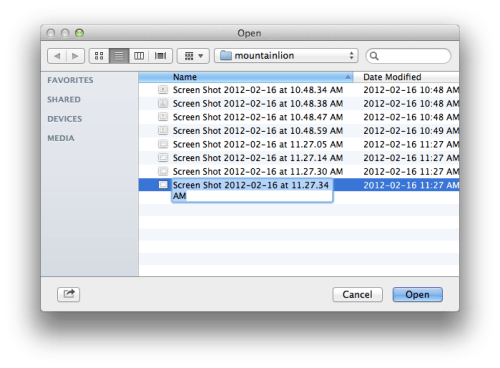
One of the great new features in OS X Mountain Lion is the ability to edit filenames from the file open dialog.
Previously you needed to open a new Finder window to make changes to filenames; however, with OS X Mountain Lion you can simply click the file twice or click it and press return to edit its name.
Take a look below...
Get the iClarified Daily Newsletter
Apple news, rumors, tutorials, price drop alerts, in your inbox every evening, free.
Unsubscribe at any time.
Success!
You have been subscribed.
Add Comment
Would you like to be notified when someone replies or adds a new comment?
Yes (All Threads)
Yes (This Thread Only)
No
Notifications
Would you like to be notified when we post a new Apple news article or tutorial?
Yes
No
Comments (10)
Comments are closed for this article.
0
JFG - November 1, 2012 at 12:49pm
I'm running ML 10.8.2 and I CANNOT do any of those things. Either slow double-click or hitting the Return key simple opens the file...
Just to clarify what other people seems not to understand, we are talking about the OPEN/SAVE DIALOG window, not a regular Finder window.
0
Ranmat - March 16, 2012 at 9:29pm
How is this news?
0
amiridwan - March 16, 2012 at 7:19pm
Do you guys just know this function? It can be used since ever.
0
ym74c - March 16, 2012 at 4:17pm
what are you talking about, people ? ... clicking a file and hit return to rename worked since ever... also double clicking with a delay... why do you need a menu function for that ?
0
Luis Abarca - March 15, 2012 at 4:13am
OSX Lion also can do that, just click, one second, click again, then rename the file.
0
Greg - March 15, 2012 at 1:35am
Noticed this the first day I installed ML. Drives me INSANE. I can't hit return to submit anymore. Screw this.
0
gaston - March 15, 2012 at 12:03am
Thank you.
0
Seriously - March 14, 2012 at 9:04pm
Uh Lion can do the same. Just right click and choose rename.
0
me84 - March 14, 2012 at 7:51pm
So cool
0
Phyo Thiha - March 14, 2012 at 7:31pm
Ive been waiting for this for a while now, you could always do this in windows and I wanted it for Mac OS.




![All 2027 iPhones Expected to Use Apple Modems [Gurman]](/images/news/102447/102447/102447-160.jpg "All 2027 iPhones Expected to Use Apple Modems [Gurman]")

![Apple Tests New Vision Headset Designs Amid Uncertain Launch Plans [Gurman]](/images/news/102444/102444/102444-160.jpg "Apple Tests New Vision Headset Designs Amid Uncertain Launch Plans [Gurman]")




![How To Find Your iPhone IMEI Number [Video]](/images/tutorials/83557/83557/83557-160.jpg "How To Find Your iPhone IMEI Number [Video]")


![16-Inch M5 Max MacBook Pro Drops $900 to New Low of $3,499 [Deal]](/images/news/102438/102438/102438-160.jpg "16-Inch M5 Max MacBook Pro Drops $900 to New Low of $3,499 [Deal]")
![Magic Keyboard for iPad Air Drops to $200 on Amazon [Deal]](/images/news/102402/102402/102402-160.jpg "Magic Keyboard for iPad Air Drops to $200 on Amazon [Deal]")
![13-Inch M5 MacBook Air With 1TB Drops to $1,449 on Amazon [Deal]](/images/news/102345/102345/102345-160.jpg "13-Inch M5 MacBook Air With 1TB Drops to $1,449 on Amazon [Deal]")


