These are instructions on how to add a custom fifth row of keys to your iPhone keyboard for improved typing.
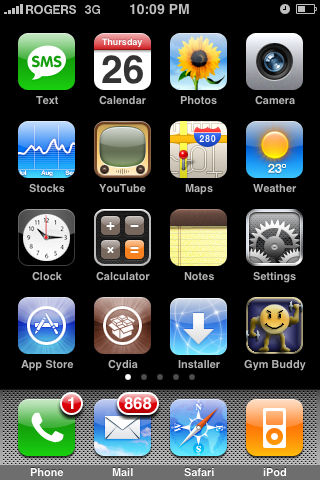
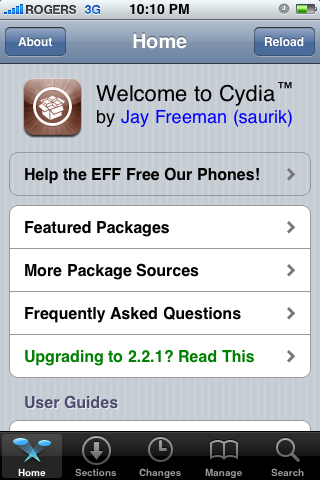
Step One Press the launch Cydia from your Springboard.
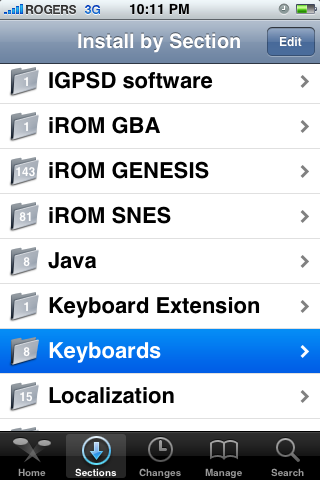
Step Two Press to select the Sections tab at the bottom of the screen.
Step Three Press to select Keyboards from the list of Sections.
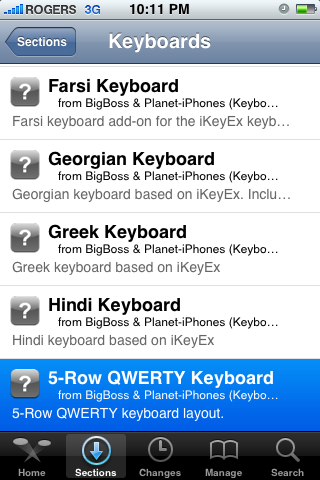
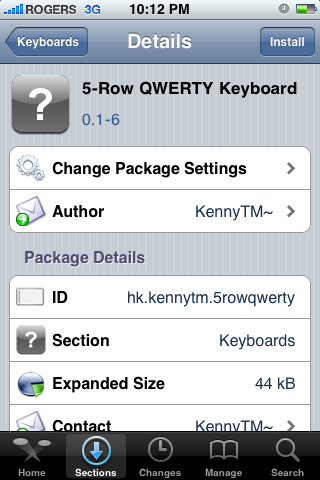
Step Four Press to select 5-row QWERTY from the list of Packages.
Step Five Press the Install button at the top right of the screen.
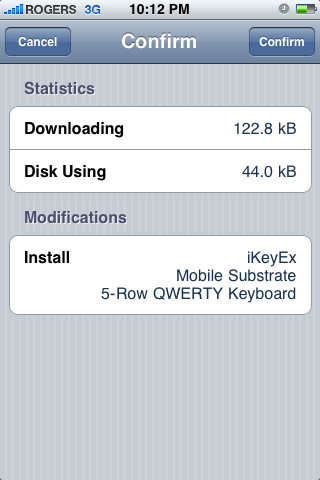
Step Six Press the Confirm button at the top right of the screen.
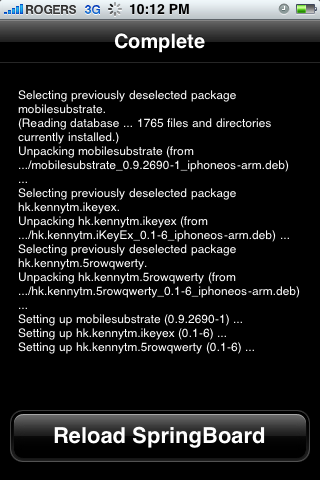
Step Seven Once installation has completed successfully press the large Restart Springboard button.
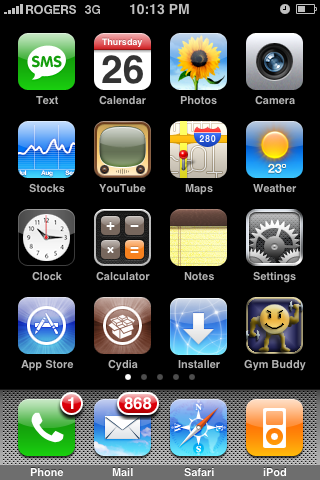
Step Eight Once your Springboard has restarted press the Notes icon to launch the notepad.
Step Nine Activate a note to bring up the keyboard. Notice you will still have the default 4 row keyboard.
Press the Globe icon to the left of the spacebar. You will now notice your keyboard has added a 5th row of keys above the usual keys.
CUSTOMIZE YOUR FIFTH ROW To customize the fifth row of your keyboard you must have 5-row QWERTY version 0.1-7 installed. At the time of writing this version hasn't made it in on Cydia; however, it should be up soon :) If you are really impatient and an advanced user you can manually download it from here
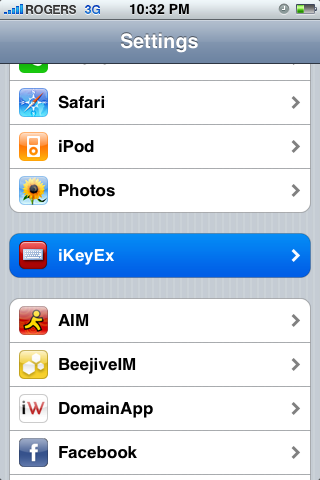
Step One Press to select Settings from your Springboard.
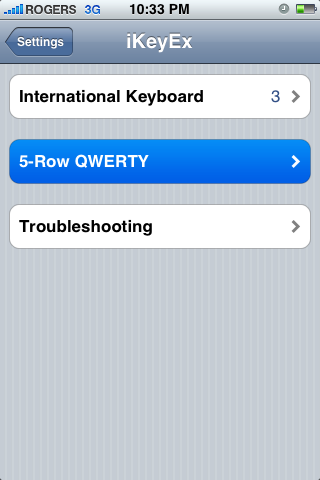
Step Two Press to select iKeyEx from the Settings Menu
Step Three Press to select 5-Row QWERTY from the iKeyEx Menu.
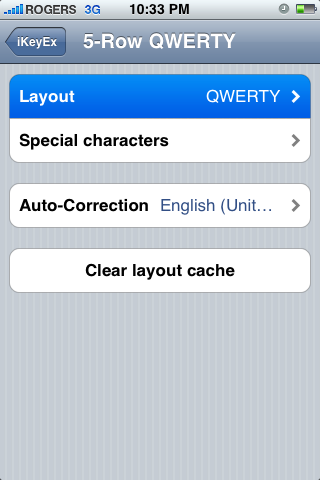
Step Four Press to select Layout from the 5-Row QWERTY menu.
Step Five From this menu you can select a host of different keyboard types for your iPhone. Press the 5-Row QWERTY button at the top left of your screen to return to the menu.
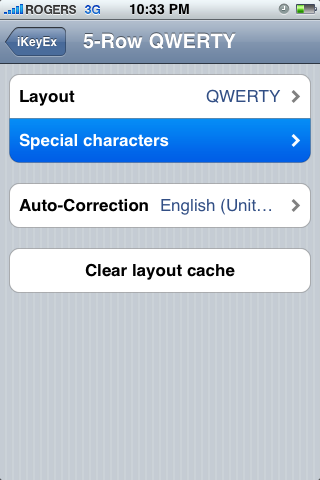
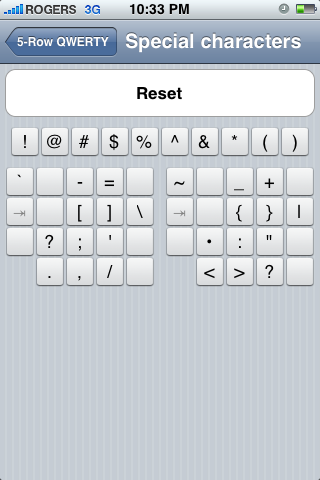
Step Six Press to select Special Characters from the 5-Row QWERTY menu.
Step Seven Notice you will see a row of keys at the top of the window. This is your current fifth row of keys. Press to select a key you would like to change.
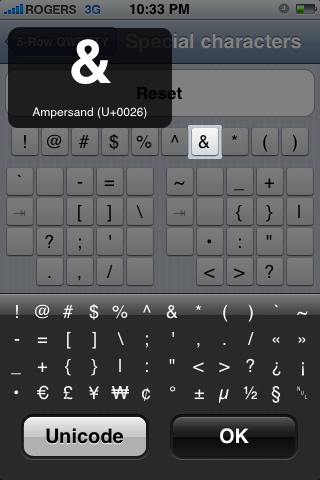
Step Eight You will now be asked to select a key to replace it with. Press to select a replacement key.
Finally, press the OK button to complete the change.
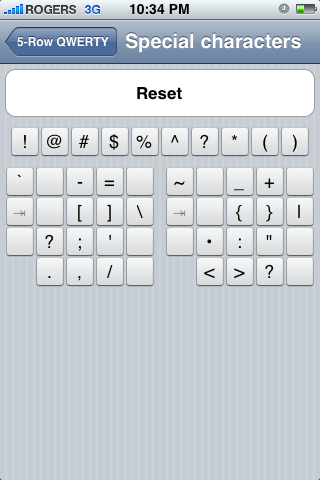
Step Nine Notice the key has been replaced.
Now if we open the keyboard in any application your custom layout will appear!
THANKS***: A big thanks to kennytm for his development of this excellent patch.
Get the iClarified Daily Newsletter
Apple news, rumors, tutorials, price drop alerts, in your inbox every evening, free.
Unsubscribe at any time.
Success!
You have been subscribed.
Add Comment
Would you like to be notified when someone replies or adds a new comment?
Yes (All Threads)
Yes (This Thread Only)
No
Notifications
Would you like to be notified when we post a new Apple news article or tutorial?
Hi brikz, you didn't tell us the name of the application and the source, i'm not able to add it to cydia.
i have a 3G iphone on the 3.1.2 so I need the 5 keyboard to work
thanks.
Hi Asaad,
You can go to the website for beyouriphone and look for ikeyex and/or 5row qwerty, you will need a webpage translator as it is in Italian... or you can add repo.beyouriphone.com in cydia and then look it for it that way the programs are under ikeyex 3 and 5 row qwerty keyboard Hope this helps and enjoy....
Anyone know when the developer is updating this? Also, anyone know what repo i need to get Little Waynes' "I'm ME" text message tone? i used to have it and now i don't where i got it from and want it back.
thanks,
At Step Nine, when I bring up the notes application, I do not see the Globe button next to the keyboard. I'm using OS 3.0 on an iPhone 3G. Can anyone provide any suggestions as to what might be wrong?
Thanks.
Have downloaded the application (0.1-10) as per the instructions and on the surface everything looks good. I am using OS 3.0. However, when i select notes n press the globe all i get is the option to change languages not the 5th row. I have uninstalled and reinstalled but to no avail. Any suggestions pse. Many thanks
i need directions adding this 5th row keyboard. when i go to mix and match, how do you save that entry?? I downloaded the right keyboard but cant set it up properly in ikeyex
I like the program in itself, but i still don't have the options to customize my 5th row. And i even downloaded the emoticons feature and there is a tab for that on the preferences ikeyex page but nothing there when it opens.
When I tried to change the caracters on the fifth row they just reseted to normal and the language i've selected resets to.
someone got the same problem or someone that solved it?
thank you
it's a really great thing for the iphone/ipod touch!
but i want to change some buttons, i know that you need 0.1-7 to do that.
and i have that 0.1-7 on my mac, but how do i get that on my iphone?
thanks in advance!!
I love this little tweak to the keyboard. It is so great not having to flip screens to put in digits, and other symbols. This ranks right up there with clippy and other great timesaver, ease of use fixes.
Big ups to the dev
For those of you who have problems, please read the tutorial properly. It says:
CUSTOMIZE YOUR FIFTH ROW
To customize the fifth row of your keyboard you must have 5-row QWERTY version 0.1-7 installed. At the time of writing this version hasn't made it in on Cydia; however, it should be up in a few hours :)
When I go into iKeyEx settings, there are no options for me to customize the 5th row. It just shows International Keyboard (4) and then two trouble shooting options underneath. Any ideas?
In the tutorial you will see this text:
CUSTOMIZE YOUR FIFTH ROW
To customize the fifth row of your keyboard you must have 5-row QWERTY version 0.1-7 installed. At the time of writing this version hasn't made it in on Cydia; however, it should be up in a few hours :)
Please read it and you will have an answer to your question :)













![Apple Releases iOS 27.2 Beta 4 and iPadOS 27.2 Beta 4 to Developers [Download]](/images/news/102795/102795/102795-160.jpg "Apple Releases iOS 27.2 Beta 4 and iPadOS 27.2 Beta 4 to Developers [Download]")

![How To Take a Screenshot on iPhone [Video]](/images/tutorials/399/399/399-160.jpg "How To Take a Screenshot on iPhone [Video]")
![How To Forward Calls on iPhone [Video]](/images/tutorials/92926/92926/92926-160.jpg "How To Forward Calls on iPhone [Video]")
![How To Back Up Your iPhone to an External Drive on Mac [Video]](/images/tutorials/72786/72786/72786-160.jpg "How To Back Up Your iPhone to an External Drive on Mac [Video]")






![Mac mini Drops to $779.99 for Prime Big Deal Days [Deal]](/images/news/102624/102624/102624-160.jpg "Mac mini Drops to $779.99 for Prime Big Deal Days [Deal]")
