
How to Access Terminal (Command Line) on Your iPhone
Posted November 2, 2008 at 9:59pm by
Shalom Levytam
These are instructions on how to access a command line prompt (Terminal window) on your iPhone or iPod touch.
To follow these steps you will need to have already jailbroken your iPhone or iPod touch.
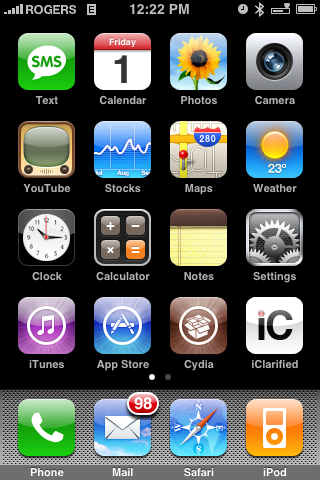
Step One
Press to launch Cydia from your iPhone's Springboard.
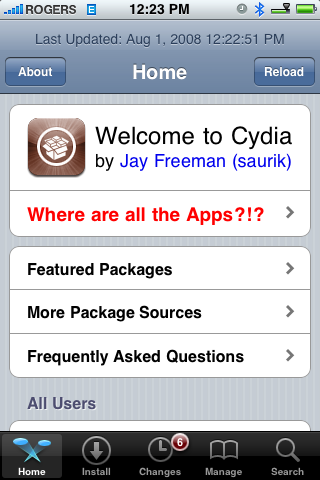
Step Two
Once Cydia opens press to select the Sections tab at the bottom of the screen.
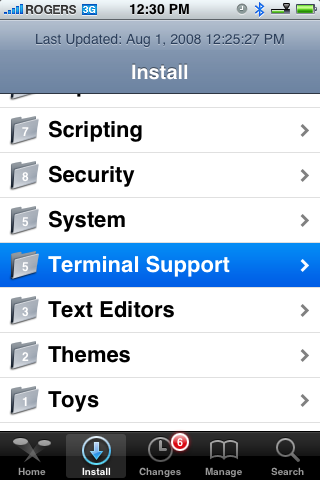
Step Three
Press to select Terminal Support from the list of Sections.
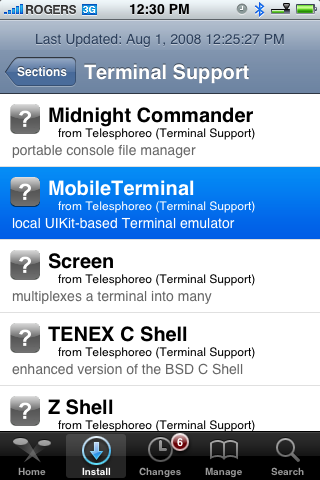
Step Four
Press to select MobileTerminal from the list of Packages available.
Step Five
Press the Install button at the top right of the screen.
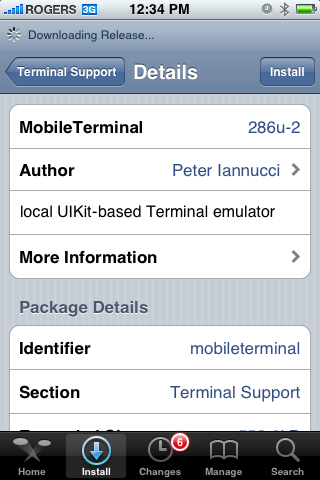
Step Six
Press the Confirm button to begin installation.
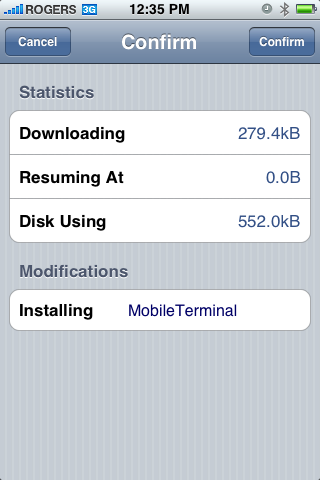
Step Seven
Once the installation has completed successfully press the large Return to Cydia or Close Window button.
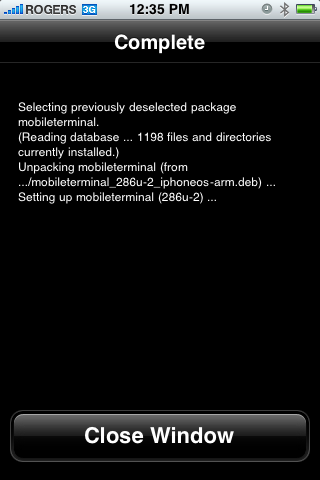
Step Eight
Press the Home button to return to your Springboard. Notice the new MobileTerminal icon. Press to launch it!
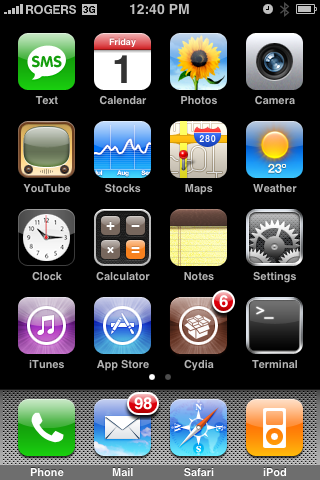
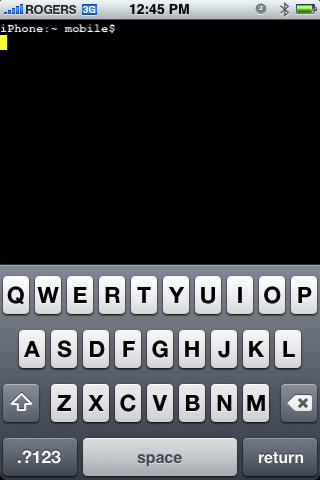
To follow these steps you will need to have already jailbroken your iPhone or iPod touch.
Step One
Press to launch Cydia from your iPhone's Springboard.
Step Two
Once Cydia opens press to select the Sections tab at the bottom of the screen.
Step Three
Press to select Terminal Support from the list of Sections.
Step Four
Press to select MobileTerminal from the list of Packages available.
Step Five
Press the Install button at the top right of the screen.
Step Six
Press the Confirm button to begin installation.
Step Seven
Once the installation has completed successfully press the large Return to Cydia or Close Window button.
Step Eight
Press the Home button to return to your Springboard. Notice the new MobileTerminal icon. Press to launch it!


![Apple Releases iOS 27.2 RC and iPadOS 27.2 RC to Developers [Download]](/images/news/102906/102906/102906-160.jpg "Apple Releases iOS 27.2 RC and iPadOS 27.2 RC to Developers [Download]")
![Apple Releases macOS 27.2 Golden Gate RC to Developers [Download]](/images/news/102909/102909/102909-160.jpg "Apple Releases macOS 27.2 Golden Gate RC to Developers [Download]")
![Apple Seeds watchOS 27.2, tvOS 27.2, and visionOS 27.2 Release Candidates [Download]](/images/news/102912/102912/102912-160.jpg "Apple Seeds watchOS 27.2, tvOS 27.2, and visionOS 27.2 Release Candidates [Download]")
![Apple Announces 'Pro and Tell' Event for October 28 [Video]](/images/news/102903/102903/102903-160.jpg "Apple Announces 'Pro and Tell' Event for October 28 [Video]")
![Apple Plans 9-Inch HomeView With Robotic Arm for 2027 or 2028 [Gurman]](/images/news/102885/102885/102885-160.jpg "Apple Plans 9-Inch HomeView With Robotic Arm for 2027 or 2028 [Gurman]")
![How To Install Homebrew on Mac [Video]](/images/tutorials/83695/83695/83695-160.jpg "How To Install Homebrew on Mac [Video]")

![How To Back Up Your iPhone to an External Drive on Mac [Video]](/images/tutorials/72786/72786/72786-160.jpg "How To Back Up Your iPhone to an External Drive on Mac [Video]")


![16-Inch MacBook Pro With M5 Max Drops to $3,499 ($900 Off), Lowest Price We've Seen [Deal]](/images/news/102900/102900/102900-160.jpg "16-Inch MacBook Pro With M5 Max Drops to $3,499 ($900 Off), Lowest Price We've Seen [Deal]")
![Mac Studio With M5 Max Is $200 Off, Lowest Price We've Seen [Deal]](/images/news/102897/102897/102897-160.jpg "Mac Studio With M5 Max Is $200 Off, Lowest Price We've Seen [Deal]")
![14-Inch MacBook Pro With M5 Pro Drops to $2,069.10 ($429 Off) [Deal]](/images/news/102879/102879/102879-160.jpg "14-Inch MacBook Pro With M5 Pro Drops to $2,069.10 ($429 Off) [Deal]")
![Apple HomeView and New Apple TV 4K Get First Pre-Order Discount on Amazon [Deal]](/images/news/102867/102867/102867-160.jpg "Apple HomeView and New Apple TV 4K Get First Pre-Order Discount on Amazon [Deal]")
![14-Inch MacBook Pro With M5 Max Drops to $3,299 ($800 Off) [Deal]](/images/news/102828/102828/102828-160.jpg "14-Inch MacBook Pro With M5 Max Drops to $3,299 ($800 Off) [Deal]")
