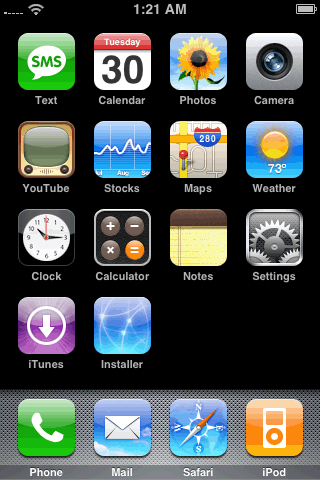
PREPARE THE PHONE Step One Press to select Settings from your springboard.
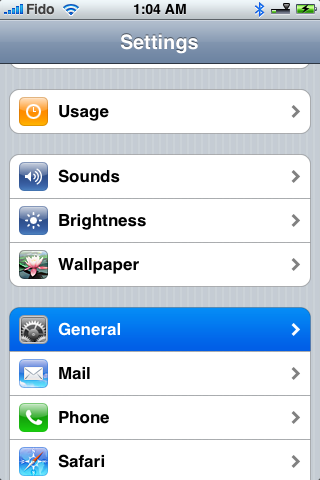
Step Two Press to select General from the list of categories.
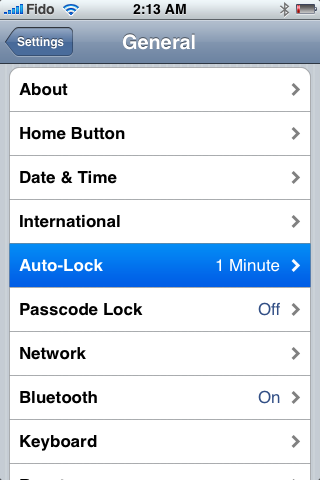
Step Three Press to select Auto-Lock from the General menu.
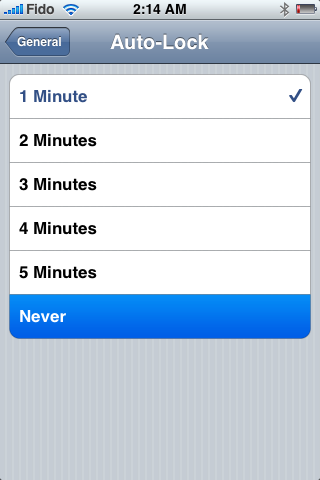
Step Four Press to select Never from the list of Auto-Lock times.
Step Five Press the Home button to return to your springboard.
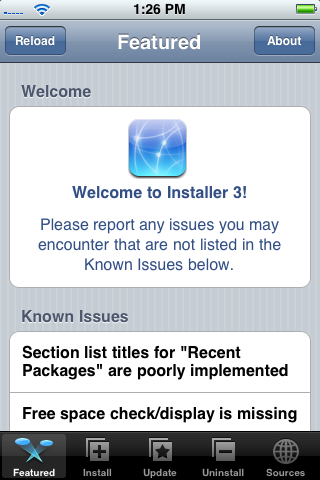
Step Six Press to select Installer from your springboard.
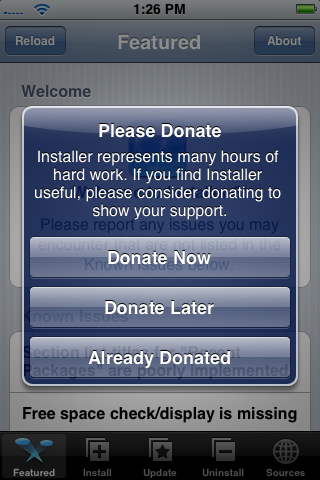
Step Seven Press Donate Later to continue into the Installer app. Note: Come back later and donate as this app is helping you out a ton!
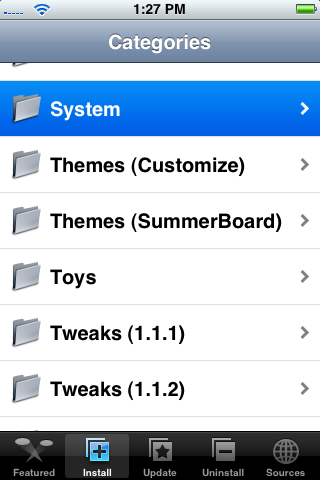
Step Eight Press to select the Install tab at the bottom of the screen.
Step Nine Press to select the System category.
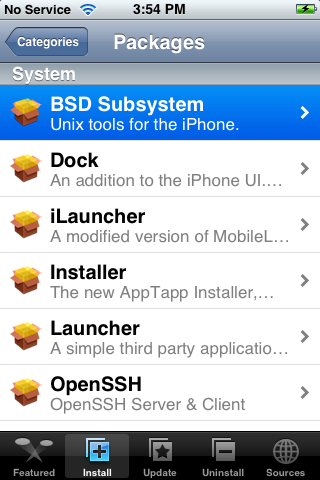
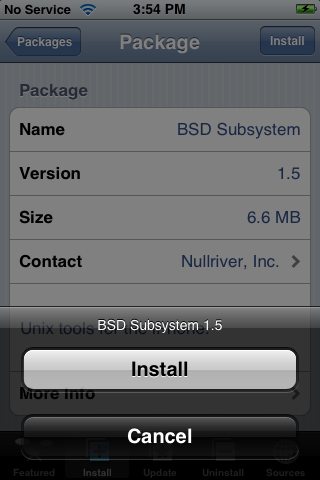
Step Ten Press to select BSD Subsystem from the list of packages.
Step Eleven Press to select the Install button at the top right.
Step Twelve Press the Install button to confirm installation.
NOTES***: Make sure if you haven't already that you update to the latest version of Installer. This is very important because the old version won't work in 1.1.3.
INSTALL THE JAILBREAK Step One Download the Jailbreak from: download link unavailable
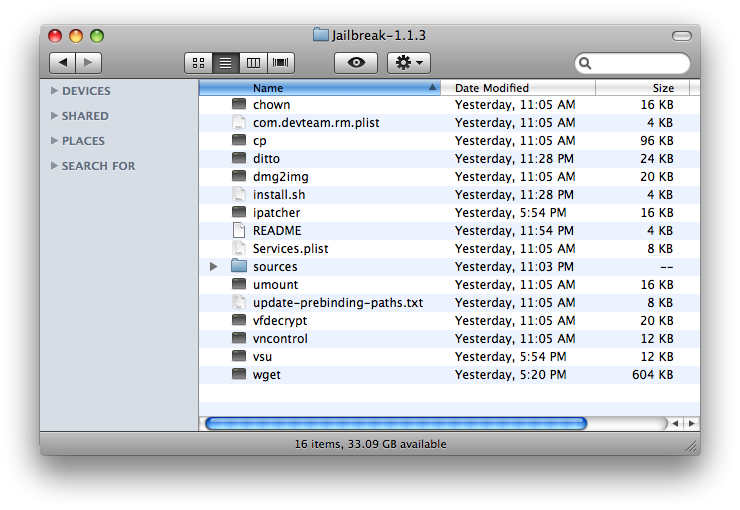
Step Two Double click the downloaded file (Jailbreak-1.1.3.tar.gz) to extract it.
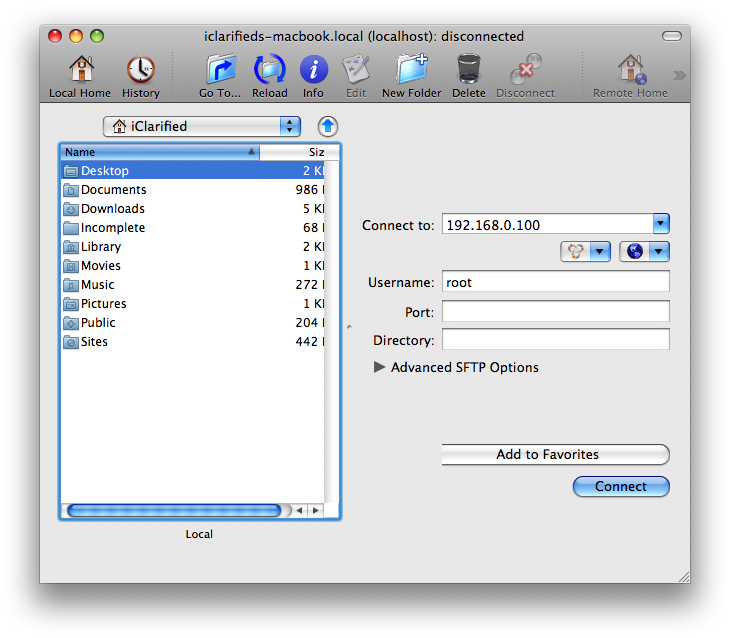
Step Three Launch Fugu by clicking its icon in the dock.
Step Four Enter your iPhone's IP Address into the Connect to: field. Enter root as the Username: and click the Connect button.
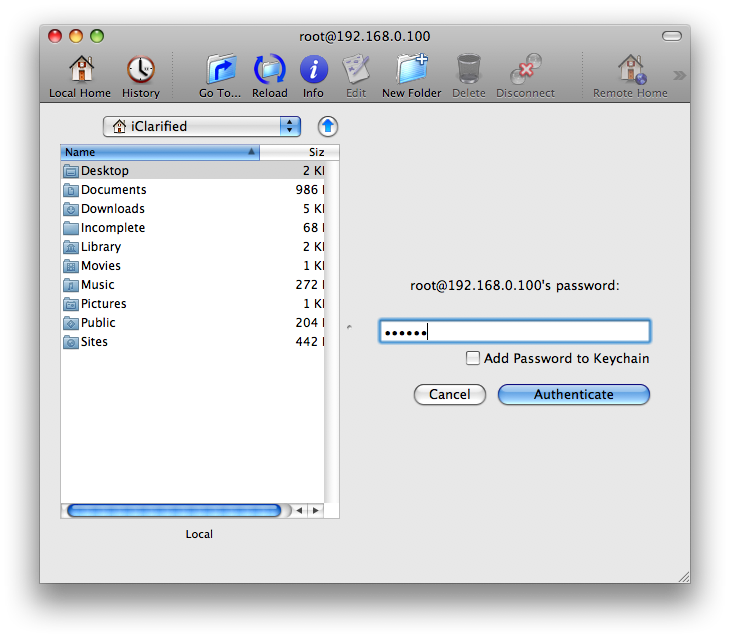
Step Five If prompted for a password enter alpine or dottie and click the Authenticate button.
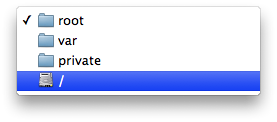
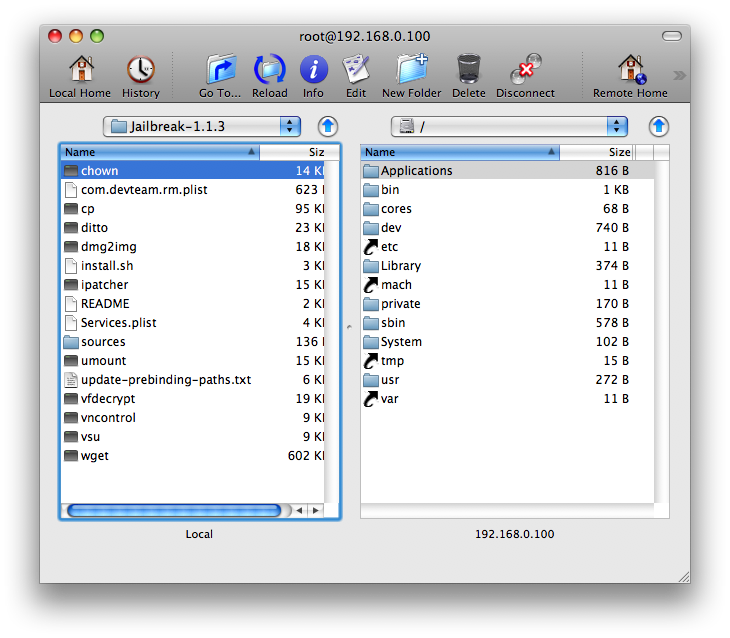
Step Six Select / from the Remote Folder Dropdown Menu (right pane).
Step Seven In the left pane navigate to the Jailbreak-1.1.3 folder.
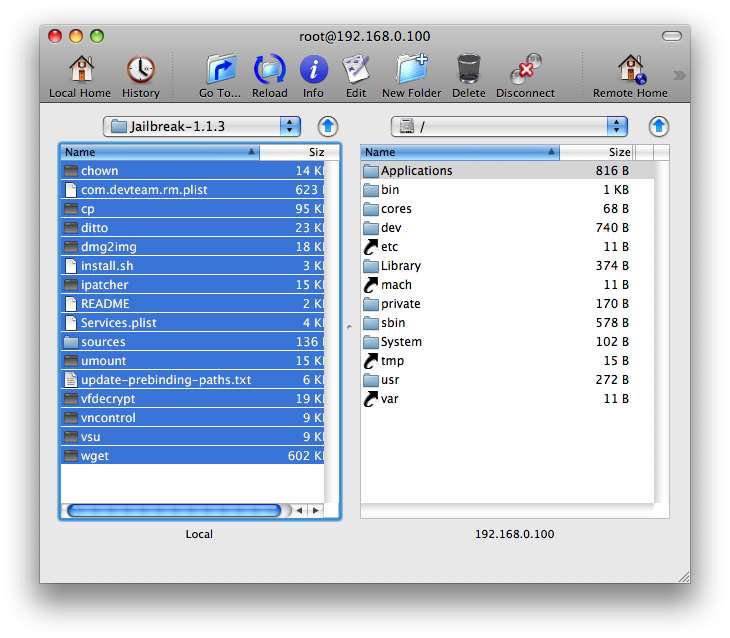
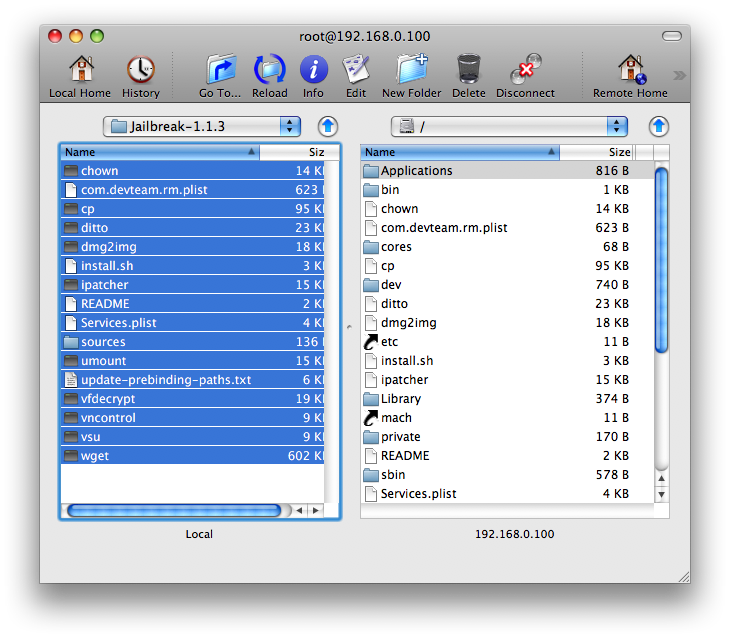
Step Eight Select all the files in the left pane and drag them to the right pane to copy them to your iPhone
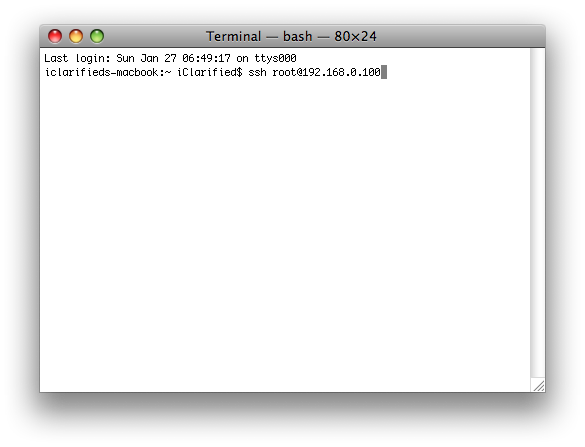
Step Nine Launch the Terminal application from Applications:Utilities.
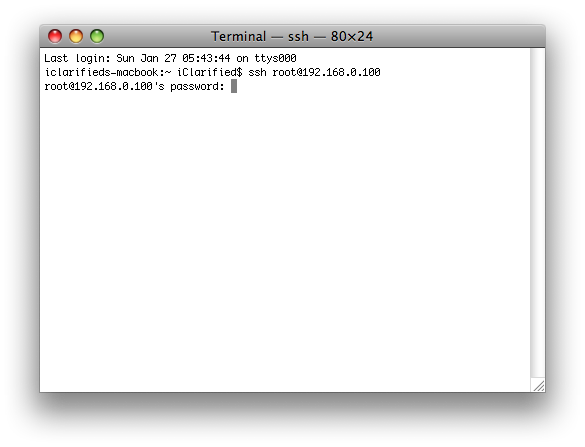
Step Ten SSH into your iPhone by entering the following command into Terminal: ssh root@192.168.0.100 (replace the IP I used here with the one for your iPhone)
Step Eleven When prompted for a password enter alpine or dottie.
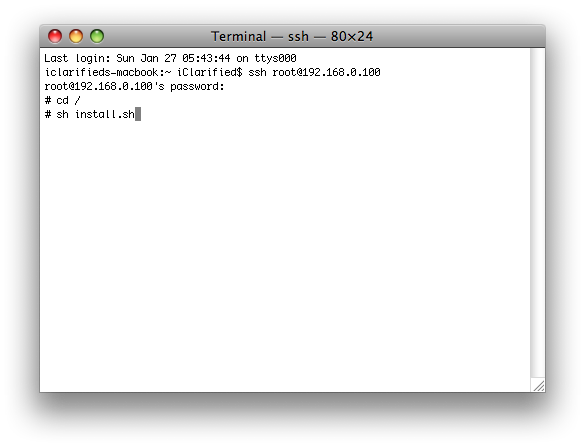
Step Twelve Enter the following commands to start the install:
cd / sh install.sh
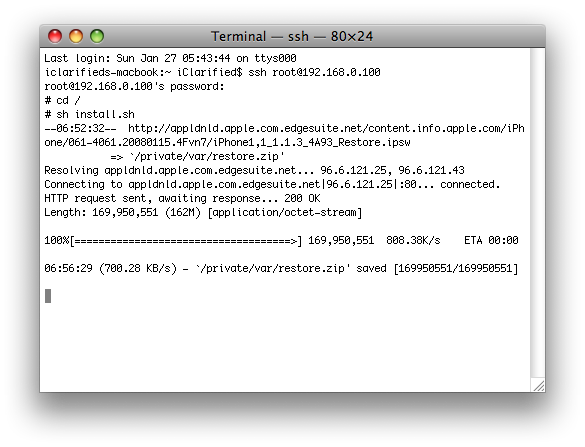
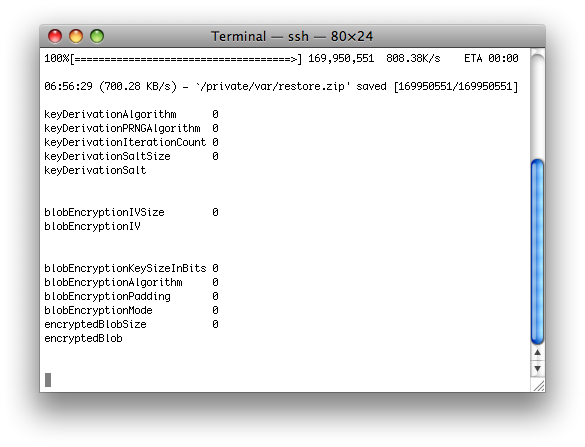
Step Thirteen The script will download the firmware from Apple once it finishes it will just sit there for a few minutes. Don't worry this is normal.
Step Fourteen It will then display some encryption information and sit there for a few minutes. Don't worry this is normal.
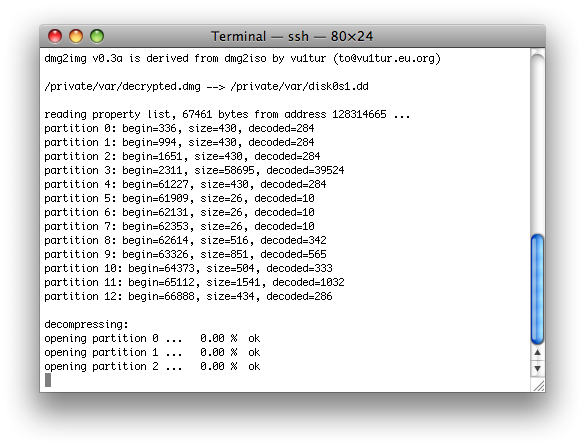
Step Fifteen The script will then display some partition information and sit there for another few minutes. Don't worry this is normal.
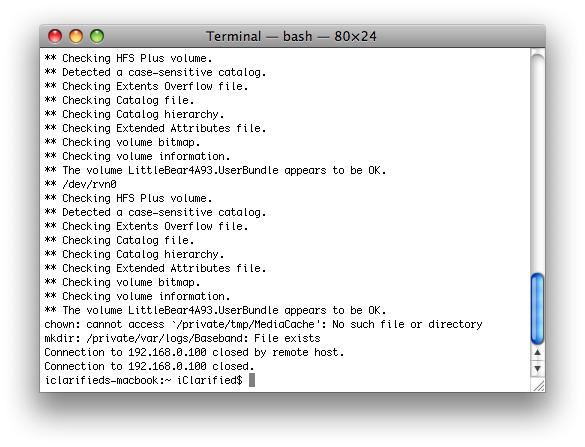
Step Sixteen The script will then continue to patch your iPhone. It will take several minutes for this to complete and then it will sit there for a longer several minutes again. Once its complete the SSH connection will terminate!
Step Seventeen After about a minute your iPhone will reboot into a Jailbroken 1.1.3 iPhone !!!!
Why does it not connect?
It tryes to connect to strange IP 1.0.0.0 Why?
Here is the error:
# sh install.sh
--19:29:54-- appldnld.apple.com.edgesuite.net/content.info.apple.com/iPhone/061-4061.20080115.4Fvn7/iPhone1,1_1.1.3_4A93_Restore.ipsw
=> `/private/var/restore.zip'
Resolving appldnld.apple.com.edgesuite.net... 1.0.0.0
Connecting to appldnld.apple.com.edgesuite.net|1.0.0.0|:80... failed: Operation timed out.
Retrying.
Ok, so I upgraded from jailbroken 1.1.2 to now jailbroken 1.1.3. Thanks guys! However, I noticed that installing OpenSSH didn't install the icon. Wondering why I ssh'd into the iPhone (which proved that the install worked?), and I noticed that the file system is full, cf:
# df
Filesystem 512-blocks Used Avail Capacity Mounted on
/dev/disk0s1 545856 540552 0 100% /
devfs 35 35 0 100% /dev
/dev/disk0s2 15244736 10748432 4496304 71% /private/var
#
Wondering if you guys can tel us what can be deleted, as I'm sure to want to install other software soon enough.
Cheers,
Andrew.
i have a 1.1.1 jailbreaked iphone with anysim to use tmobile..
If i follow these steps would i still be able to use the T-Mobile sim card!?!? or is it just jailbroken for AT&T users?!?
please let me know before i attempt this
what i did...
keep holding "home" and "power" until it Reboot.
if it stuck on the apple logo, for more 10 minutes or more, do the same as before.
thats how it work for me.
Regrets
im on the SpringBoard, with the roal icon... like working, but it's been 1:30 Hours.. and nothing Happen... i can't reset it... nothings working :'(
Heeeeeelp PLEASE
Installer (3.0b4) doesn't work: When I try to install any application (even the Installer update to 3.0b10) I get this:
Error
Main script execution failed
Plus: Movie Rentals transfer doesn't work either!
My neighbour who is a bit of a tool updated his brand new iPhone (week 50, US bought) to the 1.1.3 within 10 mins of having bought it so he gave it to me as it was broken. I have tried to downgrade it to 1.1.1-->1.1.2-->1.1.3. It is now working except for two things:
1. There is only Airplane Mode and Wifi available in the communication part of the settings menu and I see from pictures that there should be more.
2. I get the message,
"
Error
Main script execution failed!
"
everytime I try to install new applications. I need iFON or iWorld to get it to work in Scandinavia. I am totally new to this so sorry if the reasons for this are completely obvious. Feel free to guide me through the steps as if I were an idiot if you can tell me how to fix these problems. :P
Cheers
Great. Now I'm left with a phone that has the picture of the CD and synchronization cable. I get to start from (1.??) scratch. Anyone thinking of doing this should really ask the question if the minor changes are worth the probable aggravation they'll likely encounter.
Okay. So now everything seems to be working alright except that I can't update Installer. It fails every time. And the iPhone doesn't sync my contacts or calendar.
Success! After three attempts. For those who stuck with the Apple icon screen. This is what I used. My iPhone with StealthSim: 1.1.2 OTB -> 1.1.1 JB -> 1.1.2 JB -> 1.1.3 JP. I didn't use the StealthSim in the JB process until I finished the JB at 1.1.3. After swapping out the ATT sim card with the StealthSim, it is all good now. The ring tone is working. Loud and clear.
Is there any way to jailbroke the iPhone with an already firmware file downloaded to the computer previously? My Internet connection is awesome slowly and I think it will be very difficult to leave the phone connected to the Mac so many hours.





![Apple Home Hub With Siri AI in Employee Testing, Could Debut in October [Gurman]](/images/news/102309/102309/102309-160.jpg "Apple Home Hub With Siri AI in Employee Testing, Could Debut in October [Gurman]")

![Apple Cuts Fitness+ Jobs as It Rethinks the Service [Report]](/images/news/102306/102306/102306-160.jpg "Apple Cuts Fitness+ Jobs as It Rethinks the Service [Report]")

![Pro Photographer Austin Mann Tests iPhone 18 Pro Camera [Video]](/images/news/102297/102297/102297-160.jpg "Pro Photographer Austin Mann Tests iPhone 18 Pro Camera [Video]")









![Apple Studio Display XDR Hits All-Time Low of $2,969.99 ($329 Off) [Deal]](/images/news/101976/101976/101976-160.jpg "Apple Studio Display XDR Hits All-Time Low of $2,969.99 ($329 Off) [Deal]")
