These are step by step instructions how to jailbreak any iPhone instantly! No downgrading then upgrading! You can do this from any firmware version! It will also automatically install Installer.app for you!
ZiPhone is capable of the following functions: - Imei changer will work ONLY on 4.6 BL (112 and 113 ootb). - Unlock will work for 3.9BL and 4.6BL - Jailbreak will work on any OS version. - Activation will work on any OS version, except for youtube on 1.0.X.
Easier ZiPhone GUI instructions can be found here: https://www.iclarified.com/667/how-to-jailbreak-your-iphone-with-ziphone-gui-windows
Perform these steps with your iPhone on and connected to your computer.
Step One Download ZiPhone from: download link unavailable
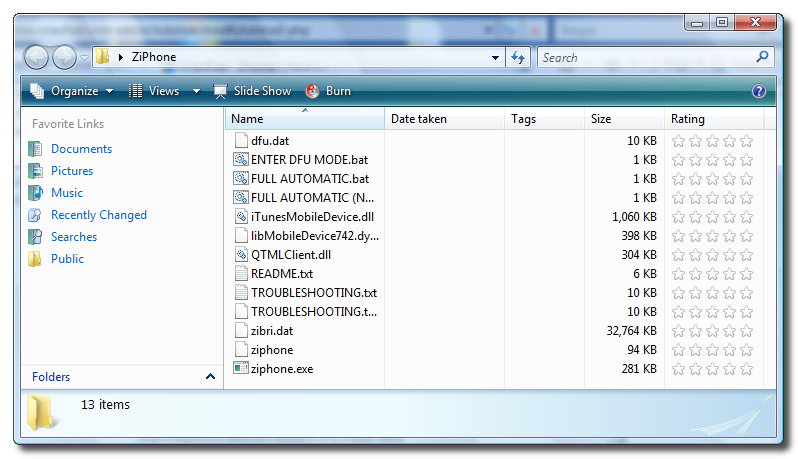
Step Two Double click ZiPhone.zip on your desktop to extract the folder ZiPhone..
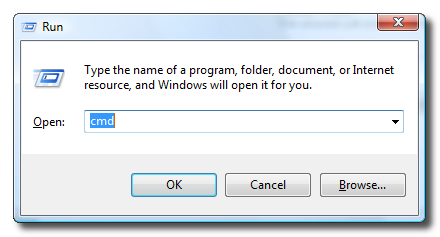
Step Three Press the Windows key and R at the same time to bring up the Run window. Type in cmd and press the Ok button to launch the Command Prompt.
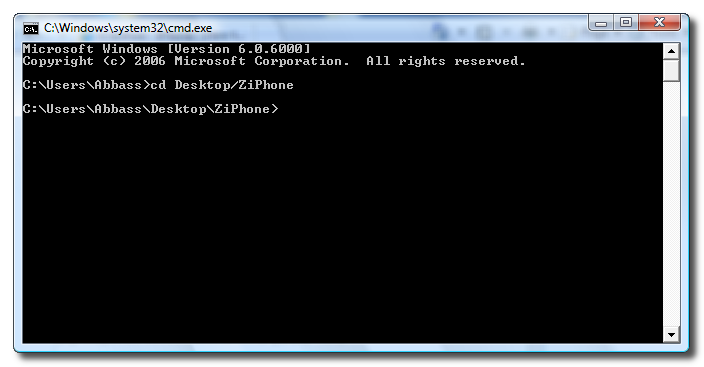
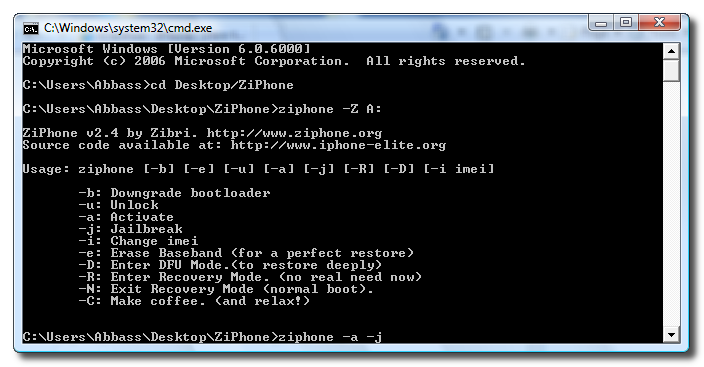
Step Four Type the following command into the Command Prompt to navigate to the ZiPhone directory: cd Desktop/ZiPhone.
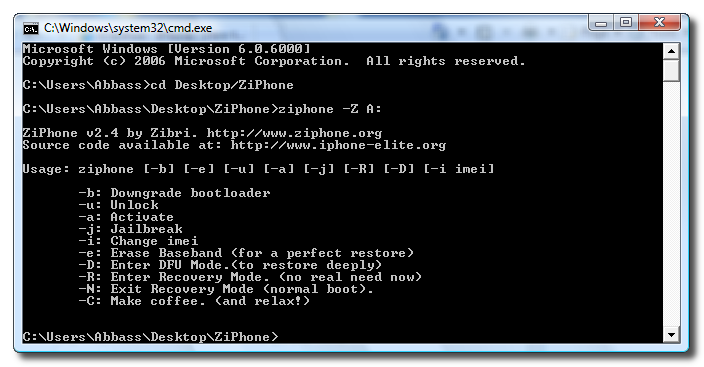
Step Four Execute the command ziphone -Z A: to see all its possible uses.
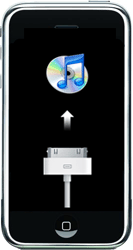
Step Five The program will prompt you to put your iPhone into recovery mode. To do this please hold down both the Sleep/Wake and Power buttons until you see the Apple logo. Once the Apple logo appears release only the Sleep/Wake button until you see the iTunes logo and cable on the screen.
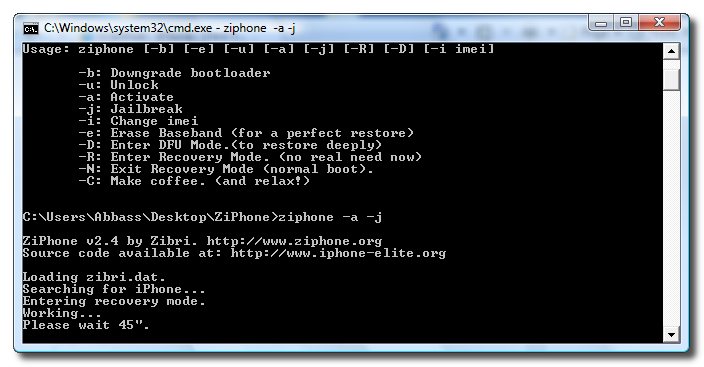
Step Six Now you can activate and jailbreak! Just simply type in this command: ziphone -a -j
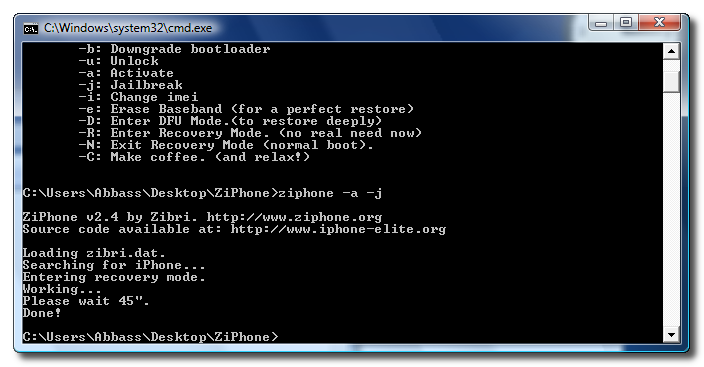
Step Seven The program will now search for zibri.dat. Then it will search for the iPhone. Once found it will tell you to wait for 45 seconds.
Step Eight After this time your iPhone will reboot and it will be activated and jailbroken!!!!!
THANKS***: Big thanks go to Zibri
Get the iClarified Daily Newsletter
Apple news, rumors, tutorials, price drop alerts, in your inbox every evening, free.
Unsubscribe at any time.
Success!
You have been subscribed.
Add Comment
Would you like to be notified when someone replies or adds a new comment?
Yes (All Threads)
Yes (This Thread Only)
No
Notifications
Would you like to be notified when we post a new Apple news article or tutorial?
I did this procedure after the "How to Unlock a 1.1.4 iPhone (ZiPhone + Installer) (Windows)" my Iphone did not responde it just stays with the apple on the screan and can't make it work nor the PC detects the iphone please help!
Hey Guys. I've got a OOB 1.1.3 unlocked in India, and I am able to send/received SMS and received phone calls. For some reason I can't call out. Anyone have any ideas? I tried iWorld, but it seems to only work in 1.1.2. I also tried the WinSCP method of patching appSupport. No luck with that. Any help appreciated. Thanks.
I have a 1.1.2 OTB HW unlocked. Recently I've upgraded it to 1.1.3 (did a restore) but after activate and jailbreake using ZiPhone its WiFi acting kind of weird. After a successfully connecting to an Ad-Hoc it will disconnect when i press the home button. I reseted the network settings but nothing happened.
BTW, my phone is a 1.1.2 OTB, I had killed all itunes stuff from the task manager and been monitoring the services. ziphone.ex is using 2684K of memory and AppleMobileDeviceService.exe 788K.
Cheers.
Hi guys I am running vista, and did the ziphone -u -a -j, it went all the way to show me Please wait 2'30. but it has been seating there for about 25min and nothing has happened. The phone rebooted at first I guess it is part of the work it is doing, and during this time the screen has flash about 2 times, that I have notice, but still sitting in the apple icon.
Is there any way to know this is still working or how to stop and try again?
I really appreciate any help.
Make sure you quit ituneshelper.exe from task manager as that stops the phone being jailbroken!
I tried on my 1.1.3 16GB OTB five times before I quit ituneshelper and then installer finally popped up!
I would add that not all apps are working on this jailbreak - I don't know if its my phone or because they are not made to work with this new jailbreak method?!
Well I completed everything and said done, but I don't see customizer and other stuff? Was I suppose to unlock it as well, if I had a legit ATT account?
After hours spent on the Dev Team's Tutorials, ending in a not 100% working iphone (installer was not installing with script execution failure error..) the best was Zibree's solution with ziphone -u -a -j .
I followed JAS advice (read comments..) : restored back to a clean 1.1.3 my OOTB phone and used ziphone from a dos window. All went OK in a few minutes !!! My phone is working now unlocked and jailbroken as expected. Thanks to ZIBREE and iClarified for the good tutorials.
Well Done !










![How To Find Your iPhone IMEI Number [Video]](/images/tutorials/83557/83557/83557-160.jpg "How To Find Your iPhone IMEI Number [Video]")


![Magic Keyboard for iPad Air Drops to $200 on Amazon [Deal]](/images/news/102402/102402/102402-160.jpg "Magic Keyboard for iPad Air Drops to $200 on Amazon [Deal]")
![13-Inch M5 MacBook Air With 1TB Drops to $1,449 on Amazon [Deal]](/images/news/102345/102345/102345-160.jpg "13-Inch M5 MacBook Air With 1TB Drops to $1,449 on Amazon [Deal]")



