These are step by step instructions how to jailbreak and unlock almost any iPhone instantly! No downgrading then upgrading! You can do the unlock from 1.1.2 or 1.1.3. It will also jailbreak and activate as well as install Installer.app for you!
ZiPhone performs all these functions: - Unlock will work on 4.6 BL and 3.9 BL. - Jailbreak will work on any OS version. - Activation will work on any OS version, except for youtube on 1.0.X. - iErase BL 3.9 Baseband
Step One Download ZiPhone from: download link unavailable
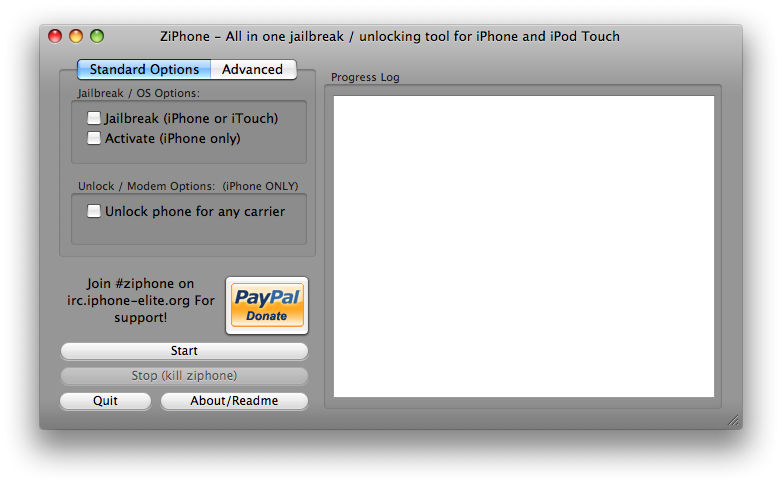
Step Two Double click ZiPhoneOSX-2.4.tbz on your desktop to extract the ZiPhoneOSX application.
Step Three Double click the ZiPhoneOSX application on your Desktop to launch it!
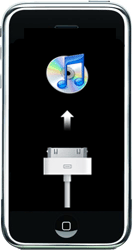
Step Four You must put your iPhone into recovery mode. To do this please hold down both the Sleep/Wake for 3 seconds. A power slider will appear. Slide it to the right to power down the iPhone. Then keeping ONLY the Home button pressed, connect the iPhone to the dock. Keep the home button pressed until you see the iTunes logo and cable on the screen.
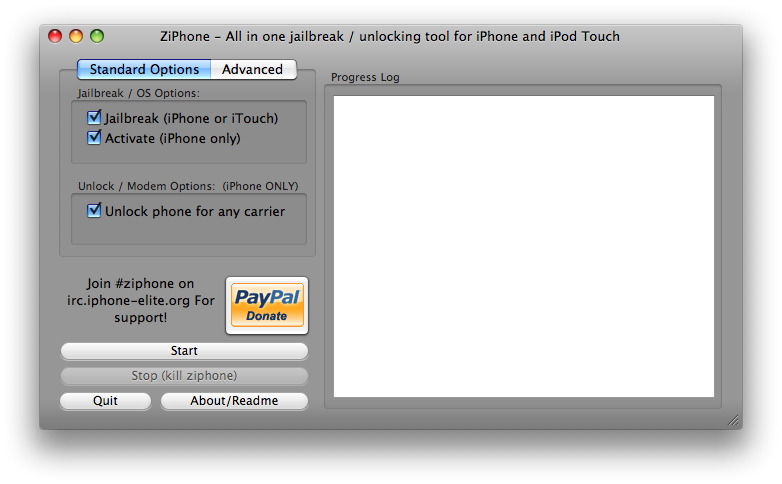
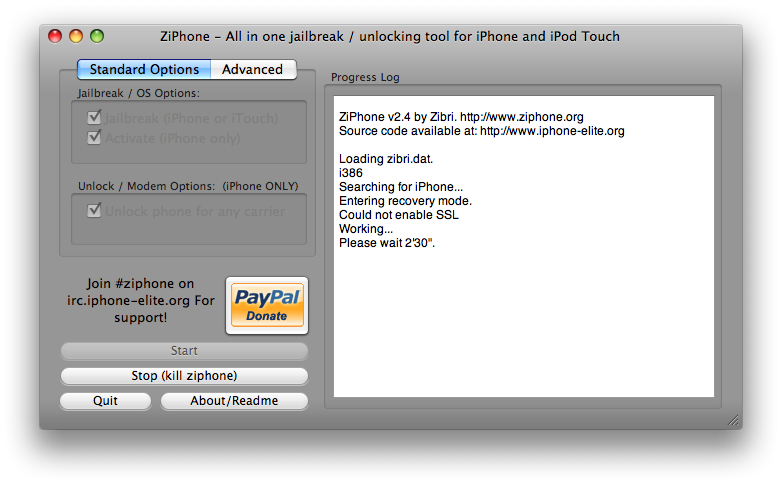
Step Five If you have a 3.9 or 4.6 BL iPhone you can now activate, jailbreak, and unlock! Just simply check the Activate, Jailbreak, and Unlock checkboxes. Then click the Start button.
Step Six The program will now load zibri.dat. Then it will search for the iPhone. Once found it will tell you to wait for 2 minutes and 30 seconds.
Step Seven After this time your iPhone will reboot and it will be activated, jailbroken, and unlocked!!!!
NOTE*: After completion its probably a good idea to install BSD Subsystem first then OpenSSH from Installer.app
The unlocking sequence stops right when ziphone says the iphone enters recovery mode. What do i do? ive tried to right click the restore button and restore the iphone with the correct firmware but nothing seems to work. and when i do restore it with the right firmware i lose the connection to ziphone so i have to start all over again and then it goes back into recovery mode and just stays there even though i just restored it with the firmware. help me please!
so i did this process because i'd rather stick with 1.1.3 than 1.1.4 and now i get this odd problem about downloading from installer...i don't know what to do because i can't uninstall or reinstall either - the exact message i get is "ERROR Package Download Failed" but i connect no problem to my wifi and my phone can make calls... anybody got an idea what's up?
With an OTB 1.1.3 is it necessary to put the phone into recovery mode? I thought ziphone 2.4 puts the phone into recovery mode for you. I have unlocked one phone otb 1.1.3- ran ziphone 2.4 with itunes running in the background. Everything works fine. Did I just get lucky? Planning on unlocking another one tomorrow.
Tks Trivels! I will try it!
I just swa the tutorial about how to downgrade the iPhone and there they say that I need iTunes 7.5. I have the 7.6 version, anyone knows if it can be done with this version of the program?
Tks again!
@oneangrytoast at gmail dot com:
Take a closer look at the email notifications you're getting of new comments. It's a link in there to unsubscribe from this tutorial. I just did it myself.
Murillo, you need a restoring with a previosly FIRNWARE of the Iphone. Found an 1.1.2 ORIGINAL software, install it with Itunes, and then lunch the Ziphone as you did it last days! !:))))
Hello guys,
Tks for the tutorial! But I have a problem, everytime I try to do the run the ZiPhone the program stops when it says "Getting into the recovering mode" and doesn't go on. Does anyone have the same problem? Should I turn down the iTunes when it starts by itself? I am not doing that.
Thank you very much for the help!!!!
I went from a 1.1.2 that was previously unlocked and updated from a 1.0.2. After much consideration I went for it. I updated to 1.1.3 ran ziphone and after a few minutes I was unlocked and jailbroken. Ziphone did say there was one error but not sure what was wrong. Everythng works. I did have to clear that cache in the installer cause it initially would not let me install anything. I was getting "Error downloading file" I think that was the error name..anyway thanks all is good on 1.1.3
Mine is working fine and the tutorial worked perfectly. (thanks iClarified) There is only one problem with youtube, i keep getting the message "Cannont connect to YouTube" is there any fix for this problem?
Thank you...
oneangrytoast AT gmail DOT com - February 22, 2008 at 1:47pm
wow trivels, thanks for the amazing response time!
ok the locate me function in google maps had no issues before, nor does it now, but the locateMe app that i just got from installer is wayyy off mark, as is navizon plugin (even moreso, actually).
bigger issues at hand: my earphone, headphones AND speaker phone do not work for phone calls. and youtube isnt playing vids. helpppp!
The error is that the LOCATE ME in google maps doesn't work. From the installer you can found a patch called LOCATE ME that resolve the problem ! !
Everything is OK now ! !



![Apple Releases macOS 27.2 Golden Gate Beta to Developers [Download]](/images/news/102249/102249/102249-160.jpg "Apple Releases macOS 27.2 Golden Gate Beta to Developers [Download]")
![Apple Seeds First Betas of watchOS 27.2, tvOS 27.2, and visionOS 27.2 to Developers [Download]](/images/news/102252/102252/102252-160.jpg "Apple Seeds First Betas of watchOS 27.2, tvOS 27.2, and visionOS 27.2 to Developers [Download]")
![Apple Releases iOS 27.2 Beta and iPadOS 27.2 Beta to Developers [Download]](/images/news/102248/102248/102248-160.jpg "Apple Releases iOS 27.2 Beta and iPadOS 27.2 Beta to Developers [Download]")










![Apple Studio Display XDR Hits All-Time Low of $2,969.99 ($329 Off) [Deal]](/images/news/101976/101976/101976-160.jpg "Apple Studio Display XDR Hits All-Time Low of $2,969.99 ($329 Off) [Deal]")
