These are step by step instructions on how to install BSD Subsystem on your iPhone. BSD Subsystem is required before installing many other applications and patches and therefore should be the first package you install on your newly jailbroken iPhone.
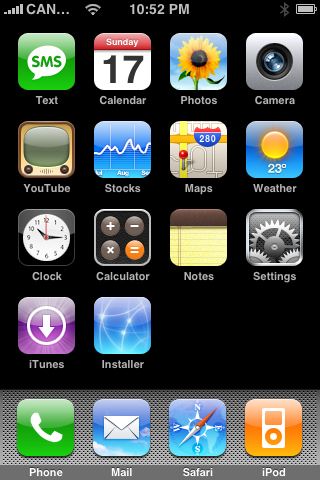
Step One Launch Installer by pressings its icon on your SpringBoard.
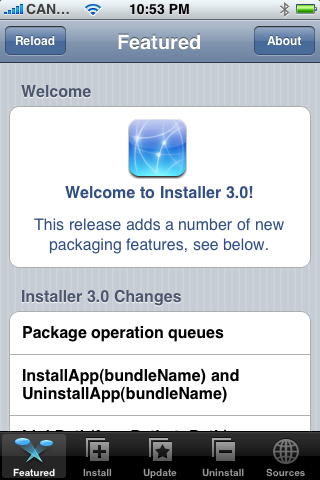
Step Two Press to select the Install tab at the bottom of the screen
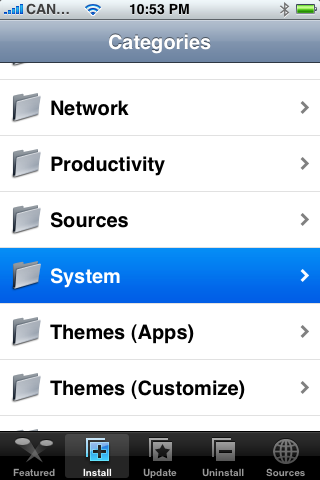
Step Three Press to select System from the list of Categories.
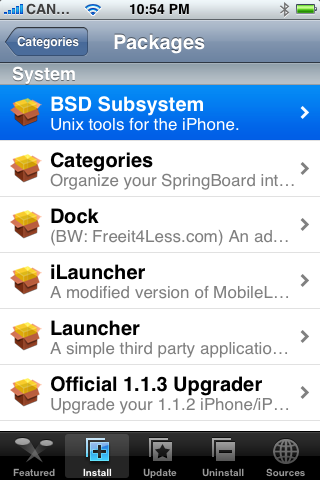
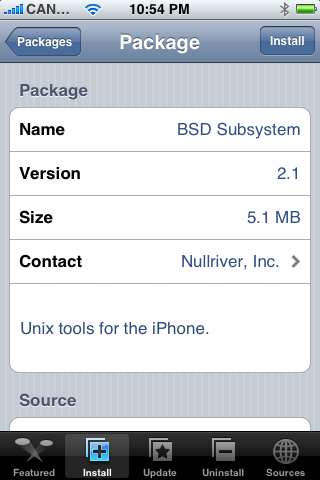
Step Four Press to select the BSD Subsystem package from the list of System packages.
Step Five Press the Install button at the top right of the screen.
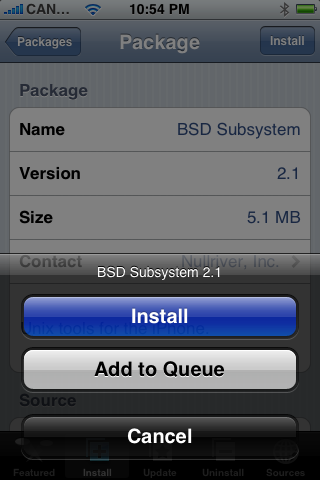
Step Six Press the large Install button that appears.
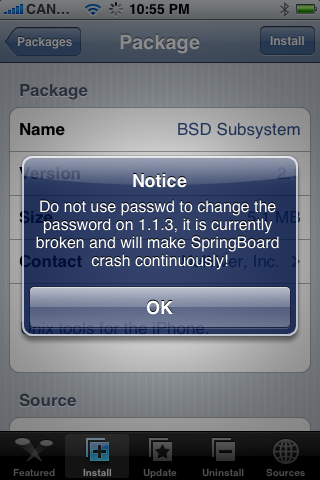
Step Seven A Notice will appear telling you not to use passwd in 1.1.3. Click the large OK button.
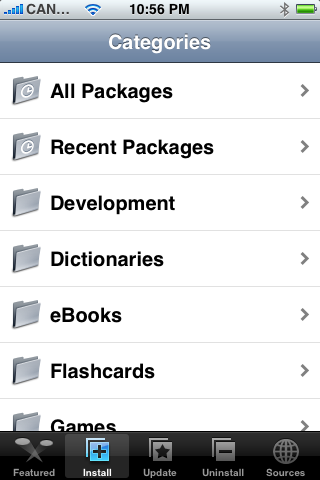
Step Eight Once the installation is complete you will be returned to the Categories List.
After finishing the BSD Subsystem install you will most likely want to install OpenSSH from System category if it hasn't been installed already.
Get the iClarified Daily Newsletter
Apple news, rumors, tutorials, price drop alerts, in your inbox every evening, free.
Unsubscribe at any time.
Success!
You have been subscribed.
Add Comment
Would you like to be notified when someone replies or adds a new comment?
Yes (All Threads)
Yes (This Thread Only)
No
Notifications
Would you like to be notified when we post a new Apple news article or tutorial?
I've jailbroken my iphone already and found installer & cydia on my springboard.do i need wifi connection to access installer in order to install BSD subsystem & openSSH?...what if i don't have wifi connection?is there any other way?
I have iphone 1.1.4 So everything works but yahoo. mail stop working. " Cannot Get Mail The user name or password for imap.apple.mail.yahoo.com is incorrect. " Please help.
Hi Bernardo,
I help the home button and the on/off button together for about 5 secs. It then went to the "slide to power off", I did. Then, when I tried to get it on again, the apple logo showed up. I held the home button again for a few seconds until the phone was on again. The installer was working again and I could get it installed.
About the time, it depends on how fast is your wireless. Mine took a few minutes. Don`t let it go to "sleep" mode tho.
-Marilia
how did you solve the "unclickable" OK icon?
does one have to wait for a very long time for it to finish installing?
let me know as i have the same problem as you. or any kind souls?
thanks!
I was installing the BSD just fine, when my phone went to sleep mode. Now whenever I enter the Installer, I get stuck at the "Do not use passwd to change password" screen. It wont do anything else, and it wont accept my ok. Isnt there a control + alt + del on this thing?
Hello,
Hoping someone can help, each time I attempt to install any program, I get an error message "cannot connect to host". Does anyone understand why I'm receiving this message and cannot install any applications?
Thanks for helping.
I was able to finally load BSD by going into the "most recent updated folder" find bsd and install from there. Make sure you "clear queue before hitting install. It loaded fine.
I am having 16GB iphone with 1.1.3 unlocked through ziphone 2.5. I am trying to install BSD, open SSH and AppSupport Patch 1.1.3 but none is getting installed.Do I need BSD subsystem. How to install it : my phone shows 2.1 version (5.1 MB) but installation fails everytime, tried about 10 times over 2 dyas.
i have a 1.1.4 iTouch. The basic installation process is the same as the iPhone, but whenever i go to install the BSD subsystem, it says that i "must install BSD subsystem or Cydia first" which is, needless to say, confusing. I could not find a "Cydia" in the package list, and there is nothing else called "BSD Subsystem." Please help! Thanks.











![Apple Studio Display XDR Hits All-Time Low of $2,969.99 ($329 Off) [Deal]](/images/news/101976/101976/101976-160.jpg "Apple Studio Display XDR Hits All-Time Low of $2,969.99 ($329 Off) [Deal]")
![Apple AirPods Pro 3 Drop to $199 ($50 Off) [Deal]](/images/news/101966/101966/101966-160.jpg "Apple AirPods Pro 3 Drop to $199 ($50 Off) [Deal]")
