
To change an item's icon to another one (These steps are from Apple):
Step One
Select the volume, application, folder, or file whose icon you want to stamp onto another, just click the icon to select it.
Step Two
From the File menu, choose Get Info or press Command-I to open the Info window.
Step Three
Click the icon in the upper-left corner of the Info window to select it.
Step Four
From the Edit menu, choose Copy or press Command-C.
Your own photo file icons, such as those from a TIFF or JPEG image, are great sources to use if you want totally unique icons.
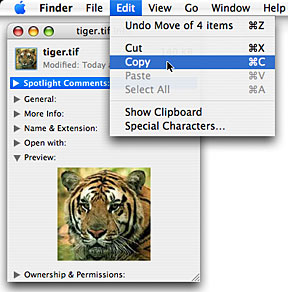
Step Five
Select the volume, application, folder, or file whose icon you want to replace.
Step Six
From the File menu, choose Get Info or press Command-I.
Step Seven
Click the icon in the upper-left corner.
Step Eight
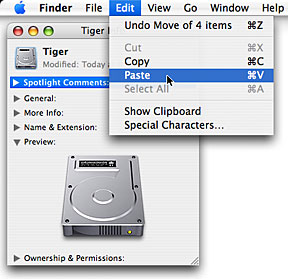
From the Edit menu, choose Paste or press Command-V to replace the icon.
Step One
Select the volume, application, folder, or file whose icon you want to stamp onto another, just click the icon to select it.
Step Two
From the File menu, choose Get Info or press Command-I to open the Info window.
Step Three
Click the icon in the upper-left corner of the Info window to select it.
Step Four
From the Edit menu, choose Copy or press Command-C.
Your own photo file icons, such as those from a TIFF or JPEG image, are great sources to use if you want totally unique icons.
Step Five
Select the volume, application, folder, or file whose icon you want to replace.
Step Six
From the File menu, choose Get Info or press Command-I.
Step Seven
Click the icon in the upper-left corner.
Step Eight
From the Edit menu, choose Paste or press Command-V to replace the icon.



![Sony WH-1000XM5 Headphones Drop to Lowest Price Ever of $198 [Deal]](/images/news/101950/101950/101950-160.jpg "Sony WH-1000XM5 Headphones Drop to Lowest Price Ever of $198 [Deal]")
![M6 Mac mini Pre-Orders Get First Discount at $879.99 [Deal]](/images/news/101923/101923/101923-160.jpg "M6 Mac mini Pre-Orders Get First Discount at $879.99 [Deal]")
![Apple AirTag 2 4-Pack Drops to New All-Time Low of $79 [Deal]](/images/news/101860/101860/101860-160.jpg "Apple AirTag 2 4-Pack Drops to New All-Time Low of $79 [Deal]")
