These are instructions on how to install Perian(Divx, Xvid), Flip4Mac, and other codecs on your Take 2 AppleTV.
Before you can attempt this tutorial you must have SSH installed on your AppleTV. To install SSH you can follow these steps.
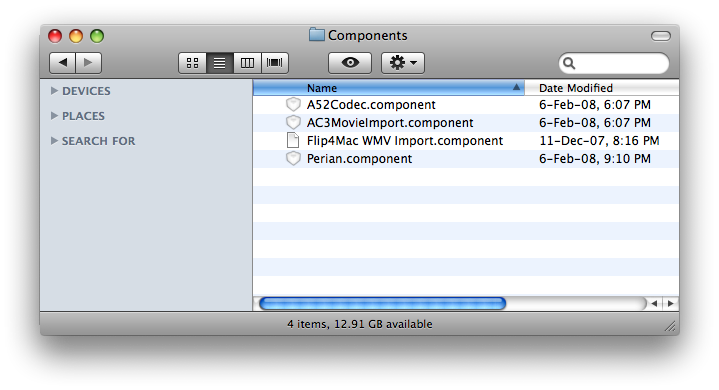
You will need these files: - AC3MovieImport.component (From Perian) - A52Codec.component (From Perian) - Perian.component (From Perian) - Flip4Mac WMV Import.component (From Flip4Mac (link no longer available))
Step One Download the required components from Components archive (Components.zip download no longer available).
Step Two Extract the zip you just downloaded to create a folder on your desktop called Components.
Step Three Launch Terminal by selecting it from your Applications:Utilities folder.
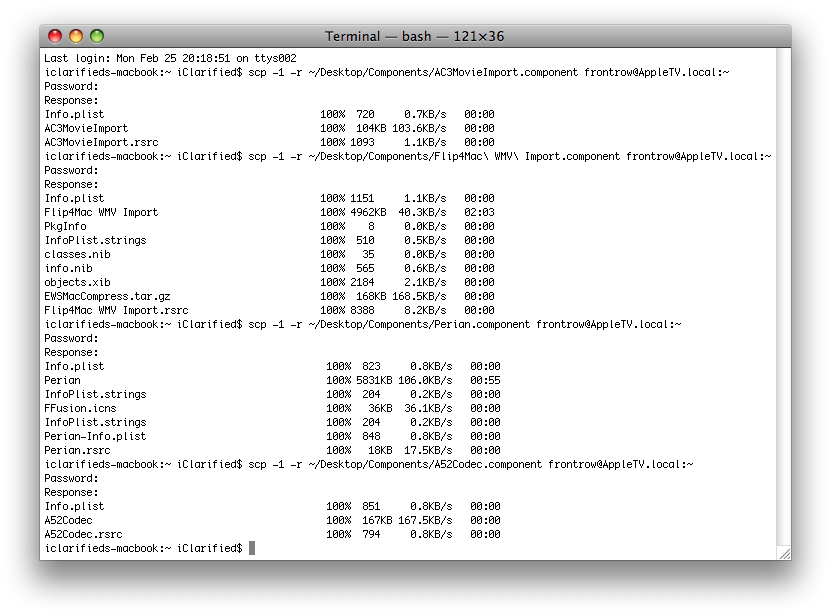
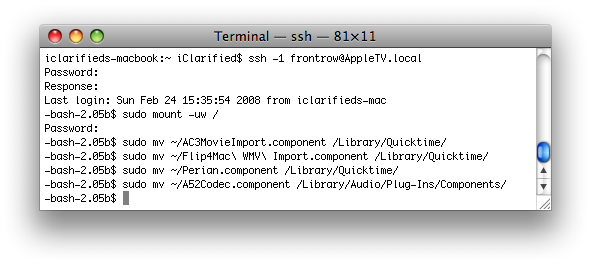
Step Four Now we will copy the components to the AppleTV. Enter the following four commands into the Terminal window. You may be asked for a password. If you are please enter frontrow as your password. Also please note you can change AppleTV.local to the IP Address of your AppleTV if you like.
Step Five Now we need to log into the AppleTV and put the files into the right location.
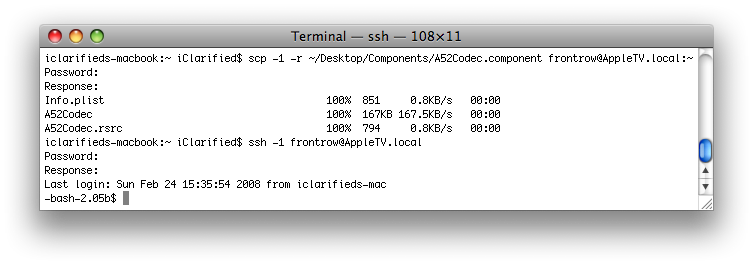
Enter the following command into the Terminal window. NOTE***: You can replace AppleTV.local with the IP Address of your AppleTV if you like.
ssh -1 frontrow@AppleTV.local (If prompted for a password please enter frontrow).
Step Six Now we will move the files to their correct location. Please enter the following commands into the Terminal window. NOTE***: If you are asked for a password please use frontrow as your password.
The point of this record is that reovall there is not a huge difference. If you watch in HD you will see DivX doesn't have quite as excellent quality. XviD has better quality so I urge that.
Hi,
when I try to install DIVX etc. through Terminal on Macbook to ATV this error occurs - Protocol major versions differ: 1 vs. 2
lost connection
Anybody could help me?
THX
Tom
Hi, I had something similar: I guess your computer name has another number than 1 and when you enter the instructions in the terminal you need to replace the 1 with the same number than your computer.
But you will be disappointed because since the last firmware update there is no sound on divx movies. I recommend to convert them with Handbrake.
I got exactly the same problem!
SSH + Plugin installation went fine but after rebooting the AppleTV I can only watch DIVX Movies but without sound. May the plugins are not up to date with regards the current Quicktime player in 2.4?!..
I have found the solution (I didn't create the solution; I just found it).
First off, these components are all outdated.
When you've gone through the tutorial and installed these pieces, go here for the rest:
http://forums.macrumors.com/showthread.php?t=733975
that should fix the sound.
Attn: iClarified. Please update your tutorial with no components AND some mention of AppleTV Fooler (especially since it's the CLEANEST way to view .avis on AppleTV). This tutorial is missing a whole bunch of info.
Just tried it out with 3.0.1 ATV update + all new Perian and Flip4Mac components and still have the same problem: DivX movie plays but no sound!
ps: I am using ATV Fooler to import my movies through iTune.
I have ssh enabled (I can log in using sftp with transmit or Fugu), but I can't copy anything onto the ATV. When I run the step 4 commands in terminal, it just sits forever on "response:". Where did I go wrong?
You should probably add a reboot after installing this as on my Take 2, I could not watch video until I rebooted. A simple:
# sudo reboot
Will do the trick
@cantiluc, you could use Fugu to ssh in and copy files... AFP (through Finder) is ideal but as of yet I have not found a way into install a compatible AppleFileServer without using the 1.0 Recovery Files. I am working on this...
me again, would it be possible that i can't see my appletv in finder because i have version 2.1 ?
if this is the case, how can i downgrade back to version 2 ?
great step by step tutorials !!!
I've installed, ssh, the divx, Xvid...patch and places on my take 2 AppleTV
but how do I get my movies on the AppleTV
can't find the way to do it
thx
Everything went well. But I am having problems trying to sync with my ATV. I get a message saying that ATV can not play the video. What am i doing wrong???
Thanks for the help
iTunes will happily sync if you drop your non QT videos on the Video 2 Mov script which will save them as self containing .mov qt files. These can be streamed and synced to ATV.
Thanks for these brilliant ATV tutorials!




![watchOS 27.0.1 Fixes Unexpected Restarts on Series 12 and Ultra 4 [Download]](/images/news/102378/102378/102378-160.jpg "watchOS 27.0.1 Fixes Unexpected Restarts on Series 12 and Ultra 4 [Download]")
![Near-Borderless Anniversary iPhone Pro Still on Track Despite Display Tech Delays [Report]](/images/news/102375/102375/102375-160.jpg "Near-Borderless Anniversary iPhone Pro Still on Track Despite Display Tech Delays [Report]")





![13-Inch M5 MacBook Air With 1TB Drops to $1,449 on Amazon [Deal]](/images/news/102345/102345/102345-160.jpg "13-Inch M5 MacBook Air With 1TB Drops to $1,449 on Amazon [Deal]")




