These are step by step instructions how to jailbreak and unlock almost any iPhone instantly! No downgrading then upgrading! You can do the unlock from 1.1.2, 1.1.3, or 1.1.4. It will also jailbreak and activate as well as install Installer.app for you!
ZiPhone performs all these functions: - Unlock will work on 4.6 BL or 3.9 BL - Jailbreak will work on any OS version. - Activation will work on any OS version, except for youtube on 1.0.X. - iErase BL 3.9 Baseband
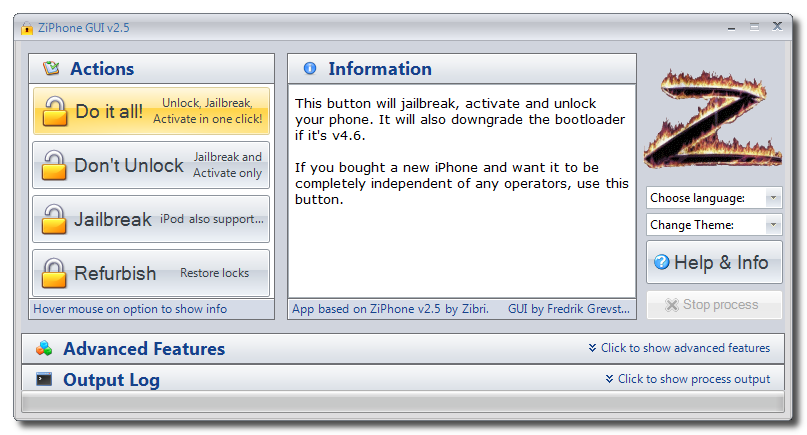
WARNING: THIS TUTORIAL WILL DOWNGRADE YOUR BOOTLOADER TO 3.9!
Step One Download ZiPhone from: ZiPhone (ZiPhone2.5.zip download no longer available)
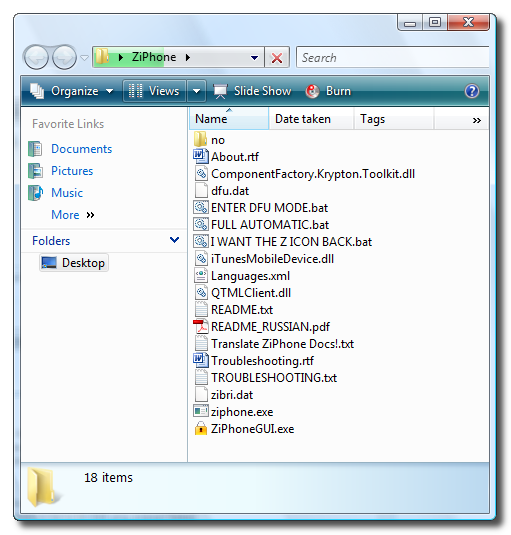
Step Two Double click ZiPhone.zip on your desktop to extract the folder ZiPhone..
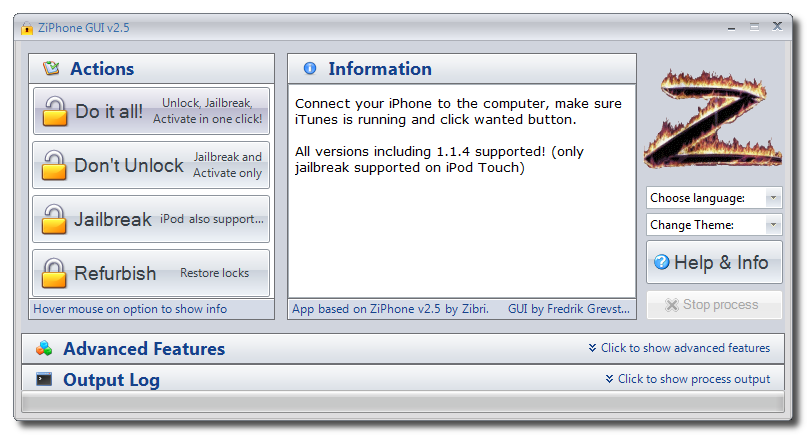
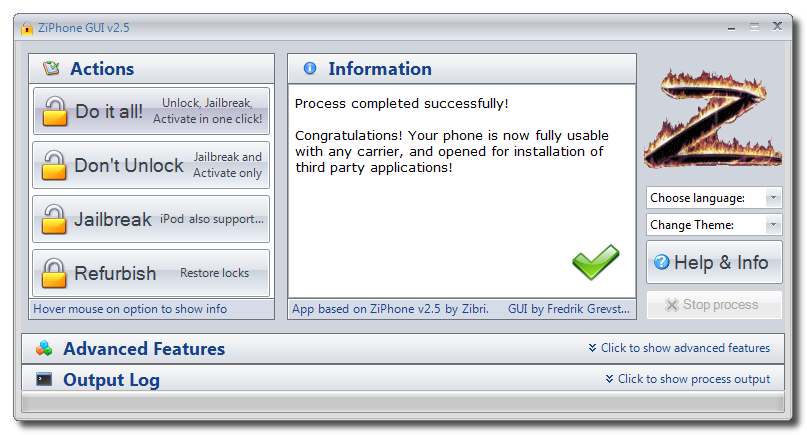
Step Three From the extracted ZiPhone folder double click ziphoneGUI.exe to launch the application.
Step Four Make sure you iPhone is connected to the computer and that iTunes has detected it.
Step Five You can now activate, jailbreak, and unlock,! Just simply click the Do It All! button.
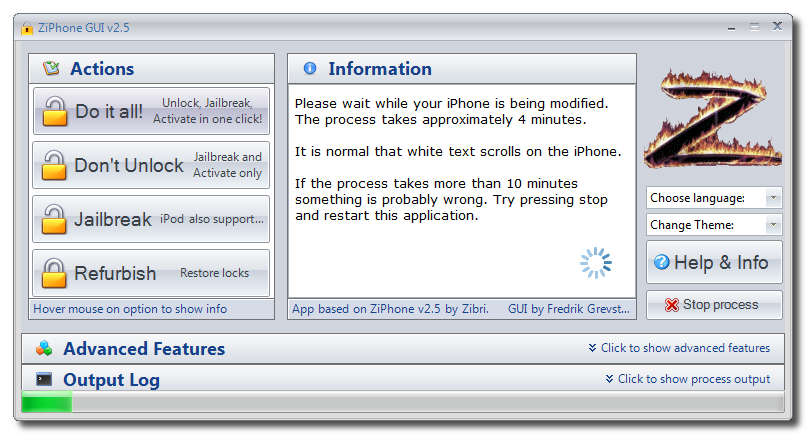
Step Six The program will now load zibri.dat. Then it will search for the iPhone. Once found it will tell you to wait for approxiametly 4 minutes.
Step Eight After this time your iPhone will reboot and it will be activated, jailbroken, and unlocked!!!!
NOTE*: After completion its probably a good idea to install BSD Subsystem first then OpenSSH from Installer.app
I need help! i connect my phone to the computer i press do it all in ziphone and it start but at one point it stops. it finds the phone and at information it says found iphone. rebooting in recovery mode and nothing happens...what do i do?
So just to clarify, this will work on a brand new OOTB 16GB iPhone? If I go to my local AT&T store, pick one up, bring it home and run this software I'll be able to put my T-Mobile SIM card in it?
How do I avoid having to get a service plan and paying an activation fee? Can I tell them I just want the phone?
used the "do it all" with Ziphone v2.6b and today, all of a sudden see the apple logo on my iphone, NEED help !
Nothing works, rebooted, put in DFU mode, restored with 1.1.4 and redone the steps with ziphone, still the same "apple logo" on my screen....pl help !
@GRIMLOCK.
Thanks for that. So they releasing a 3G soon? damn....oh well...as least it works now. But just curious again, cause I can use my 3 simcard (roaming) in my nokia 6200 (which is not a 3G phone, but tri-band I gather).
@IC. 3 network cards does not work because it uses 3G. Where as all other sim cards are ok. Thats why Apple is developed a 3G version of Iphone to be released. If you bought a new Iphone recently it is most likely to be 4.6 BL. 3.9BL are old Iphones released in the first 6 months. Otherwise all Iphone now are 4.6BL
Hi Wombat,
yes, its me again. Strange, I inserted my local simcard, and now it shows SERVICE! YES! Where as before, I was using my simcard from Australia, wondering how come it didnt work? IE, it roams on my other nokia phone (btw I uses the network "3", could that be the problem?). Just out of curiosity....
thanks!
IC
Hi Wombat,
I read all most of the post in this section, and I have some questions.
I got a new iphone 8gb a week ago and trying to unlock it to use in China. Now, this is what I have done.
1- restore phone in itunes to 1.1.4 (04.04.05_G) (do I need to install with the 1.1.4 ipw?) Also, how to tell if its 4.9BL or 3.9BL?
2- I selected the DO IT ALL with my alternate simcard in it
3- My email, youtube, safari is working fine etc, but my carrier shows NO SERVICE
4- I have installed BSD Subsystem and OPEN SSH
Please advice how to make my iphone work!
thanks alot.
I tried installing anysim 1.3 to unlock the phone, but says
no nothing but still what is the reason behind this, do you have a skype if so send me your skype name to my email and we can talk to find out the reason if you would like !!!!
No, there most definately isnt an EDGE settings menu and im prety sure i did it right, i mean there's not alot to do wrong. I plugged in my iphone, downloaded ZiPhone GUI v2.5 and clicked "Do it all!" Anything done wrong there?
there is soething wrong did you unlock and activate properly, there must be an edge setting at the end of this menu, i had it then i called my network customer service and they provided my with the settings...may be you did not unlock properly.??? do not know
Thanks Hanoverian, but there is no EDGE setting in the General > Network menu. I only have VPN, Wi-Fi and an option to turn Data roaming on/off. Any ideas whats going on??
Hi Guys: After running ZiPhone 2.5, my SMSD is not working. No problem in installing SMSD, but when click that icon, it appears to try loading it,but it won't, and then go back to the springboard (Home). I really like to have this app back as it is much more useful than the stock SMS from iPhone. So, help me out, please.
hi Tom you should go to setings, then genera, network, then edge at the bottom of the screen and then you have to enter the settings of your network if it is vodafone, or what so ever.....hope this helps you




![Apple Highlights Child Safety and Screen Time Controls in New Ad [Video]](/images/news/102393/102393/102393-160.jpg "Apple Highlights Child Safety and Screen Time Controls in New Ad [Video]")








![Magic Keyboard for iPad Air Drops to $200 on Amazon [Deal]](/images/news/102402/102402/102402-160.jpg "Magic Keyboard for iPad Air Drops to $200 on Amazon [Deal]")
![13-Inch M5 MacBook Air With 1TB Drops to $1,449 on Amazon [Deal]](/images/news/102345/102345/102345-160.jpg "13-Inch M5 MacBook Air With 1TB Drops to $1,449 on Amazon [Deal]")



