To move an image or photo from Aperture into iPhoto follow these steps:
Step One
Open iPhoto by clicking its icon in the Dock.
Step Two
From iPhoto's File menu select Show Aperture Library...
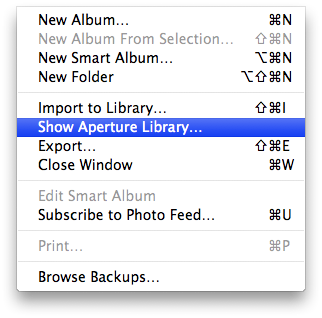
Step Three
A window will popup with your Aperture Photos. Select a photo from the window and drag and drop it onto your iPhoto window.
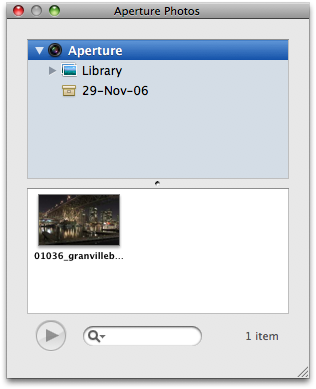
Step Four
A new event will be created in iPhoto for the imported photo. You can now use it however you wish.
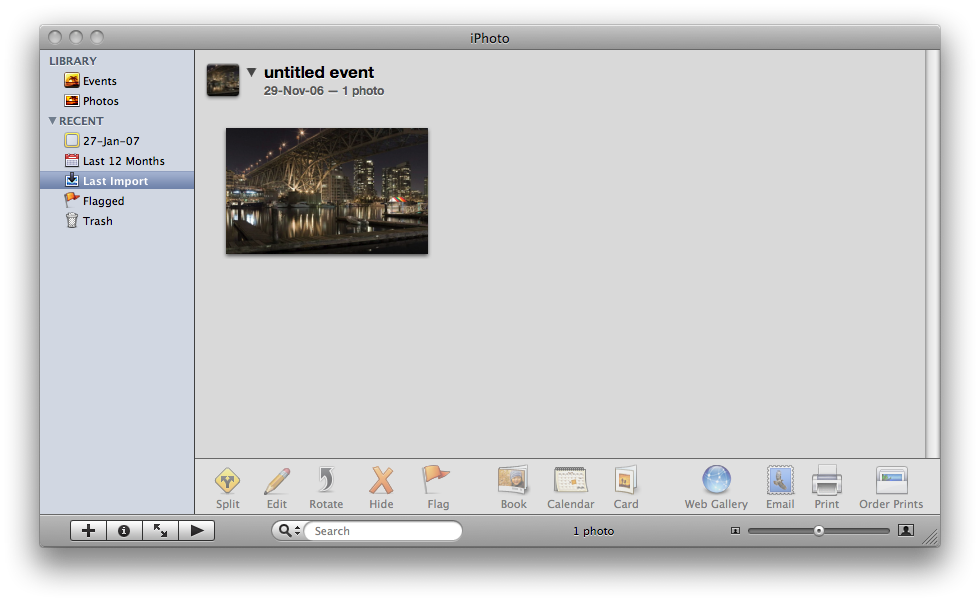
Step One
Open iPhoto by clicking its icon in the Dock.
Step Two
From iPhoto's File menu select Show Aperture Library...
Step Three
A window will popup with your Aperture Photos. Select a photo from the window and drag and drop it onto your iPhoto window.
Step Four
A new event will be created in iPhoto for the imported photo. You can now use it however you wish.



![Apple Targets October 27 for Touchscreen MacBook Pro and OLED iPad mini [Report]](/images/news/102696/102696/102696-160.jpg "Apple Targets October 27 for Touchscreen MacBook Pro and OLED iPad mini [Report]")
![LG Home Accessories Could Offer HomeKit-Exclusive NFC Setup Without Power [Leak]](/images/news/102687/102687/102687-160.jpg "LG Home Accessories Could Offer HomeKit-Exclusive NFC Setup Without Power [Leak]")

![Apple Names Steve Smith M&A Chief, Promotes App Store Leader [Report]](/images/news/102690/102690/102690-160.jpg "Apple Names Steve Smith M&A Chief, Promotes App Store Leader [Report]")
![How To Force Restart iPhone [Video]](/images/tutorials/95012/95012/95012-160.jpg "How To Force Restart iPhone [Video]")
![How To Turn Off iPhone [Video]](/images/tutorials/94999/94999/94999-160.jpg "How To Turn Off iPhone [Video]")
![How To Back Up Your iPhone to an External Drive on Mac [Video]](/images/tutorials/72786/72786/72786-160.jpg "How To Back Up Your iPhone to an External Drive on Mac [Video]")




![Mac mini Drops to $779.99 for Prime Big Deal Days [Deal]](/images/news/102624/102624/102624-160.jpg "Mac mini Drops to $779.99 for Prime Big Deal Days [Deal]")