These are instructions on how to downgrade to the 3.9-fakeblank Bootloader and unlock 1.1.4 using iPlus 2.0b for Mac.
iPlus 2.0b Features 1-Unlock and if required automatically downgrade the bootloader to 3.9FakeBlank 2-Jailbreak 3-Activate 4-Install AFC2 5-Add the following packages: Installer, Community Services, BSD subsystem, OpenSSH, VT-100
Plus: BSD Fix, VT100 Fix, Summerboard themes directory fix, Relocates Fonts and Ringtones (More than 120MB free)
Before attempting this make sure you have restored your iPhone to 1.1.4 using iTunes.
Step One Download iPlus 2.0b from iPlus (iPlus2.0b.zip download no longer available).
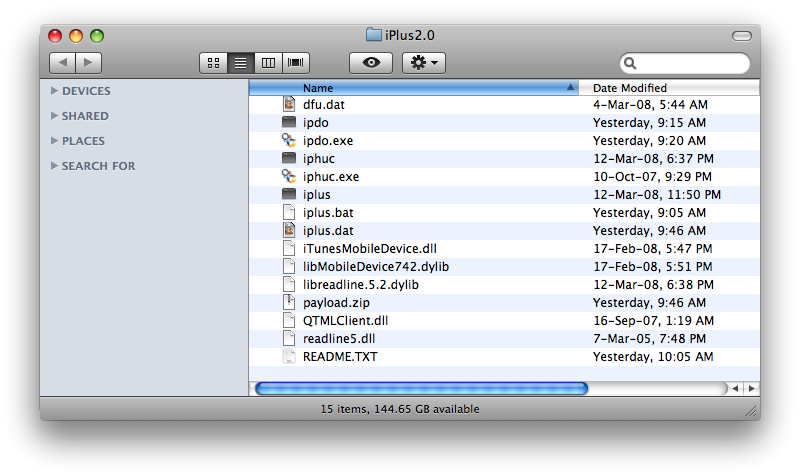
Step Two From the file we just downloaded extract the iPlus2.0 folder to your Desktop.
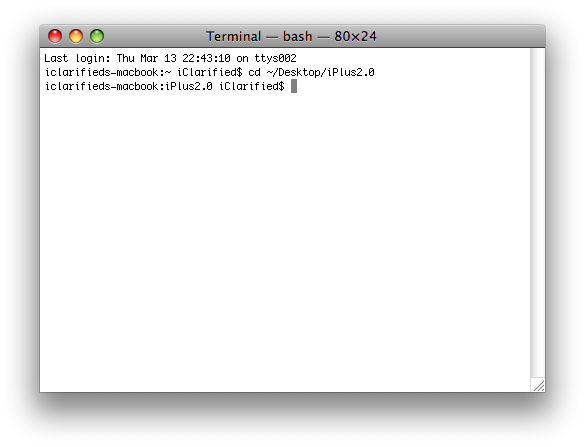
Step Three Launch Terminal by selecting it from your Applications:Utilities folder
Step Four Enter the following command into your Terminal window then press Enter cd ~/Desktop/iPlus2.0
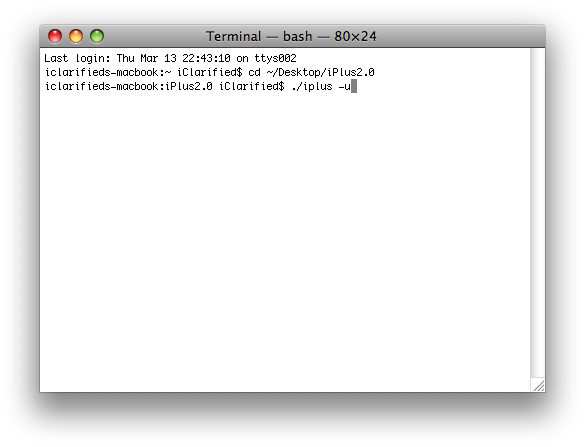
Step Five Enter the following command into the Terminal window to unlock and downgrade your bootloader. ./iplus -u
NOTE**: This command will automatically activate, jailbreak, and unlock. If necessary and able it will also change your bootloader to the 3.9-fakeblank Bootloader. If you don't want to unlock just drop the -u and iPlus will only activate and jailbreak!
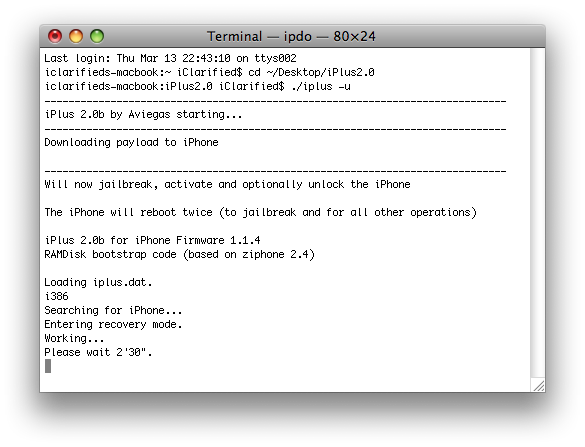
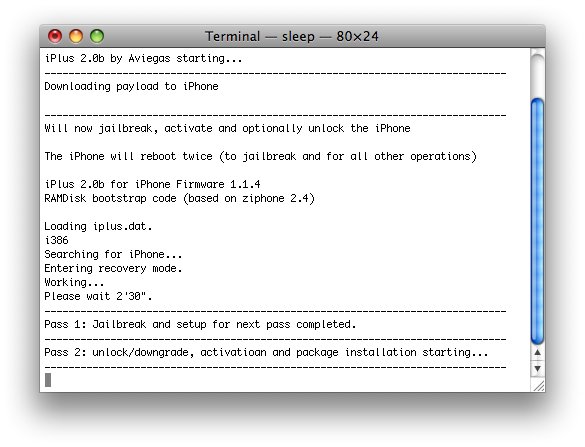
Step Six The program will then put your iPhone into recovery mode. Once it is successfully in recovery mode you will be asked to wait 2 minutes and 30 seconds.
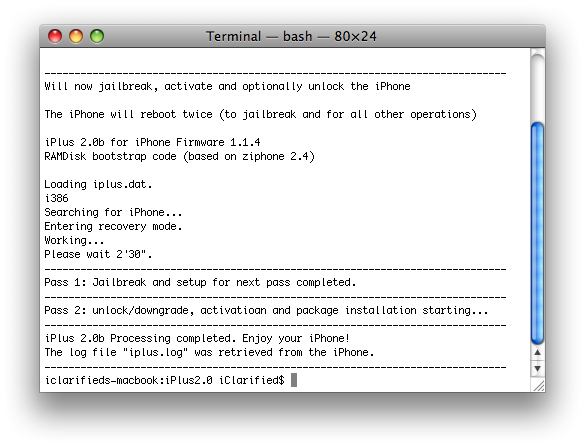
Step Seven Once rebooted it will tell you that Jailbreak and setup for next pass completed. Now it will proceed to unlock, downgrade and activate.
Step Eight Once your iPhone comes out of its final reboot it will be activated, jailbroken, unlocked and bootloader downgraded !!!!
THANKS***: A big thanks go to aviegas for creating iPlus!!!
Get the iClarified Daily Newsletter
Apple news, rumors, tutorials, price drop alerts, in your inbox every evening, free.
Unsubscribe at any time.
Success!
You have been subscribed.
Add Comment
Would you like to be notified when someone replies or adds a new comment?
Yes (All Threads)
Yes (This Thread Only)
No
Notifications
Would you like to be notified when we post a new Apple news article or tutorial?
I started iPlus 2.0b as shown but everything hangs at the "Downloading payload to iPhone" stage. Any ideas how long it normally takes to get to the Step 6 window?
Sorry, adding the problem again in case you cannot find the original post:
How do I get iTunes to recognise my iPhone again. After attempting to run iplus but something happened because it never finalized the scrip, iTunes says a resource is missing and therefore cannot reinstall 1.1.4 Stuck now with an iPhone with a screen showing the Apple logo and the revolving install logo. Can't reboot. Can't revoke. Can't do anything. Tried holding in Sleep/Wake and Back buttons screen goes black. After a few seconds I get is a red field at top and bottom of screen with aviega iPlus 2.0 etc etc. But then I am back at the same screen I started with. Rerunning the install scrip does not seem to overwrite either. HELP anyone?
Just wanted to add another positive (when I was researching the method I would use to unlock, activate, and jailbreak I would get nervous seeing all the negatives so I'm posting to offer a little reassurance).
I just used iPlus on two iPhones. The longest part was downloading the restore package via iTunes. After that it was literally 11 minutes each and I was plugging my T-Mobile SIM card in.
I restored to 1.1.4 (even though otb they already were 1.1.4 - just wanted to be safe). The restore was the hardest part to figure out - didn't realize I had to do something special on the phone (FYI to those like me - you have to plug the phone into the computer with iTunes running and even if iTunes recognizes the phone press and hold the HOME and POWER buttons, after 10 seconds let go of the POWER button, but keep holding HOME until iTunes says it detects an iPhone that needs to be restored). Once the restore was complete (just took a couple minutes after the 15 minute download - much faster on the second phone), then I did like the instructions said and ran the command with -u and 11 minutes later I was in!
I've surfed the net and made some phone calls and as I type this I'm waiting for iTunes to finish syncing my music and movies.
WOO HOO! Thanks SO much to all you great coders out there - I'm envious to the nth degree and just as appreciative!
Here's another option I found on the Apple Forums. Again, enter it into Terminal on the iPhone.
chmod u+s /System/Library/PreferenceBundles/MobileMailSettings.bundle/MobileMailSettings
@ Dj Spy
Mail crashing? Launch the Terminal on the iPhone and enter: chown -R mobile /var/mobile/Library/Mail
I was having the same problem and found this on a hackthatphone forum. It worked for me. Good Luck!
I'm 1.1.2 OTB unlocked with independence. Uptadted to 1.1.3 and unlocked with Ziphone. Updated to .1.1.4 with iTunes 7.6 and unlocked with Independence 1.4Beta5. Everything works fine except the INSTALLER: I loaded it with Independence but when I try to install or uninstall something, I find the error: "main script execution failed!". Please help! Any Ideas? I did use Independence to unlock 1.1.4 because I did not want to dowgrade the baseband. Thanks!!!!!
I noticed a few other people asked the same question i'm about to .. but none of them got a reply .. so lemme try it this way..
My mail app crashes! When I select it and I can't sync my mail box. Help!
i think i spoke for all those that didn't get their statement across :-)
How do I get iTunes to recognise my iPhone again. After attempting to run iplus but something happened because it never finalized the scrip, iTunes says a resource is missing and therefore cannot reinstall 1.1.4
Stuck now with an iPhone with a screen showing the Apple logo and the revolving install logo. Can't reboot. Can't revoke. Can't do anything. Tried holding in Sleep/Wake and Back buttons screen goes black.
After a few seconds I get is a red field at top and bottom of screen with aviega iPlus 2.0 etc etc.
But then I am back at the same screen I started with. Rerunning the install scrip does not seem to overwrite either.
HELP anyone?
I restored my iphone to 1.1.4 and ran everything. it went smooth and the turn out were great. the only problem i have is checking my mail.. i click on it and it keeps kicking me out. has anybody had this problem or is there a fix?
-Dennis
hey thanx a lot lot lot guys for your help. I unlocked my 16 GB ipod which I bought today and it doesnot have any issues everything works fine thanks a lot lot lot!
God blesss!
you guys are awesome!!!
To Clarified:
I have just bought iphone 16gb today, 03-11-08, I wonder if I can use IPLUS 2.0 to activate,jailbreak, and unlock?have anyone tried this already?
















![Apple Studio Display XDR Hits All-Time Low of $2,969.99 ($329 Off) [Deal]](/images/news/101976/101976/101976-160.jpg "Apple Studio Display XDR Hits All-Time Low of $2,969.99 ($329 Off) [Deal]")
