These are instructions on how to enable and take screenshots using the built in iPhone screenshot feature. This feature was first discovered by RiP Dev while working on an update to Caterpillar.
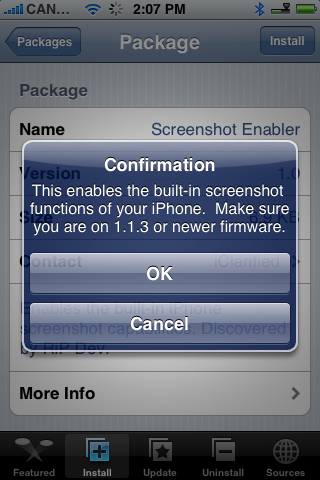
You must have 1.1.3 or higher firmware installed on your iPhone to enable this feature.
Step One Make sure you have added iClarified as an installer source. You can find instructions on how to do this here.
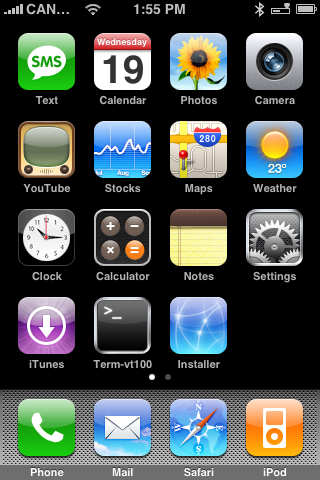
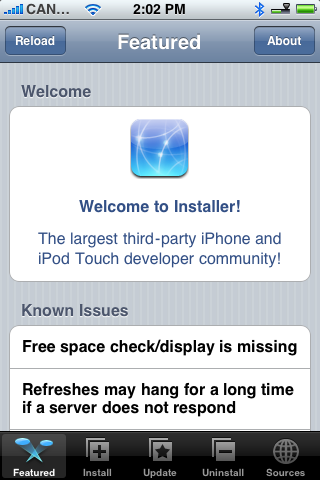
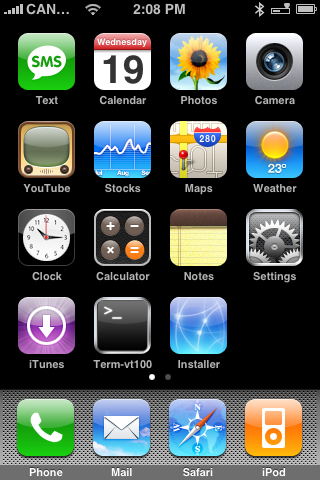
Step Two Press to launch Installer from your SpringBoard.
Step Three Press to select the Install tab at the bottom of the screen.
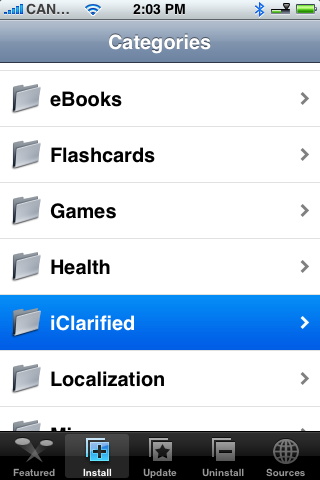
Step Four Press to select iClarified from the list of Categories.
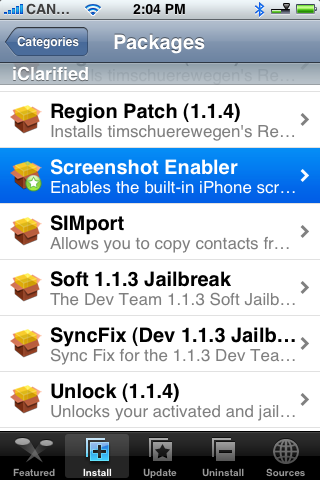
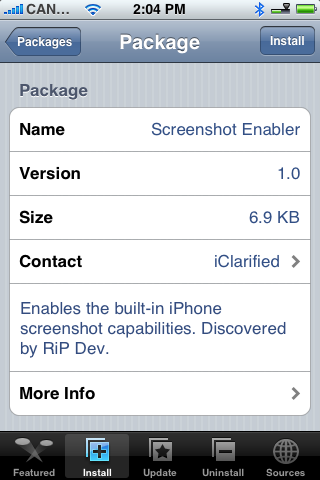
Step Five Press to select Screenshot Enabler from the list of Packages.
Step Six Press the Install button at the top right of the screen.
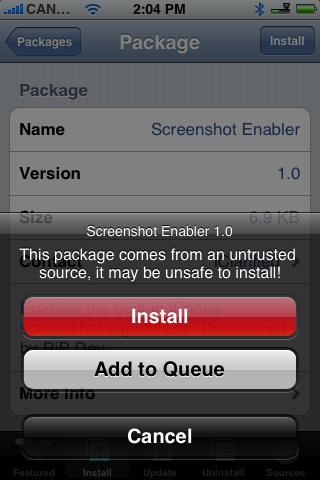
Step Seven Press the large red Install button that appears.
Step Eight You will be notified that you must be on the 1.1.3 or newer firmware. Press the large OK button.
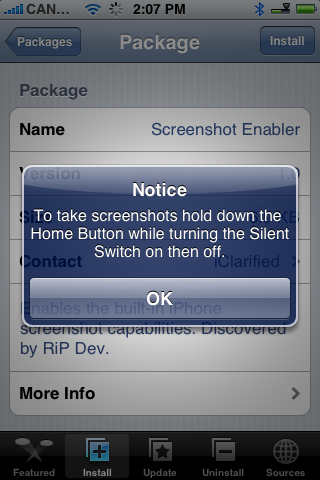
Step Nine A notifications will appear telling you how to use the new screenshot feature. Press the large OK button.
Step Nine You will be returned to the Categories menu once installation is complete. Press the Home button to return to your SpringBoard.
----- Now to take a screenshot simply hold down the Home button and toggle the Silent Switch. You will notice the screen flash white. -----
Step Ten To view the screenshot you just took, press the Photos icon on your SpringBoard.
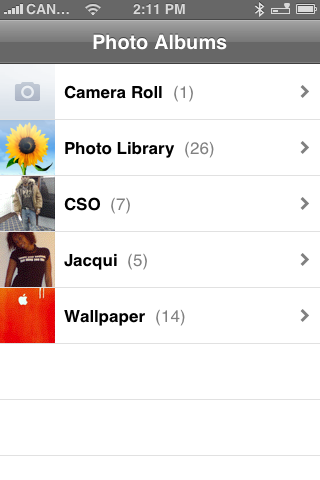
Step Eleven Press to select Camera Roll from the list of Photo Albums.
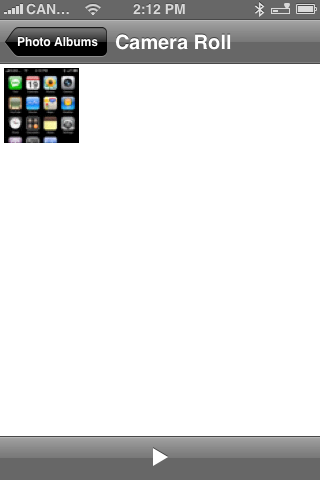
Step Twelve Press to select the small thumbnail of your screenshot.
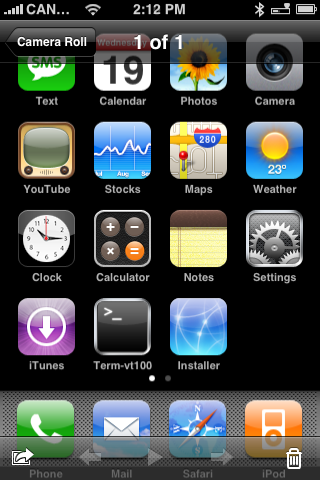
Step Thirteen Now you can see your high quality iPhone screenshot. You can easily sync this to your computer just as you would with any other photo!
THANKS***: Thanks to RiP Dev for discovering this neat tool!
Get the iClarified Daily Newsletter
Apple news, rumors, tutorials, price drop alerts, in your inbox every evening, free.
Unsubscribe at any time.
Success!
You have been subscribed.
Add Comment
Would you like to be notified when someone replies or adds a new comment?
Yes (All Threads)
Yes (This Thread Only)
No
Notifications
Would you like to be notified when we post a new Apple news article or tutorial?
This hack just changes a plist file to enable the built in screenshot ability. It should be possible to revert the changes to the plist file. But I really think your problem is caused some other app you have installed. Try to restore to 1.1.4 and don't install any extra apps just ebable this feature and see if that helps.
//Rob
Well have also just found out this is the app bricking my iPhone. the iphone just becomes completely unresposive. It might wake up for a slpit second or two in the beggining but then the phone becomes completely locked. The only way I know how to fix is to restore the iphone. Something I have done a number of times now as I haven't known what was causing the locks until now.
Is there anyway to uninstall it from the iphone from remotely logging in to iphoneover ssh or in recovery mode? Cant use iphone to uninstall as its completely locked (e.g. cant load installer).
Thanks.
You can uninstall the hack but it will stay be there. The best thing is to uninstall it from the installer. Install BossPrefs 1.6x and in the BossPrefs config turn off screensaver feature.
If you copy the screenshot to your computer it will look just great. But the picture quality looks bad on the iPhone. If you open the last picture in the camera roll and scroll to the left to see the previous pictures that somehow makes the screenshot look good.
//Rob
works perfectly fine on my 1.1.4 unlocked/jailbreaked iphone
i never used any of the other screenshot apps before, but i love how this works even while im playing games or using just about any other app on my iphone ^__^
why would you want a screen shot of your phone for just write down on a bit of paper what apps u have incase you ever have to restore not that hard is it




![Mac Studio With M5 Max and M5 Ultra Review Roundup [Video]](/images/news/102315/102315/102315-160.jpg "Mac Studio With M5 Max and M5 Ultra Review Roundup [Video]")
![Apple Home Hub With Siri AI in Employee Testing, Could Debut in October [Gurman]](/images/news/102309/102309/102309-160.jpg "Apple Home Hub With Siri AI in Employee Testing, Could Debut in October [Gurman]")
![Apple Cuts Fitness+ Jobs as It Rethinks the Service [Report]](/images/news/102306/102306/102306-160.jpg "Apple Cuts Fitness+ Jobs as It Rethinks the Service [Report]")









![Apple Studio Display XDR Hits All-Time Low of $2,969.99 ($329 Off) [Deal]](/images/news/101976/101976/101976-160.jpg "Apple Studio Display XDR Hits All-Time Low of $2,969.99 ($329 Off) [Deal]")
