These are instructions on how to upgrade your iPhone 4 or iPhone 3GS firmware without updating the baseband.
Step One Create a folder on your desktop called Pwnage
Download the latest version of RedSn0w from here and place it in the Pwnage folder. Likewise, download the firmware you would like to upgrade to from here and place it in the Pwnage folder.
Extract the RedSn0w zip file by double clicking it.
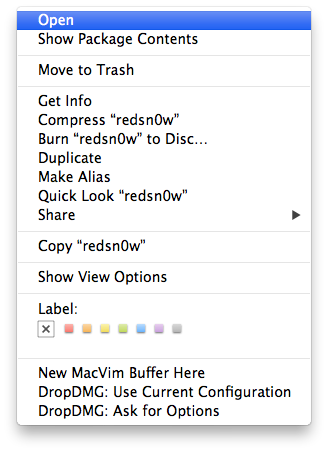
Step Two Right click or control click the RedSn0w application that you extracted in Step One and click Open from the popup menu that appears.
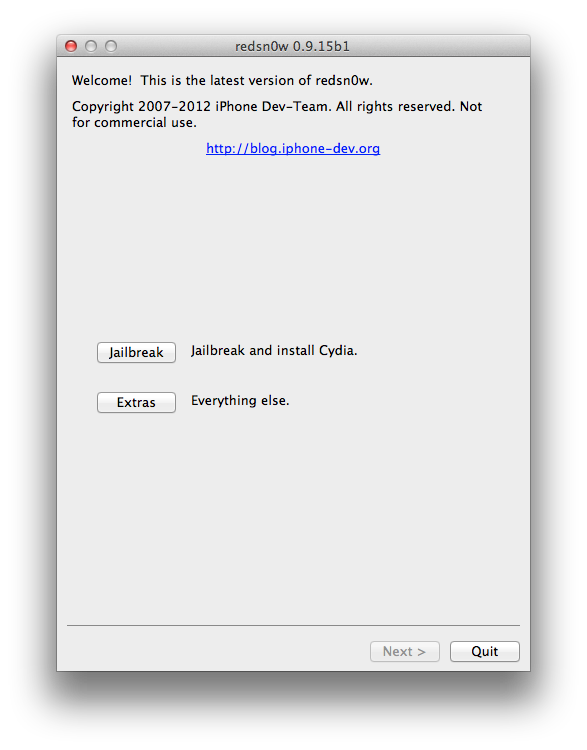
Step Three Click Extras from the RedSn0w menu.
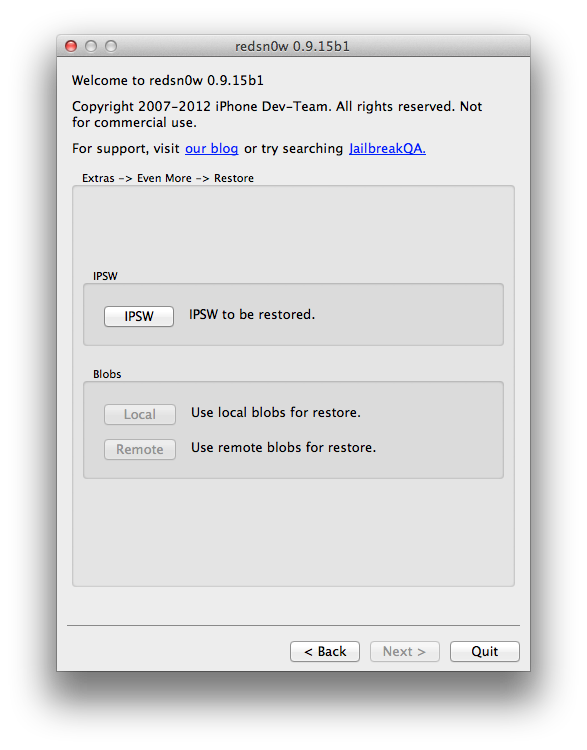
Step Four Click Even More from the Extras menu.
Step Five Click the Restore button from the Even More menu.
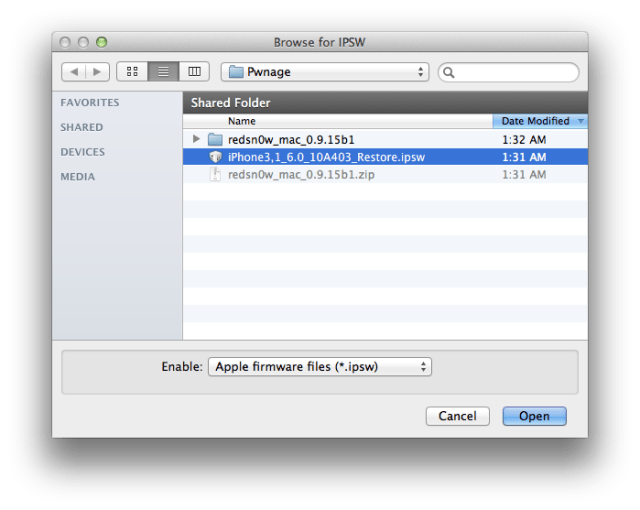
Step Six Click the IPSW button.
Choose the firmware you would like to update to from the dialog box that appears and click the Open button.
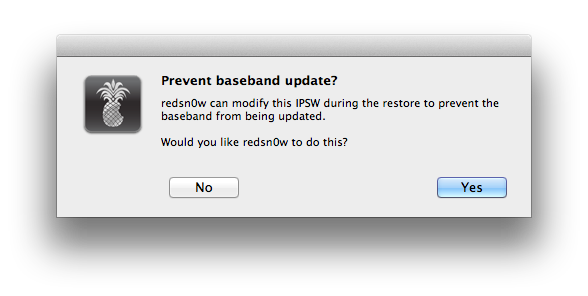
Step Seven You will be asked if you would like to Prevent baseband update. Click the Yes button.
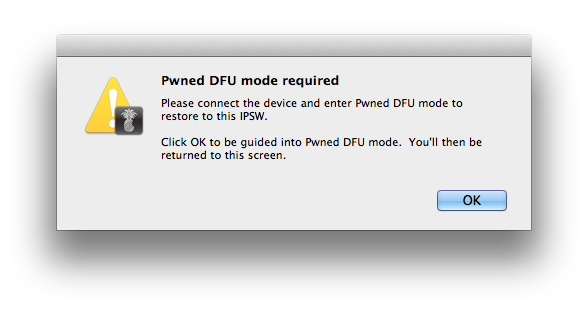
Step Eight You will be told that Pwned DFU mode is required. Click the OK button.
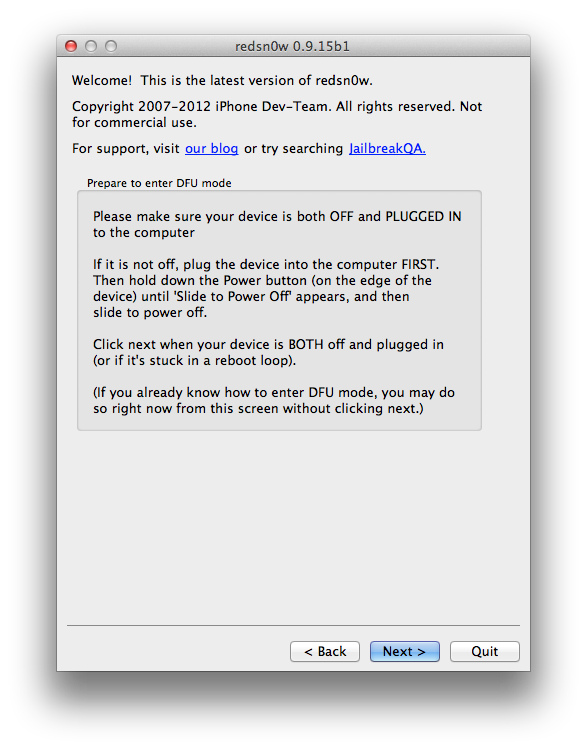
Step Nine Connect your iPhone to the computer, turn it off, and click Next
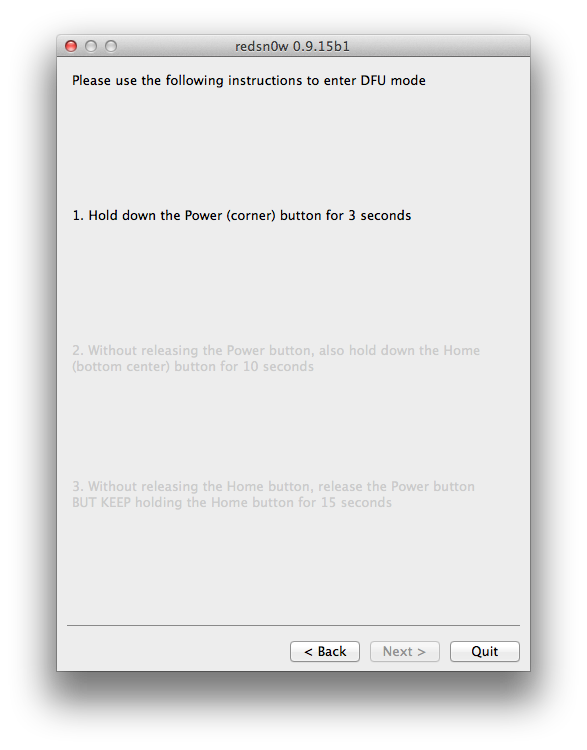
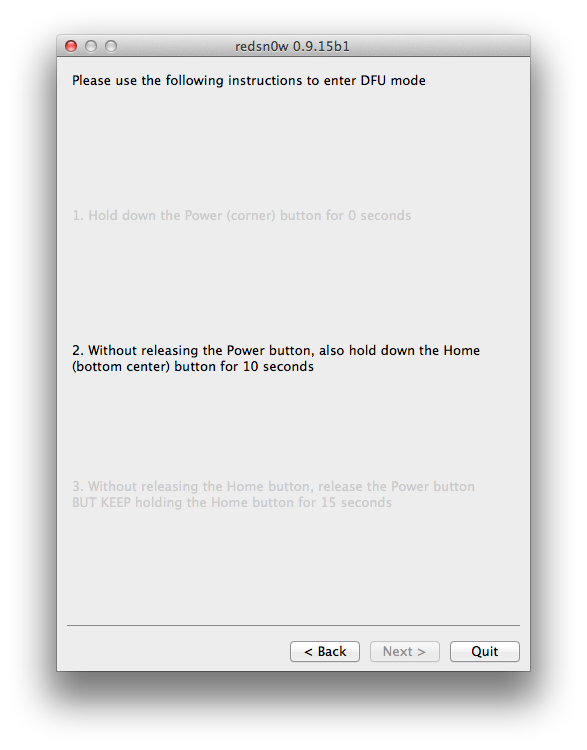
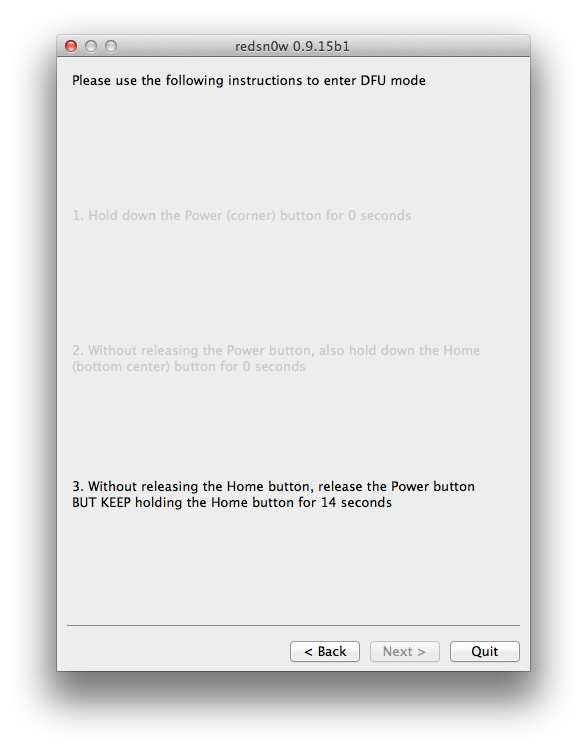
Step Ten RedSn0w will now guide you through the steps to get into DFU mode. You can find more help with DFU mode here.
Hold down both the Home button and the Power button for 10 seconds.
Release the Power button and continue holding the Home button until RedSn0w detects the device.
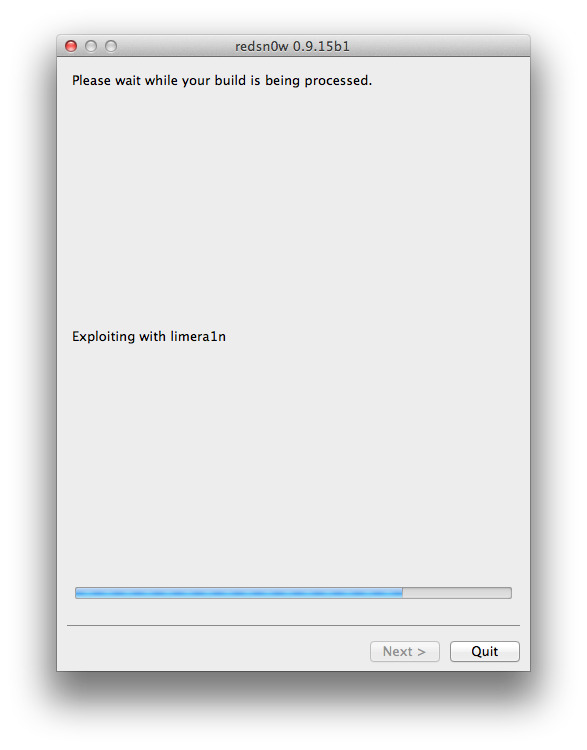
Step Eleven Your device will be detected once in DFU mode and exploited with Limera1n.
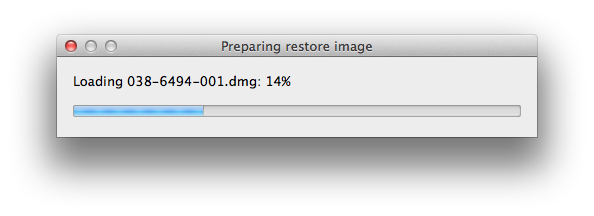
Redsn0w will then prepare a restore image.
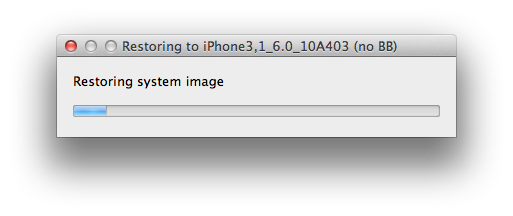
Step Twelve Redsn0w will now restore the device to the new firmware.
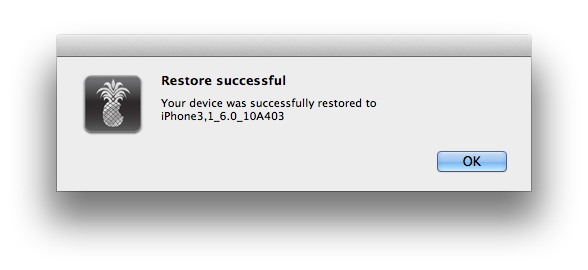
Step Thirteen RedSn0w will tell you when the restore has been completed successfully.
ANSWERS: If you need help with this tutorial please post a question in the comments or submit a question to the iClarified community using our Answers section.
Get the iClarified Daily Newsletter
Apple news, rumors, tutorials, price drop alerts, in your inbox every evening, free.
Unsubscribe at any time.
Success!
You have been subscribed.
Add Comment
Would you like to be notified when someone replies or adds a new comment?
Yes (All Threads)
Yes (This Thread Only)
No
Notifications
Would you like to be notified when we post a new Apple news article or tutorial?
Great news guys! If you iPhone is locked by AT&T and you bought it 2 years ago it can be Factory Unlocked now! Just contact AT&T from the following link: https://www.att.com/deviceunlock/client/en_US/termsAndCondition
I did it and it is free and fast! Forget about Ultrasnow/Gevey and preserving your baseband, this is the real jailbreak, haha!
iclarified should post this info in every post!
iPhone 3GS on 3.1.3
baseband 5.12.10
tried this & it asks for shsh. My cydia crashed months ago so I deleted it and don't know how to reinstall it to see my shsh or get them or whatever I'm supposed to do.
Ive been in safe mode for 2 months but everything seems to work.
I just want to go to 4.3.2 or 5.0 because most apps require it.
Any help would be enormously appreciated.
I am trying to upgrade to 6.1.3 from an iPhone 4 on 5.0.1 with BB 01.59.00 and got Unexpected Error 2831.
I tried fixing it holding Home Button through all the process, I didn't get the error but Redsnow never finished and I got stucked on Recovery Mode (itunes logo). Any ideas how to fix it?
I also got "Couldn't restore" "Unexpected error (2831)" and my phone came back on just the way it was before I began. I'll keep scoping this out to see if there's a fix. I will also try using firmware 6.0 instead of 6.1.3 and see how that goes.
I'm running iPhone 3GS 4.2.1 Modem Firmware 5.13.04.
Thanx
Can I use this method to upgrade my 3gs from iOS 4.1 to 6.x ? My iphone is running still BB 5.13.04 and I think I have to keep this BB to stay unlocked ?!
I have iphone 3gs new bootrom, AT&T unlocked and jailbreaked via redsn0w running iOS 4.1
Thanks !
if you are using IPHONE 4 running at 5.0.1 at 4.11.08 baseband and you followed these steps ACCURATELY, you have no problems after. Did every step and now I have a preserved baseband running at IOS 6 :) Thanks bud! Your steps were AWESOME! KUDOS!
Hello, i have an iphone IOS 4.3.2 Baseband 4.10.01 (Factory Unlocked using gevey sim) . and how can i update it to IOS 6 without upgrading my Baseband? and If i successfuly Updated it to ios 6 and preserved my baseband, can i still unlock it with my gevey sim?
If you got an iPhone 4 or 3GS, you can follow this guide step by step, it's pretty easy. I don't think there'll be a problem if you update multiple firmwares at once (since you are in 4.3.2). Update here to iOS 6, then jailbreak it (you can find another guide here in iClarified).
after getting it into DFU mode, its asking me for shsh blobs, local or remote, i clicked remote and it couldnt find them and i dont have any local ones, what do i do? im an iphone 4 on 4.3.5 with 4.10.01 trying to upgrade to 5.1.1
Having the same problem here. I'm on a 3GS, iOS 4.1, 04.26.08 firmware. If I try to use any higher iOS ipsw, it asks for SHSH blobs that I don't have and it can't find remotely.
What finally worked for me was finding a list of what iOSes redsn0w could remotely find blobs for, THEN downloading the right ipsw and successfully getting remote blobs for it. I ended up on 5.0.1.
Well, uh, I think this tutorial is about "How to Upgrade Your iPhone 4, 3GS Without Updating the Baseband" and not jailbreaking it... correct me if I'm wrong, but, mmm, yes
i juz update my iphone 3gs without updating the baseband i.e 5.13.4.........after restore and jailbreak there is no carrier section in settings....cydia is working fine...i also install ultraslow 1.2.7 but still no service.....help me ?? wat to do ?
Ultrasn0w isnt yet updated for 6.x
Redsn0w will still hactivate your 3GS or iPhone4 if you run it before the device is activated. Due to the current tethered 6.x JB status, redsn0w now hactivates 6.x without requiring subsequent tethered boots. If you accidentally hactivate with redsn0w, use the Deactivate checkbox available from the Jailbreak screen, not the normal one in Even more







![iPhone Duo's Initial 8 Million-Unit Order Extends Into 2027 [Gurman]](/images/news/102975/102975/102975-160.jpg "iPhone Duo's Initial 8 Million-Unit Order Extends Into 2027 [Gurman]")
![CT Scan Reveals How iPhone Duo's Hinge Works [Video]](/images/news/102981/102981/102981-160.jpg "CT Scan Reveals How iPhone Duo's Hinge Works [Video]")
![Apple Tests Face ID and Action Button for iPhone Duo, Considers Larger Display [Gurman]](/images/news/102972/102972/102972-160.jpg "Apple Tests Face ID and Action Button for iPhone Duo, Considers Larger Display [Gurman]")

![How To Back Up Your iPhone to an External Drive on Mac [Video]](/images/tutorials/72786/72786/72786-160.jpg "How To Back Up Your iPhone to an External Drive on Mac [Video]")

![How To Find Your IP Address on iPhone [Video]](/images/tutorials/496/496/496-160.jpg "How To Find Your IP Address on iPhone [Video]")

![New Fire TV Stick 4K Drops to $29.99 (50% Off) [Deal]](/images/news/102984/102984/102984-160.jpg "New Fire TV Stick 4K Drops to $29.99 (50% Off) [Deal]")
![Apple's iPhone 18 Pro and Pro Max Cases Are Up to 37% Off [Deal]](/images/news/102978/102978/102978-160.jpg "Apple's iPhone 18 Pro and Pro Max Cases Are Up to 37% Off [Deal]")
![16-Inch MacBook Pro With M5 Pro Drops to $2,429 ($570 Off), Lowest Price We've Seen [Deal]](/images/news/102957/102957/102957-160.jpg "16-Inch MacBook Pro With M5 Pro Drops to $2,429 ($570 Off), Lowest Price We've Seen [Deal]")

![16-Inch MacBook Pro With M5 Max Drops to $3,499 ($900 Off), Lowest Price We've Seen [Deal]](/images/news/102900/102900/102900-160.jpg "16-Inch MacBook Pro With M5 Max Drops to $3,499 ($900 Off), Lowest Price We've Seen [Deal]")
