These are instructions on how to upgrade your iPhone 4 or iPhone 3GS firmware without updating the baseband.
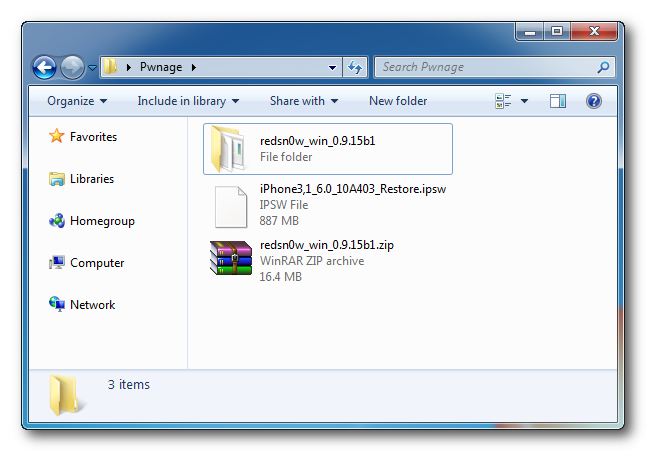
Step One Create a folder on your desktop called Pwnage
Download the latest version of RedSn0w from here and place it in the Pwnage folder. Likewise, download the firmware you would like to upgrade to from here and place it in the Pwnage folder.
Extract the RedSn0w zip file to the Pwnage folder.
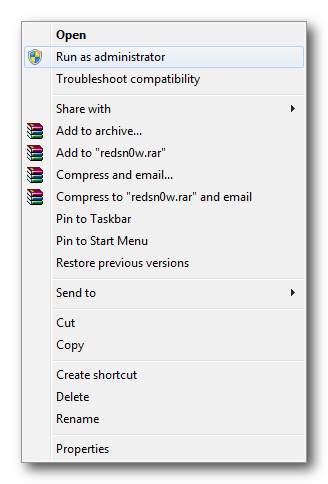
Step Two Right click or control click the RedSn0w application that you extracted in Step One and click Run as Administrator from the popup menu that appears.
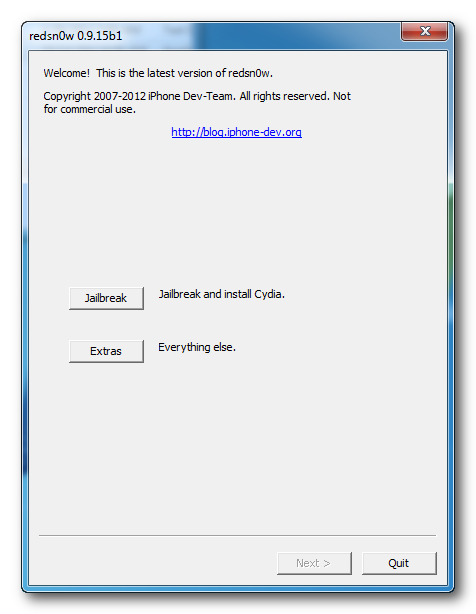
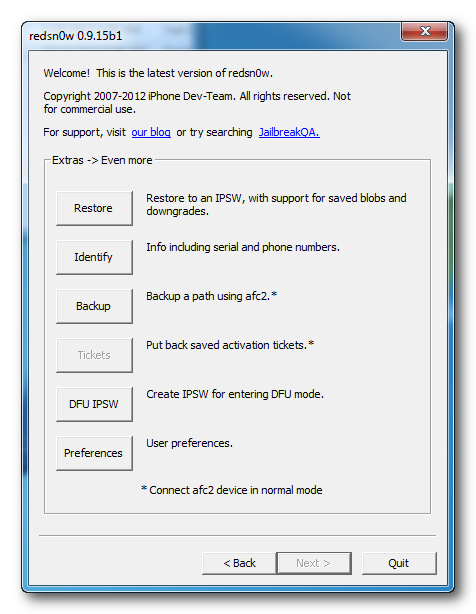
Step Three Click Extras from the RedSn0w menu.
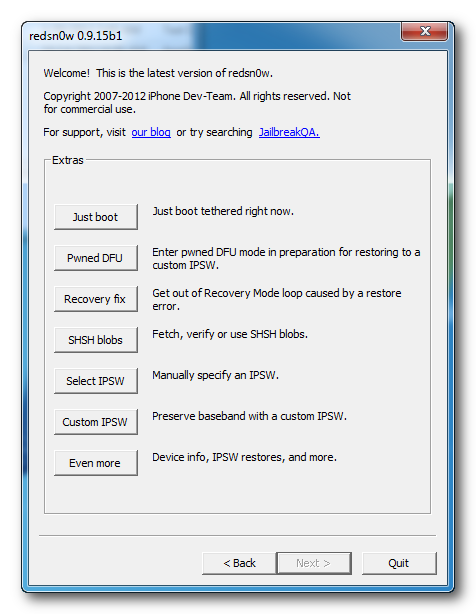
Step Four Click Even More from the Extras menu.
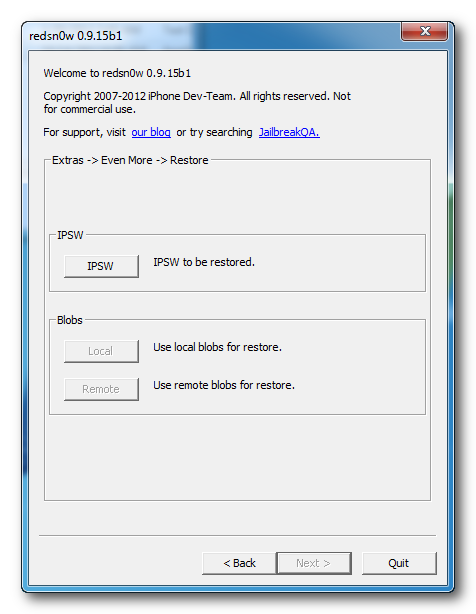
Step Five Click the Restore button from the Even More menu.
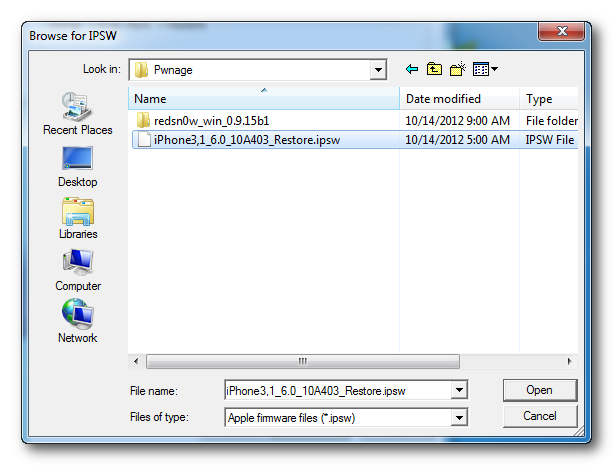
Step Six Click the IPSW button.
Choose the firmware you would like to update to from the dialog box that appears and click the Open button.
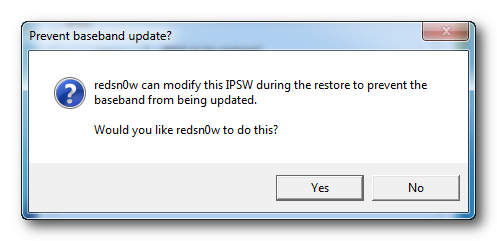
Step Seven You will be asked if you would like to Prevent baseband update. Click the Yes button.
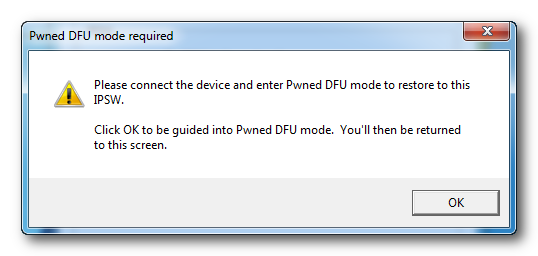
Step Eight You will be told that Pwned DFU mode is required. Click the OK button.
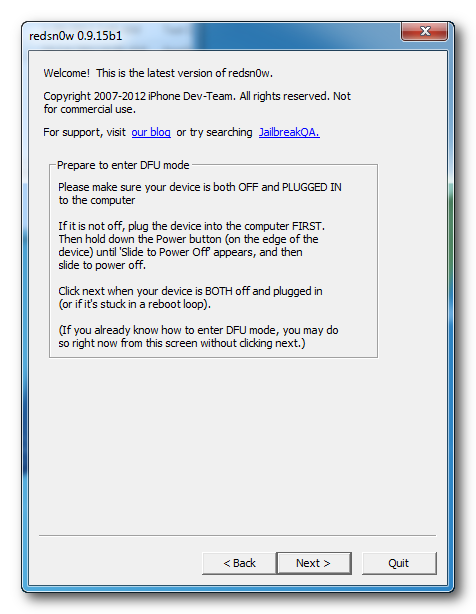
Step Nine Connect your iPhone to the computer, turn it off, and click Next
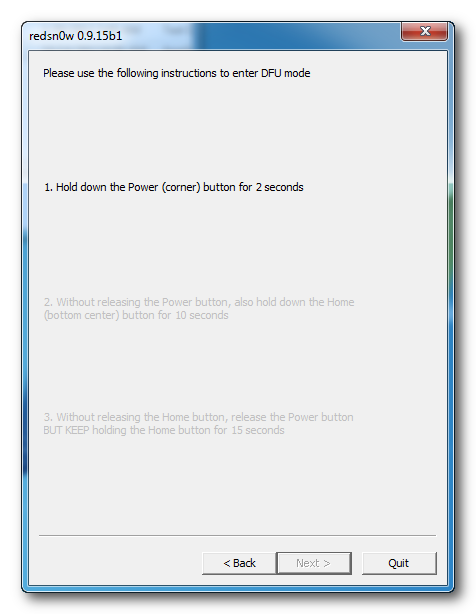
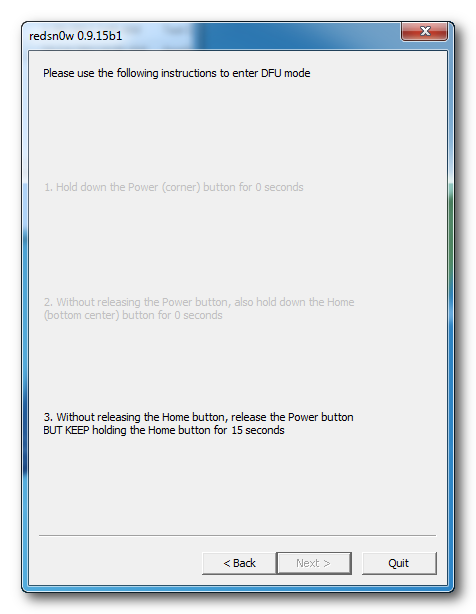
Step Ten RedSn0w will now guide you through the steps to get into DFU mode. You can find more help with DFU mode here.
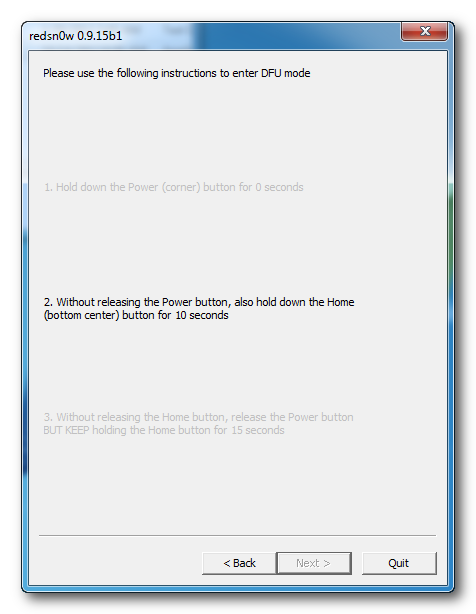
Hold down both the Home button and the Power button for 10 seconds.
Release the Power button and continue holding the Home button until RedSn0w detects the device.
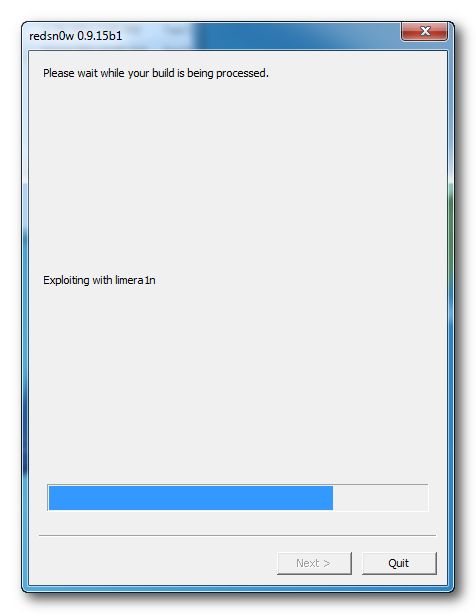
Step Eleven Your device will be detected once in DFU mode and exploited with Limera1n.
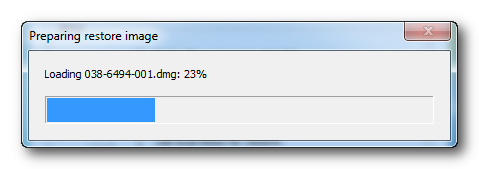
Redsn0w will then prepare a restore image.
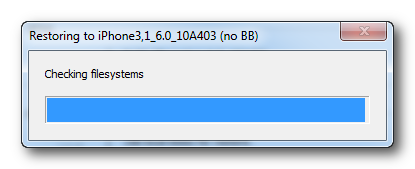
Step Twelve Redsn0w will now restore the device to the new firmware.
Step Thirteen RedSn0w will tell you when the restore has been completed successfully.
ANSWERS: If you need help with this tutorial please post a question in the comments or submit a question to the iClarified community using our Answers section.
Get the iClarified Daily Newsletter
Apple news, rumors, tutorials, price drop alerts, in your inbox every evening, free.
Unsubscribe at any time.
Success!
You have been subscribed.
Add Comment
Would you like to be notified when someone replies or adds a new comment?
Yes (All Threads)
Yes (This Thread Only)
No
Notifications
Would you like to be notified when we post a new Apple news article or tutorial?
I have an iphone 4 ios 4.3.5 Model su firmware 04:10:01 using GEVEY Ultra, if I upgrade to 6.0.1 without upgrading the baseband, whether to re-locked my iphone? n can not use the GEVEY Ultra again?
Hi, after following this procedure, I get an unexpected error 2831, I want to upgrade an iPhone 3GS with BB 5.11.07 from 5.0.1 to any higher version, and no matter what I do, I get the same error. Any comments please? Win 7, last redsn0w version, already jailbreaked. Many thanks
what dus it means when the jailbreak sait missing keys.plist datz for this build
device: iphone 3gs
build:iphone2,1_6.1.3_10B329
???
can anybody help me please?
I have a 3GS on 3.1.3 BB = 5.12.***
I used Umbrella to save my shsh to my PC, then used this process to update from 3.1.3 to 4.3.5, it worked well, but iphone was stuck in recovery mode.
It suggested I use "Recovery Fix", so I did, it said it was "Done!" that my device would complete the process, 20 minutes later, it finished.
Still stuck in "Recovery Mode"
Now what do I do?
Thx in advance.
Ladies and gentlemen, after reading dozens of posts and tutorials I finally could update my iPhone 3GS with 5.1.1 preserving my baseband. I used 'snowbreeze' which avoided the iTunes errors.
1. Create a folder on the desktop. Use Tiny Umbrella to save your blobs there.
2. Download Sn0wbreeze and the desired firmware.
3. Run Sn0wbreeze in iFaith mode.
4. Load your saved blobs.
5. Create and save the custom IPSW.
6. Open iTunes and Shift-Restore the custom file.
Note: Back up your contacts first. Use ultrasn0w in Cydia for unlocking after installation.
Does this work for anybody? As I understood there are no positive comments. I am stuck with unlocked jailbroken 3GS 4.2.1. baseband 6.15.0, GPS not working, trying to find a way to update my IPhone, keep it unlocked, get GPS back. Any advices (as simple as possible please I consider myself advanced user but I don't have time to sit for hours...) Thank you!
I have an iPhone 4 and I need to restore it to 6.1.2 without updating the baseband 01.59.00; can I use this tool and procedure to do it? I don't have the blobs for any IOS, only for the 6.1.2.
Hello, I did all the steps mentioned here and at the end of the process, redsnow said that everything was fine and I should do jailbrake with redsnow but my iphone is in recovery mode and it doesnt go out of that mode, PLEAAASE, What can i doooo??
I tried to restore with redsnow 15b3 and IPSW(iPhone3,1_6.1_10B144_Restore.ipsw) for updating my iphone4 IOS4.3.3 to 6.1 but I got this error during updating blobs message :
Could not fine recovery device.
please help me
My 3gs after updating 4.0.1 to 6.0.1 i have an issue. My phone suddenly goes off after halfway battery.
This happens when trying to use apps like FB, Camera etc .. Is it a bug in IOS6 for 3gs.
I feels like whether its has something to do with base band (05.13.04) which I didnt updated as my phone is a operator locked one.
Anyone had the same issue and fixed ??
need HELP! I have iphone 3gs ios 6.1 baseband 5.13.04 its already jailbroken and I already install ultrasnow I can make calls and receive calls but and I cant receive SMS and send SMS! NEED HELP! any reply will be appreciated thanks ^_^
3GS Using Ultrasn0w. The early release of this unlock tool does not support any new baseband versions, but works to unlock the following basebands:
01.59.00
04.26.08
05.11.07
05.13.01
05.12.01
06.15.00
Your baseband is not on the list so better luck next time :)
I've got the same device: 3gs , ios 6.0.1, same baseband 5.13.04 and everything works fine with ultrasnow 1.1.8? i think, the latest one. Try to reinitialise/ reset the modem settings or delete and reinstall ultrasnow from devteam source in cydia. It happened once to me that i couldn't receive SMS but i fixed it by just reinstalling Ultrasnow. Don't use both Ultrasnow and ultrasnowfixer! Good luck.
you need to have blobs for the ios you are trying to update. The method shown here automatically find your blobs either from your phone or cydia. Now, if cydia is not offering blobs anymore for the ios you are trying to update then you get the message unable to find the blobs. You then need to manually specify blobs if you have stored it earlier. You can store your blobs using Tiny Umbrella. However if cydia is no more offering blobs for the ios you are trying to update then you cant do anything.
At present my phone (3gs) is on 4.0.1 and it is jailbraken and unlocked. (earlier it is factory locked). Now if I upgrade with above steps will it be unlocked and jail break?






![iPhone Duo's Initial 8 Million-Unit Order Extends Into 2027 [Gurman]](/images/news/102975/102975/102975-160.jpg "iPhone Duo's Initial 8 Million-Unit Order Extends Into 2027 [Gurman]")
![CT Scan Reveals How iPhone Duo's Hinge Works [Video]](/images/news/102981/102981/102981-160.jpg "CT Scan Reveals How iPhone Duo's Hinge Works [Video]")
![Apple Tests Face ID and Action Button for iPhone Duo, Considers Larger Display [Gurman]](/images/news/102972/102972/102972-160.jpg "Apple Tests Face ID and Action Button for iPhone Duo, Considers Larger Display [Gurman]")

![How To Back Up Your iPhone to an External Drive on Mac [Video]](/images/tutorials/72786/72786/72786-160.jpg "How To Back Up Your iPhone to an External Drive on Mac [Video]")

![How To Find Your IP Address on iPhone [Video]](/images/tutorials/496/496/496-160.jpg "How To Find Your IP Address on iPhone [Video]")

![New Fire TV Stick 4K Drops to $29.99 (50% Off) [Deal]](/images/news/102984/102984/102984-160.jpg "New Fire TV Stick 4K Drops to $29.99 (50% Off) [Deal]")
![Apple's iPhone 18 Pro and Pro Max Cases Are Up to 37% Off [Deal]](/images/news/102978/102978/102978-160.jpg "Apple's iPhone 18 Pro and Pro Max Cases Are Up to 37% Off [Deal]")
![16-Inch MacBook Pro With M5 Pro Drops to $2,429 ($570 Off), Lowest Price We've Seen [Deal]](/images/news/102957/102957/102957-160.jpg "16-Inch MacBook Pro With M5 Pro Drops to $2,429 ($570 Off), Lowest Price We've Seen [Deal]")

![16-Inch MacBook Pro With M5 Max Drops to $3,499 ($900 Off), Lowest Price We've Seen [Deal]](/images/news/102900/102900/102900-160.jpg "16-Inch MacBook Pro With M5 Max Drops to $3,499 ($900 Off), Lowest Price We've Seen [Deal]")
