These are instructions on how to trick your iPhone into thinking its on Wi-Fi and thus enable VOIP over 3G amongst other benefits.
In the current version of VoIPover3G by crash-x there is built in support for Fring, Truphone, App Store, and iTunes Store.
You will need to have jailbroken your iPhone for this tutorial to work. You can find instructions on how to do that here.
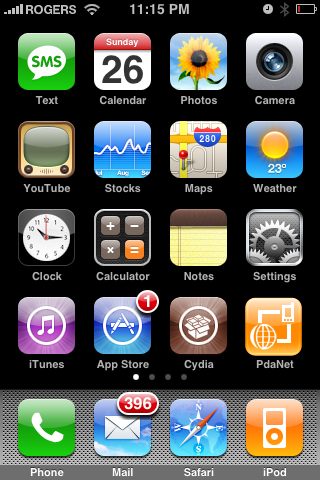
Step One Press to launch Cydia from your iPhone Springboard.
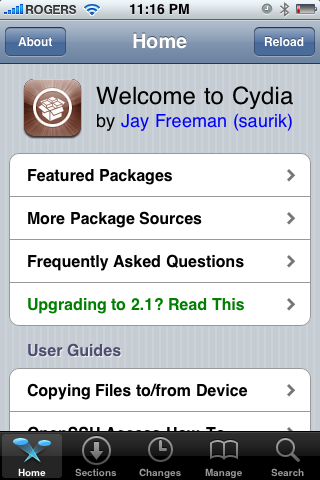
Step Two Press to select Sections from the tabs at the bottom of the screen.
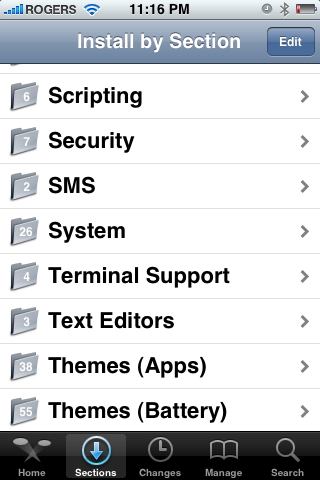
Step Three Press to select System from the list of Sections.
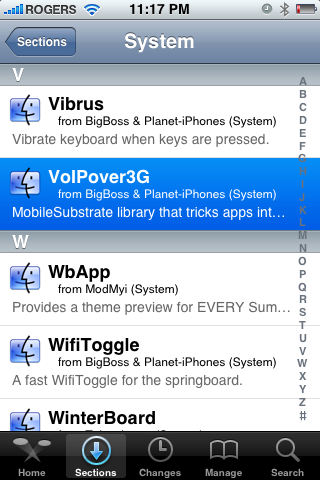
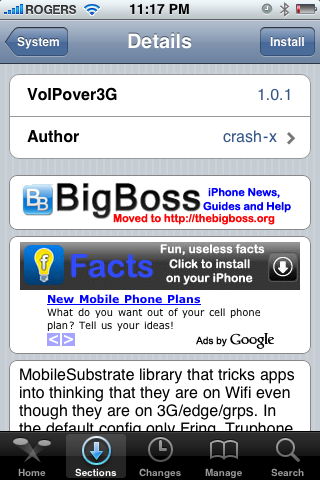
Step Four Press to select VoIPover3G from the list of Packages.
Step Five Press the Install button at the top right of the screen.
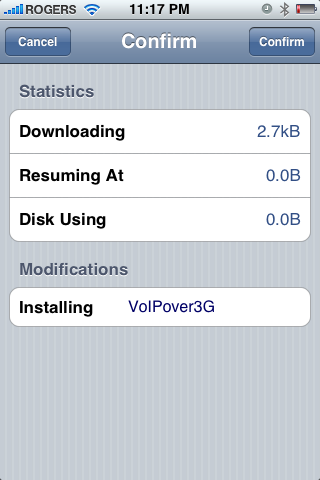
Step Six Press the Confirm button at the top right of the screen.
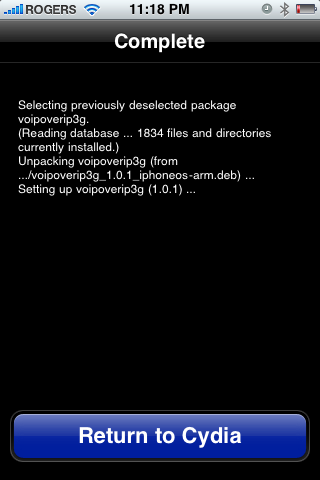
Step Seven Once installation has completed successfully press the large Return to Cydia button.
Step Eight You may now use App Store, Fring, Truphone, and the iTunes Store while on 3G. Your phone will act as though you are on Wi-Fi.
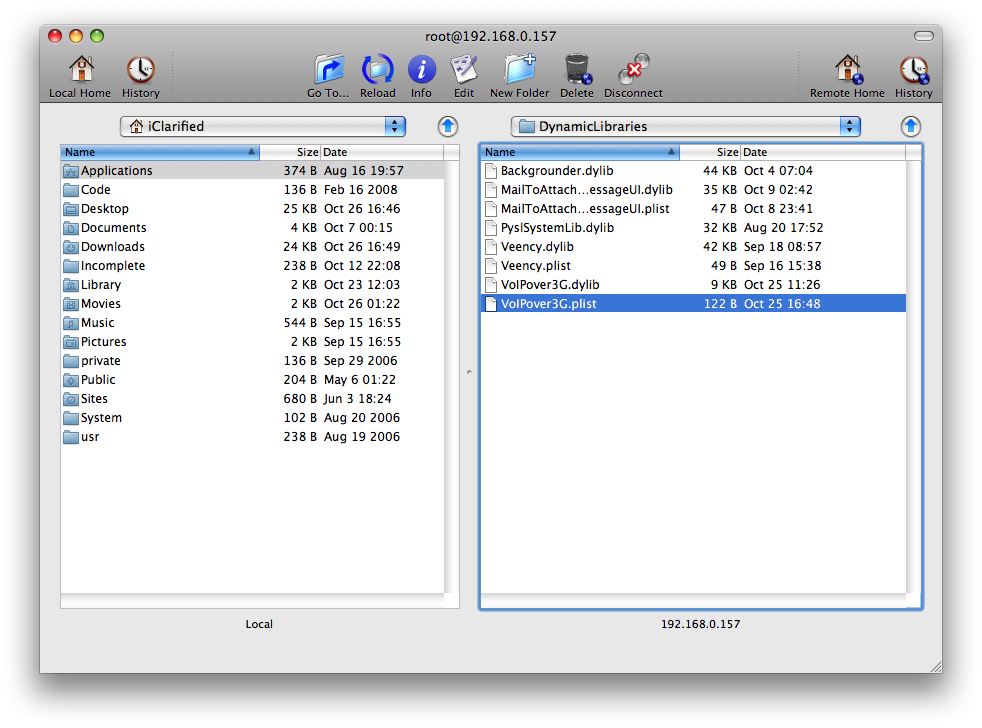
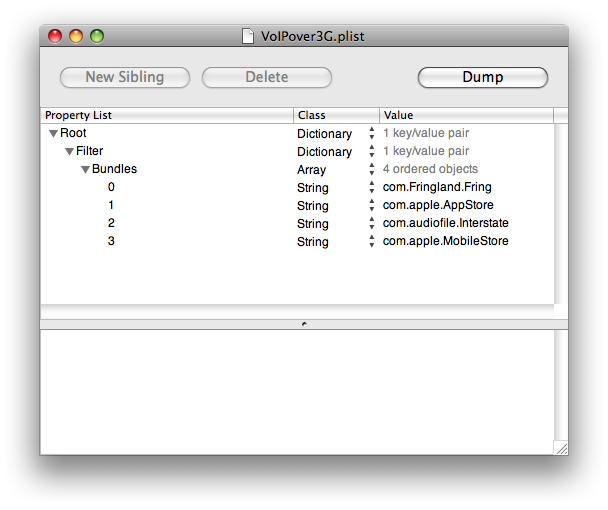
NOTES: You can also manually set a specific app to run in simulated Wi-Fi mode. To do this you must SSH into the iPhone and add the desired app's bundle identifier to "/Library/MobileSubstrate/DynamicLibraries/VoIPover3G.plist".
You can find instructions on how to SSH into your iPhone here.
You will need to locate the VoIPover3G.plist and transfer it to your computer.
Then open it using Property List Editor, add your bundle identifier to the list, and transfer the modified VoIPover3G.plist back to your iPhone.
Get the iClarified Daily Newsletter
Apple news, rumors, tutorials, price drop alerts, in your inbox every evening, free.
Unsubscribe at any time.
Success!
You have been subscribed.
Add Comment
Would you like to be notified when someone replies or adds a new comment?
Yes (All Threads)
Yes (This Thread Only)
No
Notifications
Would you like to be notified when we post a new Apple news article or tutorial?
Does not work for appstore or youtube anymore as of 2/17/2010. Could only get skype to work. I have my config like this
Filter = {Bundles = ("com.Fringland.Fring", "com.skype.skype", "com.apple.AppStore", "com.apple.MobileStore", "com.audiofile.Interstate", "com.apple.youtube");};
Can i just clarify something...if i set this up does this mean that i can essentially get free internet on the listed apps above ie appstore, itunes etc.
I am currently on a plan that charges me 99c a day to use 3g but if i use this above method will this mean that i get away with it for free, as the phone thinks it is on wi fi as opposed to 3g??
Have the same not-working over 3G problem as lots of people complainting about here. But work like a charm after install the winterboard. mine is the 3G 2.2 brand new JB & yellowsn0w iphone. like to share with you guys to make full usage of this woderful piece.
also thanks iclarified for the excellent instruction!!
I got itunes to work with "Voipover3g"
edit your VoipOver3g.plist, located in /library/mobilesubstrate/dynamiclibrays/
And copy the format of the "com's"
Add In "com.apple.mobileipod"
Works Like a charm, Glad i jailbroke this fine piece of technology
Thanks for your help it was greatly appreciated. I would like to say if you want to add PennyTel to the list just add "com.pennytel.iphoneos.PennyTelMobile" This will allow you to VoIP over 3G works great!....I am running 2.1 firmware on my Iphone and now i can VoIP where ever i want to with kick ass cheap call rates :)
Hi I have pennytel on my iphone 3g and have installed voip3g program but pennytel doesn't work it says you are not connected to wifi. How do I add "com.pennytel.iphoneos.PennyTelMobile"
someone please help.
Thanks
please explain why I would want to enable VoIP on 3G?
this seems duplicitous... pay for VoIP, then pay to use it on a cell network? Even at simple data plan rates, I don't see the payoff aside from the act of being able to do it.
anyone explain this to me? f
iClarified please remove this tutorial as it is useless because it does NOT work. I appreciate all the time and effort you put in to make these tutorials but the developer of this tweak needs to test this out only thing that I was able to do was to make calls via fring/skype but that's about it. appstore/itunes do NOT work.









![How To Back Up Your iPhone to an External Drive on Mac [Video]](/images/tutorials/72786/72786/72786-160.jpg "How To Back Up Your iPhone to an External Drive on Mac [Video]")


![How To Find Your IP Address on iPhone [Video]](/images/tutorials/496/496/496-160.jpg "How To Find Your IP Address on iPhone [Video]")

![16-Inch MacBook Pro With M5 Max Drops to $3,499 ($900 Off), Lowest Price We've Seen [Deal]](/images/news/102900/102900/102900-160.jpg "16-Inch MacBook Pro With M5 Max Drops to $3,499 ($900 Off), Lowest Price We've Seen [Deal]")
![Mac Studio With M5 Max Is $200 Off, Lowest Price We've Seen [Deal]](/images/news/102897/102897/102897-160.jpg "Mac Studio With M5 Max Is $200 Off, Lowest Price We've Seen [Deal]")
![14-Inch MacBook Pro With M5 Pro Drops to $2,069.10 ($429 Off) [Deal]](/images/news/102879/102879/102879-160.jpg "14-Inch MacBook Pro With M5 Pro Drops to $2,069.10 ($429 Off) [Deal]")
![Apple HomeView and New Apple TV 4K Get First Pre-Order Discount on Amazon [Deal]](/images/news/102867/102867/102867-160.jpg "Apple HomeView and New Apple TV 4K Get First Pre-Order Discount on Amazon [Deal]")
