****THIS TUTORIAL HAS BEEN RETIRED IN FAVOUR OF THE NEW FUZZYBAND DOWNGRADER. YOU CAN FIND INSTRUCTIONS ON HOW TO USE FUZZYBAND HERE****
These are instructions on how to downgrade your baseband from 2.30 to 2.28 for iPhone 3Gs with the 5.8 bootloader. This will allow you to unlock your iPhone 3G using YellowSn0w. An similar exploit is still be worked on for those with a higher bootloader version...
IMPORTANT: Make sure your iPhone uses the 5.8 bootloader before continuing. You can find instructions on how to check your bootloader version here: Windows, Mac. Ensure you are on the 2.30 baseband by following this tutorial. You will also need MobileTerminal installed to completed this tutorial.
Step One Launch Cydia by pressings its icon on your SpringBoard.
Step Two Press to select the Sections tab at the bottom of the screen.
Step Three Press to select iClarifed from the list of Sections. If you don't see iClarified you will need to add the iClarified source using these instructions.
Step Four Press to select DownBB from the list of Packages.
Step Five Press the Install button at the top right of the screen.
Step Six Press the Confirm button to begin installation.
Step Seven Once installation has completed successfully press the large Return to Cydia button.
Step Eight Press the Home button to return to your SpringBoard then press to launch Terminal
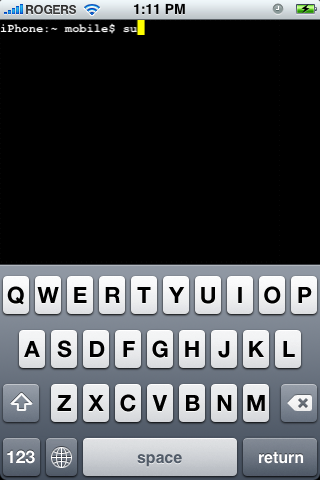
Step Nine Enter su into the terminal window then enter alpine when prompted for a password.
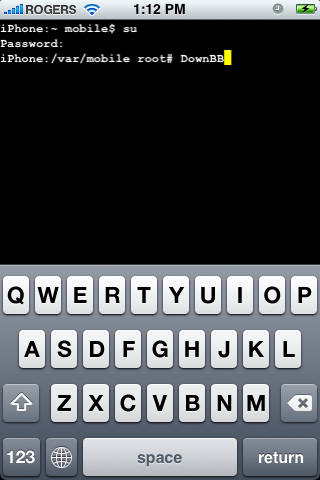
Step Ten Enter DownBB into the terminal window to launch the baseband downgrade script.
Step Eleven You will be asked to confirm you would like to continue. Please make sure you are on the 2.30 baseband and have the 5.8 bootloader before entering yes into the window.
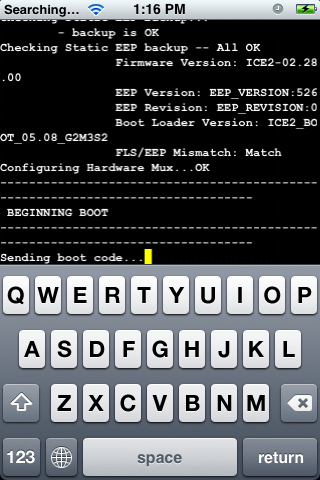
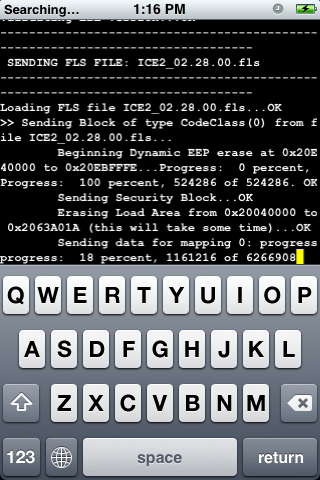
Step Twelve DownBB will now execute the script which downgrades your baseband.
Step Thirteen Once the script has completed it will automatically reboot your iPhone.
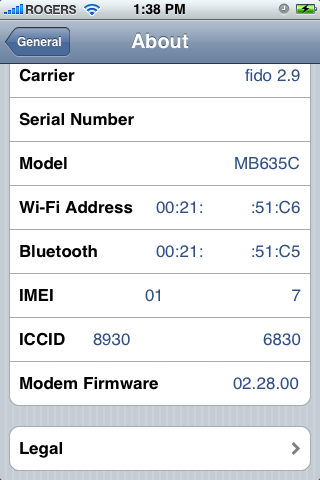
Step Fourteen Please note you will now be on the 2.28 baseband.
Step Fifteen You may now unlock your iPhone using the iPhone 3G unlock tutorial found here!
THANKS Many thanks to EvilPenguin|, pH, and DHowett for their work on this script! Thanks to Geo-hot for discovering the exploit!
Get the iClarified Daily Newsletter
Apple news, rumors, tutorials, price drop alerts, in your inbox every evening, free.
Unsubscribe at any time.
Success!
You have been subscribed.
Add Comment
Would you like to be notified when someone replies or adds a new comment?
Yes (All Threads)
Yes (This Thread Only)
No
Notifications
Would you like to be notified when we post a new Apple news article or tutorial?
i have iphone 3g bootloader 6.2 .... by mistake i upgraded it to 4.2.1 baseband 5.15.04 .... now its sim is not getting unlocked.....
Is there any way to do it......as the baseband cannot be downgraded using fuzzyband......??????????
I have an Iphone 3G with 3.0 and 5.9 bootloader and 05.11.07 baseband.... When are they gonna come out with a fix for this to be unlocked or an update or something... Ive been waiting a long time for this... Plz Help a brother out.... Im stuck like chuck
Hey, i have iphone 3g with fw 3.0. my bootloader is 5.09 and bb is 5.11.07. do you think i can do this to downgrade my bb.
Please let me know.
And thanks for help.
Hello, I have iphone 3g i installed firmware 3.1 by mistake after that i again installed firmware 3.0 after getting errors now i have baseband 05.11.04 something like that, and bootloader 5.90. now I want to unlock my iphone because ultrasn0w is no longer working now.... please help me out.
I cant unlock my phone wit yellowsnow..........its show NO SERVICE>.........pLS any1 help me .......... IPHONE 3G 2.2 baseband 04.26.08..................PLSSSSSS
hello my friend i have iphone 3g 16 gb 3 but i cant use in turkey my phones version 5.9 i cant use with simcard just use turbo sim plz ı need ur help ...
Thank you for the help.
However, yet, the problem could not be solved.
Again, we request your help.
At present, it is " modem version 02.30.03 ", "OS 5G77".
Tell the way of changing into modem version 02.28.0.
It tried a down grade in the envoy modem version in the Fuzzyband software.
However, because the bootloader version was to do 5.9 being, it isn't possible to do a change.
Tell the way of changing a bootloader version into 5.8.
Or, tell the way of modem version's being able to be changed in the other way.
I request your help.
Hi,
Dev team, we know that you guys are working on upgrading Yellowsn0w to make it possible to unlock bootloader 5.09 - 6.0. Hopefully can be done... don't let Apple laugh at us... poor people who really don't want to be "jailed" and the people who decided to follow your path.
Hey i was asked to unlock + jailbreak my friends iphone but he has bootloader 05.09 i have looked around but have not seen any way to downgrade this i just want to know if the dev team or someone is developing software to do this if anyone knows please reply thanks
Help.
3 g of my iPhone had been locked.
It loaded DownBB file but the modem version is as 02.30.03 and doesn't change.
How does the modem version return in 02.28.00 if being?
Please, help.
Hey. I don't know how but I downloaded the OS 3 to my 3G iphone and after I return to 2.2.1 and it was okay but at the second restore to 2.2.1 the phone is locked. while i see the cellular carier I can accept calls i can't call.
Every time where i try to call i take the message "call failed".
I downloaded finaly the fuzzyband downgrader 1.0 after DownBB and I see the below :
Bootloader Version 05.09
Baseband ICE2-04.26.08
iPhone OS Version 2.2.1
What I must do to call again from my iPhone?
dve team please help me and other person for world people please help our baseband 2.2.1 and boot 05.09
so we can unlock iphone 3g please help we wait all ready 3 month .we can not use iphone 3g becouse our iphone 3g now locked only use ipod so please help
from iphone 3g user..........hold world











![Apple Highlights Child Safety and Screen Time Controls in New Ad [Video]](/images/news/102393/102393/102393-160.jpg "Apple Highlights Child Safety and Screen Time Controls in New Ad [Video]")



![How To Find Your iPhone IMEI Number [Video]](/images/tutorials/83557/83557/83557-160.jpg "How To Find Your iPhone IMEI Number [Video]")


![Magic Keyboard for iPad Air Drops to $200 on Amazon [Deal]](/images/news/102402/102402/102402-160.jpg "Magic Keyboard for iPad Air Drops to $200 on Amazon [Deal]")
![13-Inch M5 MacBook Air With 1TB Drops to $1,449 on Amazon [Deal]](/images/news/102345/102345/102345-160.jpg "13-Inch M5 MacBook Air With 1TB Drops to $1,449 on Amazon [Deal]")



