These are step by step instructions how to jailbreak and unlock almost any iPhone instantly! No downgrading then upgrading! You can do the unlock from 1.1.2 or 1.1.3. It will also jailbreak and activate as well as install Installer.app for you!
ZiPhone performs all these functions: - Unlock will work on 4.6 BL or 3.9 BL - Jailbreak will work on any OS version. - Activation will work on any OS version, except for youtube on 1.0.X. - iErase BL 3.9 Baseband
UPDATE*: It seems the Apple logo problem can be resolved by using verbose mode. I have updated the tutorial...
Step One Download ZiPhone from: download link unavailable
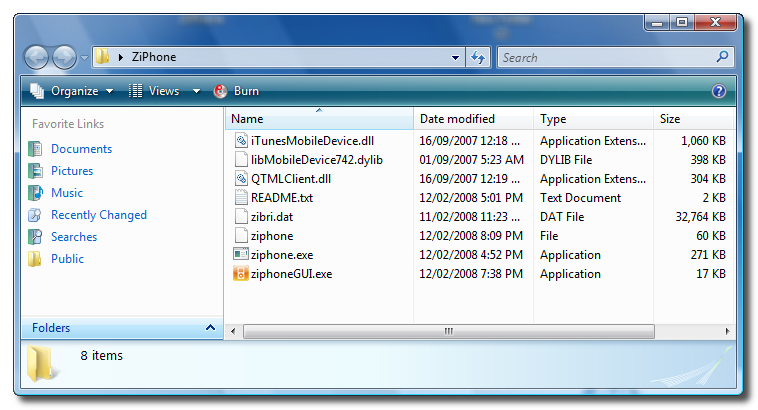
Step Two Double click ZiPhone.zip on your desktop to extract the folder ZiPhone..
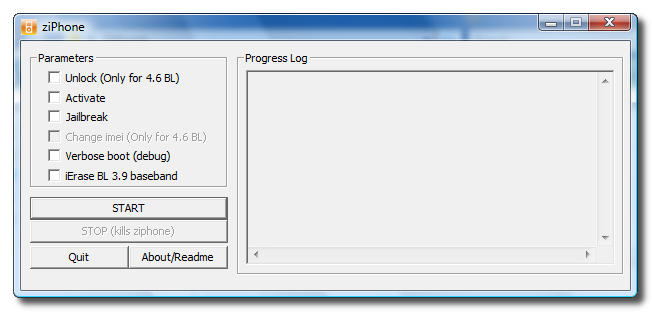
Step Three From the extracted ZiPhone folder double click ziphoneGUI.exe to launch the application.
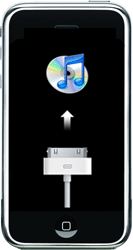
Step Four You must put your iPhone into recovery mode. To do this please hold down both the Sleep/Wake for 3 seconds. A power slider will appear. Slide it to the right to power down the iPhone. Then keeping ONLY the Home button pressed, connect the iPhone to the dock. Keep the home button pressed until you see the iTunes logo and cable on the screen.
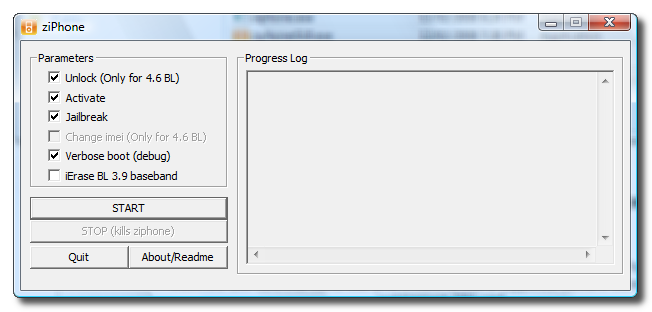
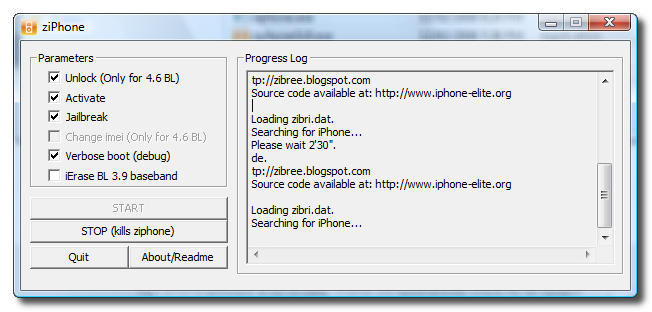
Step Five If you have a 4.6 BL iPhone you can now activate, jailbreak, unlock, and verbose! Just simply check the Activate, Jailbreak, Unlock, and Verbose checkboxes. Then click the Start button.
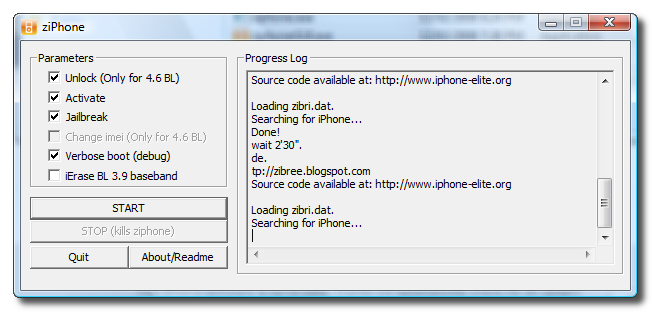
Step Six The program will now load zibri.dat. Then it will search for the iPhone. Once found it will tell you to wait for 2 minutes and 30 seconds.
Step Eight After this time your iPhone will reboot and it will be activated, jailbroken, and unlocked!!!!
NOTE*: After completion its probably a good idea to install BSD Subsystem first then OpenSSH from Installer.app
Dear folks
i have an unlock iphone i follow your instructions, everything is done but when i click on DO IT ALL, it is unlocked and a masseage appeared saying LODING zibri dat SEARCHING FOR IPHONE.... athough my iphone ic connected to computer and detected by itune plz help
Hi,
I ran this tutorial and it unlocked my 1.1.3 version, but it appears that some glitches has arise. Immediately after and as of this date, I tried to install the BSD application and any other applications but I receive a message 'ERROR Package download failed Can't find host' each time.
In addition, I have not used the iphone at all and it remained off for 3 days fully charged. I turned it on the 4th day and the battery is already low. Can someone please comment on this?
Best regards
hi all,i had a 1.1.3 otb unlocked by ziphone gui method.my modem version before unlock was 4.03 but it changed to 4.02 after ziphone gui unlock.now my g map n wifi r not working.can anyone help me out plz.also can i change my 1.1.3 version to 1.1.2 or modem 4m 4.02 to original 4.03?plz do help.thanx
Thanks in advance for support!
i have 1.1.2 otb iphone - dowgraded to 1.1.1 jaibroken and activated/ (using it as ipod touch)can i just select one point "unlock" and my phone will be unlocked????
I don't want to frustrate anyone here with stupid questions, but I just need to ask to be certain.
I have a newly AT&T activated 16GB iPhone that I have on trial for 12 more days. I would like to run the unlock, jailbreak and patch sequence to test out if I can stay with my current carrier and use the iPhone until my BBerry contract is up next year.
So here goes...
Can I run this sequence on an already activated AT&T device?
Can it be restored to original condition should this experiment not work out?
We use Juniper for VPN; can the NetConnect java applet run on a jailbroken phone?
Is there an apploader link for it?
Will the Apani Contivity web client run on the jailbroken device?
I need VPN access so that I can set up OTA imap or exhange mailbox.
Can I cancel the AT&T contract and keep the iPhone I've paid for or do I need to return the hardware as well and start over with one from the local Apple Store if this works out?
Any help is apprecieated/
For some reason when i ran the program evreything worked fine as far as the unlock but i have no installer.app on the desktop could anyone help me with this?
How do I upgrade my NEW 16GB iPhone which I unlocked and has 1.1.3 BL 4.6 ... BUT Modem Firmware 04.02.13_G to Firmware 04.13.13_G (this is what it had when I bought it 5 days ago.
Thanks for the unlocking tutorials.....great work iClarified!!!!
And now we also have the country appsupport in the installer....Wonderful.
Hey I'm sorry, but i'm not sure when i have tu switch the Sim cards ( i mean the AT&T card with the one i want to use).
Could someone tell me? =S
And by the way Thanks for all!!
I used ziphone 2.0 gui (with 1.1.2 OOB 04.02.13_G iphone) but I just select activate, jailbrake and verbose, forgot to select unlock. :(
1- Can I use ziphone just selecting unlock
2- If I restore to 1.1.2, can I try the (activate, jailbrake and verbose, unlock procedure ) again ?
I mean can I restore to my original 1.1.2 unactivated and unjailbroke phone ???
thanks again
I tried the Ziphoe 2.2 on two iphones and it works great! The only problem I have run into is that the preferences, notes, picture (iphone camera roll) and a few other things are lost after recovery from itunes. ( I did back up using itunes before I restored to 1.1.3) I think it's something to do with itunes and iphone recovery process. Any suggestions?



![Apple Developing iPhone Game Controllers Likely to Launch Under Beats [Report]](/images/news/102201/102201/102201-160.jpg "Apple Developing iPhone Game Controllers Likely to Launch Under Beats [Report]")
![Apple to Remove Video Walls and Bring Back Dedicated Genius Bars [Gurman]](/images/news/102198/102198/102198-160.jpg "Apple to Remove Video Walls and Bring Back Dedicated Genius Bars [Gurman]")
![John Ternus and Joz Discuss iPhone Duo Design, Price, and iPhone 18 Pro Camera [Video]](/images/news/102197/102197/102197-160.jpg "John Ternus and Joz Discuss iPhone Duo Design, Price, and iPhone 18 Pro Camera [Video]")







![Apple Studio Display XDR Hits All-Time Low of $2,969.99 ($329 Off) [Deal]](/images/news/101976/101976/101976-160.jpg "Apple Studio Display XDR Hits All-Time Low of $2,969.99 ($329 Off) [Deal]")
![Apple AirPods Pro 3 Drop to $199 ($50 Off) [Deal]](/images/news/101966/101966/101966-160.jpg "Apple AirPods Pro 3 Drop to $199 ($50 Off) [Deal]")
