These are instructions on how to downgrade your iPhone 3GS or iPhone 3G's baseband from the iPad's 06.15 baseband to 05.13.04 using RedSn0w for Windows. The Mac version of this tutorial can be found here.
Typically you'd have the 06.15 baseband if you unlock with ultrasn0w but updated your iPhone baseband past 05.13.04. With this new capability, you can now downgrade specifically from 06.15 to 05.13.04 (even if you never had 05.13.04 on that device before). This gives you the best of both worlds: ultrasn0w unlock compatibility and a normal iPhone baseband with full GPS and the ability to use stock IPSWs again.
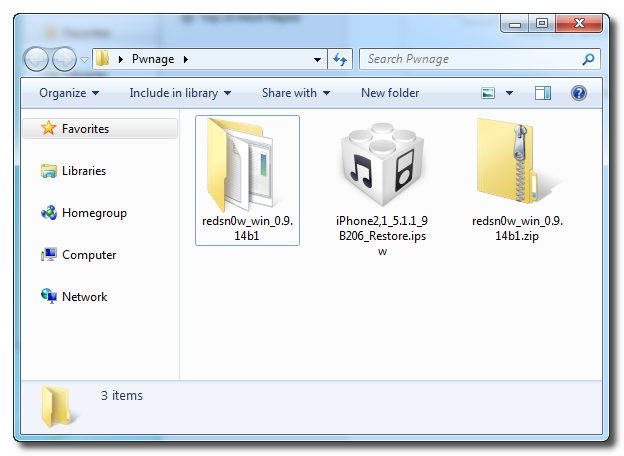
Step One Create a new folder on your desktop called Pwnage.
In the folder place the current firmware of your device (which can be downloaded from here) and the latest version of RedSn0w (from here).
Extract the RedSn0w zip file by double clicking it.
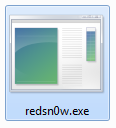
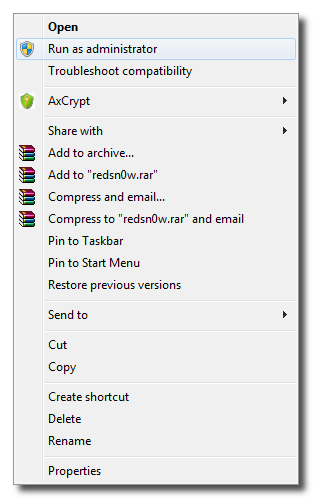
Step Two Launch the redsn0w application from the redsn0w folder we extracted earlier. You can do this by right clicking the executable and selecting Run as Administrator contextual menu.
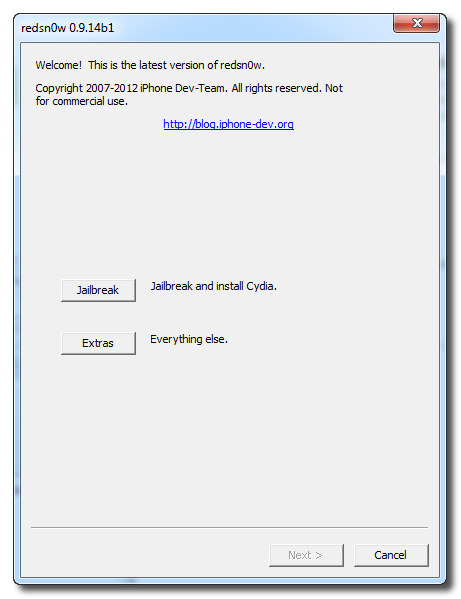
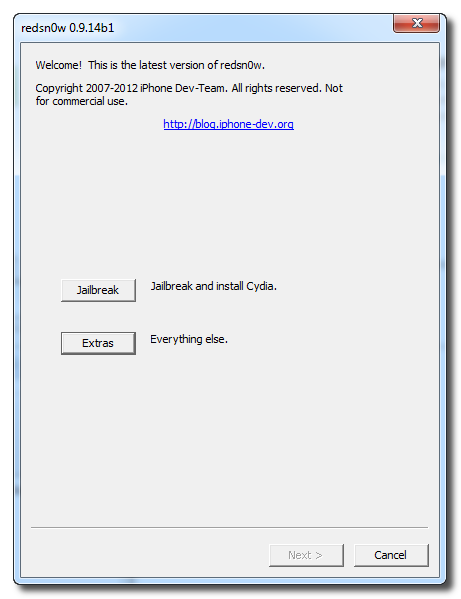
Step Three Once RedSn0w opens click the Extras button.
Step Four Choose Select IPSW from the Extras menu.
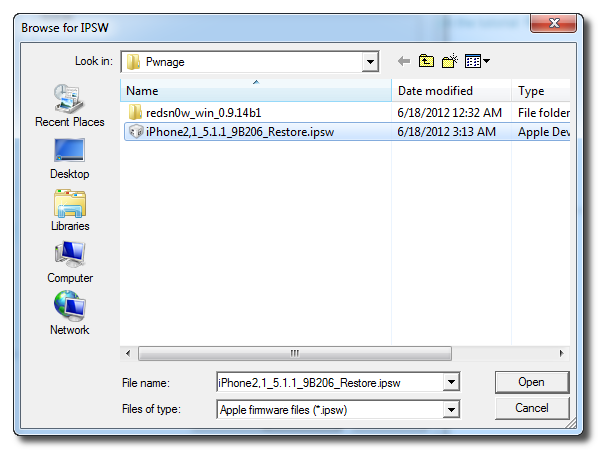
Step Five Navigate to the Pwnage folder on your desktop, choose the firmware ipsw we downloaded earlier, and click Open.
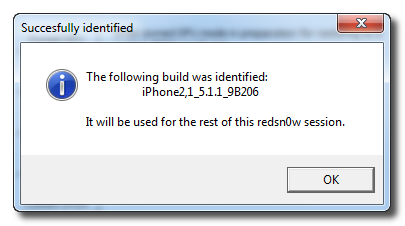
Click OK to confirm your selection.
Tell RedSn0w whether you have a newer or older model iPhone 3GS.
Step Six Press Back to get back to the main menu then click the Jailbreak button.
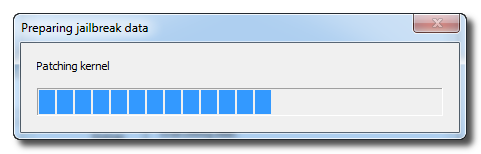
Step Seven RedSn0w will now prepare the jailbreak data.
Step Eight Check the Downgrade from iPad baseband checkbox, uncheck Cydia if you already have it installed, and click Next to proceed through the normal DFU ramdisk steps.
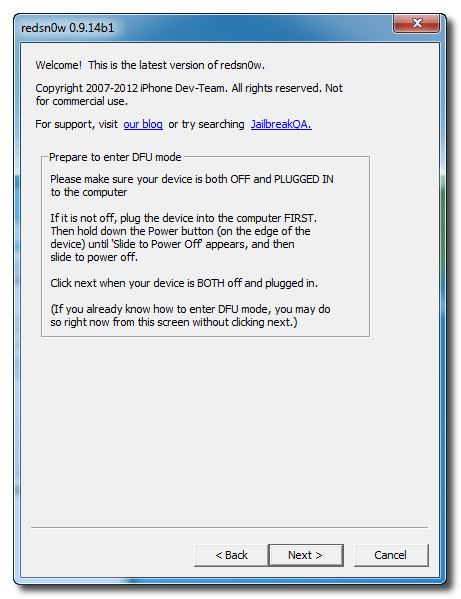
Step Nine Plug your iPhone into the computer and make sure its OFF then click the Next button
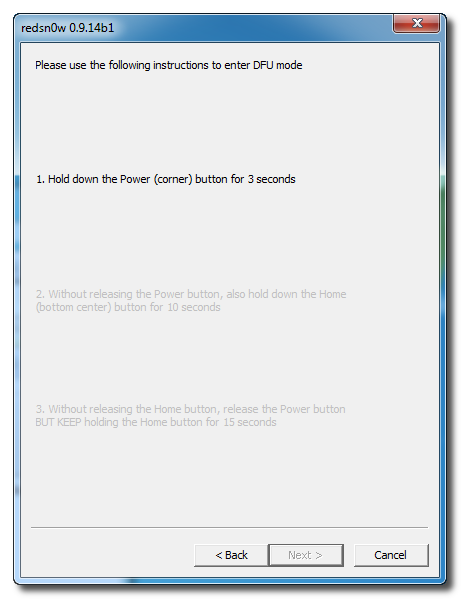
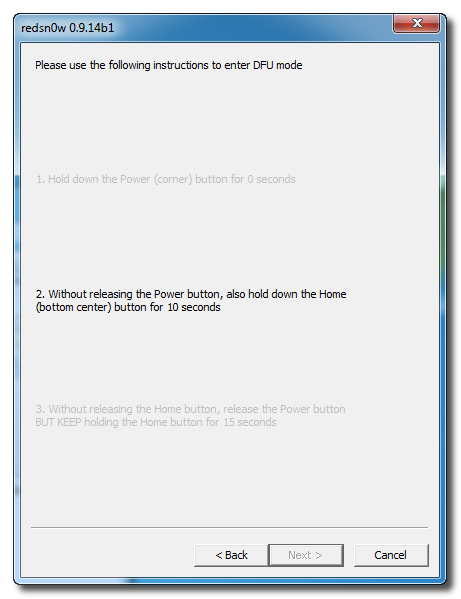
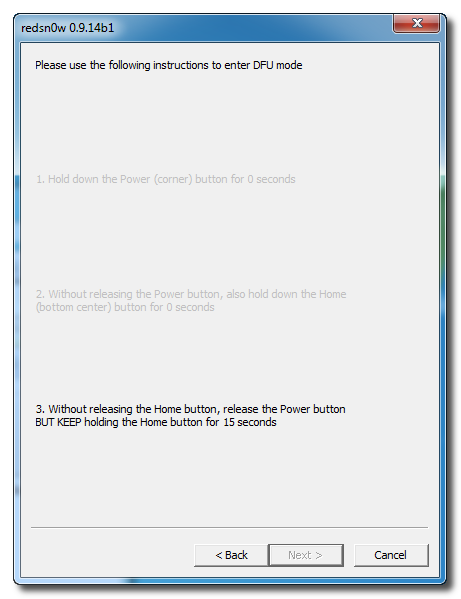
Step Ten RedSn0w will now guide you through the steps to get into DFU mode. You can find more help with DFU mode here.
Hold down both the Home button and the Power button for 10 seconds.
Release the Power button and continue holding the Home button until RedSn0w detects the device.
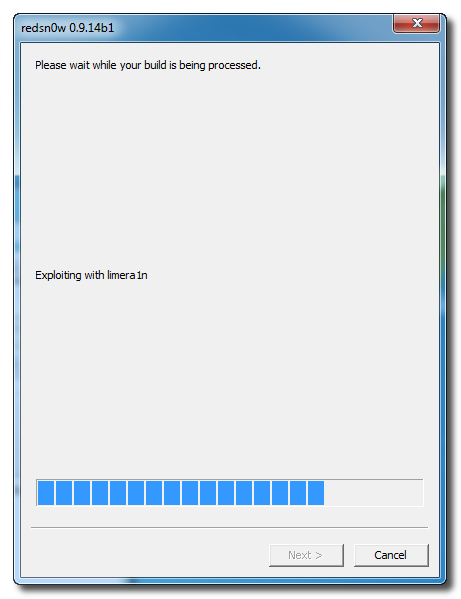
Step Eleven Your iPhone will now be exploited with limera1n and reboot
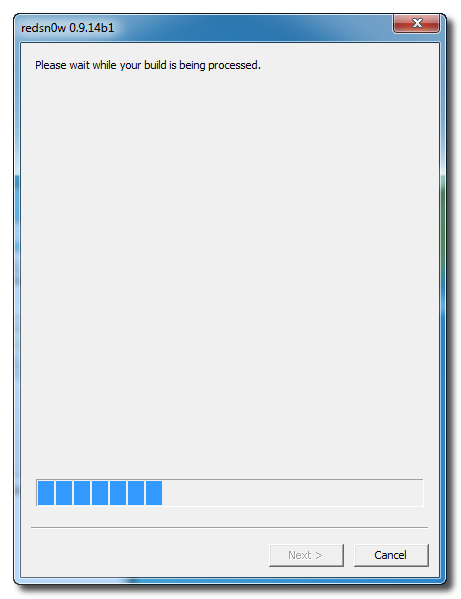
Step Twelve Your iPhone will now be rebooted again and RedSn0w will begin uploading the new RAM Disk and Kernel.
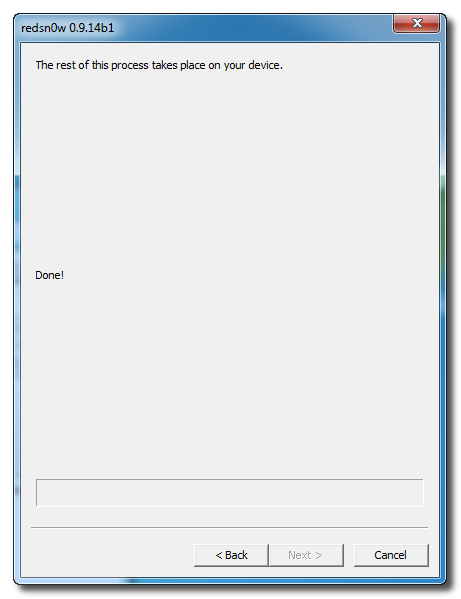
Step Thirteen RedSn0w will now inform you that its work is done. The rest of this process will take place on your device.
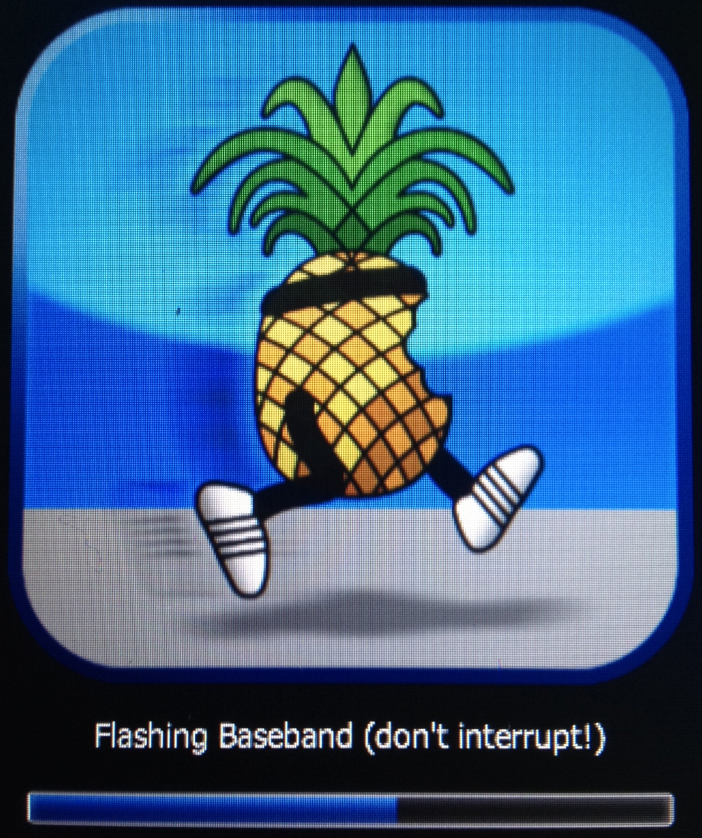
Step Fourteen After showing some scrolling text, your iPhone will display the pwnapple icon and say Flashing Baseband. THIS STEP TAKES A VERY LONG TIME to complete and there won't be any feedback while its running. Please just let it be for the next 3-8 minutes! When the ramdisk has done its job it will reboot the phone on its own.
Step Fifteen Once the phone has rebooted you will be on the 05.13.04 baseband. You can then follow this tutorial to unlock!
***A big thanks to the iPhone Dev-Team for making this possible!
Get the iClarified Daily Newsletter
Apple news, rumors, tutorials, price drop alerts, in your inbox every evening, free.
Unsubscribe at any time.
Success!
You have been subscribed.
Add Comment
Would you like to be notified when someone replies or adds a new comment?
Yes (All Threads)
Yes (This Thread Only)
No
Notifications
Would you like to be notified when we post a new Apple news article or tutorial?
I am on activation screen of 6.1.6 with baseband 6.15.00. The problem with these steps is that my power button doesn't work and so I created a custom IPSW of 5.1.1 as specified in https://www.iclarified.com/entry/index.php?enid=23009 for putting the phone in DFU mode. Will I be able to use that ipsw to put the phone in DFU mode and downgrade it as specified in this tutorial?
You can downgrade only if you have baseband version 06.15.00 (NOT 06.15.05 or like that). If you don't have that you have to first jailbreak with "Install iPad baseband" from redsn0w to get exactly 06.15.00. Then you can jailbreak with "Downgrade from iPad baseband" and then it will work! :)
Whatever I do I am unable to downgrade the baseband for my iPhone 3GS running iOS 5.1.1 from 6.15.00.
Have tried all steps on all forums. Its been 4 days I have been trying continuously....
Redsn0w is not supporting "iPhone2,1_5.1.1_9B206_Restore". It says this version of Redsn0w doesn't support this. have iphone 3gs iOS 6.1.6 which i recently jailbreak but after the jailbreak it shows "no service" and in ICCID shows No SIM..Please help..
should i download some other version of firmware.?
My iphone 3gs have problem with "no services" error. I have done step by step but can't still downgrade from 6.15 to 5.13. Its information:
Version 5.1.1 (9B206)
Model MC131B
Serial 8700485Z3NP
IMEI 012154000135252
ICCID NoSIm
Firmware 06.15.00
When I check, my iphone is new boot room.
Please help,
Thanks,
Hello, This thing is stuck on Waiting for Rebooting...can anybody tell me how to get it fix? or maybe I should downgrade from firmware 6.1.3 to 6.1.2 and I would like to have the instruction how to do it.
Thanks!
I had the same problem than you (with an iPhone 3GS, ios 6.1.3) and here is how I fixed it :
before starting the downgrading process, you click on "Extras", then "Select IPSW" and choose the ios 6.0, even though you're in 6.1.3. Its because Redsn0w doesnt support the ios 6.1.3 so you're gonna trick it into believing that you're in 6.0.
Once you've done that, (and you need to specifiy wether you have the old or the new bootroom), you can start downgrading your baseband as explained in this tutorial.
And everytime you want to use redsn0w (for booting, or anything else), you have to do the same thing again : selecting the 6.0 ipsw.
And it won't be stuck on "waiting for rebooting" anymore !
Thanks for your help, but Still no luck it just hang when it's loading the jailbreak it couldn't even get to the pineapple part.
Don't know what else to do with this phone it's very frustrating.
for 6.1.3 users.. simply use 6.0 firmware and downgrade from ipad baseband.. and thats it.. then use ultrasn0w.. i have done it many times.. on some 3gs only baseband downgrading works and for some ultrasn0w works..







![Apple Releases Xcode 27.1 Beta With iPhone Duo SDKs and Simulator [Download]](/images/news/102276/102276/102276-160.jpg "Apple Releases Xcode 27.1 Beta With iPhone Duo SDKs and Simulator [Download]")
![Apple Shares 'new trick' Shot on iPhone 18 Pro Ad Featuring ROSÉ [Video]](/images/news/102273/102273/102273-160.jpg "Apple Shares 'new trick' Shot on iPhone 18 Pro Ad Featuring ROSÉ [Video]")
![iPhone 18 Pro Teardown Shows Under-Display Face ID Camera and Larger Vapor Chamber [Video]](/images/news/102270/102270/102270-160.jpg "iPhone 18 Pro Teardown Shows Under-Display Face ID Camera and Larger Vapor Chamber [Video]")











![Apple Studio Display XDR Hits All-Time Low of $2,969.99 ($329 Off) [Deal]](/images/news/101976/101976/101976-160.jpg "Apple Studio Display XDR Hits All-Time Low of $2,969.99 ($329 Off) [Deal]")
