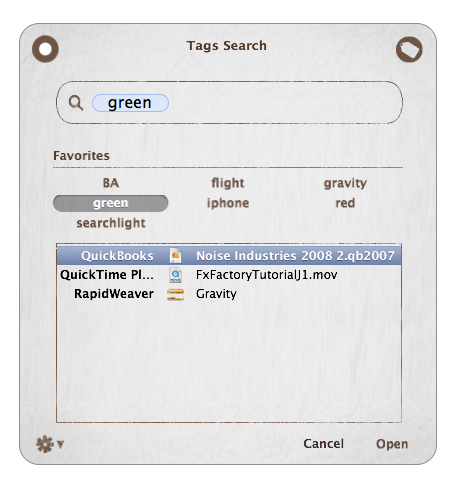
Gravity Applications, developer of innovative solutions for the Mac platform, has announced the release of their Tags application. Tags allows users to tag all their files on their Mac, including emails in Mail, Bookmarks in Safari, pictures in iPhoto and files in the Finder.
Tags are like keywords for files. Using tags allows users to group files which have something in common. Users can apply many different tags to a single file as well as apply the same tag to multiple files. This allows users to associate files to one another in a way far superior to a rigid file / folder structure.
With Tags users can quickly find files irrespective of where they were saved. Tags can be invoked with a simple keystroke in most applications, so that users can Tag files and search for Tags, wherever they are.
Feature Highlights: * Tag Files directly in all supported applications * Full Spotlight Integration * Supports in application search * Create smart folders and smart mailboxes * Applescript support
Tags works natively with all applications that properly support Applescript, the following are popular apps that are fully supported:
* Finder * Mail * Address Book * iPhoto * Safari * Microsoft Office (Word, Excel etc.) * Xcode * Rapidweaver * Omnioutliner * Pages * Keynote * Quicktime * and Many more
Pricing and Availability: Tags available for $29.00 (USD) and available for download and purchase directly from the Gravity Applications website.
Get the iClarified Daily Newsletter
Apple news, rumors, tutorials, price drop alerts, in your inbox every evening, free.
Unsubscribe at any time.
Success!
You have been subscribed.
Add Comment
Would you like to be notified when someone replies or adds a new comment?
Yes (All Threads)
Yes (This Thread Only)
No
Notifications
Would you like to be notified when we post a new Apple news article or tutorial?









![How To Change Wallpaper on Mac [Video]](/images/tutorials/90512/90512/90512-160.jpg "How To Change Wallpaper on Mac [Video]")
![How To Turn Off Always On Display on iPhone [Video]](/images/tutorials/87524/87524/87524-160.jpg "How To Turn Off Always On Display on iPhone [Video]")





![16-Inch M5 Max MacBook Pro Drops $900 to New Low of $3,499 [Deal]](/images/news/102438/102438/102438-160.jpg "16-Inch M5 Max MacBook Pro Drops $900 to New Low of $3,499 [Deal]")
![Magic Keyboard for iPad Air Drops to $200 on Amazon [Deal]](/images/news/102402/102402/102402-160.jpg "Magic Keyboard for iPad Air Drops to $200 on Amazon [Deal]")
